What is anOperating System
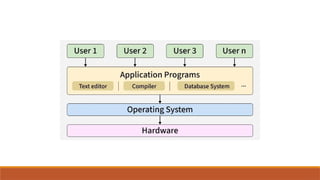
An Operating System (OS) is the main software of a computer that helps you use the computer easily.
It acts as a bridge between the user and the computer hardware.
Without an operating system, a computer cannot work properly.
An operating system (OS) is essential software that manages all hardware and software
resources on a computer, acting as a bridge between the user and the machine to run
applications and perform tasks like file management, memory allocation, and input/output
handling
4.
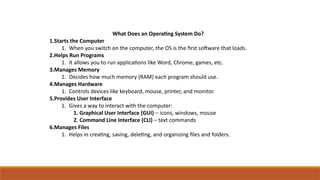
What Does anOperating System Do?
1.Starts the Computer
1. When you switch on the computer, the OS is the first software that loads.
2.Helps Run Programs
1. It allows you to run applications like Word, Chrome, games, etc.
3.Manages Memory
1. Decides how much memory (RAM) each program should use.
4.Manages Hardware
1. Controls devices like keyboard, mouse, printer, and monitor.
5.Provides User Interface
1. Gives a way to interact with the computer:
1. Graphical User Interface (GUI) – icons, windows, mouse
2. Command Line Interface (CLI) – text commands
6.Manages Files
1. Helps in creating, saving, deleting, and organizing files and folders.
5.
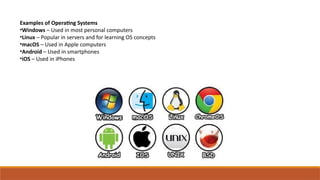
Examples of OperatingSystems
•Windows – Used in most personal computers
•Linux – Popular in servers and for learning OS concepts
•macOS – Used in Apple computers
•Android – Used in smartphones
•iOS – Used in iPhones
6.
Function of OperatingSystem
•Memory management
•Process management
•File management
•Device Management
•Deadlock Prevention
•Input/Output device management
7.
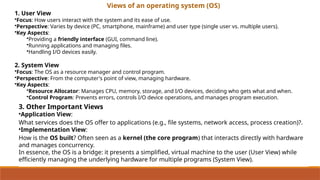
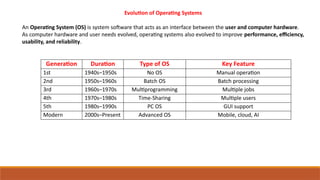
Generation Duration Typeof OS Key Feature
1st 1940s–1950s No OS Manual operation
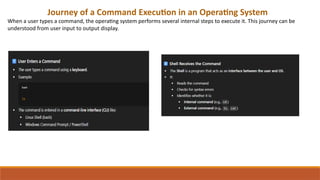
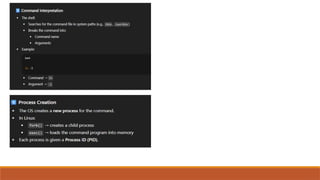
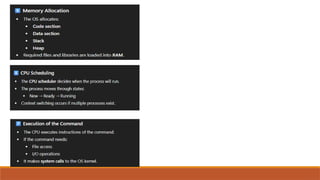
2nd 1950s–1960s Batch OS Batch processing
3rd 1960s–1970s Multiprogramming Multiple jobs
4th 1970s–1980s Time-Sharing Multiple users
5th 1980s–1990s PC OS GUI support
Modern 2000s–Present Advanced OS Mobile, cloud, AI
Evolution of Operating Systems
An Operating System (OS) is system software that acts as an interface between the user and computer hardware.
As computer hardware and user needs evolved, operating systems also evolved to improve performance, efficiency,
usability, and reliability.
8.
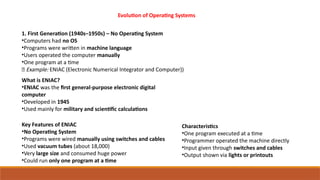
1. First Generation(1940s–1950s) – No Operating System
•Computers had no OS
•Programs were written in machine language
•Users operated the computer manually
•One program at a time
📝 Example: ENIAC (Electronic Numerical Integrator and Computer))
What is ENIAC?
•ENIAC was the first general-purpose electronic digital
computer
•Developed in 1945
•Used mainly for military and scientific calculations
Key Features of ENIAC
•No Operating System
•Programs were wired manually using switches and cables
•Used vacuum tubes (about 18,000)
•Very large size and consumed huge power
•Could run only one program at a time
Characteristics
•One program executed at a time
•Programmer operated the machine directly
•Input given through switches and cables
•Output shown via lights or printouts
Evolution of Operating Systems
9.
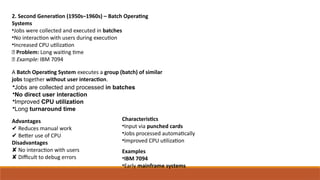
2. Second Generation(1950s–1960s) – Batch Operating
Systems
•Jobs were collected and executed in batches
•No interaction with users during execution
•Increased CPU utilization
🔹 Problem: Long waiting time
📝 Example: IBM 7094
A Batch Operating System executes a group (batch) of similar
jobs together without user interaction.
•Jobs are collected and processed in batches
•No direct user interaction
•Improved CPU utilization
•Long turnaround time
Advantages
✔ Reduces manual work
Better use of CPU
✔
Disadvantages
✘ No interaction with users
Difficult to debug errors
✘
Examples
•IBM 7094
•Early mainframe systems
Characteristics
•Input via punched cards
•Jobs processed automatically
•Improved CPU utilization
10.
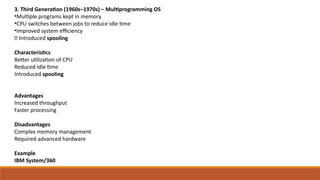
3. Third Generation(1960s–1970s) – Multiprogramming OS
•Multiple programs kept in memory
•CPU switches between jobs to reduce idle time
•Improved system efficiency
🔹 Introduced spooling
Characteristics
Better utilization of CPU
Reduced idle time
Introduced spooling
Advantages
Increased throughput
Faster processing
Disadvantages
Complex memory management
Required advanced hardware
Example
IBM System/360
11.
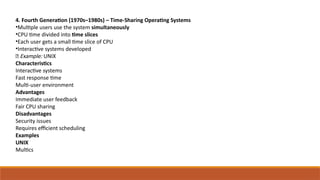
4. Fourth Generation(1970s–1980s) – Time-Sharing Operating Systems
•Multiple users use the system simultaneously
•CPU time divided into time slices
•Each user gets a small time slice of CPU
•Interactive systems developed
📝 Example: UNIX
Characteristics
Interactive systems
Fast response time
Multi-user environment
Advantages
Immediate user feedback
Fair CPU sharing
Disadvantages
Security issues
Requires efficient scheduling
Examples
UNIX
Multics
12.
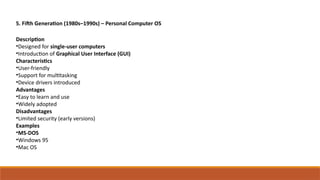
5. Fifth Generation(1980s–1990s) – Personal Computer OS
Description
•Designed for single-user computers
•Introduction of Graphical User Interface (GUI)
Characteristics
•User-friendly
•Support for multitasking
•Device drivers introduced
Advantages
•Easy to learn and use
•Widely adopted
Disadvantages
•Limited security (early versions)
Examples
•MS-DOS
•Windows 95
•Mac OS
13.
6. Modern OperatingSystems (2000s–Present)
•Support multitasking, multithreading
•Used in mobiles, cloud, AI systems
•High security and networking support
📝 Examples: Windows 10/11, Linux, Android, iOS
Description
•Highly advanced systems supporting mobiles, cloud, and AI
•Focus on security, scalability, and performance
Characteristics
•Multitasking and multithreading
•Virtualization and cloud support
•Strong security mechanisms
•Support for mobile and embedded devices
Examples
•Windows 10/11
•Linux
•Android
•iOS
14.
Types of OperatingSystems
An Operating System (OS) manages computer hardware and software resources and provides services to users and
applications. Based on functionality, usage, and processing method, operating systems are classified into different types.
1. Batch Operating System
Description
•Jobs are collected and executed in batches
•No interaction between user and system during execution
Features
•Uses resident monitor
•Input via punched cards or tapes
•Sequential job execution
Advantages
•Improved CPU utilization
•Reduced manual intervention
Disadvantages
•Long turnaround time
•Difficult debugging
Example
•IBM 7094
15.
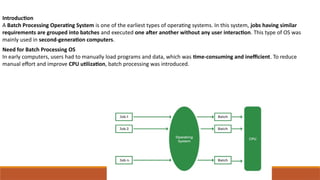
Introduction
A Batch ProcessingOperating System is one of the earliest types of operating systems. In this system, jobs having similar
requirements are grouped into batches and executed one after another without any user interaction. This type of OS was
mainly used in second-generation computers.
Need for Batch Processing OS
In early computers, users had to manually load programs and data, which was time-consuming and inefficient. To reduce
manual effort and improve CPU utilization, batch processing was introduced.
16.
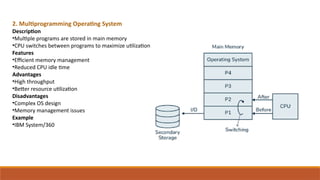
2. Multiprogramming OperatingSystem
Description
•Multiple programs are stored in main memory
•CPU switches between programs to maximize utilization
Features
•Efficient memory management
•Reduced CPU idle time
Advantages
•High throughput
•Better resource utilization
Disadvantages
•Complex OS design
•Memory management issues
Example
•IBM System/360
17.
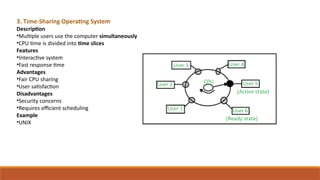
3. Time-Sharing OperatingSystem
Description
•Multiple users use the computer simultaneously
•CPU time is divided into time slices
Features
•Interactive system
•Fast response time
Advantages
•Fair CPU sharing
•User satisfaction
Disadvantages
•Security concerns
•Requires efficient scheduling
Example
•UNIX
18.
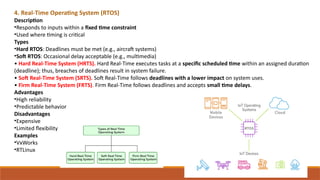
4. Real-Time OperatingSystem (RTOS)
Description
•Responds to inputs within a fixed time constraint
•Used where timing is critical
Types
•Hard RTOS: Deadlines must be met (e.g., aircraft systems)
•Soft RTOS: Occasional delay acceptable (e.g., multimedia)
• Hard Real-Time System (HRTS). Hard Real-Time executes tasks at a specific scheduled time within an assigned duration
(deadline); thus, breaches of deadlines result in system failure.
• Soft Real-Time System (SRTS). Soft Real-Time follows deadlines with a lower impact on system uses.
• Firm Real-Time System (FRTS). Firm Real-Time follows deadlines and accepts small time delays.
Advantages
•High reliability
•Predictable behavior
Disadvantages
•Expensive
•Limited flexibility
Examples
•VxWorks
•RTLinux
19.
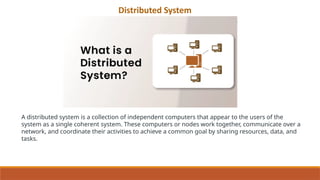
A distributed systemis a collection of independent computers that appear to the users of the
system as a single coherent system. These computers or nodes work together, communicate over a
network, and coordinate their activities to achieve a common goal by sharing resources, data, and
tasks.
Distributed System
20.
Difference between centralizedsystem and distributed system
All data and computational resources are kept and controlled in a single central
place, such as a server, in a centralized system. Applications and users connect to
this hub in order to access and handle data. Although this configuration is easy to
maintain and secure, if too many users access it simultaneously or if the central server
malfunctions, it could become a bottleneck.
A distributed system, on the other hand, disperses data and resources over several
servers or locations, frequently across various physical places. Better scalability and
reliability are made possible by this configuration since the system can function even
in the event of a component failure. However, because of their numerous points of
interaction, distributed systems can be more difficult to secure and administer.
21.
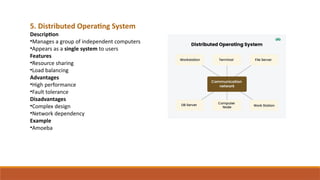
5. Distributed OperatingSystem
Description
•Manages a group of independent computers
•Appears as a single system to users
Features
•Resource sharing
•Load balancing
Advantages
•High performance
•Fault tolerance
Disadvantages
•Complex design
•Network dependency
Example
•Amoeba
22.
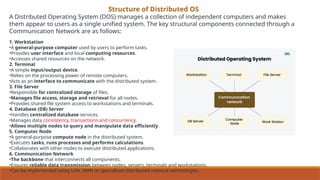
Structure of DistributedOS
A Distributed Operating System (DOS) manages a collection of independent computers and makes
them appear to users as a single unified system. The key structural components connected through a
Communication Network are as follows:
1. Workstation
•A general-purpose computer used by users to perform tasks.
•Provides user interface and local computing resources.
•Accesses shared resources on the network.
2. Terminal
•A simple input/output device.
•Relies on the processing power of remote computers.
•Acts as an interface to communicate with the distributed system.
3. File Server
•Responsible for centralized storage of files.
•Manages file access, storage and retrieval for all nodes.
•Provides shared file system access to workstations and terminals.
4. Database (DB) Server
•Handles centralized database services.
•Manages data consistency, transactions and concurrency.
•Allows multiple nodes to query and manipulate data efficiently.
5. Computer Node
•A general-purpose compute node in the distributed system.
•Executes tasks, runs processes and performs calculations.
•Collaborates with other nodes to execute distributed applications.
6. Communication Network
•The backbone that interconnects all components.
•Ensures reliable data transmission between nodes, servers, terminals and workstations.
•Can be implemented using LAN, WAN or specialized distributed network technologies.
23.
Types of DistributedOS
There are many types of Distributed Operating System, some of them are as follows:
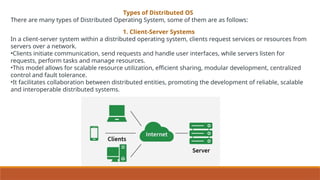
1. Client-Server Systems
In a client-server system within a distributed operating system, clients request services or resources from
servers over a network.
•Clients initiate communication, send requests and handle user interfaces, while servers listen for
requests, perform tasks and manage resources.
•This model allows for scalable resource utilization, efficient sharing, modular development, centralized
control and fault tolerance.
•It facilitates collaboration between distributed entities, promoting the development of reliable, scalable
and interoperable distributed systems.
24.
2. Peer-to-Peer(P2P) Systems
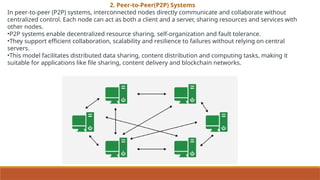
Inpeer-to-peer (P2P) systems, interconnected nodes directly communicate and collaborate without
centralized control. Each node can act as both a client and a server, sharing resources and services with
other nodes.
•P2P systems enable decentralized resource sharing, self-organization and fault tolerance.
•They support efficient collaboration, scalability and resilience to failures without relying on central
servers.
•This model facilitates distributed data sharing, content distribution and computing tasks, making it
suitable for applications like file sharing, content delivery and blockchain networks.
25.
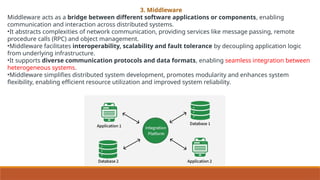
3. Middleware
Middleware actsas a bridge between different software applications or components, enabling
communication and interaction across distributed systems.
•It abstracts complexities of network communication, providing services like message passing, remote
procedure calls (RPC) and object management.
•Middleware facilitates interoperability, scalability and fault tolerance by decoupling application logic
from underlying infrastructure.
•It supports diverse communication protocols and data formats, enabling seamless integration between
heterogeneous systems.
•Middleware simplifies distributed system development, promotes modularity and enhances system
flexibility, enabling efficient resource utilization and improved system reliability.
26.
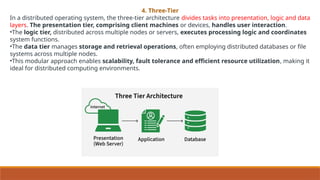
4. Three-Tier
In adistributed operating system, the three-tier architecture divides tasks into presentation, logic and data
layers. The presentation tier, comprising client machines or devices, handles user interaction.
•The logic tier, distributed across multiple nodes or servers, executes processing logic and coordinates
system functions.
•The data tier manages storage and retrieval operations, often employing distributed databases or file
systems across multiple nodes.
•This modular approach enables scalability, fault tolerance and efficient resource utilization, making it
ideal for distributed computing environments.
27.
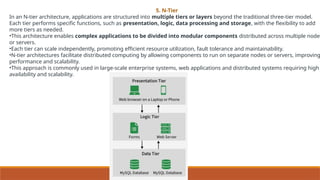
5. N-Tier
In anN-tier architecture, applications are structured into multiple tiers or layers beyond the traditional three-tier model.
Each tier performs specific functions, such as presentation, logic, data processing and storage, with the flexibility to add
more tiers as needed.
•This architecture enables complex applications to be divided into modular components distributed across multiple nodes
or servers.
•Each tier can scale independently, promoting efficient resource utilization, fault tolerance and maintainability.
•N-tier architectures facilitate distributed computing by allowing components to run on separate nodes or servers, improving
performance and scalability.
•This approach is commonly used in large-scale enterprise systems, web applications and distributed systems requiring high
availability and scalability.
28.
Applications of DistributedOS
Distributed operating systems find applications across various domains where distributed computing is essential.
Cloud Computing Platforms
•Distributed operating systems form the backbone of cloud computing platforms like Amazon Web Services (AWS), Microsoft Azure and Google Cloud Platform (GCP).
•These platforms provide scalable, on-demand computing resources distributed across multiple data centers, enabling organizations to deploy and manage
applications, storage and services in a distributed manner.
Internet of Things (IoT)
•Distributed operating systems play a crucial role in IoT networks, where numerous interconnected devices collect and exchange data.
•These operating systems manage communication, coordination and data processing tasks across distributed IoT devices, enabling applications such as smart home
automation, industrial monitoring and environmental sensing.
Distributed Databases:
•Distributed operating systems are used in distributed database management systems (DDBMS) to manage and coordinate data storage and processing across
multiple nodes or servers.
•These systems ensure data consistency, availability and fault tolerance in distributed environments, supporting applications such as online transaction processing
(OLTP), data warehousing and real-time analytics.
Content Delivery Networks (CDNs)
•CDNs rely on distributed operating systems to deliver web content, media and applications to users worldwide.
•These operating systems manage distributed caching, content replication and request routing across a network of edge servers, reducing latency and improving
performance for users accessing web content from diverse geographic locations.
Peer-to-Peer (P2P) Networks
•Distributed operating systems are used in peer-to-peer networks to enable decentralized communication, resource sharing and collaboration among distributed
nodes.
•These systems facilitate file sharing, content distribution and decentralized applications (DApps) by coordinating interactions between peers without relying on
centralized servers.
High-Performance Computing (HPC)
•Distributed operating systems are employed in HPC clusters and supercomputers to coordinate parallel processing tasks across multiple nodes or compute units.
•These systems support scientific simulations, computational modeling and data-intensive computations by distributing workloads and managing communication
between nodes efficiently.
Distributed File Systems
•Distributed operating systems power distributed file systems like Hadoop Distributed File System (HDFS), Google File System (GFS) and CephFS.
•These file systems enable distributed storage and retrieval of large-scale data sets across clusters of machines, supporting applications such as big data analytics,
data processing and content storage.
29.
Examples of DistributedOS
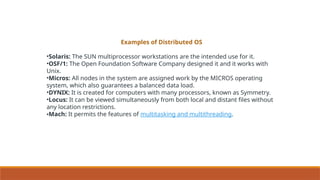
•Solaris: The SUN multiprocessor workstations are the intended use for it.
•OSF/1: The Open Foundation Software Company designed it and it works with
Unix.
•Micros: All nodes in the system are assigned work by the MICROS operating
system, which also guarantees a balanced data load.
•DYNIX: It is created for computers with many processors, known as Symmetry.
•Locus: It can be viewed simultaneously from both local and distant files without
any location restrictions.
•Mach: It permits the features of multitasking and multithreading.
30.
Security in DistributedOS
•Protection and security are crucial aspects of a Distributed
Operating System, especially in organizational settings.
•Measures are employed to safeguard the system from potential
damage or loss caused by external sources.
•Various security measures can be implemented, including
authentication methods such as username/password and user key.
•One Time Password (OTP) is also commonly utilized in distributed
OS security applications.
31.
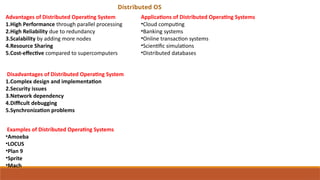
Advantages of DistributedOperating System
1.High Performance through parallel processing
2.High Reliability due to redundancy
3.Scalability by adding more nodes
4.Resource Sharing
5.Cost-effective compared to supercomputers
Disadvantages of Distributed Operating System
1.Complex design and implementation
2.Security issues
3.Network dependency
4.Difficult debugging
5.Synchronization problems
Examples of Distributed Operating Systems
•Amoeba
•LOCUS
•Plan 9
•Sprite
•Mach
Applications of Distributed Operating Systems
•Cloud computing
•Banking systems
•Online transaction systems
•Scientific simulations
•Distributed databases
Distributed OS
32.
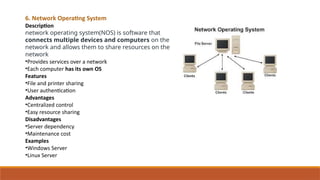
6. Network OperatingSystem
Description
network operating system(NOS) is software that
connects multiple devices and computers on the
network and allows them to share resources on the
network
•Provides services over a network
•Each computer has its own OS
Features
•File and printer sharing
•User authentication
Advantages
•Centralized control
•Easy resource sharing
Disadvantages
•Server dependency
•Maintenance cost
Examples
•Windows Server
•Linux Server
33.
Types of NetworkOperating Systems
There are mainly two types of networks, one is peer-to-peer and another is
client/server. Now let's see each type one by one.
•Peer to Peer: Peer-to-peer network operating systems allow the sharing of
resources and files with small-sized networks and having fewer resources. In
general, peer-to-peer network operating systems are used on LAN.
•Client/server: Client-server network operating systems provide users
access to resources through the central server. This NOS is too expensive to
implement and maintain. This operating system is good for the big networks
which provide many services.
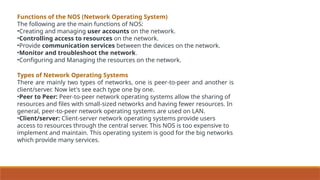
Functions of the NOS (Network Operating System)
The following are the main functions of NOS:
•Creating and managing user accounts on the network.
•Controlling access to resources on the network.
•Provide communication services between the devices on the network.
•Monitor and troubleshoot the network.
•Configuring and Managing the resources on the network.
34.
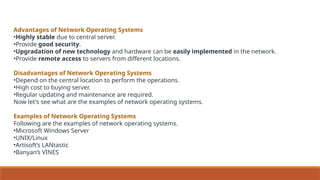
Advantages of NetworkOperating Systems
•Highly stable due to central server.
•Provide good security.
•Upgradation of new technology and hardware can be easily implemented in the network.
•Provide remote access to servers from different locations.
Disadvantages of Network Operating Systems
•Depend on the central location to perform the operations.
•High cost to buying server.
•Regular updating and maintenance are required.
Now let's see what are the examples of network operating systems.
Examples of Network Operating Systems
Following are the examples of network operating systems.
•Microsoft Windows Server
•UNIX/Linux
•Artisoft’s LANtastic
•Banyan’s VINES
35.
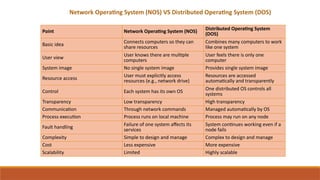
Point Network OperatingSystem (NOS) Distributed Operating System
(DOS)
Basic idea
Connects computers so they can
share resources
Combines many computers to work
like one system
User view
User knows there are multiple
computers
User feels there is only one
computer
System image No single system image Provides single system image
Resource access
User must explicitly access
resources (e.g., network drive)
Resources are accessed
automatically and transparently
Control Each system has its own OS
One distributed OS controls all
systems
Transparency Low transparency High transparency
Communication Through network commands Managed automatically by OS
Process execution Process runs on local machine Process may run on any node
Fault handling Failure of one system affects its
services
System continues working even if a
node fails
Complexity Simple to design and manage Complex to design and manage
Cost Less expensive More expensive
Scalability Limited Highly scalable
Network Operating System (NOS) VS Distributed Operating System (DOS)
36.
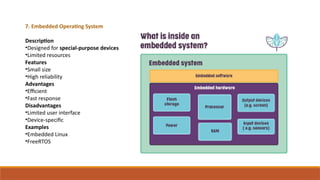
7. Embedded OperatingSystem
Description
•Designed for special-purpose devices
•Limited resources
Features
•Small size
•High reliability
Advantages
•Efficient
•Fast response
Disadvantages
•Limited user interface
•Device-specific
Examples
•Embedded Linux
•FreeRTOS
37.
An embedded operatingsystem (OS) is specialized software for dedicated
tasks in devices like cars, medical equipment, or smart appliances, focusing on
efficiency, reliability, and often real-time performance, unlike general-
purpose OSes (Windows, macOS)
38.
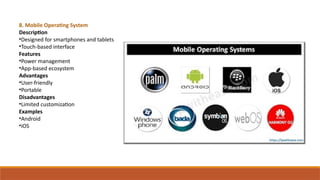
8. Mobile OperatingSystem
Description
•Designed for smartphones and tablets
•Touch-based interface
Features
•Power management
•App-based ecosystem
Advantages
•User-friendly
•Portable
Disadvantages
•Limited customization
Examples
•Android
•iOS
39.
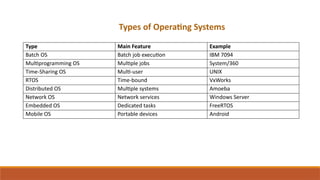
Type Main FeatureExample
Batch OS Batch job execution IBM 7094
Multiprogramming OS Multiple jobs System/360
Time-Sharing OS Multi-user UNIX
RTOS Time-bound VxWorks
Distributed OS Multiple systems Amoeba
Network OS Network services Windows Server
Embedded OS Dedicated tasks FreeRTOS
Mobile OS Portable devices Android
Types of Operating Systems
40.
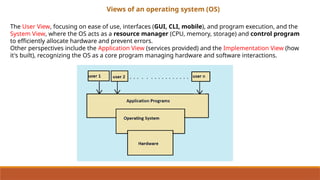
Views of anoperating system (OS)
The User View, focusing on ease of use, interfaces (GUI, CLI, mobile), and program execution, and the
System View, where the OS acts as a resource manager (CPU, memory, storage) and control program
to efficiently allocate hardware and prevent errors.
Other perspectives include the Application View (services provided) and the Implementation View (how
it's built), recognizing the OS as a core program managing hardware and software interactions.
41.
1. User View
•Focus:How users interact with the system and its ease of use.
•Perspective: Varies by device (PC, smartphone, mainframe) and user type (single user vs. multiple users).
•Key Aspects:
•Providing a friendly interface (GUI, command line).
•Running applications and managing files.
•Handling I/O devices easily.
2. System View
•Focus: The OS as a resource manager and control program.
•Perspective: From the computer's point of view, managing hardware.
•Key Aspects:
•Resource Allocator: Manages CPU, memory, storage, and I/O devices, deciding who gets what and when.
•Control Program: Prevents errors, controls I/O device operations, and manages program execution.
3. Other Important Views
•Application View:
What services does the OS offer to applications (e.g., file systems, network access, process creation)?.
•Implementation View:
How is the OS built? Often seen as a kernel (the core program) that interacts directly with hardware
and manages concurrency.
In essence, the OS is a bridge: it presents a simplified, virtual machine to the user (User View) while
efficiently managing the underlying hardware for multiple programs (System View).
Views of an operating system (OS)
42.
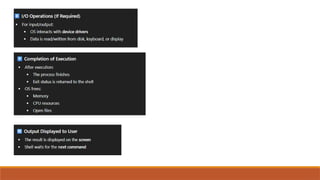
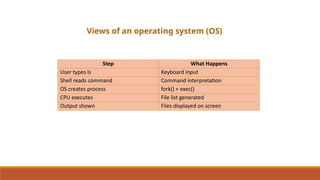
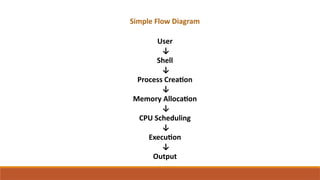
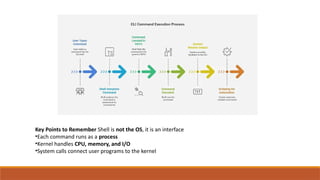
Journey of aCommand Execution in an Operating System
When a user types a command, the operating system performs several internal steps to execute it. This journey can be
understood from user input to output display.
46.
Step What Happens
Usertypes ls Keyboard input
Shell reads command Command interpretation
OS creates process fork() + exec()
CPU executes File list generated
Output shown Files displayed on screen
Views of an operating system (OS)
Key Points toRemember Shell is not the OS, it is an interface
•Each command runs as a process
•Kernel handles CPU, memory, and I/O
•System calls connect user programs to the kernel
 Lo más leído
 Lo más leído