COLEGIO NACIONAL NICOLAS ESGUERRA
                                “Edificamos Futuro”

                 ESTRUCTURA DE UNA PAGINA WEB III


Estudiantes: Juan Holguín Torres                07

             Daniel Fernando López Ríos         08     Curso: 904


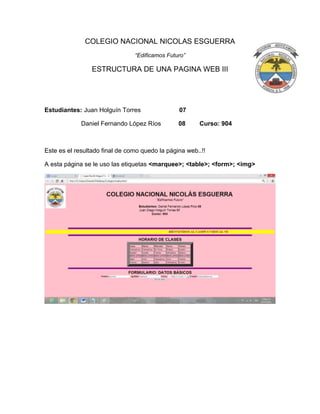
Este es el resultado final de como quedo la página web..!!

A esta página se le uso las etiquetas <marquee>; <table>; <form>; <img>
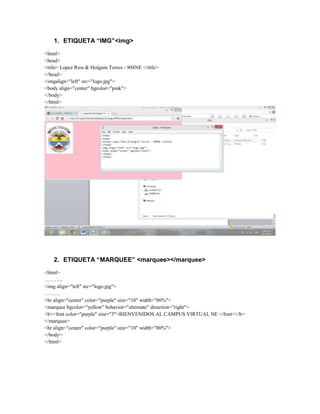
1. ETIQUETA “IMG”<img>
<html>
<head>
<title> Lopez Rios & Holguin Torres - 904NE </title>
</head>
<imgalign="left" src="logo.jpg">
<body align="center" bgcolor="pink">
</body>
</html>


    2. ETIQUETA “MARQUEE” <marquee></marquee>
<html>
………..
<img align="left" src="logo.jpg">
………
<hr align="center" color="purple" size="10" width="80%">
<marquee bgcolor="yellow" behavior="alternate" direction="right">
<b><font color="purple" size="5">BIENVENIDOS AL CAMPUS VIRTUAL NE </font></b>
</marquee>
<hr align="center" color="purple" size="10" width="80%">
</body>
</html>
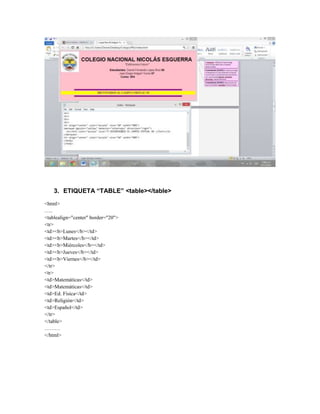
3. ETIQUETA “TABLE” <table></table>
<html>
…..
<tablealign="center" border="20">
<tr>
<td><b>Lunes</b></td>
<td><b>Martes</b></td>
<td><b>Miércoles</b></td>
<td><b>Jueves</b></td>
<td><b>Viernes</b></td>
</tr>
<tr>
<td>Matemáticas</td>
<td>Ed. Física</td>
<td>Religión</td>
<td>Español</td>
</tr>
</table>
………
</html>
4. ETIQUETA “FORM” <form></form>
<html>
………
<body>
……………
<formmethod="post" enctype="text/plain" >
<b>Nombre:</b><input name="campo" type="text" value="Nombre" size="25" maxlength="30">
<b>Apellido:</b><input name="campo" type="text" value="Apellidos" size="25" maxlength="30">
<b>Curso:</b><select name="Curso">
<option selected>~~~ElijeTuCurso~~~</option>
<option>901</option>
<option>902</option>
<option>903</option>
<option>904</option>
<option>905</option>
<option>906</option>
</select>
<b>E-mail:</b><input name="campo" type="text" value="CorreoElectronico" size="25"
maxlength="95"><br>
<input name="boton" type="submit" value="Enviardatos">
</form>
</body>
</html>
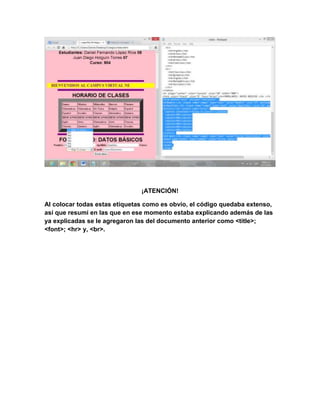
¡ATENCIÓN!

Al colocar todas estas etiquetas como es obvio, el código quedaba extenso,
así que resumí en las que en ese momento estaba explicando además de las
ya explicadas se le agregaron las del documento anterior como <title>;
<font>; <hr> y, <br>.

Estructura HTML III

  • 1.
    COLEGIO NACIONAL NICOLASESGUERRA “Edificamos Futuro” ESTRUCTURA DE UNA PAGINA WEB III Estudiantes: Juan Holguín Torres 07 Daniel Fernando López Ríos 08 Curso: 904 Este es el resultado final de como quedo la página web..!! A esta página se le uso las etiquetas <marquee>; <table>; <form>; <img>
  • 2.
    1. ETIQUETA “IMG”<img> <html> <head> <title>Lopez Rios & Holguin Torres - 904NE </title> </head> <imgalign="left" src="logo.jpg"> <body align="center" bgcolor="pink"> </body> </html> 2. ETIQUETA “MARQUEE” <marquee></marquee> <html> ……….. <img align="left" src="logo.jpg"> ……… <hr align="center" color="purple" size="10" width="80%"> <marquee bgcolor="yellow" behavior="alternate" direction="right"> <b><font color="purple" size="5">BIENVENIDOS AL CAMPUS VIRTUAL NE </font></b> </marquee> <hr align="center" color="purple" size="10" width="80%"> </body> </html>
  • 3.
    3. ETIQUETA “TABLE”<table></table> <html> ….. <tablealign="center" border="20"> <tr> <td><b>Lunes</b></td> <td><b>Martes</b></td> <td><b>Miércoles</b></td> <td><b>Jueves</b></td> <td><b>Viernes</b></td> </tr> <tr> <td>Matemáticas</td> <td>Matemáticas</td> <td>Ed. Física</td> <td>Religión</td> <td>Español</td> </tr> </table> ……… </html>
  • 4.
    4. ETIQUETA “FORM”<form></form> <html> ……… <body> …………… <formmethod="post" enctype="text/plain" > <b>Nombre:</b><input name="campo" type="text" value="Nombre" size="25" maxlength="30"> <b>Apellido:</b><input name="campo" type="text" value="Apellidos" size="25" maxlength="30"> <b>Curso:</b><select name="Curso"> <option selected>~~~ElijeTuCurso~~~</option> <option>901</option> <option>902</option> <option>903</option> <option>904</option> <option>905</option> <option>906</option> </select> <b>E-mail:</b><input name="campo" type="text" value="CorreoElectronico" size="25" maxlength="95"><br> <input name="boton" type="submit" value="Enviardatos"> </form> </body> </html>
  • 5.
    ¡ATENCIÓN! Al colocar todasestas etiquetas como es obvio, el código quedaba extenso, así que resumí en las que en ese momento estaba explicando además de las ya explicadas se le agregaron las del documento anterior como <title>; <font>; <hr> y, <br>.