Introduction to
Docker
April 2015, Javier Cortejoso
1
Contact
What is Docker?1 32 First steps Docker ecosystem
ÍNDICE
Javier Cortejoso
jcortejoso@stratio.com
@jcortejoso
2
What is Docker?
3
Technology for manage software containers
1.1.- Software containers
★ Operating-system-level virtualization
○ Kernel shared between containers and the host
★ Isolation of each container
○ File system
○ Network
○ Processes
○ Users
○ Hardware resources
Introduction to Docker
1.- What is Docker?
4
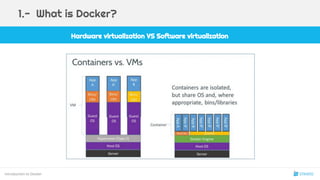
Hardware virtualization VS Software virtualization
Introduction to Docker
1.- What is Docker?
5
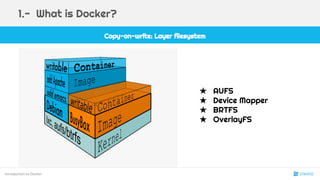
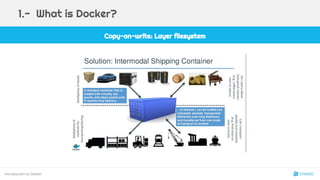
Copy-on-write: Layer filesystem
Introduction to Docker
1.- What is Docker?
★ AUFS
★ Device Mapper
★ BRTFS
★ OverlayFS
6
Introduction to Docker
1.- What is Docker?
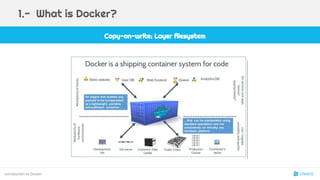
Copy-on-write: Layer filesystem
7
Introduction to Docker
1.- What is Docker?
Copy-on-write: Layer filesystem
8
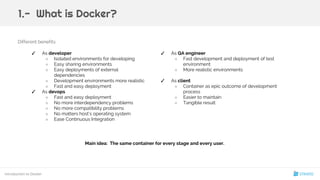
Different benefits:
✓ As QA engineer
○ Fast development and deployment of test
environment
○ More realistic environments
✓ As client
○ Container as epic outcome of development
process
○ Easier to maintain
○ Tangible result
Main idea: The same container for every stage and every user.
Introduction to Docker
1.- What is Docker?
✓ As developer
○ Isolated environments for developing
○ Easy sharing environments
○ Easy deployments of external
dependencies
○ Development environments more realistic
○ Fast and easy deployment
✓ As devops
○ Fast and easy deployment
○ No more interdependency problems
○ No more compatibility problems
○ No matters host’s operating system
○ Ease Continuous Integration
9
Using Docker
10
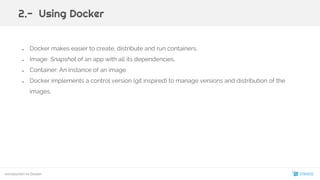
● Docker makes easier to create, distribute and run containers.
● Image: Snapshot of an app with all its dependencies.
● Container: An instance of an image.
● Docker implements a control version (git inspired) to manage versions and distribution of the
images.
2.- Using Docker
Introduction to Docker
11
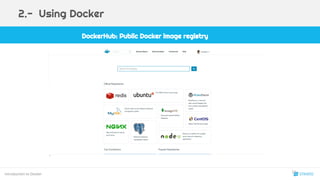
DockerHub: Public Docker image registry
Introduction to Docker
2.- Using Docker
12
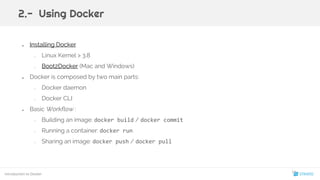
● Installing Docker
○ Linux Kernel > 3.8
○ Boot2Docker (Mac and Windows)
● Docker is composed by two main parts:
○ Docker daemon
○ Docker CLI
● Basic Workflow :
○ Building an image: docker build / docker commit
○ Running a container: docker run
○ Sharing an image: docker push / docker pull
Introduction to Docker
2.- Using Docker
13
Demo: Running your first containers
Introduction to Docker
2.- Using Docker
14
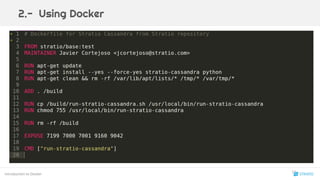
● Creating new images. Two ways:
○ Interactively: You can commit a running container: docker commit
○ Imperatively: Using a Dockerfile: Easy to audit, verify, rebuild, upgrade, mantain...
■ Starting from an existing image (FROM ubuntu)
■ Se ejecutan comándos bash (RUN apt-get update && apt-get install vim)
■ Se añaden ficheros (ADD or COPY)
■ Se configura la imágen (EXPOSE; VOLUME; ENTRYPOINT; CMD…)
Introduction to Docker
2.- Using Docker
15
$ docker run --help
Usage: docker run [OPTIONS] IMAGE [COMMAND] [ARG...]
Run a command in a new container
-c, --cpu-shares=0 CPU shares (relative weight)
--cpuset="" CPUs in which to allow execution (0-3, 0,1)
-d, --detach=false Detached mode: run the container in the background and print the new container ID
-e, --env=[] Set environment variables
-h, --hostname="" Container host name
-i, --interactive=false Keep STDIN open even if not attached
--link=[] Add link to another container in the form of <name|id>:alias
-m, --memory="" Memory limit (format: <number><optional unit>, where unit = b, k, m or g)
--name="" Assign a name to the container
-P, --publish-all=false Publish all exposed ports to random ports on the host interfaces
-p, --publish=[] Publish a container's port to the host. format: ip:hostPort:containerPort | ip::containerPort |
hostPort:containerPort | containerPort (use 'docker port' to see the actual mapping)
--privileged=false Give extended privileges to this container
--rm=false Automatically remove the container when it exits (incompatible with -d)
-t, --tty=false Allocate a pseudo-TTY
-v, --volume=[] Bind mount a volume (e.g., from the host: -v /host:/container, from Docker: -v /container)
--volumes-from=[] Mount volumes from the specified container(s)
Introduction to Docker
2.- Using Docker
16
Introduction to Docker
2.- Using Docker
17
Docker ecosystem
18
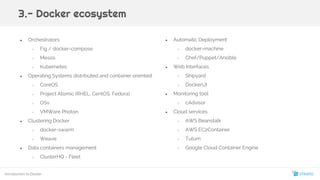
● Orchestrators
○ Fig / docker-compose
○ Mesos
○ Kubernetes
● Operating Systems distributed and container oriented:
○ CoreOS
○ Project Atomic (RHEL, CentOS, Fedora)
○ OSv
○ VMWare Photon
● Clustering Docker
○ docker-swarm
○ Weave
● Data containers management
○ ClusterHQ - Fleet
3.- Docker ecosystem
● Automatic Deployment
○ docker-machine
○ Chef/Puppet/Ansible
● Web Interfaces
○ Shipyard
○ DockerUI
● Monitoring tool
○ cAdvisor
● Cloud services
○ AWS Beanstalk
○ AWS EC2Container
○ Tutum
○ Google Cloud Container Engine
Introduction to Docker
19
Recommended Book
One last thing
Questions?
20
We are hiring!!
One last another thing
★ Metodologías ágiles tipo XP y Scrum.
★ Arquitecturas J2EE (Struts, Spring, Hibernate)
★ Recién Titulados
★ Web semántica
★ Big Data
★ Aplicaciones móviles
www.paradig.ma www.stratio.com
21
1.- ¿Qué es docker?
Cuestionario
a) Docker es un sistema de virtualización a nivel de sistema
operativo
b) Docker es un sistema de gestión de contenedores de
software
c) Todas las anteriores
d) Ninguna de las anteriores
22
1.- ¿Qué es docker?
Cuestionario
a) Docker es un sistema de virtualización a nivel de sistema
operativo
b) Docker es un sistema de gestión de contenedores de
software
c) Todas las anteriores
d) Ninguna de las anteriores
23
2.- ¿Qué tecnología permite a Docker limitar los recursos de hardware de un contenedor?
Cuestionario
a) AuFS
b) nameservices
c) KVM
d) cgroups
24
2.- ¿Qué tecnología permite a Docker limitar los recursos de hardware de un contenedor?
Cuestionario
a) AuFS
b) nameservices
c) KVM
d) cgroups
25
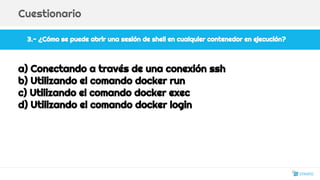
3.- ¿Cómo se puede abrir una sesión de shell en cualquier contenedor en ejecución?
Cuestionario
a) Conectando a través de una conexión ssh
b) Utilizando el comando docker run
c) Utilizando el comando docker exec
d) Utilizando el comando docker login
26
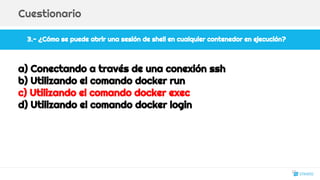
3.- ¿Cómo se puede abrir una sesión de shell en cualquier contenedor en ejecución?
Cuestionario
a) Conectando a través de una conexión ssh
b) Utilizando el comando docker run
c) Utilizando el comando docker exec
d) Utilizando el comando docker login
27
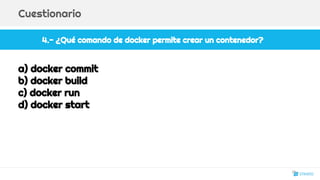
4.- ¿Qué comando de docker permite crear un contenedor?
Cuestionario
a) docker commit
b) docker build
c) docker run
d) docker start
28
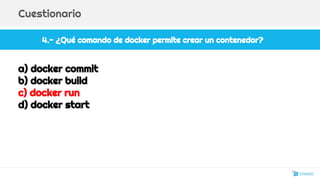
4.- ¿Qué comando de docker permite crear un contenedor?
Cuestionario
a) docker commit
b) docker build
c) docker run
d) docker start
29
5.- ¿Que afirmación de las siguientes es correcta?
Cuestionario
a) Docker es una tecnología que sustituye a los sistemas de virtualización
completa tradicionales (ej.: Virtualbox, VMWare)
b) Con docker es posible virtualizar arquitecturas de 32 bits en sistemas
de 64 bits
c) Todas de las anteriores
d) Ninguna de las anteriores
30
5.- ¿Que afirmación de las siguientes es correcta?
Cuestionario
a) Docker es una tecnología que sustituye a los sistemas de virtualización
completa tradicionales (ej.: Virtualbox, VMWare)
b) Con docker es posible virtualizar arquitecturas de 32 bits en sistemas
de 64 bits
c) Todas de las anteriores
d) Ninguna de las anteriores
31

Introduction to docker. Stratio

  • 1.
  • 2.
    Contact What is Docker?132 First steps Docker ecosystem ÍNDICE Javier Cortejoso jcortejoso@stratio.com @jcortejoso 2
  • 3.
  • 4.
    Technology for managesoftware containers 1.1.- Software containers ★ Operating-system-level virtualization ○ Kernel shared between containers and the host ★ Isolation of each container ○ File system ○ Network ○ Processes ○ Users ○ Hardware resources Introduction to Docker 1.- What is Docker? 4
  • 5.
    Hardware virtualization VSSoftware virtualization Introduction to Docker 1.- What is Docker? 5
  • 6.
    Copy-on-write: Layer filesystem Introductionto Docker 1.- What is Docker? ★ AUFS ★ Device Mapper ★ BRTFS ★ OverlayFS 6
  • 7.
    Introduction to Docker 1.-What is Docker? Copy-on-write: Layer filesystem 7
  • 8.
    Introduction to Docker 1.-What is Docker? Copy-on-write: Layer filesystem 8
  • 9.
    Different benefits: ✓ AsQA engineer ○ Fast development and deployment of test environment ○ More realistic environments ✓ As client ○ Container as epic outcome of development process ○ Easier to maintain ○ Tangible result Main idea: The same container for every stage and every user. Introduction to Docker 1.- What is Docker? ✓ As developer ○ Isolated environments for developing ○ Easy sharing environments ○ Easy deployments of external dependencies ○ Development environments more realistic ○ Fast and easy deployment ✓ As devops ○ Fast and easy deployment ○ No more interdependency problems ○ No more compatibility problems ○ No matters host’s operating system ○ Ease Continuous Integration 9
  • 10.
  • 11.
    ● Docker makeseasier to create, distribute and run containers. ● Image: Snapshot of an app with all its dependencies. ● Container: An instance of an image. ● Docker implements a control version (git inspired) to manage versions and distribution of the images. 2.- Using Docker Introduction to Docker 11
  • 12.
    DockerHub: Public Dockerimage registry Introduction to Docker 2.- Using Docker 12
  • 13.
    ● Installing Docker ○Linux Kernel > 3.8 ○ Boot2Docker (Mac and Windows) ● Docker is composed by two main parts: ○ Docker daemon ○ Docker CLI ● Basic Workflow : ○ Building an image: docker build / docker commit ○ Running a container: docker run ○ Sharing an image: docker push / docker pull Introduction to Docker 2.- Using Docker 13
  • 14.
    Demo: Running yourfirst containers Introduction to Docker 2.- Using Docker 14
  • 15.
    ● Creating newimages. Two ways: ○ Interactively: You can commit a running container: docker commit ○ Imperatively: Using a Dockerfile: Easy to audit, verify, rebuild, upgrade, mantain... ■ Starting from an existing image (FROM ubuntu) ■ Se ejecutan comándos bash (RUN apt-get update && apt-get install vim) ■ Se añaden ficheros (ADD or COPY) ■ Se configura la imágen (EXPOSE; VOLUME; ENTRYPOINT; CMD…) Introduction to Docker 2.- Using Docker 15
  • 16.
    $ docker run--help Usage: docker run [OPTIONS] IMAGE [COMMAND] [ARG...] Run a command in a new container -c, --cpu-shares=0 CPU shares (relative weight) --cpuset="" CPUs in which to allow execution (0-3, 0,1) -d, --detach=false Detached mode: run the container in the background and print the new container ID -e, --env=[] Set environment variables -h, --hostname="" Container host name -i, --interactive=false Keep STDIN open even if not attached --link=[] Add link to another container in the form of <name|id>:alias -m, --memory="" Memory limit (format: <number><optional unit>, where unit = b, k, m or g) --name="" Assign a name to the container -P, --publish-all=false Publish all exposed ports to random ports on the host interfaces -p, --publish=[] Publish a container's port to the host. format: ip:hostPort:containerPort | ip::containerPort | hostPort:containerPort | containerPort (use 'docker port' to see the actual mapping) --privileged=false Give extended privileges to this container --rm=false Automatically remove the container when it exits (incompatible with -d) -t, --tty=false Allocate a pseudo-TTY -v, --volume=[] Bind mount a volume (e.g., from the host: -v /host:/container, from Docker: -v /container) --volumes-from=[] Mount volumes from the specified container(s) Introduction to Docker 2.- Using Docker 16
  • 17.
  • 18.
  • 19.
    ● Orchestrators ○ Fig/ docker-compose ○ Mesos ○ Kubernetes ● Operating Systems distributed and container oriented: ○ CoreOS ○ Project Atomic (RHEL, CentOS, Fedora) ○ OSv ○ VMWare Photon ● Clustering Docker ○ docker-swarm ○ Weave ● Data containers management ○ ClusterHQ - Fleet 3.- Docker ecosystem ● Automatic Deployment ○ docker-machine ○ Chef/Puppet/Ansible ● Web Interfaces ○ Shipyard ○ DockerUI ● Monitoring tool ○ cAdvisor ● Cloud services ○ AWS Beanstalk ○ AWS EC2Container ○ Tutum ○ Google Cloud Container Engine Introduction to Docker 19
  • 20.
    Recommended Book One lastthing Questions? 20
  • 21.
    We are hiring!! Onelast another thing ★ Metodologías ágiles tipo XP y Scrum. ★ Arquitecturas J2EE (Struts, Spring, Hibernate) ★ Recién Titulados ★ Web semántica ★ Big Data ★ Aplicaciones móviles www.paradig.ma www.stratio.com 21
  • 22.
    1.- ¿Qué esdocker? Cuestionario a) Docker es un sistema de virtualización a nivel de sistema operativo b) Docker es un sistema de gestión de contenedores de software c) Todas las anteriores d) Ninguna de las anteriores 22
  • 23.
    1.- ¿Qué esdocker? Cuestionario a) Docker es un sistema de virtualización a nivel de sistema operativo b) Docker es un sistema de gestión de contenedores de software c) Todas las anteriores d) Ninguna de las anteriores 23
  • 24.
    2.- ¿Qué tecnologíapermite a Docker limitar los recursos de hardware de un contenedor? Cuestionario a) AuFS b) nameservices c) KVM d) cgroups 24
  • 25.
    2.- ¿Qué tecnologíapermite a Docker limitar los recursos de hardware de un contenedor? Cuestionario a) AuFS b) nameservices c) KVM d) cgroups 25
  • 26.
    3.- ¿Cómo sepuede abrir una sesión de shell en cualquier contenedor en ejecución? Cuestionario a) Conectando a través de una conexión ssh b) Utilizando el comando docker run c) Utilizando el comando docker exec d) Utilizando el comando docker login 26
  • 27.
    3.- ¿Cómo sepuede abrir una sesión de shell en cualquier contenedor en ejecución? Cuestionario a) Conectando a través de una conexión ssh b) Utilizando el comando docker run c) Utilizando el comando docker exec d) Utilizando el comando docker login 27
  • 28.
    4.- ¿Qué comandode docker permite crear un contenedor? Cuestionario a) docker commit b) docker build c) docker run d) docker start 28
  • 29.
    4.- ¿Qué comandode docker permite crear un contenedor? Cuestionario a) docker commit b) docker build c) docker run d) docker start 29
  • 30.
    5.- ¿Que afirmaciónde las siguientes es correcta? Cuestionario a) Docker es una tecnología que sustituye a los sistemas de virtualización completa tradicionales (ej.: Virtualbox, VMWare) b) Con docker es posible virtualizar arquitecturas de 32 bits en sistemas de 64 bits c) Todas de las anteriores d) Ninguna de las anteriores 30
  • 31.
    5.- ¿Que afirmaciónde las siguientes es correcta? Cuestionario a) Docker es una tecnología que sustituye a los sistemas de virtualización completa tradicionales (ej.: Virtualbox, VMWare) b) Con docker es posible virtualizar arquitecturas de 32 bits en sistemas de 64 bits c) Todas de las anteriores d) Ninguna de las anteriores 31