Microsoft SharePoint 2010
La plataforma de colaboración empresarial para la empresa y el Web
Sitios
Comunidades
Contenido
Búsqueda
Insights
Composites
Insights
Composites
Arquitectura
Introducción
Plataforma
Lógica (Roles, Servicios, Terminología)
Física (Componentes, Topologías)
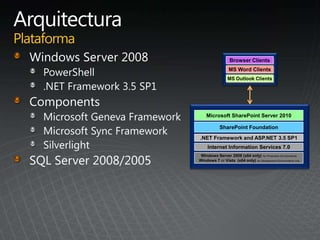
SharePoint Foundation
Microsoft SharePoint Server 2010
Windows Server 2008 (x64 only) for Production Environments
Windows 7 or Vista (x64 only) for Development Environments only
Internet Information Services 7.0
.NET Framework and ASP.NET 3.5 SP1
Browser Clients
MS Word Clients
MS Outlook Clients
• Carpeta (recursivo) - Folder
• Documento – Document
• Página - Page
• Recursos (Imagen, video, js, css, silverlight) – Asset / Artifact
• Elemento - Item
SPFarm
SPWebApplication
SPSite
SPWeb
SPList SPDocumentLibrary
SPFolder
SPListItem
SPFile
Masterpage
Navigation
Logos
Search box
Login control
Editing controls
CSS references
Server controls
Page Layout
Provide the
template
for rendering
Reference a master
page for navigation
and chrome
Define what can be
authored in the
page
Field controls
Web parts
Web part zones
many layouts per
content type
Field Controls
Bind to fields in
page content
type
Provide control
over structure
and branding
Restrictions on
author options
Web Parts
Full Gallery of
Controls
Zones
Authors control
selection and
placement
In Layout
Designers place
and configure on
users behalf
Single
Server
Demos and
Dev Boxes
Limited deployments
minimum services
up to 5000 users (~5 RPS)
50-100 GB of data
Small
Farm
Schematic
Diagram,
not to be use as a
recommendation
for Server Counts
Limited deployments
minimum services
up to 5000 users (~5 RPS)
50-100 GB of data
Demos and
Dev Boxes
Common Enterprises
10-50k users (~50 RPS)
1-2 TB of data
Single
Server
Small
Farm
Medium
Farm
App Servers
SQL
WFE
Large Enterprise
Up to 500k users (~500 RPS)
10-20 TB of data
Large
Farm
Schematic
Diagram,
not to be use as a
recommendation
for Server Counts
Seguridad
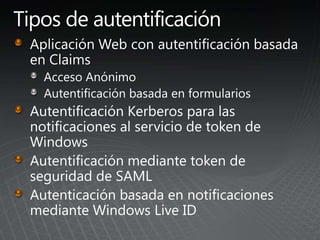
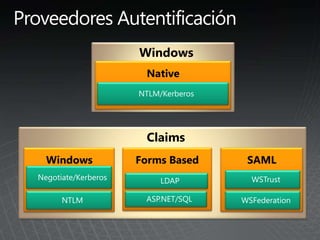
Autentificación
User Profile Store
Cuentas administradas
Permisos de usuario
s
s
Regular label-callout text
Multi-AuthenticationMixed Authentication
SharePoint
Farm
Web Application
Extended Web Application
Zone: Custom
Zone: Extranet
Zone: Intranet
Zone: Internet
Zone: Default
Windows
Authentication
FBA
Authentication
...
...
...
SharePoint
Farm
Web Application
Extended Web Application
Zone: Custom
Zone: Extranet
Zone: Intranet
Zone: Internet
Zone: Default
Windows Authentication
FBA Authentication
SAML Based Authentication
FBA Authentication
Windows Authentication
...
...
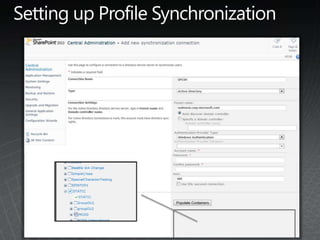
Import or Export to
Directory Source
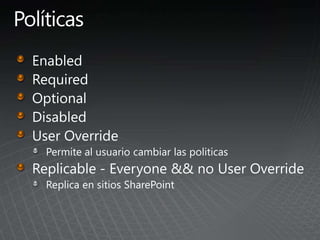
Permite al usuario cambiar las politicas
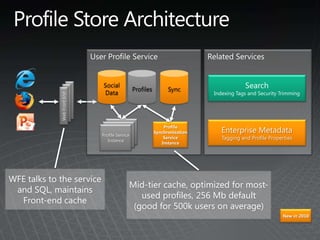
WebFrontEnd
Profile
Synchronization
Service
Instance
Profile Service
Instance
Enterprise Metadata
Tagging and Profile Properties
WFE talks to the service
and SQL, maintains
Front-end cache
New in 2010
Mid-tier cache, optimized for most-
used profiles, 256 Mb default
(good for 500k users on average)
Social
Data
SyncProfiles
Profile
Synchronization
Service
Instance
Profile Service
Instance
AD LDAP
BCS
Service
WebFrontEnd
New in 2010
Import or Export to
Directory Source
replicar
Federar
Audienciass
Cuenta Propósito Requisitos
Servicio de SQL Server
Se usa para ejecutar SQL Server. Se trata
de la cuenta de servicio de los siguientes
servicios de SQL Server:
•MSSQLSERVER
•SQLSERVERAGENT
Use una cuenta Sistema local o una
cuenta de usuario de dominio.
Usuario de programa de instalación
Sirve para ejecutar lo siguiente:
•Programa de instalación
•Asistente para configuración de
Productos de SharePoint
•Cuenta de usuario de dominio.
•Pertenece al grupo de administradores
en cada servidor en que se ejecuta la
instalación.
•Pertenece a los siguientes roles de
seguridad de SQL Server:
• Rol fijo de servidor
securityadmin
• Rol fijo de servidor
dbcreator.
Granja o conjunto de servidores o cuenta
de acceso a la base de datos
Se usa para llevar a cabo las siguientes
tareas:
•Configurar y administrar la granja o
conjunto de servidores.
•Actuar como la identidad del grupo de
aplicaciones para el sitio web de
Administración central de SharePoint.
•Ejecutar el servicio de temporizador de
flujo de trabajo de Microsoft SharePoint
Foundation.
•Cuenta de usuario de dominio.
La cuenta se agrega a los siguientes roles
de seguridad de SQL Server:
•Rol fijo de servidor dbcreator
•Rol fijo de servidor securityadmin
•Rol fijo de base de datos db_owner para
todas las bases de datos de SharePoint de
la granja o conjunto de servidores
Account Config DB Roles
Content
DB Roles Service DB(s) Roles
Local Group
Membership on
the SharePoint
Box
SQL Server
Roles
Farm Setup
Account db_owner db_owner db_owner
Local
Administrators
Group
dbcreator /
security
administrator
Farm Service
Account db_owner db_owner db_owner WSS_ADMIN_WPG None
Account Config DB Roles
Content
DB Roles Service DB(s) Roles
Local Group
Membership on
the SharePoint
Box
SQL Server
Roles
Farm Setup
Account db_owner db_owner db_owner
Local
Administrators
Group None
Farm Service
Account db_owner db_owner db_owner WSS_ADMIN_WPG None
Account Config DB Roles Content DB Roles Service DB(s) Roles
Local Group
Membership on
the SharePoint Box
Shell
Administrators Db_dataReader/db_datawriter
Db_dataReader/db_
datawriter/Execute
Db_dataReader/db_d
atawriter
Local Administrators
Group
Farm Service
Account Db_dataReader/db_datawriter
Db_dataReader/db_
datawriter/Execute
Db_dataReader/db_d
atawriter WSS_ADMIN_WPG
Shared Service
Windows Service
Account Db_dataReader None
Db_dataReader/db_d
atawriter WSS_WPG
Shared Service IIS
Application Pool
Account WSS_CONTENT_APPLICATION_POOLS None
Db_dataReader/db_d
atawriter WSS_ WPG
Application Pool
Account WSS_CONTENT_APPLICATION_POOLS
Db_dataReader/db_
datawriter/Execute None WSS_WPG
Organización de la información
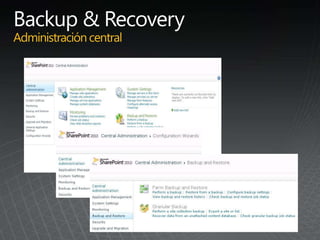
Backup & Recovery
RBS
BCS
_
_
_
_
_
)
_
_
_
_
_
_
SharePointDesign
Tools
Office Applications
2010
2010
2010
2010
High-Level Architecture
Office Client
Office Add-In/ Custom Code
SharePoint Site
External List
SQLOther
BCS
(Client Runtime)
Cache
BCS Runtime
Search, Workflow, Web Parts
BCS
(Server Runtime)
SSS
External
Content Type
VSTO
Package
BCS
Sync
BCS
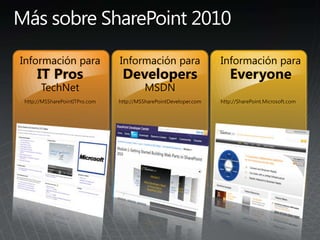
Información para
IT Pros
TechNet
http://MSSharePointITPro.com
Información para
Developers
MSDN
http://MSSharePointDeveloper.com
Información para
Everyone
http://SharePoint.Microsoft.com
¡Muchas gracias!
Administracion Sharepoint 2010

Administracion Sharepoint 2010

  • 3.
    Microsoft SharePoint 2010 Laplataforma de colaboración empresarial para la empresa y el Web
  • 4.
  • 5.
    Arquitectura Introducción Plataforma Lógica (Roles, Servicios,Terminología) Física (Componentes, Topologías)
  • 7.
    SharePoint Foundation Microsoft SharePointServer 2010 Windows Server 2008 (x64 only) for Production Environments Windows 7 or Vista (x64 only) for Development Environments only Internet Information Services 7.0 .NET Framework and ASP.NET 3.5 SP1 Browser Clients MS Word Clients MS Outlook Clients
  • 8.
    • Carpeta (recursivo)- Folder • Documento – Document • Página - Page • Recursos (Imagen, video, js, css, silverlight) – Asset / Artifact • Elemento - Item
  • 9.
  • 11.
    Masterpage Navigation Logos Search box Login control Editingcontrols CSS references Server controls Page Layout Provide the template for rendering Reference a master page for navigation and chrome Define what can be authored in the page Field controls Web parts Web part zones many layouts per content type Field Controls Bind to fields in page content type Provide control over structure and branding Restrictions on author options Web Parts Full Gallery of Controls Zones Authors control selection and placement In Layout Designers place and configure on users behalf
  • 21.
    Single Server Demos and Dev Boxes Limiteddeployments minimum services up to 5000 users (~5 RPS) 50-100 GB of data Small Farm Schematic Diagram, not to be use as a recommendation for Server Counts
  • 22.
    Limited deployments minimum services upto 5000 users (~5 RPS) 50-100 GB of data Demos and Dev Boxes Common Enterprises 10-50k users (~50 RPS) 1-2 TB of data Single Server Small Farm Medium Farm App Servers SQL WFE Large Enterprise Up to 500k users (~500 RPS) 10-20 TB of data Large Farm Schematic Diagram, not to be use as a recommendation for Server Counts
  • 23.
  • 26.
  • 28.
  • 33.
    Regular label-callout text Multi-AuthenticationMixedAuthentication SharePoint Farm Web Application Extended Web Application Extended Web Application Extended Web Application Extended Web Application Zone: Custom Zone: Extranet Zone: Intranet Zone: Internet Zone: Default Windows Authentication FBA Authentication ... ... ... SharePoint Farm Web Application Extended Web Application Extended Web Application Extended Web Application Extended Web Application Zone: Custom Zone: Extranet Zone: Intranet Zone: Internet Zone: Default Windows Authentication FBA Authentication SAML Based Authentication FBA Authentication Windows Authentication ... ...
  • 36.
    Import or Exportto Directory Source
  • 37.
    Permite al usuariocambiar las politicas
  • 39.
    WebFrontEnd Profile Synchronization Service Instance Profile Service Instance Enterprise Metadata Taggingand Profile Properties WFE talks to the service and SQL, maintains Front-end cache New in 2010 Mid-tier cache, optimized for most- used profiles, 256 Mb default (good for 500k users on average) Social Data SyncProfiles
  • 41.
  • 44.
  • 48.
    Cuenta Propósito Requisitos Serviciode SQL Server Se usa para ejecutar SQL Server. Se trata de la cuenta de servicio de los siguientes servicios de SQL Server: •MSSQLSERVER •SQLSERVERAGENT Use una cuenta Sistema local o una cuenta de usuario de dominio. Usuario de programa de instalación Sirve para ejecutar lo siguiente: •Programa de instalación •Asistente para configuración de Productos de SharePoint •Cuenta de usuario de dominio. •Pertenece al grupo de administradores en cada servidor en que se ejecuta la instalación. •Pertenece a los siguientes roles de seguridad de SQL Server: • Rol fijo de servidor securityadmin • Rol fijo de servidor dbcreator. Granja o conjunto de servidores o cuenta de acceso a la base de datos Se usa para llevar a cabo las siguientes tareas: •Configurar y administrar la granja o conjunto de servidores. •Actuar como la identidad del grupo de aplicaciones para el sitio web de Administración central de SharePoint. •Ejecutar el servicio de temporizador de flujo de trabajo de Microsoft SharePoint Foundation. •Cuenta de usuario de dominio. La cuenta se agrega a los siguientes roles de seguridad de SQL Server: •Rol fijo de servidor dbcreator •Rol fijo de servidor securityadmin •Rol fijo de base de datos db_owner para todas las bases de datos de SharePoint de la granja o conjunto de servidores
  • 49.
    Account Config DBRoles Content DB Roles Service DB(s) Roles Local Group Membership on the SharePoint Box SQL Server Roles Farm Setup Account db_owner db_owner db_owner Local Administrators Group dbcreator / security administrator Farm Service Account db_owner db_owner db_owner WSS_ADMIN_WPG None Account Config DB Roles Content DB Roles Service DB(s) Roles Local Group Membership on the SharePoint Box SQL Server Roles Farm Setup Account db_owner db_owner db_owner Local Administrators Group None Farm Service Account db_owner db_owner db_owner WSS_ADMIN_WPG None
  • 50.
    Account Config DBRoles Content DB Roles Service DB(s) Roles Local Group Membership on the SharePoint Box Shell Administrators Db_dataReader/db_datawriter Db_dataReader/db_ datawriter/Execute Db_dataReader/db_d atawriter Local Administrators Group Farm Service Account Db_dataReader/db_datawriter Db_dataReader/db_ datawriter/Execute Db_dataReader/db_d atawriter WSS_ADMIN_WPG Shared Service Windows Service Account Db_dataReader None Db_dataReader/db_d atawriter WSS_WPG Shared Service IIS Application Pool Account WSS_CONTENT_APPLICATION_POOLS None Db_dataReader/db_d atawriter WSS_ WPG Application Pool Account WSS_CONTENT_APPLICATION_POOLS Db_dataReader/db_ datawriter/Execute None WSS_WPG
  • 56.
    Organización de lainformación Backup & Recovery RBS BCS
  • 66.
  • 67.
  • 70.
  • 71.
  • 72.
    High-Level Architecture Office Client OfficeAdd-In/ Custom Code SharePoint Site External List SQLOther BCS (Client Runtime) Cache BCS Runtime Search, Workflow, Web Parts BCS (Server Runtime) SSS External Content Type VSTO Package BCS Sync BCS
  • 74.
    Información para IT Pros TechNet http://MSSharePointITPro.com Informaciónpara Developers MSDN http://MSSharePointDeveloper.com Información para Everyone http://SharePoint.Microsoft.com
  • 75.

Notas del editor

  • #4 Los seis pilares de SPS 2010.s presento las capacidades de SPS2010:- Sitios (WCM)- Comunidades (Colaboración, Enterprise 2.0, Proyectos)- Contenido (ECM, Gestión de documentación y registros, recursos digitales, Taxonomía)- Búsqueda (SharePoint, FAST, Federación, Facetación)- Insights(BI, Servicios Visio, Access, Excel)- Composites(BCS, SharePoint Designer, Servicios de Formularios, OBA/LOBI)Los Insights se refiere a todas aquellas "Ideas brillantes" que necesitamos componer, para la gestión de negocio. Con los gráficos de Visio y su soporte en servicio, podemos hacer un seguimiento real de los procesos.Los Composites se refiere a aplicaciones empresariales, que podemos montar sin necesidad de codificar.Ahora el BDC = Business Data Catalog se amplía y pasa a llamarse BCS = Business Conectivity Services
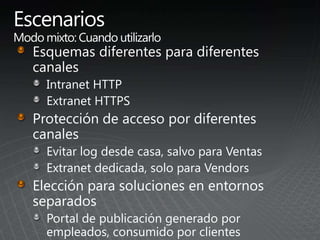
  • #27 Different scheme for different channelsIntranet HTTPExtranet HTTPSProtecting access from different channelsPreventing employees log in from home except Sales divisionDedicate Extranet to vendors onlyPreferred choice for solutions that require separate environmentsPublishing Portal authored by employees and consumed by customers
  • #29 Same experience for different class of usersSingle URLSame experience for same users no matter where they access content from:A la’ Outlook Web AccessPreferred choice for cross company collaboration solutions
  • #32 User Profile Service AdminNew: Sub-typesCustom propertiesNew: Taxonomic propertiesPrivacyPolicyNew: Organizations
  • #58 Clicking the Backup and Restore link displays another new set of features. Previously the ability to perform granular backups such as backing up a site collection, site, or list was only possible by using the Stsadm command line tool. New in SharePoint Server 2010 is the ability to perform these granular backups directly from the Backup and Restore page in Central Administration.A complete disaster recovery plan not only includes the ability to restore servers and databases but also how to recover smaller units of data like a single document.SharePoint Server 2010 has added the ability to recover data from an unattached content database: In other words, if you need to restore data from a backed-up content database, you can browse the content of that content database as long as it is attached to a computer running SQL Server, even if it is not necessarily associated with SharePoint Server.
  • #59 One of the parameters of the Windows PowerShell command will cause a SQL snapshot to be generated, and then Windows PowerShell will run the action against the snapshot instead of the production database. This will reduce the resource impact of the backup operation on the production environment.
  • #61 SharePoint Server 2010 provides several new features that provide a granular level of backup for various components of site content. This includes content at the site, subsite, and list level. When backing up the site collection through Central Administration, a SharePoint administrator identifies the site collection and provides a destination for the storage of the backup file.
  • #62 Es posible determinar el uso de SQL Snapshots, la compresión y el registro del proceso.
  • #63 SharePoint administrators can simply do a SQL Server restore of the content database to any computer running SQL Server, then tell SharePoint to connect to it. Click:Now they can browse the contents of the database and then back up or export the content they need. This eliminates the need to build a second farm for granular recovery. After you point to the unattached content database you will be able to browse, back up, or export the content. The same level of backup granularity is available for both attached and unattached content databases.
  • #72 CRUDQ = Create, Read, Update, Delete, Query
  • #73 SSS = Secure Store ServiceDe izda a dcha, en linea inferior: .NET connector, AS custom connector WCF connector DB connector