Barcelona Developers Conference www.bcndevcon.org
           Taller de Iniciación en Cocos2D
          Barcelona 08 de Diciembre 2012
                    www.agbo.biz
cocos2d-iphone
   Alberto González
   @agonzalez_net
   cursos@agbo.biz
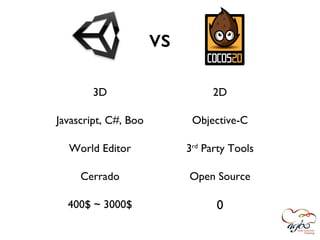
vs
       3D                       2D

Javascript, C#, Boo         Objective-C

  World Editor             3rd Party Tools

     Cerrado               Open Source

  400$ ~ 3000$                   0
¿Qué es cocos2d?
Framework para desarrollar juegos 2D, demos y
    otras aplicaciones gráficas/interactivas.

Funciona sobre OpenGL pero no es necesario
     conocer los entresijos de OpenGL.

  Incorpora 2 motores de físicas (Chipmunk y
                  Box2D).

  Incluye la librería de audio CocosDension.
¿Qué no es cocos2d?

 No incluye ningún tipo de editor visual para mundo,
interfaz, escenas, sprites, efectos, fuentes bitmap, etc.


             ¡Pero existen aplicaciones! :)
Algunos Ejemplos
Algunos Ejemplos
¿De dónde viene
   cocos2d?
 2005 PyCon
 2008 “Los cocos” Python
 2008 cocos2d-iphone v0.1
 2012 cocos2d-iphone v2.0
Familia cocos2d
cocos2d 2.x vs 1.x
 Open GL ES 2.0   Open GL ES 1.1
cocos2d 2.x
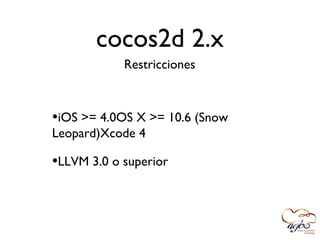
            Restricciones


•iOS >= 4.0OS X >= 10.6 (Snow
Leopard)Xcode 4

•LLVM 3.0 o superior
cocos2d 2.x
                Ventajas

•Mejor rendimiento
•Mejoras en sprites, animaciones,
resoluciones retina, integración con los
motores de físicas...
•Compatible con ARC
•Actual rama en desarrollo
Instalación

• Descargar de
  www.cocosd2-iphone.org/download


• Ejecutar script
  ./install-templates.sh -f
[Demo]
CCNode
CCScene   CCLayer   CCSprite
CCAction
[Demo]
Touch Events
                            HelloWorldLayer *layer = [HelloWorldLayer node];
                            layer.isTouchEnabled = YES;

- (void) ccTouchesBegan:(NSSet *)touches withEvent:(UIEvent *)event
- (void) ccTouchesMoved:(NSSet *)touches withEvent:(UIEvent *)event
- (void) ccTouchesEnded:(NSSet *)touches withEvent:(UIEvent *)event
- (void) ccTouchesCancelled:(NSSet *)touches withEvent:(UIEvent *)event


- (void) ccTouchesEnded:(NSSet *)touches withEvent:(UIEvent *)event
{
    UITouch *touch = [touches anyObject];
    CGPoint touchLocation = [touch locationInView:touch.view];
    CGPoint touchLocationGL = [[CCDirector sharedDirector] convertToGL:touchLocation];
    // do what needed
}
[Demo]
Autorotation iOS 6

           “Autorotation is changing in iOS 6. In iOS 6,
the shouldAutorotateToInterfaceOrientation: method of
  UIViewController is deprecated. In its place, you should use the
    supportedInterfaceOrientationsForWindow: and
                 shouldAutorotate methods.”
Autorotation iOS 6
@interface MyNavigationController : UINavigationController <CCDirectorDelegate>
@end


@implementation MyNavigationController

// Autorotation (iOS < 6.0)
- (BOOL)shouldAutorotateToInterfaceOrientation:(UIInterfaceOrientation)interfaceOrientation
{
    return UIInterfaceOrientationIsLandscape(interfaceOrientation);
}

// Autorotation (iOS >= 6.0)
- (BOOL)shouldAutorotate
{
   return YES;
}

// Autorotation (iOS >= 6.0)
- (NSUInteger)supportedInterfaceOrientations
{
   return UIInterfaceOrientationMaskLandscape;
}

@end
Game Loop

 [self scheduleUpdate];

 - (void) update:(ccTime)delta
 {
 }
Colisiones

                           boundingBox


CGRectIntersectsRect(self.player.boundingBox, self.ball.boundingBox)
[Demo]
¿Y ahora qué?
Transiciones Game Loop         TexturePacker
             Sprite Batching
 Bitmap Fonts     Game Objects Menús
Sprite Sheets ARC con CCSprite
                                       iPhone 5
Multiple Layers        Texture Atlas
Retina Devices
               Scrolling     Sprite Animations
                       Glyph Designer Audio
        Acelerómetro
 iPad                   Máquinas de estado
¿Y ahora qué?
       www.cocos2d-iphone.org/api-ref/2.0.0/
      www.cocos2d-iphone.org/wiki/doku.php/
             Learn cocos2d 2 - Apress
        Learning Cocos2D - Addison-Wesley
github.com/albertogonzalez/cocos2d-iphone-helloworld
  github.com/albertogonzalez/cocos2d-iphone-blocks
              Probar, probar, probar...
AGBO Training
          cursos@agbo.biz
http://agbo.biz/category/tech/cocos2d/

Iniciacion a Cocos2d en @bcndevcon

  • 1.
    Barcelona Developers Conferencewww.bcndevcon.org Taller de Iniciación en Cocos2D Barcelona 08 de Diciembre 2012 www.agbo.biz
  • 2.
    cocos2d-iphone Alberto González @agonzalez_net cursos@agbo.biz
  • 3.
    vs 3D 2D Javascript, C#, Boo Objective-C World Editor 3rd Party Tools Cerrado Open Source 400$ ~ 3000$ 0
  • 4.
    ¿Qué es cocos2d? Frameworkpara desarrollar juegos 2D, demos y otras aplicaciones gráficas/interactivas. Funciona sobre OpenGL pero no es necesario conocer los entresijos de OpenGL. Incorpora 2 motores de físicas (Chipmunk y Box2D). Incluye la librería de audio CocosDension.
  • 5.
    ¿Qué no escocos2d? No incluye ningún tipo de editor visual para mundo, interfaz, escenas, sprites, efectos, fuentes bitmap, etc. ¡Pero existen aplicaciones! :)
  • 6.
  • 7.
  • 8.
    ¿De dónde viene cocos2d? 2005 PyCon 2008 “Los cocos” Python 2008 cocos2d-iphone v0.1 2012 cocos2d-iphone v2.0
  • 9.
  • 10.
    cocos2d 2.x vs1.x Open GL ES 2.0 Open GL ES 1.1
  • 11.
    cocos2d 2.x Restricciones •iOS >= 4.0OS X >= 10.6 (Snow Leopard)Xcode 4 •LLVM 3.0 o superior
  • 12.
    cocos2d 2.x Ventajas •Mejor rendimiento •Mejoras en sprites, animaciones, resoluciones retina, integración con los motores de físicas... •Compatible con ARC •Actual rama en desarrollo
  • 13.
    Instalación • Descargar de www.cocosd2-iphone.org/download • Ejecutar script ./install-templates.sh -f
  • 14.
  • 15.
  • 16.
    CCScene CCLayer CCSprite
  • 17.
  • 18.
  • 19.
    Touch Events HelloWorldLayer *layer = [HelloWorldLayer node]; layer.isTouchEnabled = YES; - (void) ccTouchesBegan:(NSSet *)touches withEvent:(UIEvent *)event - (void) ccTouchesMoved:(NSSet *)touches withEvent:(UIEvent *)event - (void) ccTouchesEnded:(NSSet *)touches withEvent:(UIEvent *)event - (void) ccTouchesCancelled:(NSSet *)touches withEvent:(UIEvent *)event - (void) ccTouchesEnded:(NSSet *)touches withEvent:(UIEvent *)event { UITouch *touch = [touches anyObject]; CGPoint touchLocation = [touch locationInView:touch.view]; CGPoint touchLocationGL = [[CCDirector sharedDirector] convertToGL:touchLocation]; // do what needed }
  • 20.
  • 21.
    Autorotation iOS 6 “Autorotation is changing in iOS 6. In iOS 6, the shouldAutorotateToInterfaceOrientation: method of UIViewController is deprecated. In its place, you should use the supportedInterfaceOrientationsForWindow: and shouldAutorotate methods.”
  • 22.
    Autorotation iOS 6 @interfaceMyNavigationController : UINavigationController <CCDirectorDelegate> @end @implementation MyNavigationController // Autorotation (iOS < 6.0) - (BOOL)shouldAutorotateToInterfaceOrientation:(UIInterfaceOrientation)interfaceOrientation { return UIInterfaceOrientationIsLandscape(interfaceOrientation); } // Autorotation (iOS >= 6.0) - (BOOL)shouldAutorotate { return YES; } // Autorotation (iOS >= 6.0) - (NSUInteger)supportedInterfaceOrientations { return UIInterfaceOrientationMaskLandscape; } @end
  • 23.
    Game Loop [selfscheduleUpdate]; - (void) update:(ccTime)delta { }
  • 24.
    Colisiones boundingBox CGRectIntersectsRect(self.player.boundingBox, self.ball.boundingBox)
  • 25.
  • 26.
    ¿Y ahora qué? TransicionesGame Loop TexturePacker Sprite Batching Bitmap Fonts Game Objects Menús Sprite Sheets ARC con CCSprite iPhone 5 Multiple Layers Texture Atlas Retina Devices Scrolling Sprite Animations Glyph Designer Audio Acelerómetro iPad Máquinas de estado
  • 27.
    ¿Y ahora qué? www.cocos2d-iphone.org/api-ref/2.0.0/ www.cocos2d-iphone.org/wiki/doku.php/ Learn cocos2d 2 - Apress Learning Cocos2D - Addison-Wesley github.com/albertogonzalez/cocos2d-iphone-helloworld github.com/albertogonzalez/cocos2d-iphone-blocks Probar, probar, probar...
  • 28.
    AGBO Training cursos@agbo.biz http://agbo.biz/category/tech/cocos2d/