Apache Solr
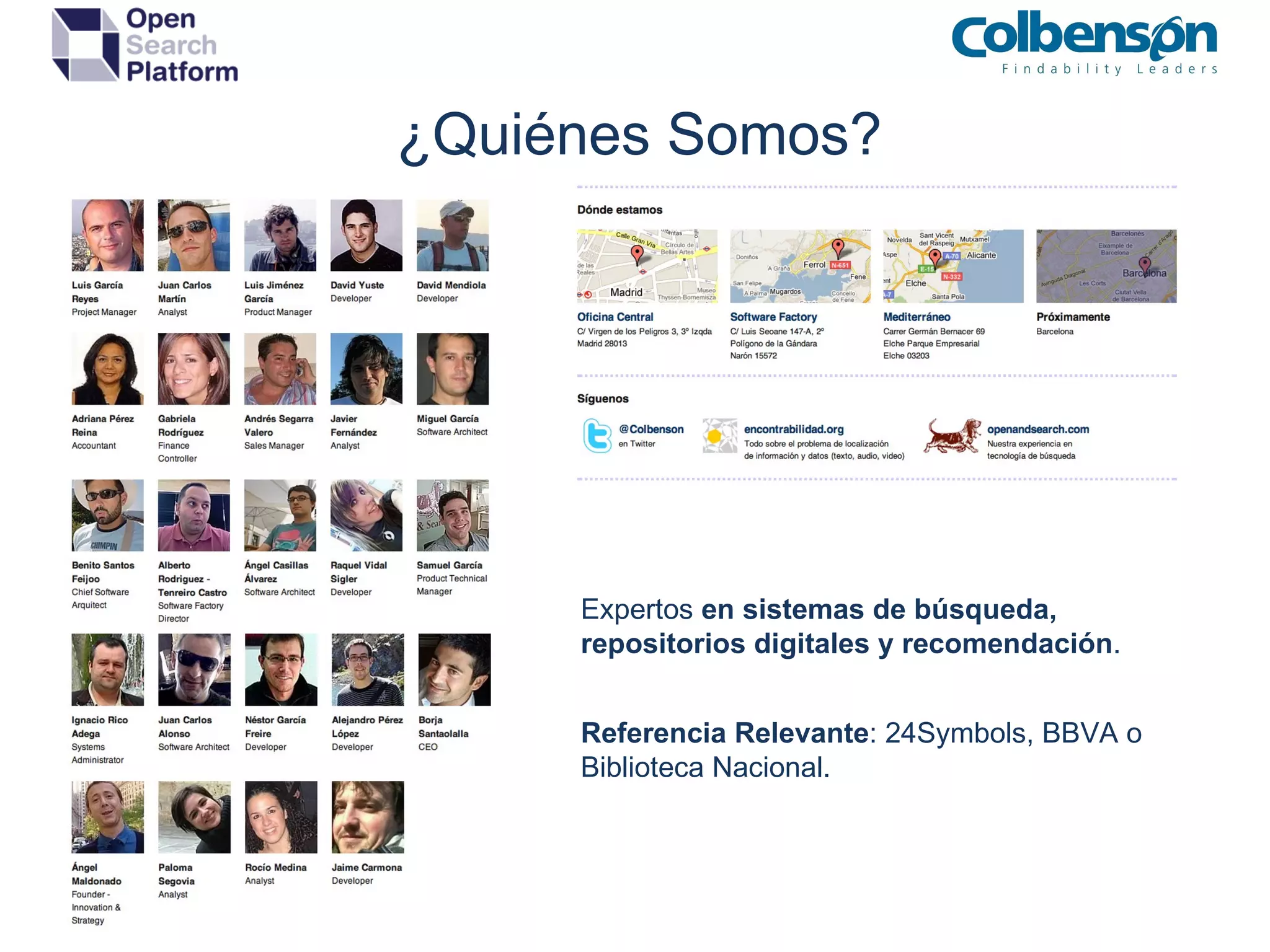
¿Quiénes Somos? Expertos  en sistemas de búsqueda, repositorios digitales y recomendación . Referencia Relevante : 24Symbols, BBVA o Biblioteca Nacional.
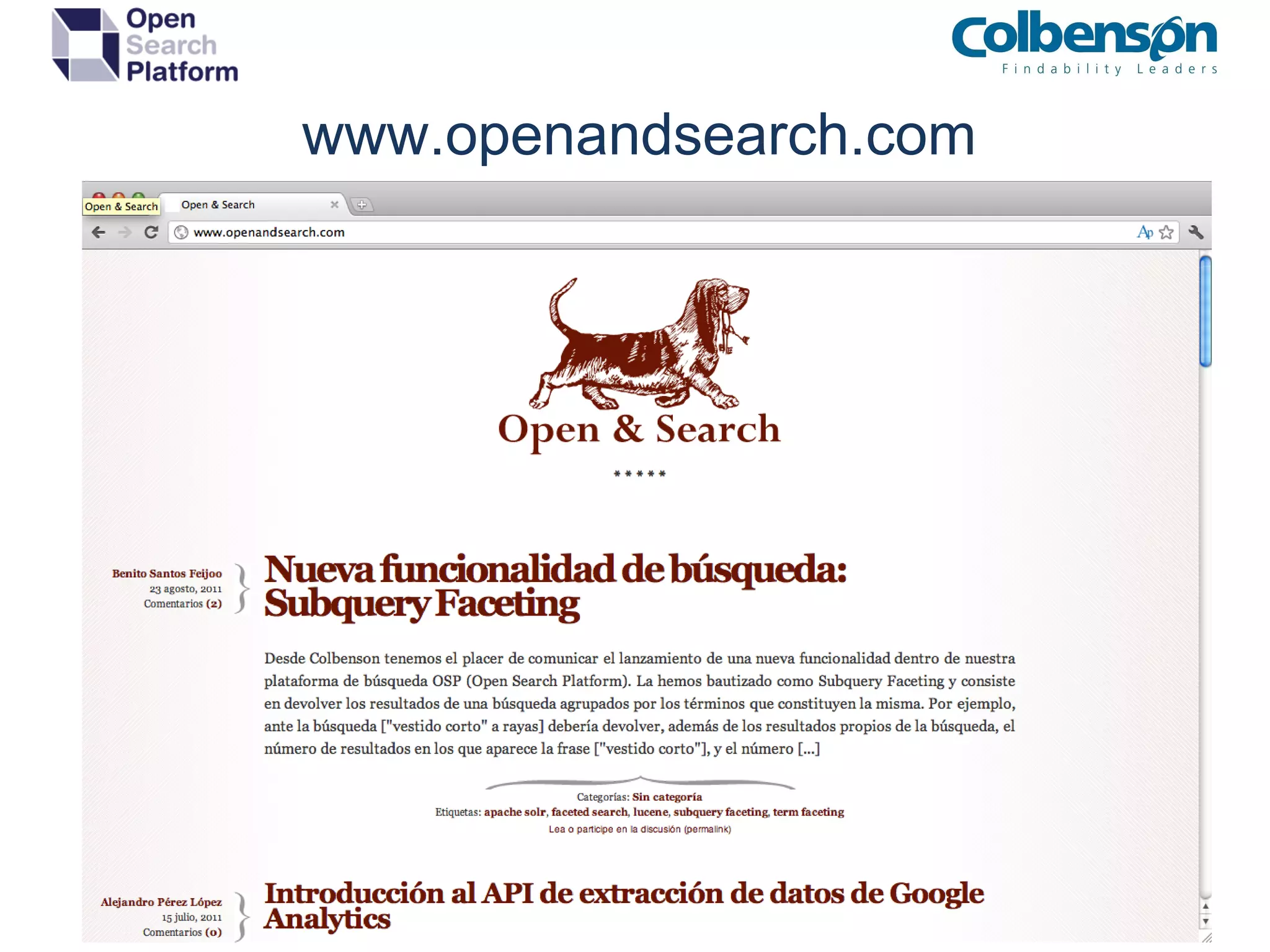
www.openandsearch.com
Índice Conceptos y descripción de Apache Solr Preparando el terreno ¿Cómo lo instalamos? Configurando Apache Solr Con las manos en la masa Modificando el índice Consultando el índice Análisis personalizado Clustering Operaciones y Mantenimiento
¿Qué es Apache Solr? Es un servidor de búsqueda full-text  basado en Apache Solr Utiliza protocolos estándar de comunicación como HTTP y HTTPS Es  altamente escalable Es  totalmente modular  gracias a su sistema de plugins Ofrece una interfaz (simple) de administración web Está construido utilizando la tecnología de  Apache Lucene
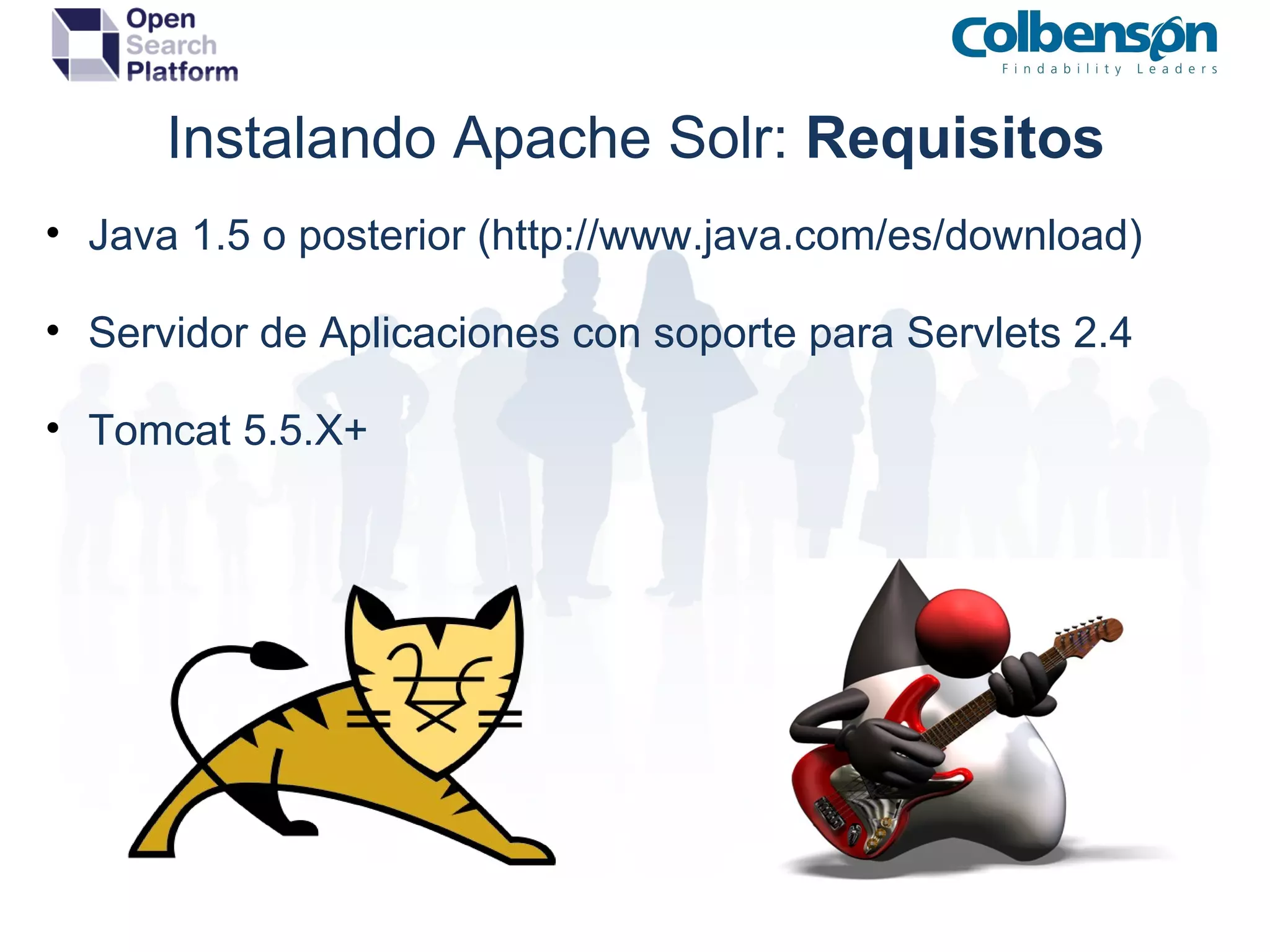
Componentes Principales RequestHandlers : Procesan la consulta solicitada SearchComponents : Añaden datos (de la consulta) a la respuesta ResponseWriters : Transforman a formato de respuesta concreto. SolrCore : conjunto de configuración y documentos UpdateHandler : Lógica de actualización de documentos Cache : Estrategia de  caching.
 
Instalando Apache Solr:  Requisitos Java 1.5 o posterior (http://www.java.com/es/download) Servidor de Aplicaciones con soporte para Servlets 2.4 Tomcat 5.5.X+
Instalando Apache Solr:  Despliegue Despliegue del fichero WAR en contenedor Configuración del SOLR_HOME JNDI Variable de entorno Estructura del directorio SOLR_HOME solrconfig.xml schema.xml solr.xml  ( opcional )
Configurando Apache Solr:  Ficheros solr.xml : configuración de los SolrCores activos schema.xml : Configuración de campos y procesado solrconfig.xml : Configuración de componentes Varios : Ficheros de sinónimos, stopwords, etc.
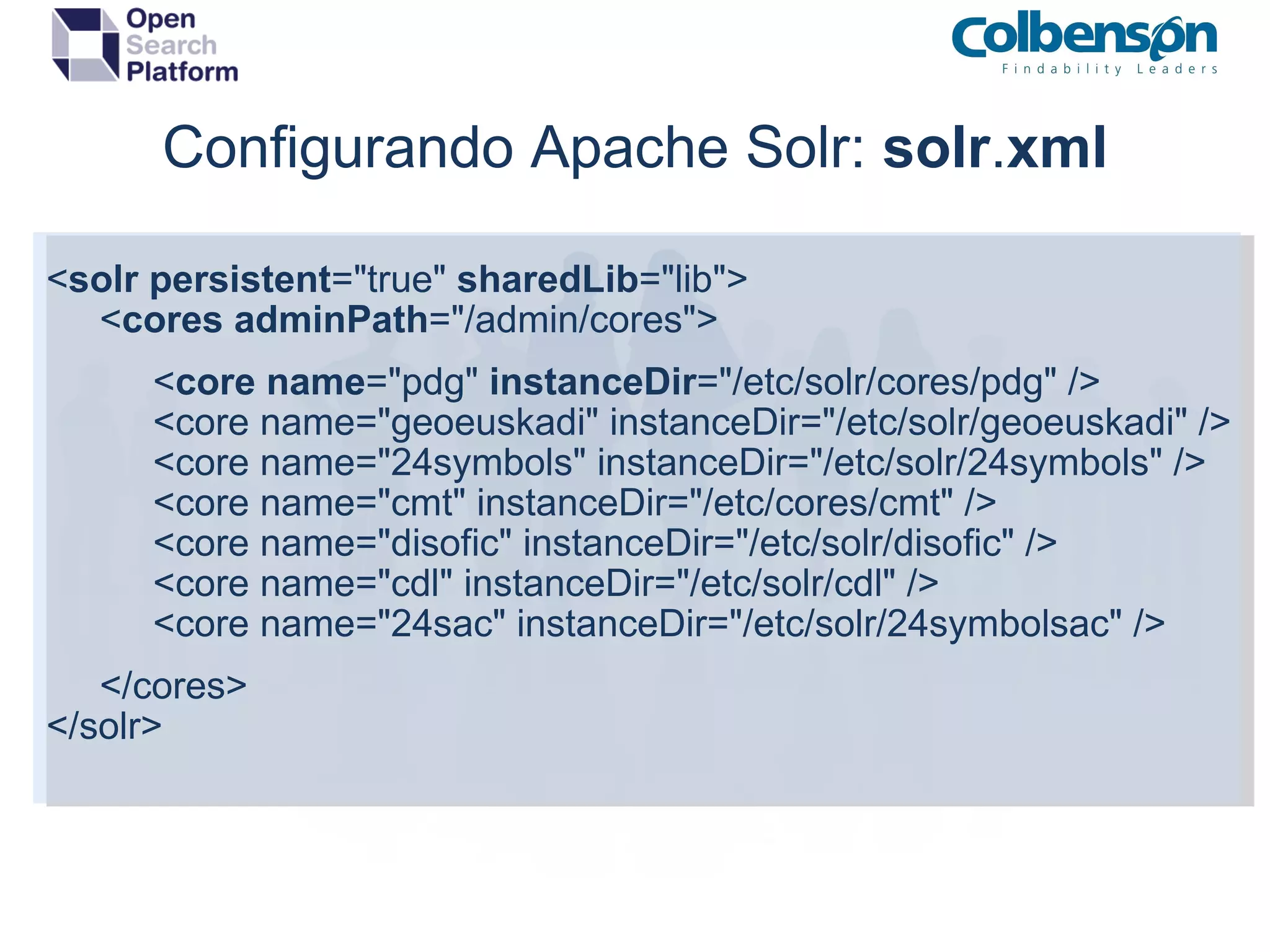
Configurando Apache Solr:  solr . xml < solr   persistent =&quot;true&quot;  sharedLib =&quot;lib&quot;>       < cores   adminPath =&quot;/admin/cores&quot;>            < core   name =&quot;pdg&quot;  instanceDir =&quot;/etc/solr/cores/pdg&quot; />            <core name=&quot;geoeuskadi&quot; instanceDir=&quot;/etc/solr/geoeuskadi&quot; />            <core name=&quot;24symbols&quot; instanceDir=&quot;/etc/solr/24symbols&quot; />            <core name=&quot;cmt&quot; instanceDir=&quot;/etc/cores/cmt&quot; />            <core name=&quot;disofic&quot; instanceDir=&quot;/etc/solr/disofic&quot; />            <core name=&quot;cdl&quot; instanceDir=&quot;/etc/solr/cdl&quot; />            <core name=&quot;24sac&quot; instanceDir=&quot;/etc/solr/24symbolsac&quot; />       </cores> </solr>
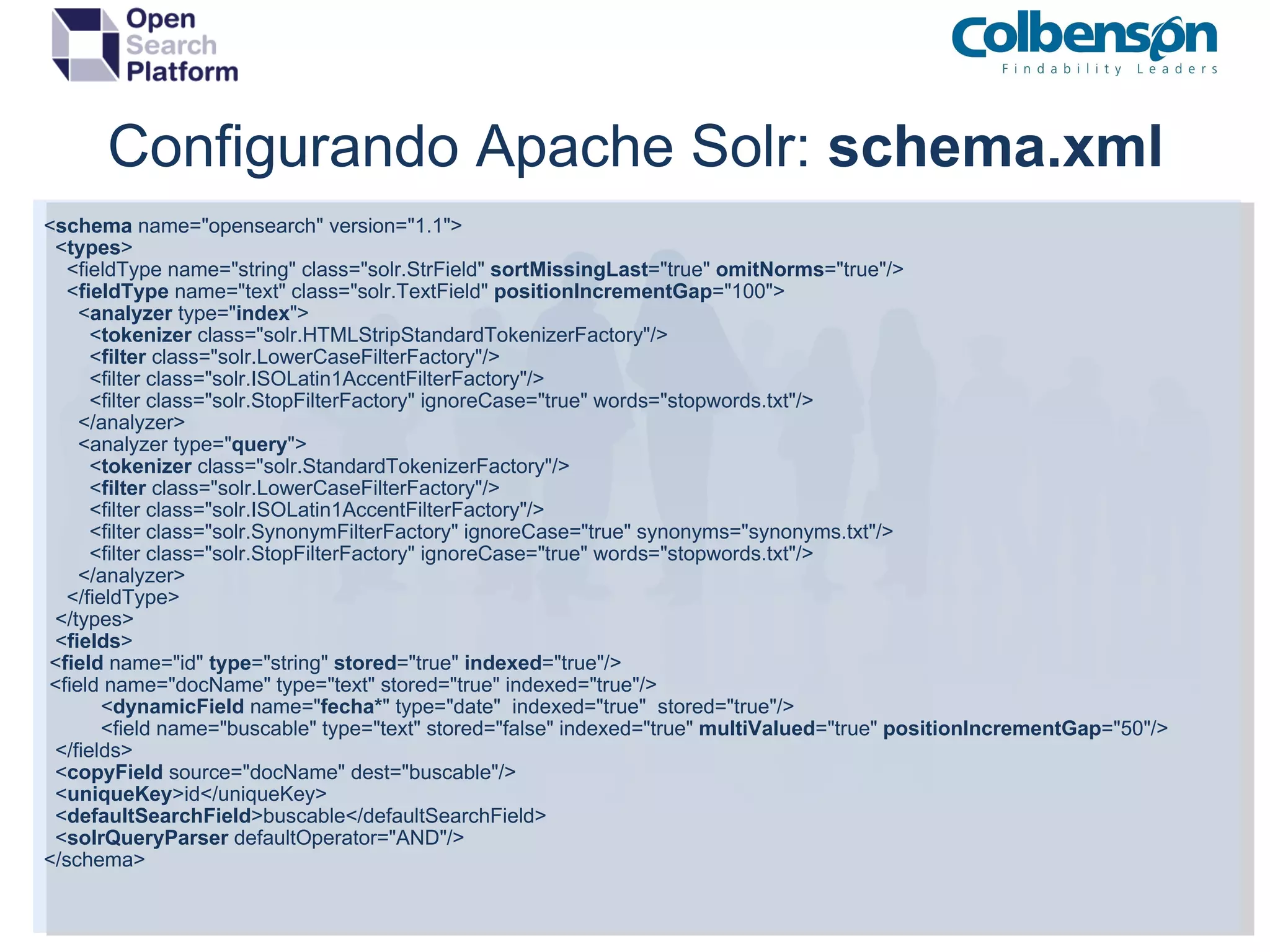
Configurando Apache Solr:  schema.xml < schema  name=&quot;opensearch&quot; version=&quot;1.1&quot;>    < types >      <fieldType name=&quot;string&quot; class=&quot;solr.StrField&quot;  sortMissingLast =&quot;true&quot;  omitNorms =&quot;true&quot;/>      < fieldType  name=&quot;text&quot; class=&quot;solr.TextField&quot;  positionIncrementGap =&quot;100&quot;>        < analyzer  type=&quot; index &quot;>          < tokenizer  class=&quot;solr.HTMLStripStandardTokenizerFactory&quot;/>             < filter  class=&quot;solr.LowerCaseFilterFactory&quot;/>          <filter class=&quot;solr.ISOLatin1AccentFilterFactory&quot;/>          <filter class=&quot;solr.StopFilterFactory&quot; ignoreCase=&quot;true&quot; words=&quot;stopwords.txt&quot;/>        </analyzer>        <analyzer type=&quot; query &quot;>          < tokenizer  class=&quot;solr.StandardTokenizerFactory&quot;/>          < filter  class=&quot;solr.LowerCaseFilterFactory&quot;/>          <filter class=&quot;solr.ISOLatin1AccentFilterFactory&quot;/>          <filter class=&quot;solr.SynonymFilterFactory&quot; ignoreCase=&quot;true&quot; synonyms=&quot;synonyms.txt&quot;/>          <filter class=&quot;solr.StopFilterFactory&quot; ignoreCase=&quot;true&quot; words=&quot;stopwords.txt&quot;/>        </analyzer>      </fieldType>    </types>    < fields >   < field  name=&quot;id&quot;  type =&quot;string&quot;  stored =&quot;true&quot;  indexed =&quot;true&quot;/>   <field name=&quot;docName&quot; type=&quot;text&quot; stored=&quot;true&quot; indexed=&quot;true&quot;/>               < dynamicField  name=&quot; fecha* &quot; type=&quot;date&quot;  indexed=&quot;true&quot;  stored=&quot;true&quot;/>                <field name=&quot;buscable&quot; type=&quot;text&quot; stored=&quot;false&quot; indexed=&quot;true&quot;  multiValued =&quot;true&quot;  positionIncrementGap =&quot;50&quot;/>    </fields>    < copyField  source=&quot;docName&quot; dest=&quot;buscable&quot;/>    < uniqueKey >id</uniqueKey>    < defaultSearchField >buscable</defaultSearchField>    < solrQueryParser  defaultOperator=&quot;AND&quot;/> </schema>
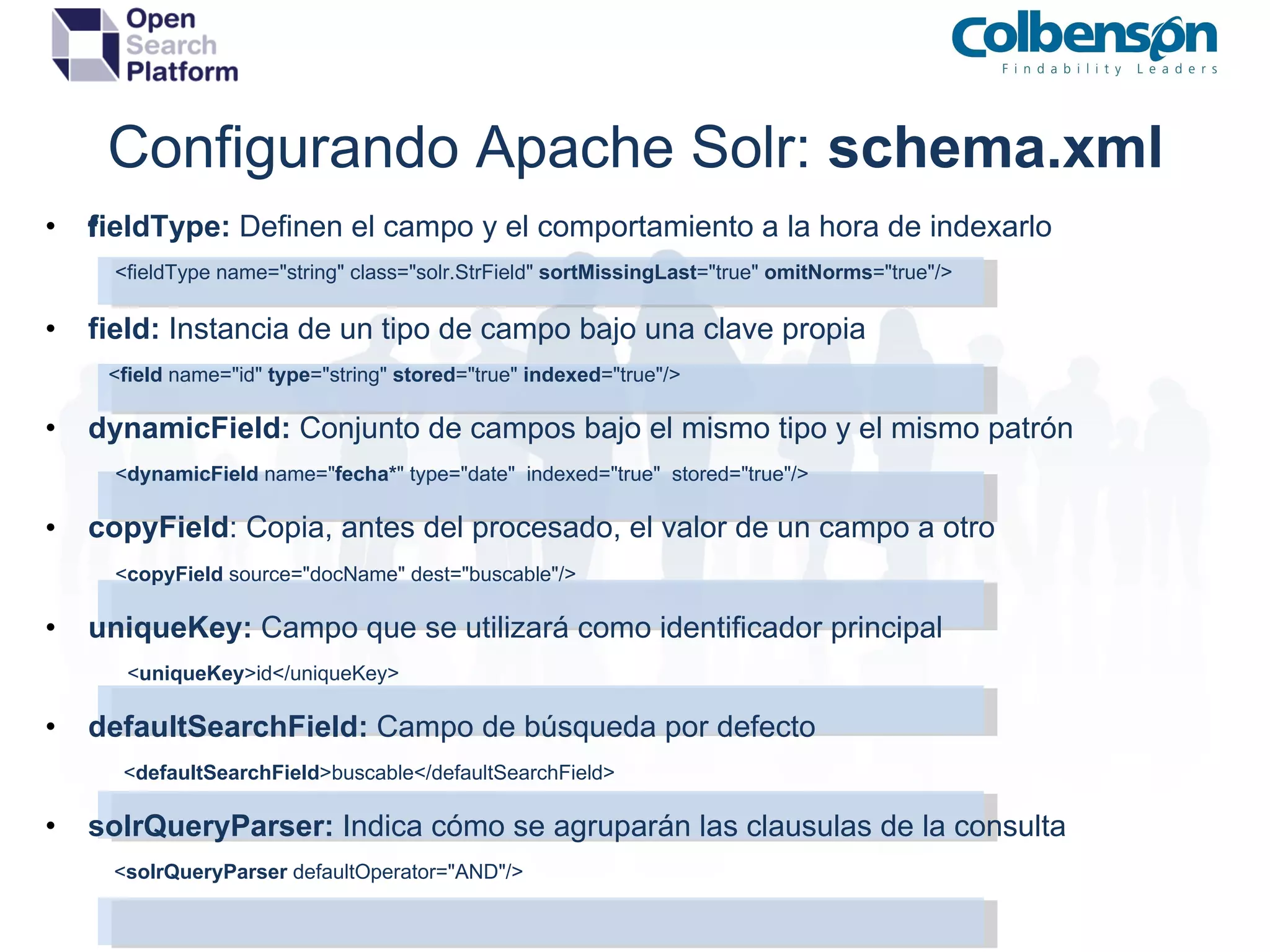
Configurando Apache Solr:  schema.xml field  Type:  Definen el campo y el comportamiento a la hora de indexarlo         <fieldType name=&quot;string&quot; class=&quot;solr.StrField&quot;  sortMissingLast =&quot;true&quot;  omitNorms =&quot;true&quot;/> field:  Instancia de un tipo de campo bajo una clave propia            < field  name=&quot;id&quot;  type =&quot;string&quot;  stored =&quot;true&quot;  indexed =&quot;true&quot;/> dynamicField:  Conjunto de campos bajo el mismo tipo y el mismo patrón                   < dynamicField  name=&quot; fecha* &quot; type=&quot;date&quot;  indexed=&quot;true&quot;  stored=&quot;true&quot;/>   copyField  :   Copia, antes del procesado, el valor de un campo a otro                  < copyField  source=&quot;docName&quot; dest=&quot;buscable&quot;/> uniqueKey:  Campo que se utilizará como identificador principal                  < uniqueKey >id</uniqueKey> defaultSearchField:  Campo de búsqueda por defecto                  < defaultSearchField >buscable</defaultSearchField> solrQueryParser:  Indica cómo se agruparán las clausulas de la consulta                 < solrQueryParser  defaultOperator=&quot;AND&quot;/>
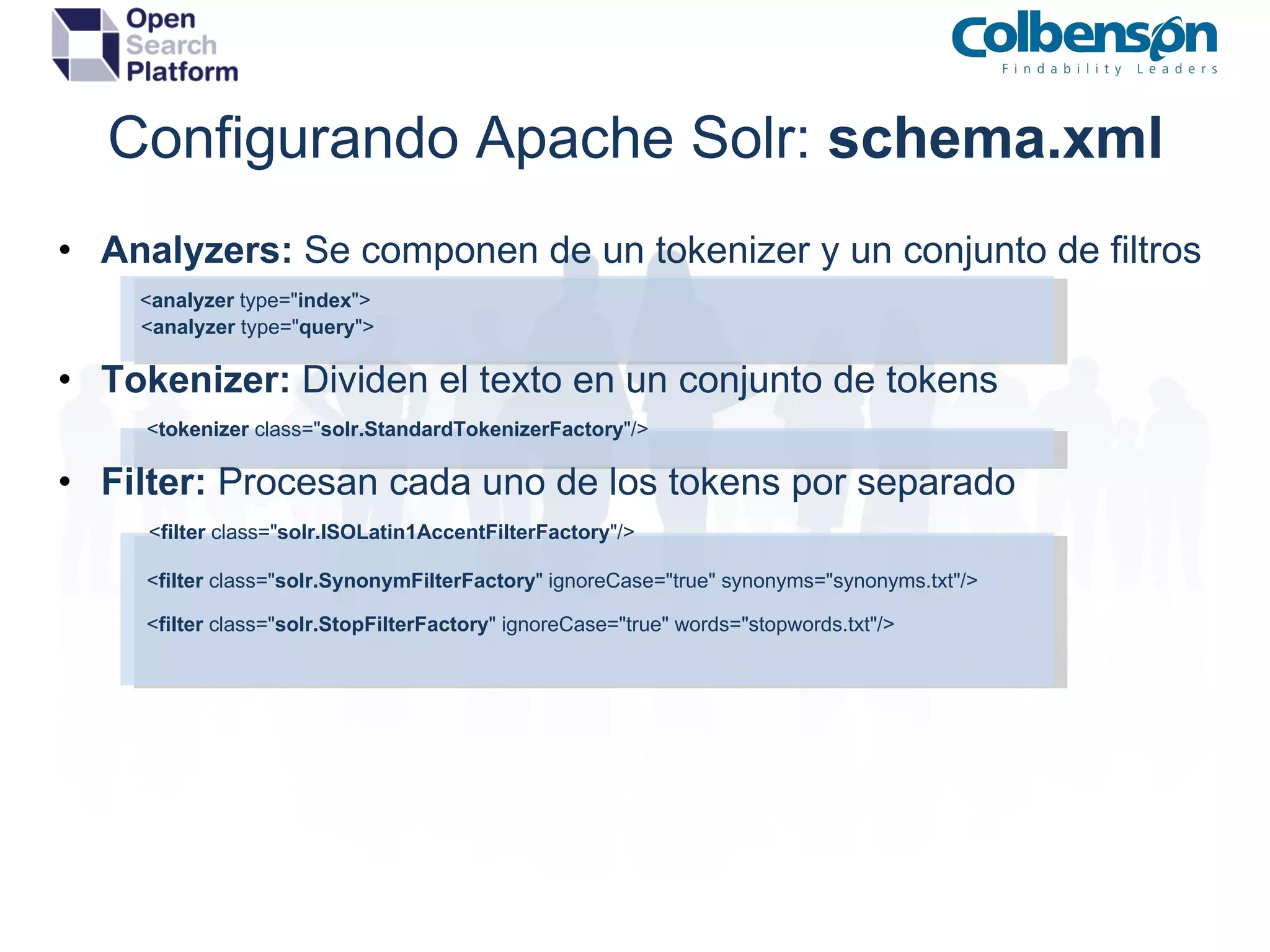
Configurando Apache Solr:  schema.xml Analyzers:  Se componen de un tokenizer y un conjunto de filtros          < analyzer  type=&quot; index &quot;>                   < analyzer  type=&quot; query &quot;> Tokenizer:  Dividen el texto en un conjunto de tokens                    < tokenizer  class=&quot; solr.StandardTokenizerFactory &quot;/> Filter:  Procesan cada uno de los tokens por separado                   < filter  class=&quot; solr.ISOLatin1AccentFilterFactory &quot;/>                    < filter  class=&quot; solr.SynonymFilterFactory &quot; ignoreCase=&quot;true&quot; synonyms=&quot;synonyms.txt&quot;/>                    < filter  class=&quot; solr.StopFilterFactory &quot; ignoreCase=&quot;true&quot; words=&quot;stopwords.txt&quot;/>
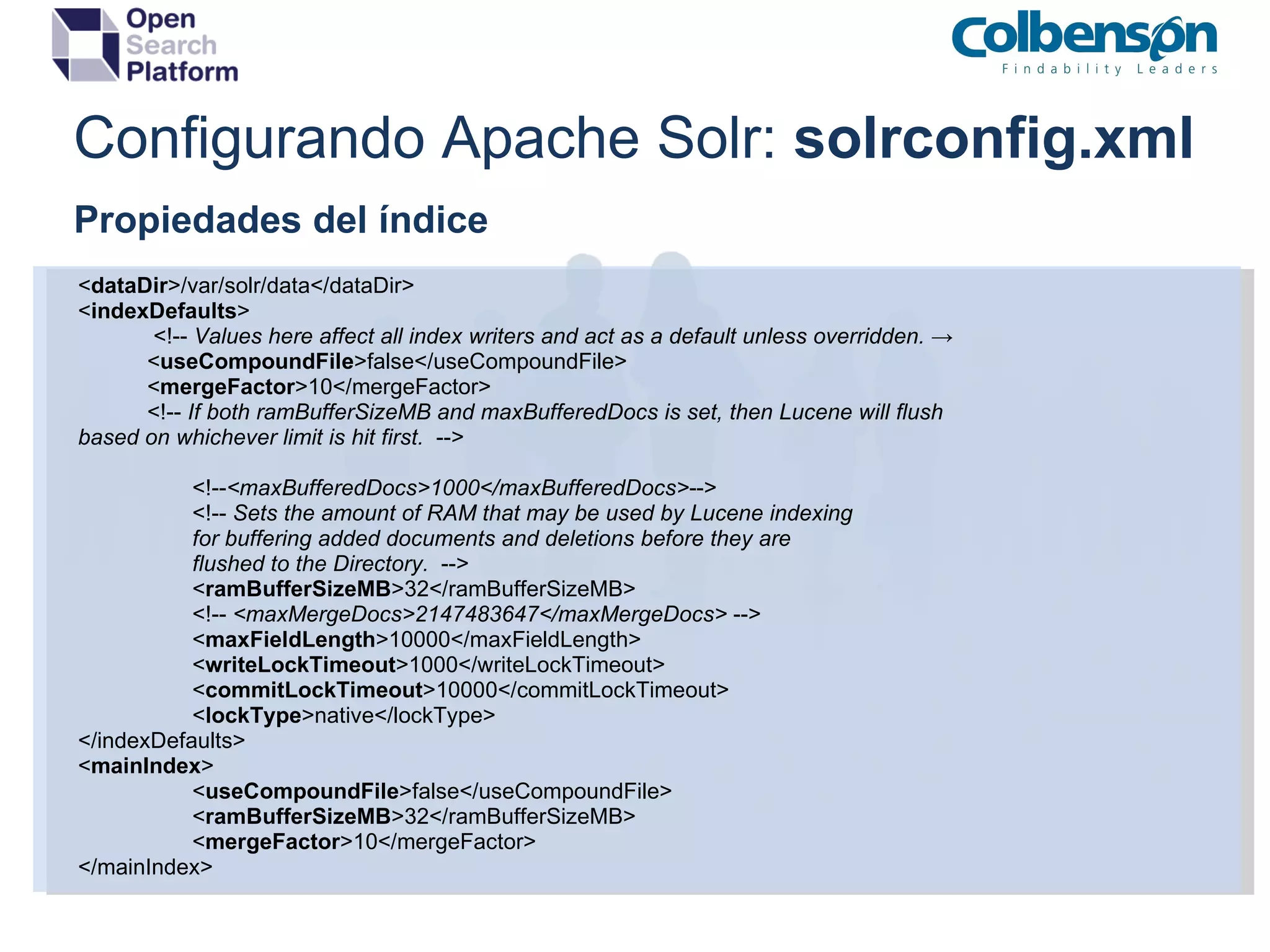
Configurando Apache Solr:  solrconfig.xml Propiedades del índice < dataDir >/var/solr/data</dataDir> < indexDefaults >              <!--  Values here affect all index writers and act as a default unless overridden.  ->             < useCompoundFile >false</useCompoundFile>             < mergeFactor >10</mergeFactor>             <!--  If both ramBufferSizeMB and maxBufferedDocs is set, then Lucene will flush based on whichever limit is hit first.   --> <!-- <maxBufferedDocs>1000</maxBufferedDocs> --> <!--  Sets the amount of RAM that may be used by Lucene indexing for buffering added documents and deletions before they are flushed to the Directory.   --> < ramBufferSizeMB >32</ramBufferSizeMB> <!--  <maxMergeDocs>2147483647</maxMergeDocs>  --> < maxFieldLength >10000</maxFieldLength> < writeLockTimeout >1000</writeLockTimeout> < commitLockTimeout >10000</commitLockTimeout> < lockType >native</lockType> </indexDefaults> < mainIndex > < useCompoundFile >false</useCompoundFile> < ramBufferSizeMB >32</ramBufferSizeMB>   < mergeFactor >10</mergeFactor> </mainIndex>
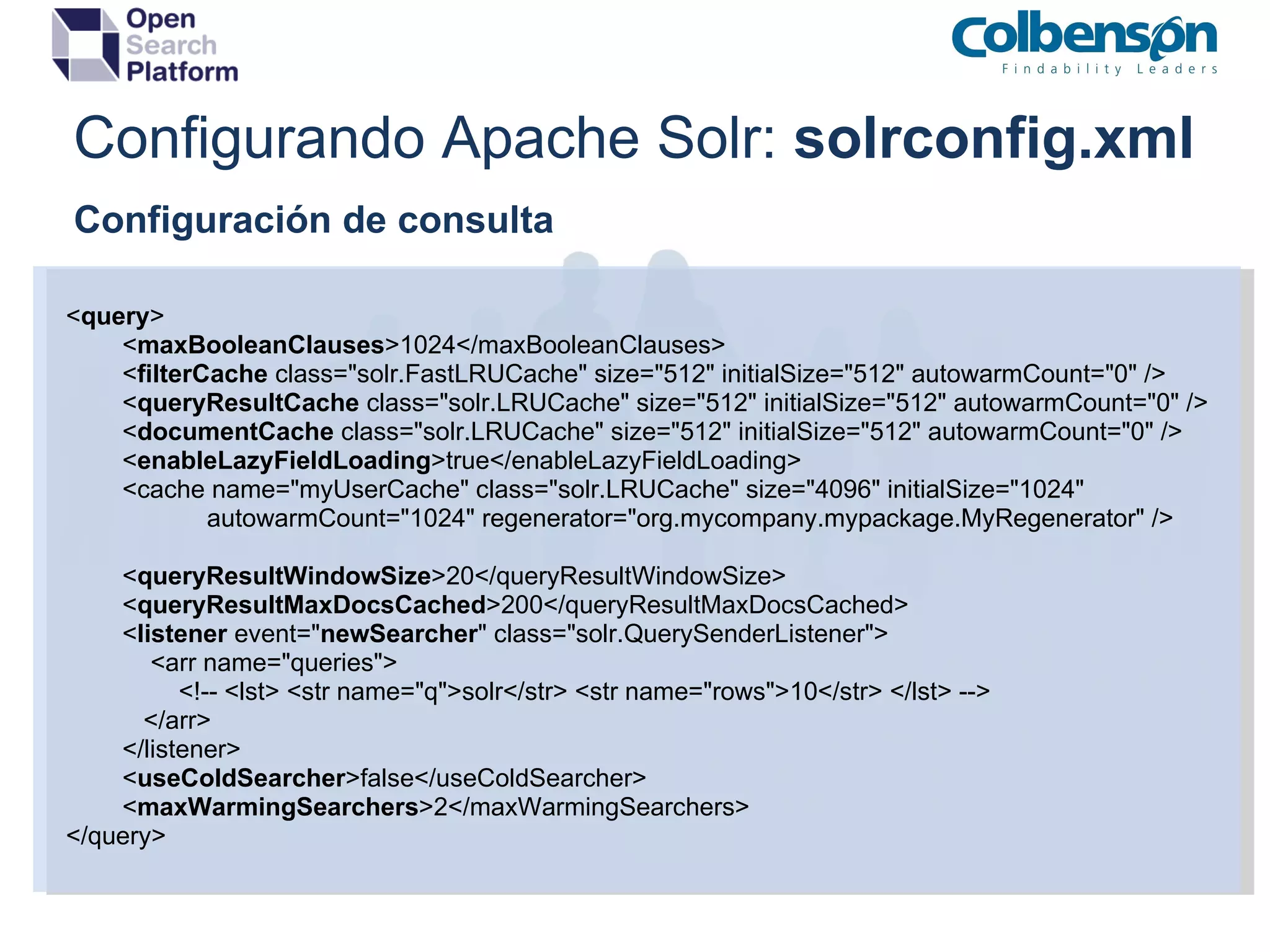
Configurando Apache Solr:  solrconfig.xml    Configuración de consulta < query >          < maxBooleanClauses >1024</maxBooleanClauses>          < filterCache  class=&quot;solr.FastLRUCache&quot; size=&quot;512&quot; initialSize=&quot;512&quot; autowarmCount=&quot;0&quot; />          < queryResultCache  class=&quot;solr.LRUCache&quot; size=&quot;512&quot; initialSize=&quot;512&quot; autowarmCount=&quot;0&quot; />          < documentCache  class=&quot;solr.LRUCache&quot; size=&quot;512&quot; initialSize=&quot;512&quot; autowarmCount=&quot;0&quot; />          < enableLazyFieldLoading >true</enableLazyFieldLoading>          <cache name=&quot;myUserCache&quot; class=&quot;solr.LRUCache&quot; size=&quot;4096&quot; initialSize=&quot;1024&quot;                       autowarmCount=&quot;1024&quot; regenerator=&quot;org.mycompany.mypackage.MyRegenerator&quot; />          < queryResultWindowSize >20</queryResultWindowSize>          < queryResultMaxDocsCached >200</queryResultMaxDocsCached>          < listener  event=&quot; newSearcher &quot; class=&quot;solr.QuerySenderListener&quot;>              <arr name=&quot;queries&quot;>                  <!-- <lst> <str name=&quot;q&quot;>solr</str> <str name=&quot;rows&quot;>10</str> </lst> -->             </arr>          </listener>          < useColdSearcher >false</useColdSearcher>          < maxWarmingSearchers >2</maxWarmingSearchers> </query>
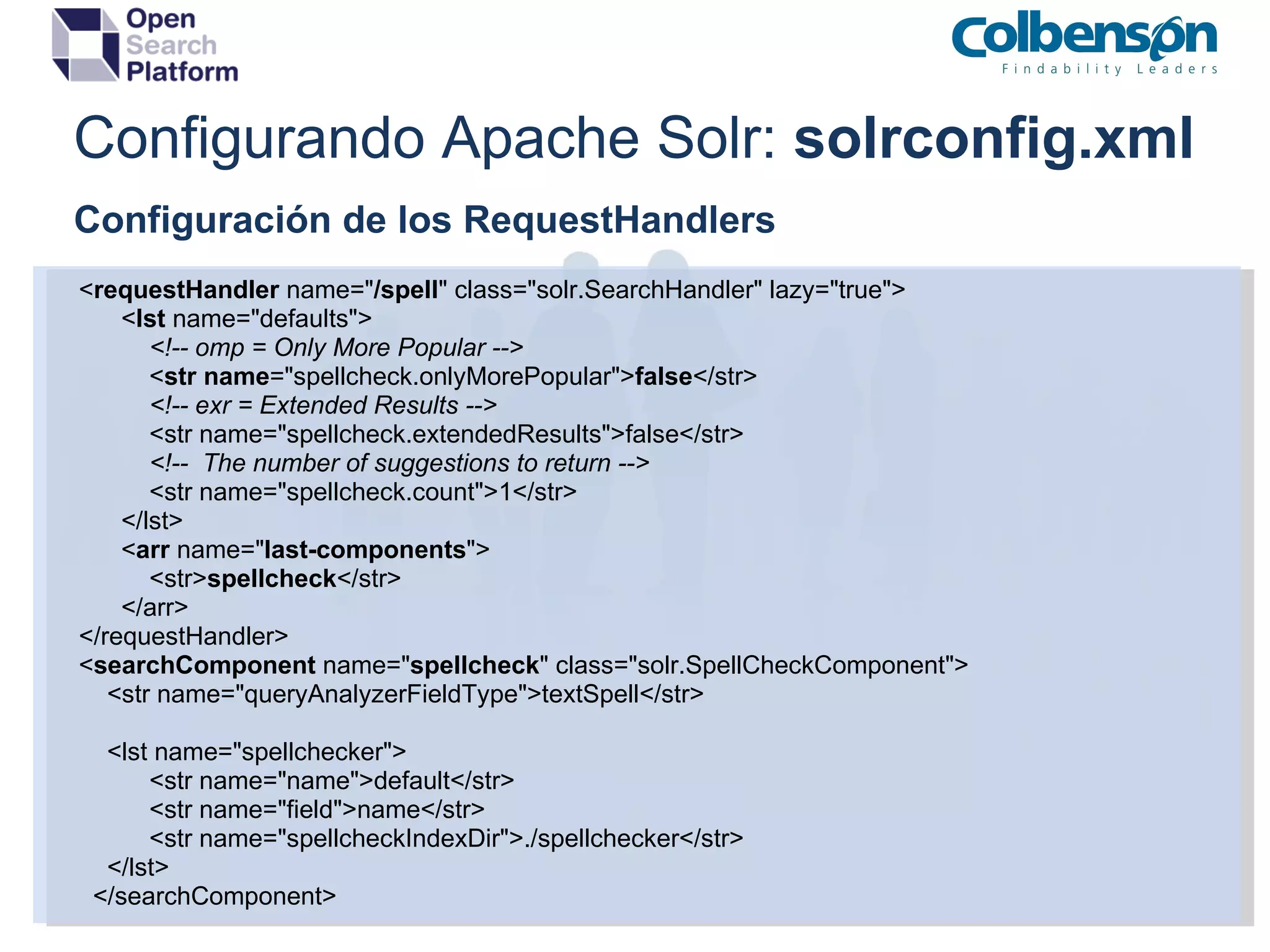
Configurando Apache Solr:  solrconfig.xml Configuración de los RequestHandlers          < requestHandler  name=&quot; /spell &quot; class=&quot;solr.SearchHandler&quot; lazy=&quot;true&quot;>                < lst  name=&quot;defaults&quot;>                     <!-- omp = Only More Popular -->                    < str   name =&quot;spellcheck.onlyMorePopular&quot;> false </str>                     <!-- exr = Extended Results -->                    <str name=&quot;spellcheck.extendedResults&quot;>false</str>                     <!--  The number of suggestions to return -->                    <str name=&quot;spellcheck.count&quot;>1</str>                </lst>                < arr  name=&quot; last-components &quot;>                    <str> spellcheck </str>                </arr>          </requestHandler>          < searchComponent  name=&quot; spellcheck &quot; class=&quot;solr.SpellCheckComponent&quot;>              <str name=&quot;queryAnalyzerFieldType&quot;>textSpell</str>              <lst name=&quot;spellchecker&quot;>                    <str name=&quot;name&quot;>default</str>                    <str name=&quot;field&quot;>name</str>                    <str name=&quot;spellcheckIndexDir&quot;>./spellchecker</str>              </lst>            </searchComponent>
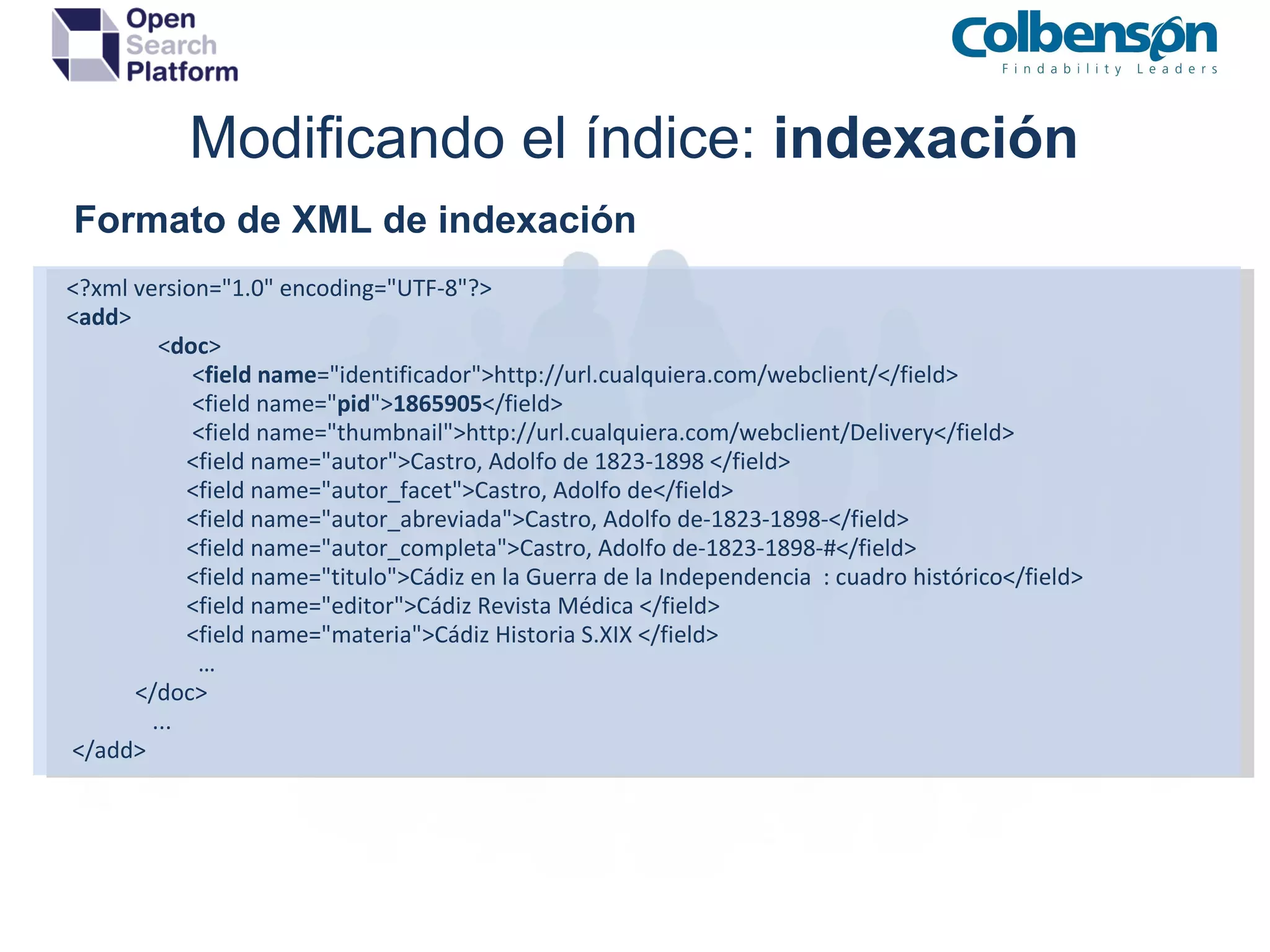
Modificando el índice:  indexación Formatos admitidos XML : Formato de intercambio por defecto Binario : Serialización Java ( SolrJ ) - commons-codec Ficheros   binarios : indexación de ficheros  DOC ,  PDF ,etc utilizando  Solr Cell  ( Apache Tika )   Limitaciones Visibilidad : no son visibles hasta que suceda el commit (automático o manual) Encoding : solo se soporta indexación en UTF-8 Actualización : No existe tal operación. Se añade un documento bajo mismo id.
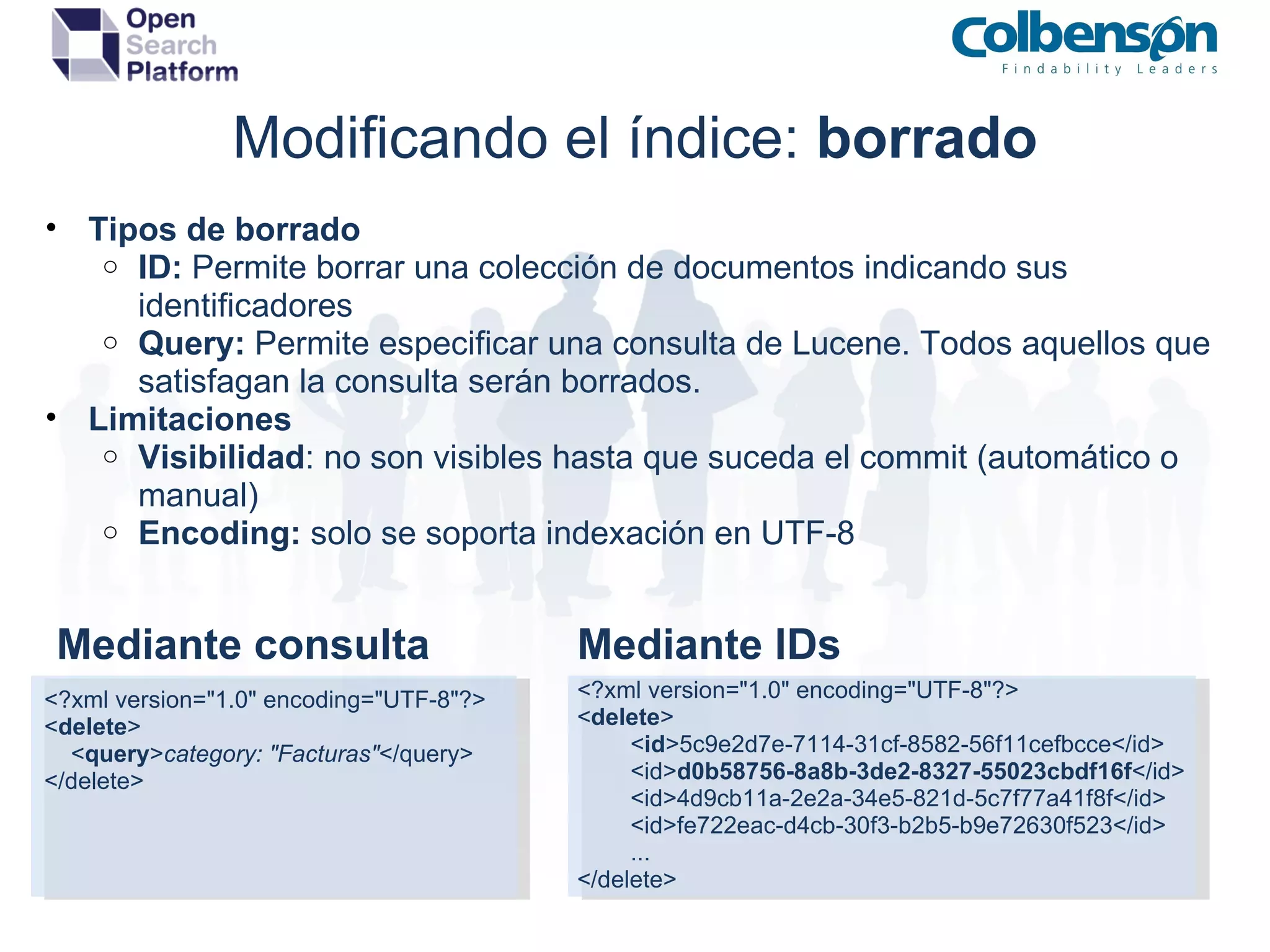
Modificando el índice:  indexación      Formato de XML de indexación   <?xml version=&quot;1.0&quot; encoding=&quot;UTF-8&quot;?>   < add >                   < doc >                         < field   name =&quot;identificador&quot;>http://url.cualquiera.com/webclient/</field>                         <field name=&quot; pid &quot;> 1865905 </field>                         <field name=&quot;thumbnail&quot;>http://url.cualquiera.com/webclient/Delivery</field>                        <field name=&quot;autor&quot;>Castro, Adolfo de 1823-1898 </field>                        <field name=&quot;autor_facet&quot;>Castro, Adolfo de</field>                        <field name=&quot;autor_abreviada&quot;>Castro, Adolfo de-1823-1898-</field>                        <field name=&quot;autor_completa&quot;>Castro, Adolfo de-1823-1898-#</field>                        <field name=&quot;titulo&quot;>Cádiz en la Guerra de la Independencia  : cuadro histórico</field>                        <field name=&quot;editor&quot;>Cádiz Revista Médica </field>                        <field name=&quot;materia&quot;>Cádiz Historia S.XIX </field>                         …               </doc>                  ...    </add>
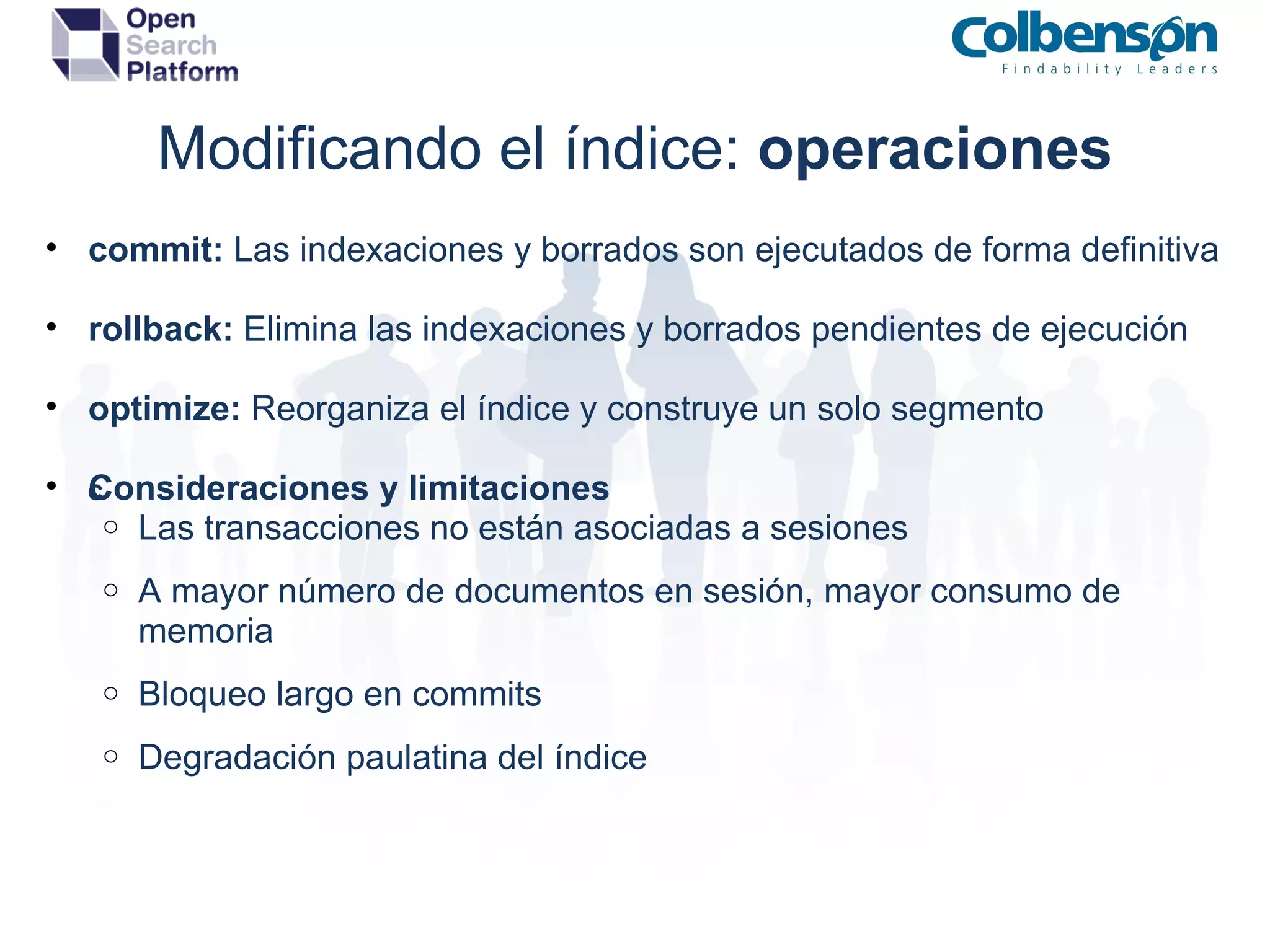
Modificando el índice:  borrado Tipos de borrado ID:  Permite borrar una colección de documentos indicando sus identificadores Query:  Permite especificar una consulta de Lucene. Todos aquellos que satisfagan la consulta serán borrados. Limitaciones Visibilidad : no son visibles hasta que suceda el commit (automático o manual) Encoding:  solo se soporta indexación en UTF-8 <?xml version=&quot;1.0&quot; encoding=&quot;UTF-8&quot;?> < delete >          < id >5c9e2d7e-7114-31cf-8582-56f11cefbcce</id>          <id> d0b58756-8a8b-3de2-8327-55023cbdf16f </id>          <id>4d9cb11a-2e2a-34e5-821d-5c7f77a41f8f</id>          <id>fe722eac-d4cb-30f3-b2b5-b9e72630f523</id>          ... </delete> <?xml version=&quot;1.0&quot; encoding=&quot;UTF-8&quot;?> < delete >     < query > category: &quot;Facturas&quot; </query> </delete> Mediante consulta Mediante IDs
Modificando el índice:  operaciones commit:  Las indexaciones y borrados son ejecutados de forma definitiva rollback:  Elimina las indexaciones y borrados pendientes de ejecución optimize:  Reorganiza el índice y construye un solo segmento Consideraciones y limitaciones  Las transacciones no están asociadas a sesiones A mayor número de documentos en sesión, mayor consumo de memoria Bloqueo largo en commits  Degradación paulatina del índice
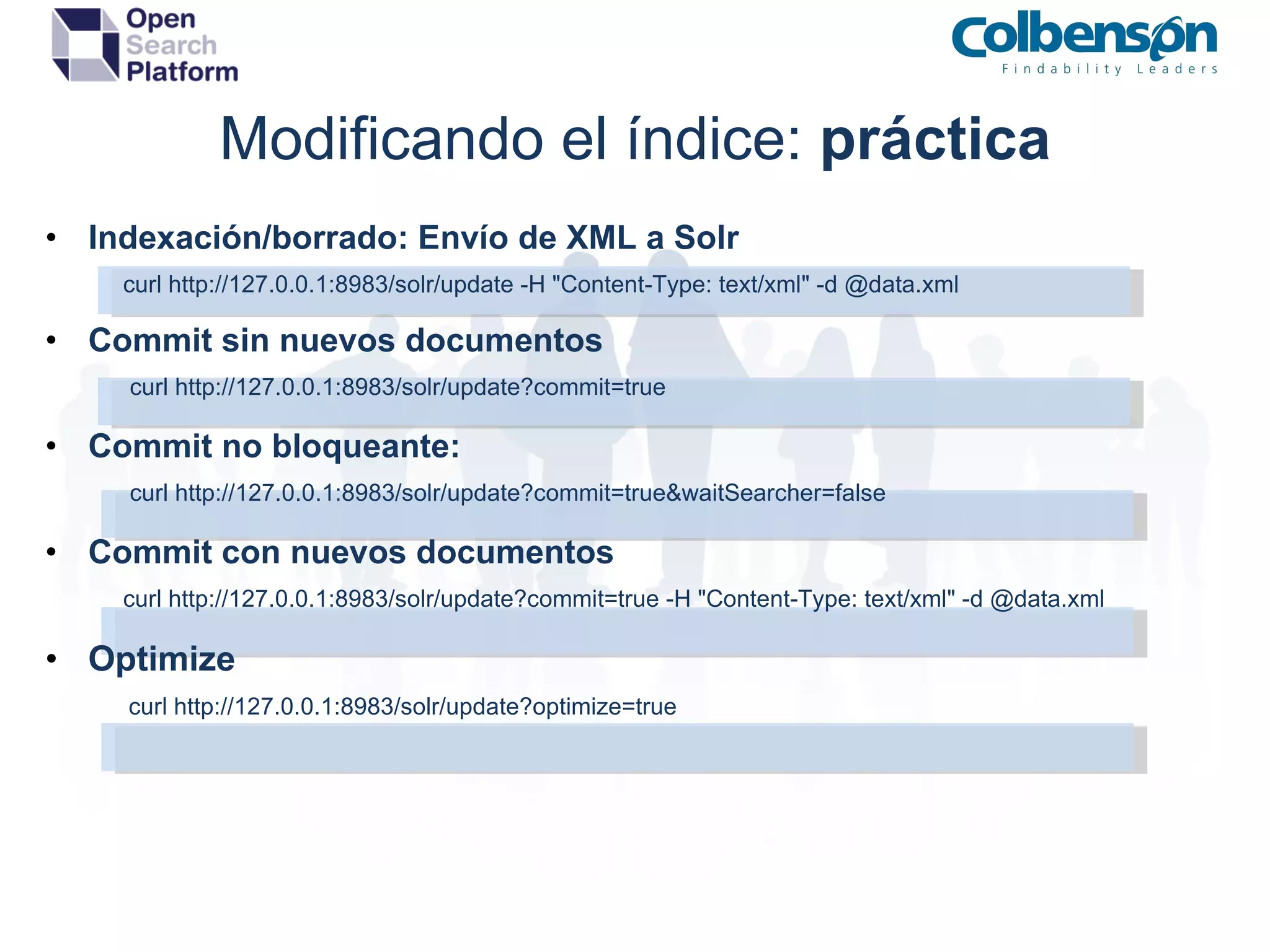
Modificando el índice:  práctica Indexación/borrado: Envío de XML a Solr                 curl http://127.0.0.1:8983/solr/update -H &quot;Content-Type: text/xml&quot; -d @data.xml Commit sin nuevos documentos                 curl   http://127.0.0.1:8983/solr/update?commit=true Commit no bloqueante:                 curl http://127.0.0.1:8983/solr/update?commit=true&waitSearcher=false Commit con nuevos documentos                 curl http://127.0.0.1:8983/solr/update?commit=true -H &quot;Content-Type: text/xml&quot; -d @data.xml Optimize                curl   http://127.0.0.1:8983/solr/update?optimize=true
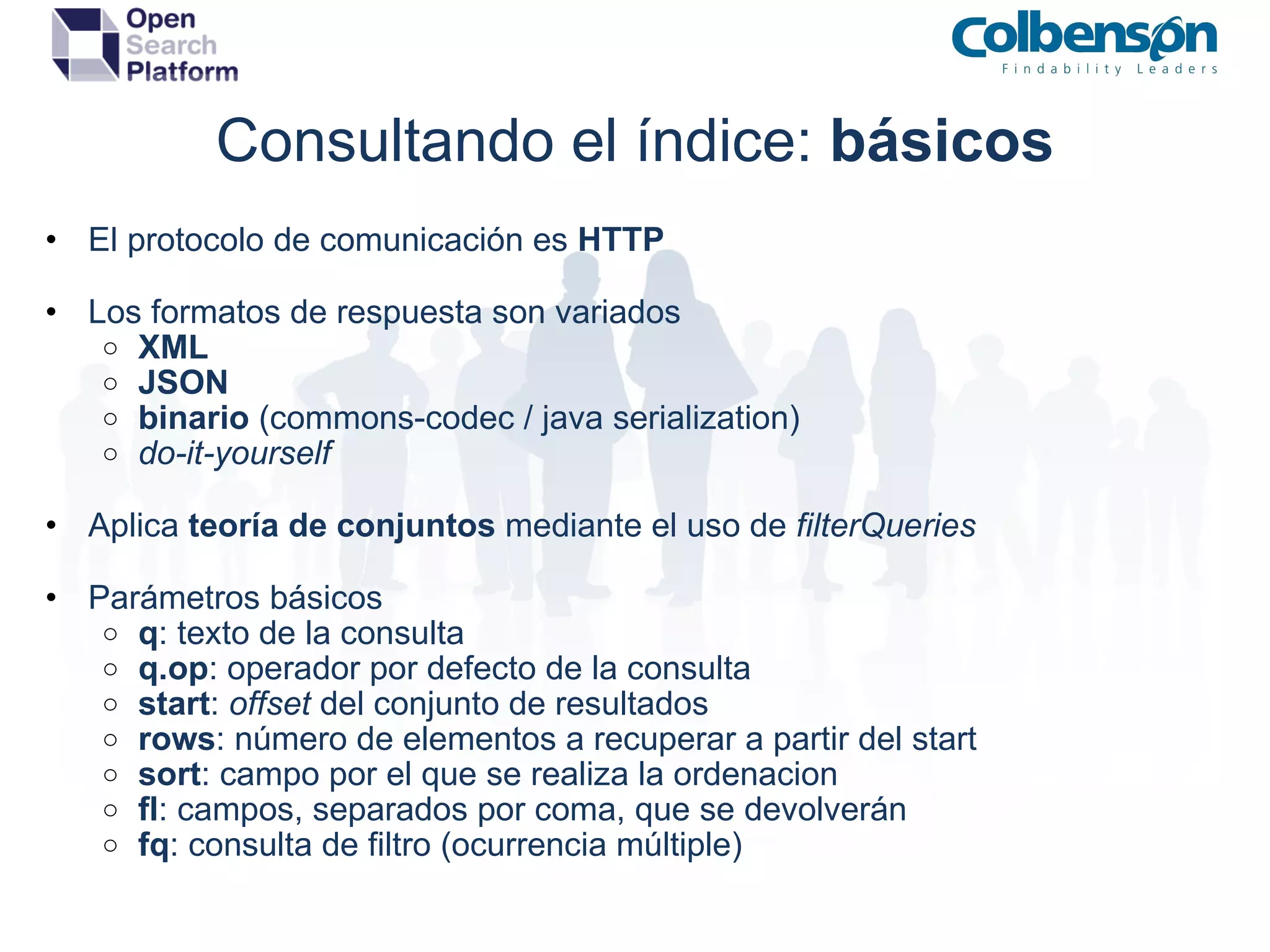
Consultando el índice:  básicos El protocolo de comunicación es  HTTP Los formatos de respuesta son variados XML  JSON binario  (commons-codec / java serialization) do-it-yourself Aplica  teoría de conjuntos  mediante el uso de  filterQueries Parámetros básicos q : texto de la consulta q.op : operador por defecto de la consulta start :  offset  del conjunto de resultados rows : número de elementos a recuperar a partir del start sort : campo por el que se realiza la ordenacion fl : campos, separados por coma, que se devolverán fq : consulta de filtro (ocurrencia múltiple)
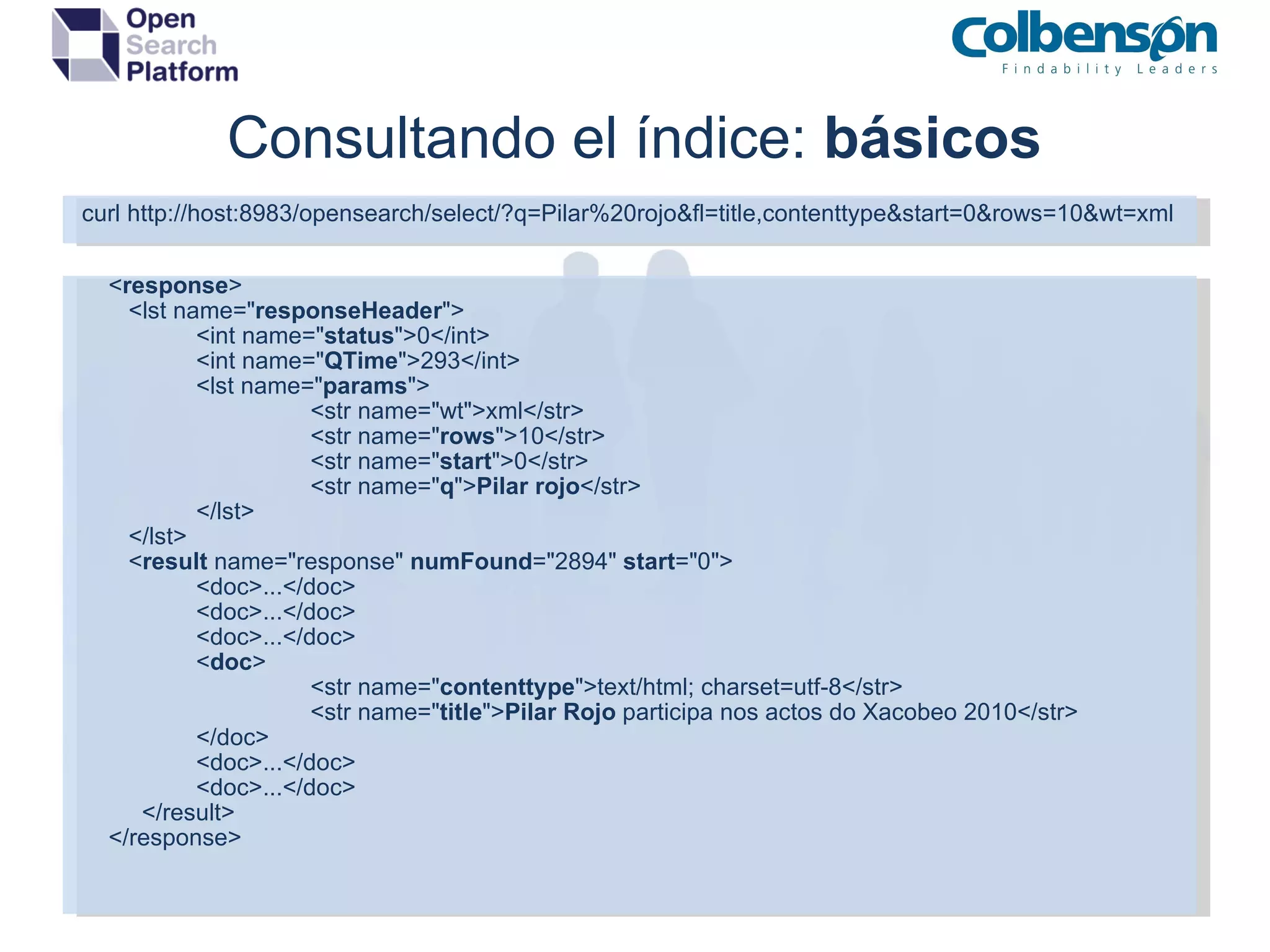
Consultando el índice:  básicos curl http://host:8983/opensearch/select/?q=Pilar%20rojo&fl=title,contenttype&start=0&rows=10&wt=xml      < response >       <lst name=&quot; responseHeader &quot;> <int name=&quot; status &quot;>0</int> <int name=&quot; QTime &quot;>293</int> <lst name=&quot; params &quot;> <str name=&quot;wt&quot;>xml</str> <str name=&quot; rows &quot;>10</str> <str name=&quot; start &quot;>0</str> <str name=&quot; q &quot;> Pilar rojo </str> </lst> </lst> < result  name=&quot;response&quot;  numFound =&quot;2894&quot;  start =&quot;0&quot;> <doc>...</doc> <doc>...</doc> <doc>...</doc> < doc > <str name=&quot; contenttype &quot;>text/html; charset=utf-8</str> <str name=&quot; title &quot;> Pilar Rojo  participa nos actos do Xacobeo 2010</str> </doc> <doc>...</doc> <doc>...</doc> </result>      </response>
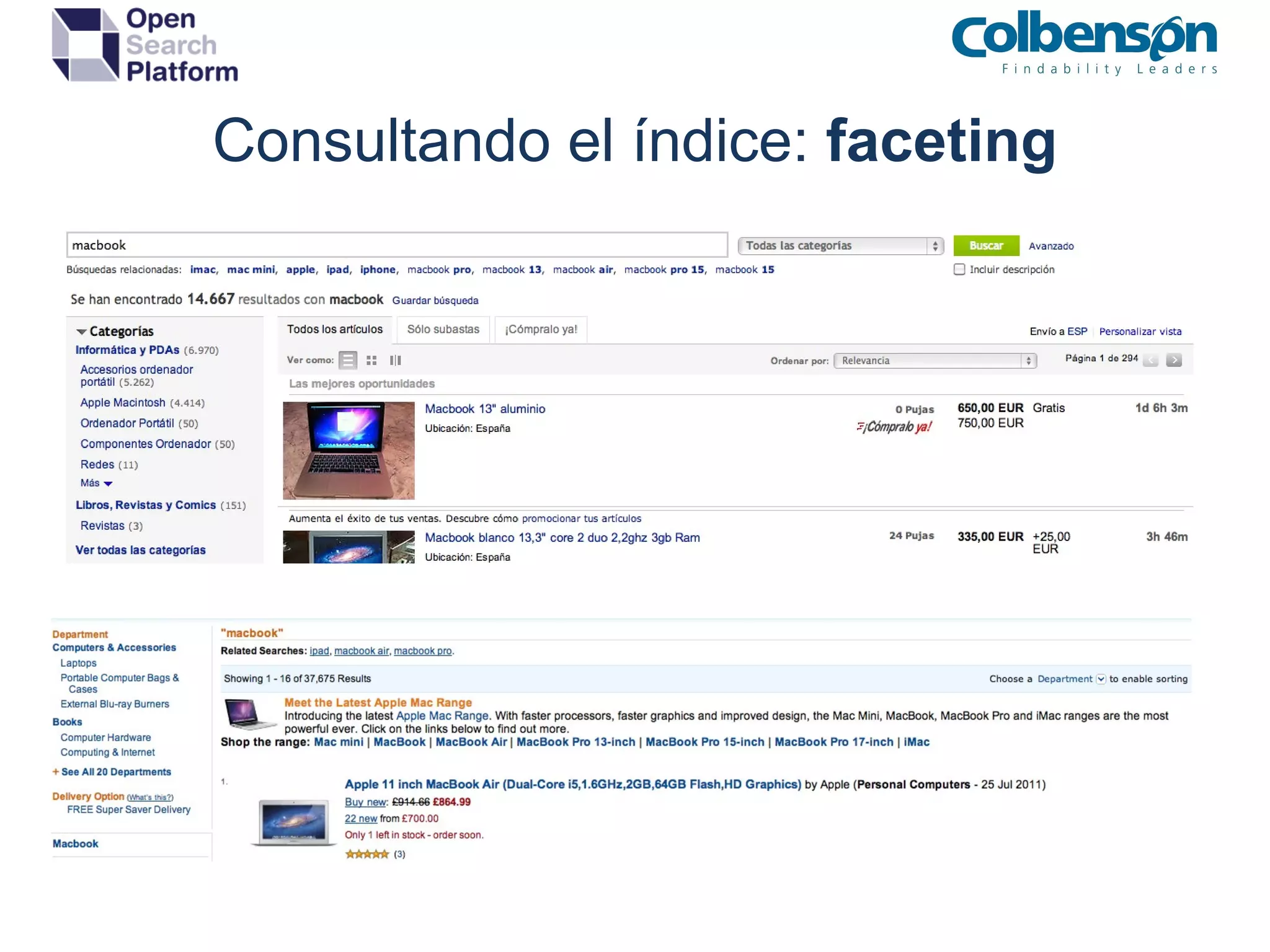
Consultando el índice:  avanzada Selección del RequestHandler qt : http://host:8983/opensearch/select?q=Pilar%20rojo&start=0&rows=10& qt=dismax Path : http://host:8983/opensearch /dismax ?q=Pilar%20rojo&start=0&rows=10 Utilización de sintáxis de consulta avanzada phrase slopping :  “jakarta apache”~10 fuzzy queries :  sony~0.9 wildcarding : c?sa OR casa* range queries : [&quot;&quot; to *] term boosting : apache^3 Utilización de SearchComponents Faceting : Búsqueda paramétrica (folding de Amazon, eBay, etc) Highlight : Resaltado de los términos que concuerdan de la búsqueda Spellcheck : Sugerencias de búsqueda con corrección ortográfica MoreLikeThis : Documentos relacionados a partir de uno que actúa de patrón.
Consultando el índice:  faceting
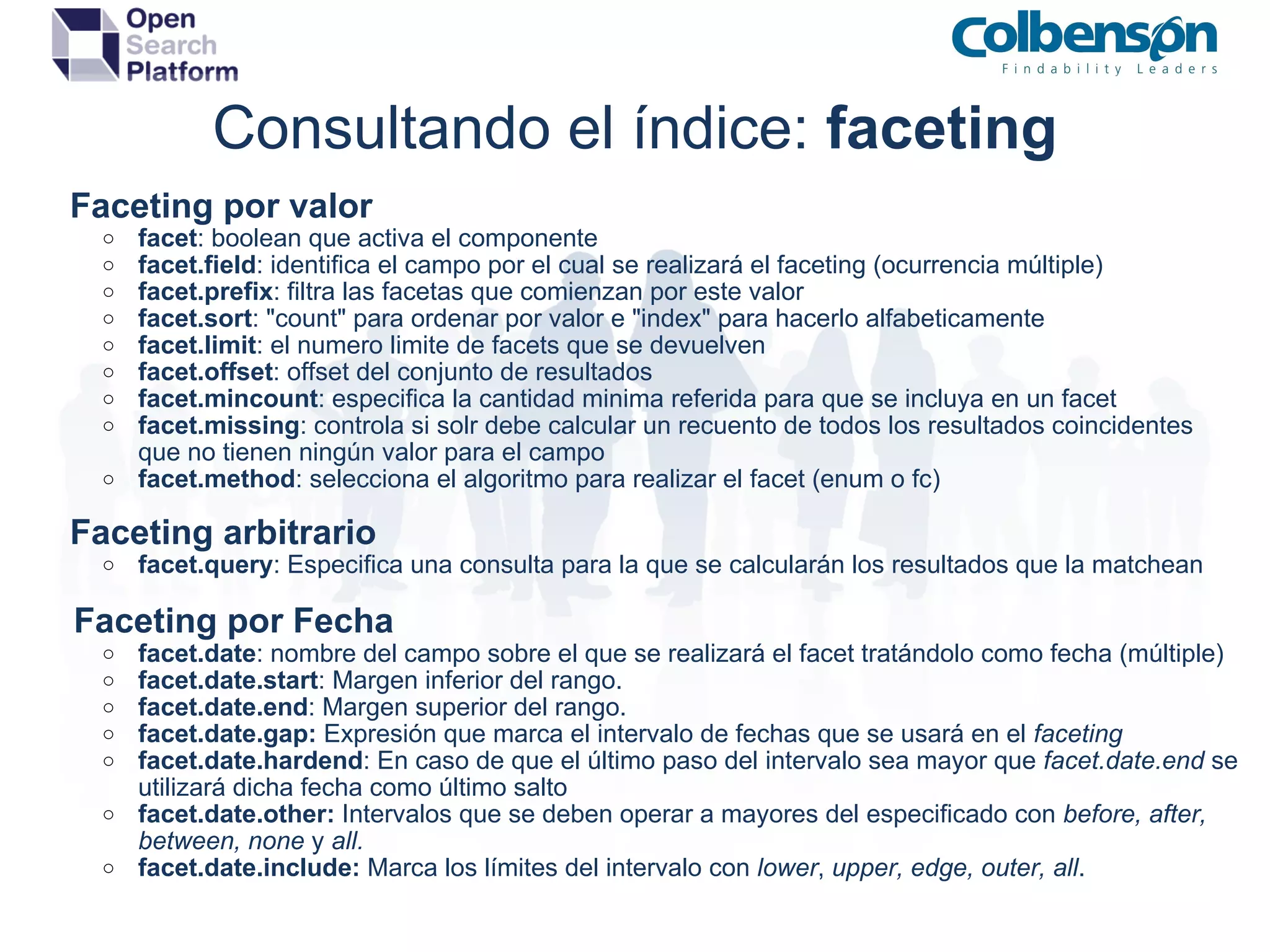
Consultando el índice:  faceting      Faceting por valor facet : boolean que activa el componente facet.field : identifica el campo por el cual se realizará el faceting (ocurrencia múltiple) facet.prefix : filtra las facetas que comienzan por este valor facet.sort : &quot;count&quot; para ordenar por valor e &quot;index&quot; para hacerlo alfabeticamente facet.limit : el numero limite de facets que se devuelven facet.offset : offset del conjunto de resultados facet.mincount : especifica la cantidad minima referida para que se incluya en un facet facet.missing : controla si solr debe calcular un recuento de todos los resultados coincidentes que no tienen ningún valor para el campo facet.method : selecciona el algoritmo para realizar el facet (enum o fc)      Faceting arbitrario facet.query : Especifica una consulta para la que se calcularán los resultados que la matchean      Faceting por Fecha facet.date : nombre del campo sobre el que se realizará el facet tratándolo como fecha (múltiple) facet.date.start : Margen inferior del rango. facet.date.end : Margen superior del rango. facet.date.gap:  Expresión que marca el intervalo de fechas que se usará en el  faceting facet.date.hardend : En caso de que el último paso del intervalo sea mayor que  facet.date.end  se utilizará dicha fecha como último salto facet.date.other:  Intervalos que se deben operar a mayores del especificado con  before, after, between, none  y  all. facet.date.include:  Marca los límites del intervalo con  lower ,  upper, edge, outer, all . 
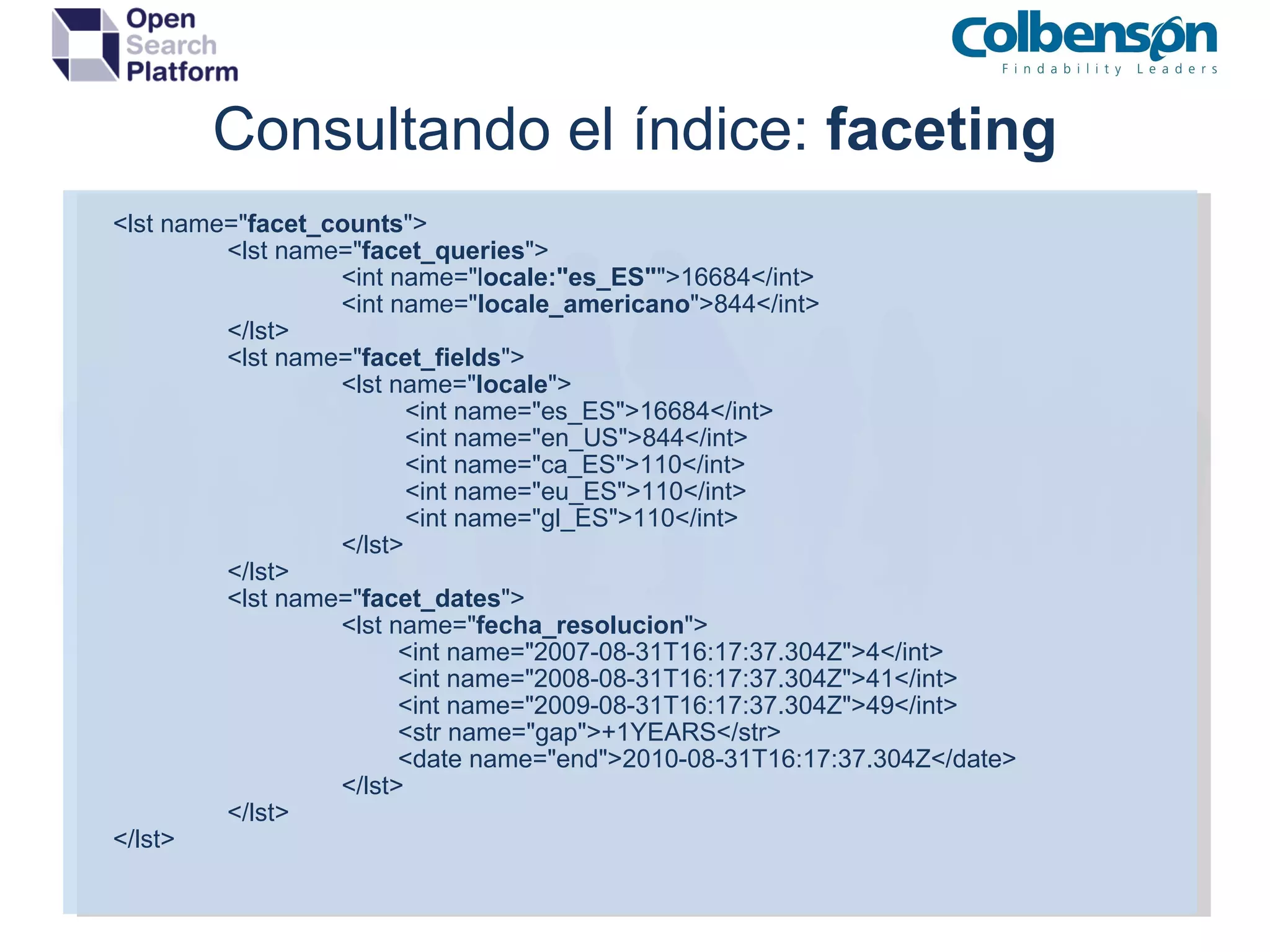
Consultando el índice:  faceting <lst name=&quot; facet_counts &quot;> <lst name=&quot; facet_queries &quot;> <int name=&quot;l ocale:&quot;es_ES&quot; &quot;>16684</int> <int name=&quot; locale_americano &quot;>844</int> </lst> <lst name=&quot; facet_fields &quot;> <lst name=&quot; locale &quot;>           <int name=&quot;es_ES&quot;>16684</int>           <int name=&quot;en_US&quot;>844</int>           <int name=&quot;ca_ES&quot;>110</int>           <int name=&quot;eu_ES&quot;>110</int>           <int name=&quot;gl_ES&quot;>110</int> </lst> </lst> <lst name=&quot; facet_dates &quot;> <lst name=&quot; fecha_resolucion &quot;>          <int name=&quot;2007-08-31T16:17:37.304Z&quot;>4</int>          <int name=&quot;2008-08-31T16:17:37.304Z&quot;>41</int>          <int name=&quot;2009-08-31T16:17:37.304Z&quot;>49</int>          <str name=&quot;gap&quot;>+1YEARS</str>          <date name=&quot;end&quot;>2010-08-31T16:17:37.304Z</date> </lst> </lst> </lst>
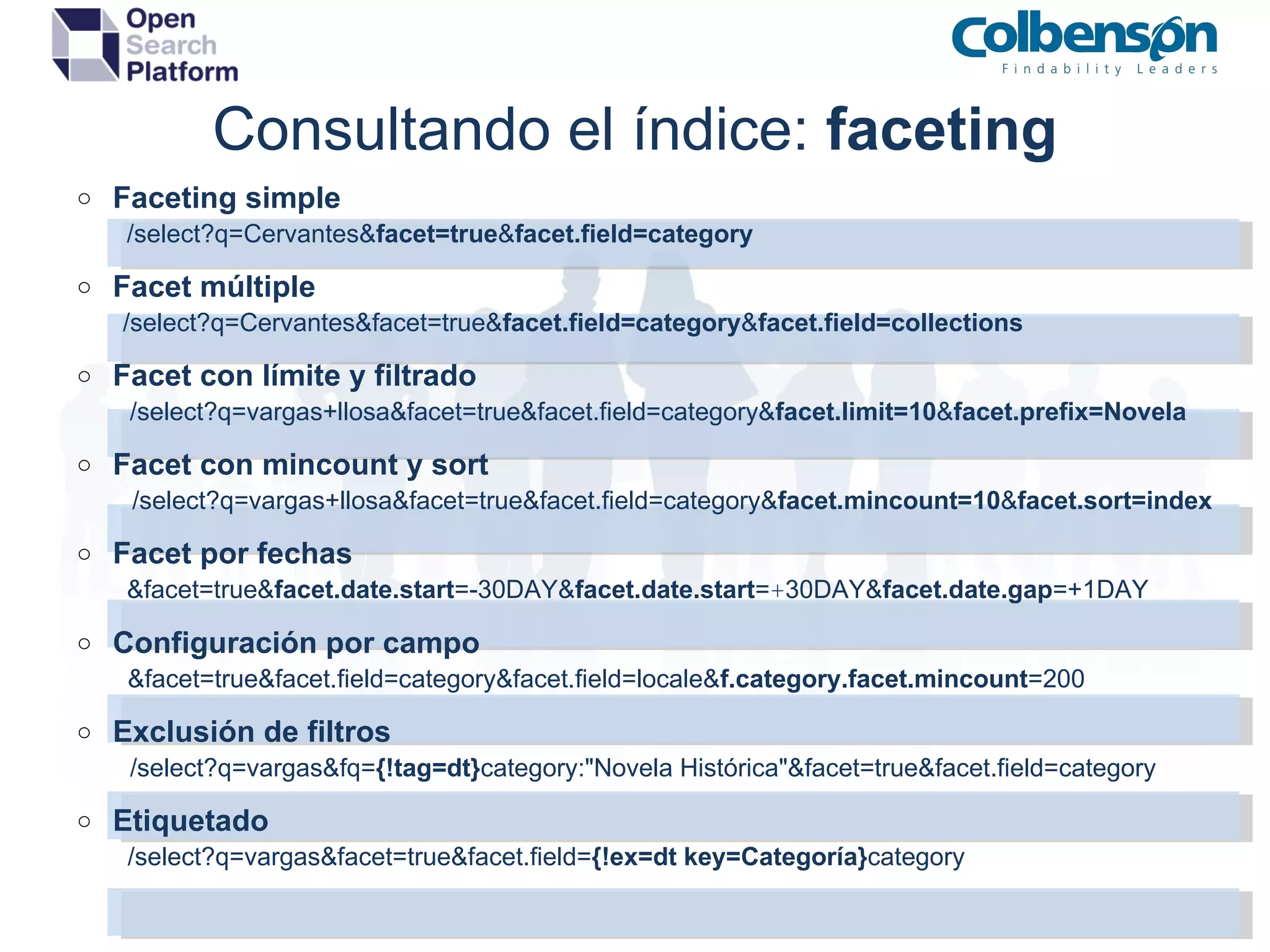
Consultando el índice:  faceting Faceting simple               /select?q=Cervantes& facet=true & facet.field=category Facet múltiple                    /select?q=Cervantes&facet=true& facet.field=category & facet.field=collections Facet con límite y filtrado                     /select?q=vargas+llosa&facet=true&facet.field=category& facet.limit=10 & facet.prefix=Novela Facet con mincount y sort                    /select?q=vargas+llosa&facet=true&facet.field=category& facet.mincount=10 & facet.sort=index Facet por fechas             &facet=true& facet.date.start =-30DAY& facet.date.start = + 30DAY& facet.date.gap =+1DAY Configuración por campo                     &facet=true&facet.field=category&facet.field=locale& f.category.facet.mincount =200   Exclusión de filtros                     /select?q=vargas&fq= {!tag=dt} category:&quot;Novela Histórica&quot;&facet=true&facet.field=category Etiquetado                     /select?q=vargas&facet=true&facet.field= {!ex=dt key=Categoría} category                   
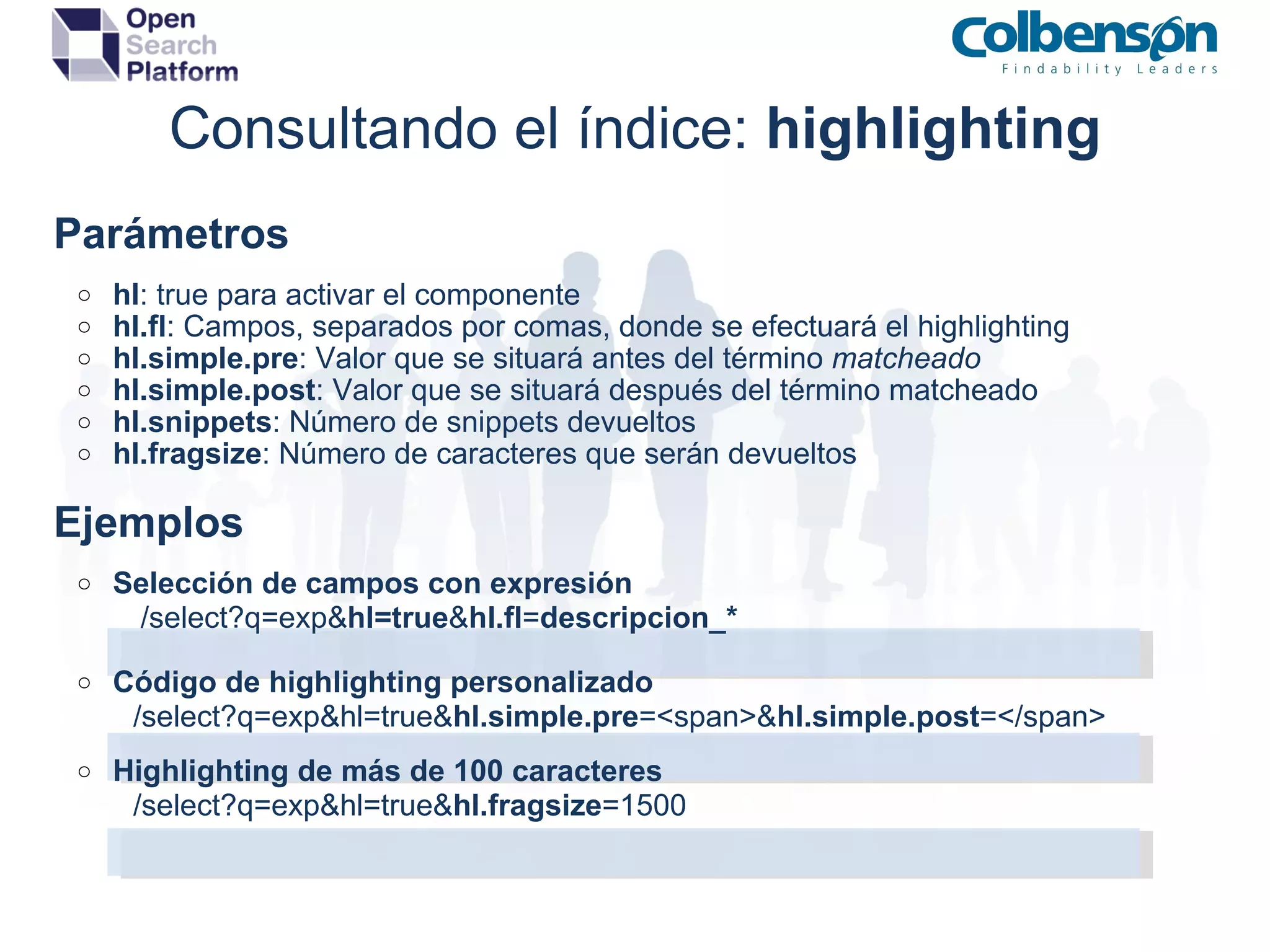
Consultando el índice:  highlighting      Parámetros hl : true para activar el componente hl.fl : Campos, separados por comas, donde se efectuará el highlighting hl.simple.pre : Valor que se situará antes del término  matcheado hl.simple.post : Valor que se situará después del término matcheado hl.snippets : Número de snippets devueltos hl.fragsize : Número de caracteres que serán devueltos      Ejemplos   Selección de campos con expresión                    /select?q=exp& hl=true & hl.fl = descripcion_* Código de highlighting personalizado                   /select?q=exp&hl=true& hl.simple.pre =<span>& hl.simple.post =</span> Highlighting de más de 100 caracteres                   /select?q=exp&hl=true& hl.fragsize =1500     
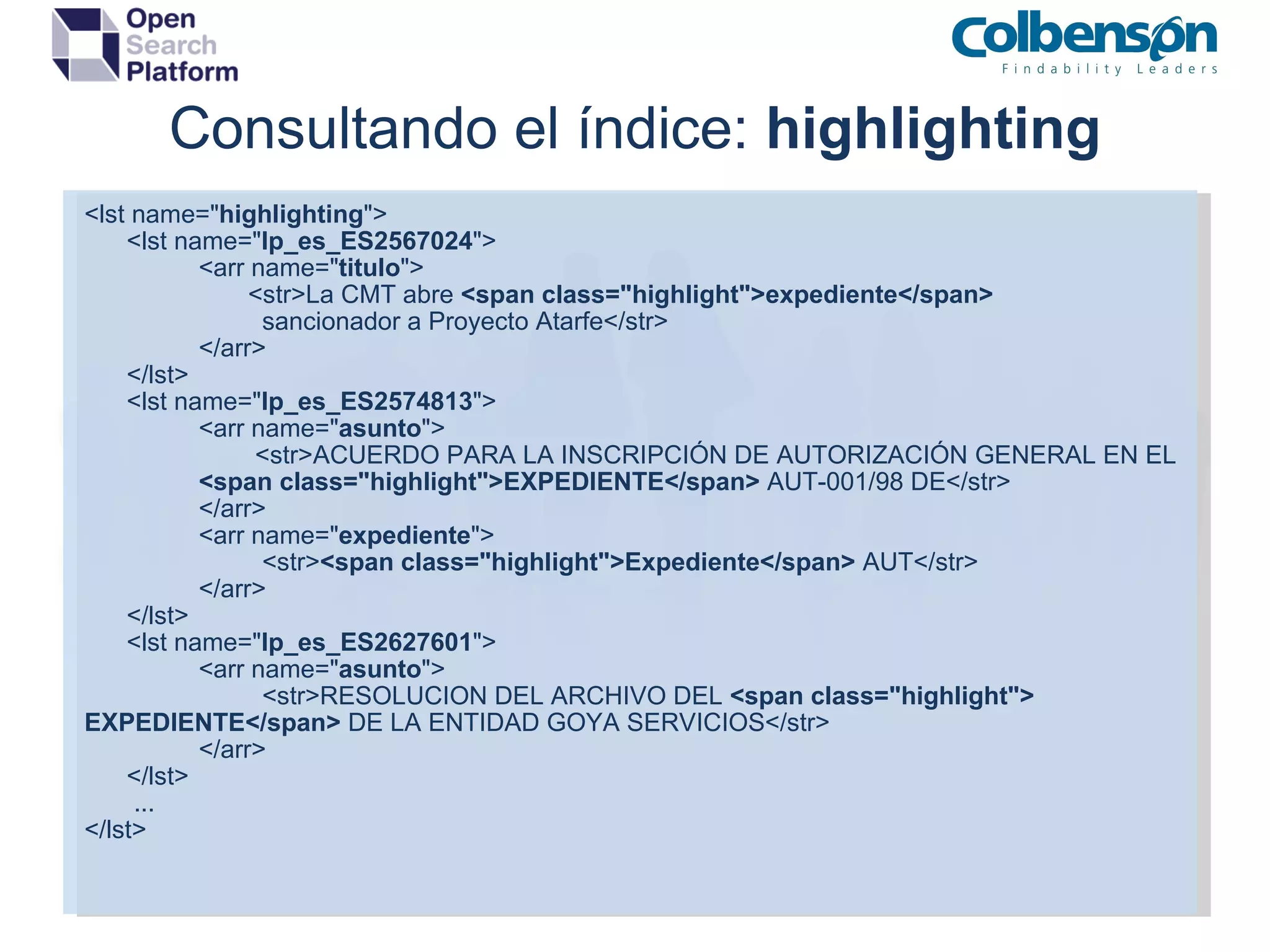
Consultando el índice:  highlighting <lst name=&quot; highlighting &quot;> <lst name=&quot; lp_es_ES2567024 &quot;> <arr name=&quot; titulo &quot;>   <str>La CMT abre  <span class=&quot;highlight&quot;>expediente</span>   sancionador a Proyecto Atarfe</str> </arr> </lst> <lst name=&quot; lp_es_ES2574813 &quot;> <arr name=&quot; asunto &quot;>   <str>ACUERDO PARA LA INSCRIPCIÓN DE AUTORIZACIÓN GENERAL EN EL  <span class=&quot;highlight&quot;>EXPEDIENTE</span>  AUT-001/98 DE</str> </arr> <arr name=&quot; expediente &quot;>   <str> <span class=&quot;highlight&quot;>Expediente</span>  AUT</str> </arr> </lst> <lst name=&quot; lp_es_ES2627601 &quot;> <arr name=&quot; asunto &quot;>   <str>RESOLUCION DEL ARCHIVO DEL  <span class=&quot;highlight&quot;>  EXPEDIENTE</span>  DE LA ENTIDAD GOYA SERVICIOS</str> </arr> </lst> ... </lst>
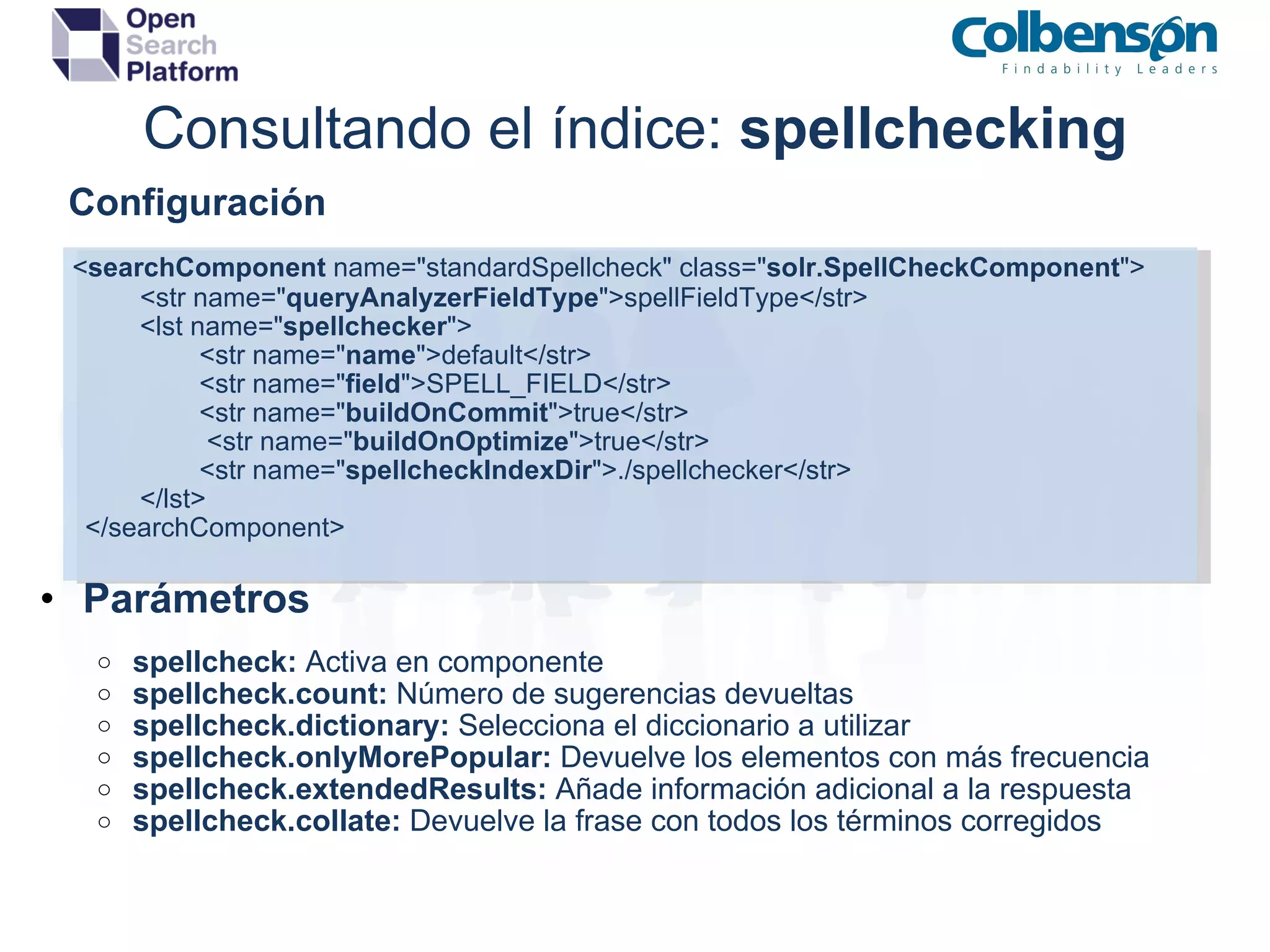
Consultando el índice:  spellchecking      Configuración       < searchComponent  name=&quot;standardSpellcheck&quot; class=&quot; solr.SpellCheckComponent &quot;>         <str name=&quot; queryAnalyzerFieldType &quot;>spellFieldType</str> <lst name=&quot; spellchecker &quot;>          <str name=&quot; name &quot;>default</str>          <str name=&quot; field &quot;>SPELL_FIELD</str>          <str name=&quot; buildOnCommit &quot;>true</str>           <str name=&quot; buildOnOptimize &quot;>true</str>          <str name=&quot; spellcheckIndexDir &quot;>./spellchecker</str> </lst>          </searchComponent>      Parámetros spellcheck:  Activa en componente spellcheck.count:  Número de sugerencias devueltas spellcheck.dictionary:  Selecciona el diccionario a utilizar spellcheck.onlyMorePopular:  Devuelve los elementos con más frecuencia spellcheck.extendedResults:  Añade información adicional a la respuesta spellcheck.collate:   Devuelve la frase con todos los términos corregidos
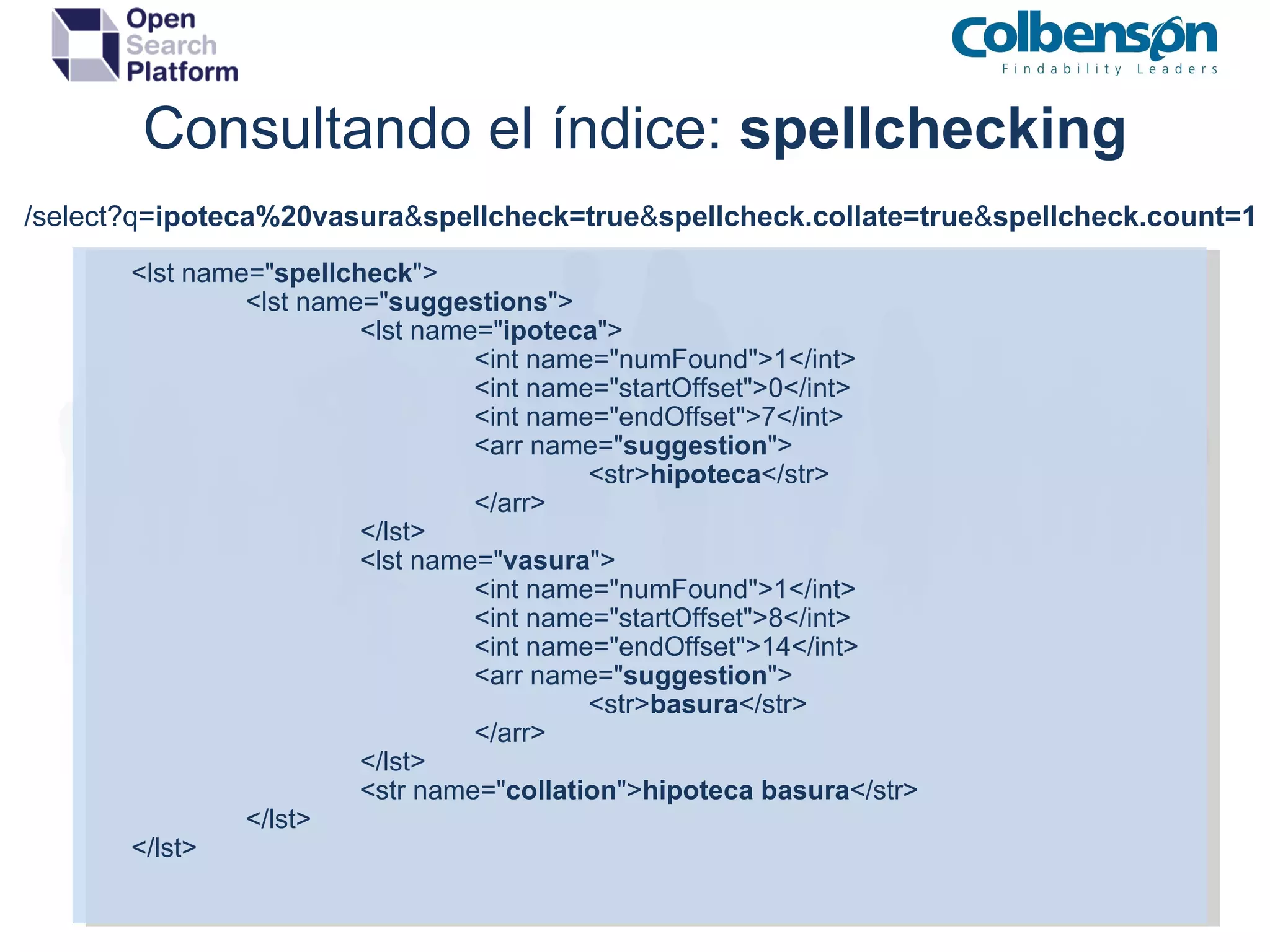
Consultando el índice:  spellchecking <lst name=&quot; spellcheck &quot;> <lst name=&quot; suggestions &quot;> <lst name=&quot; ipoteca &quot;> <int name=&quot;numFound&quot;>1</int> <int name=&quot;startOffset&quot;>0</int> <int name=&quot;endOffset&quot;>7</int> <arr name=&quot; suggestion &quot;> <str> hipoteca </str> </arr> </lst> <lst name=&quot; vasura &quot;> <int name=&quot;numFound&quot;>1</int> <int name=&quot;startOffset&quot;>8</int> <int name=&quot;endOffset&quot;>14</int> <arr name=&quot; suggestion &quot;> <str> basura </str> </arr> </lst> <str name=&quot; collation &quot;> hipoteca basura </str> </lst> </lst> /select?q= ipoteca%20vasura & spellcheck=true & spellcheck.collate=true & spellcheck.count=1
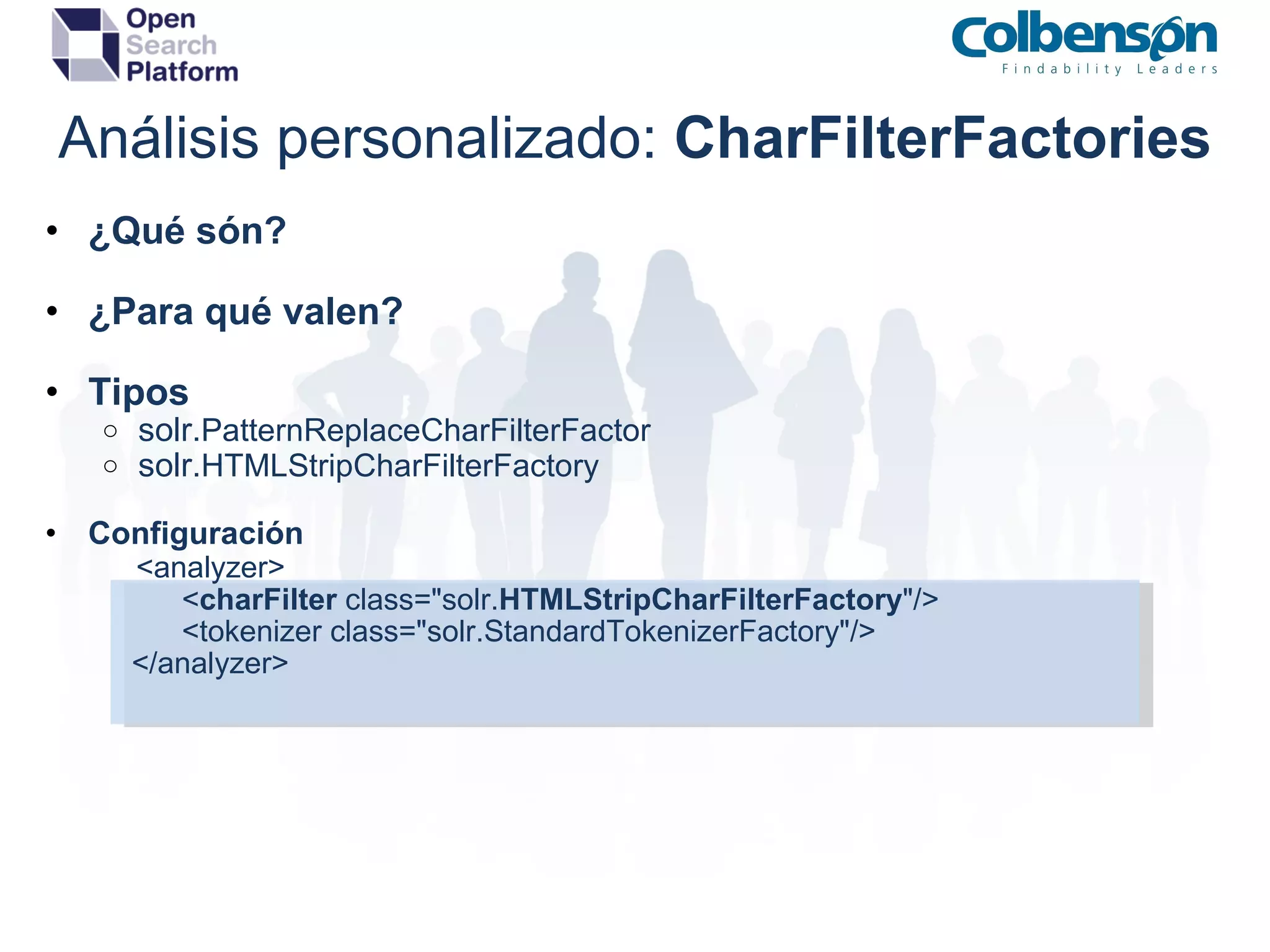
Análisis personalizado:  CharFilterFactories ¿Qué són? ¿Para qué valen? Tipos solr. PatternReplaceCharFilterFactor solr. HTMLStripCharFilterFactory Configuración              <analyzer>                    < charFilter  class=&quot;solr. HTMLStripCharFilterFactory &quot;/>                    <tokenizer class=&quot;solr.StandardTokenizerFactory&quot;/>              </analyzer>
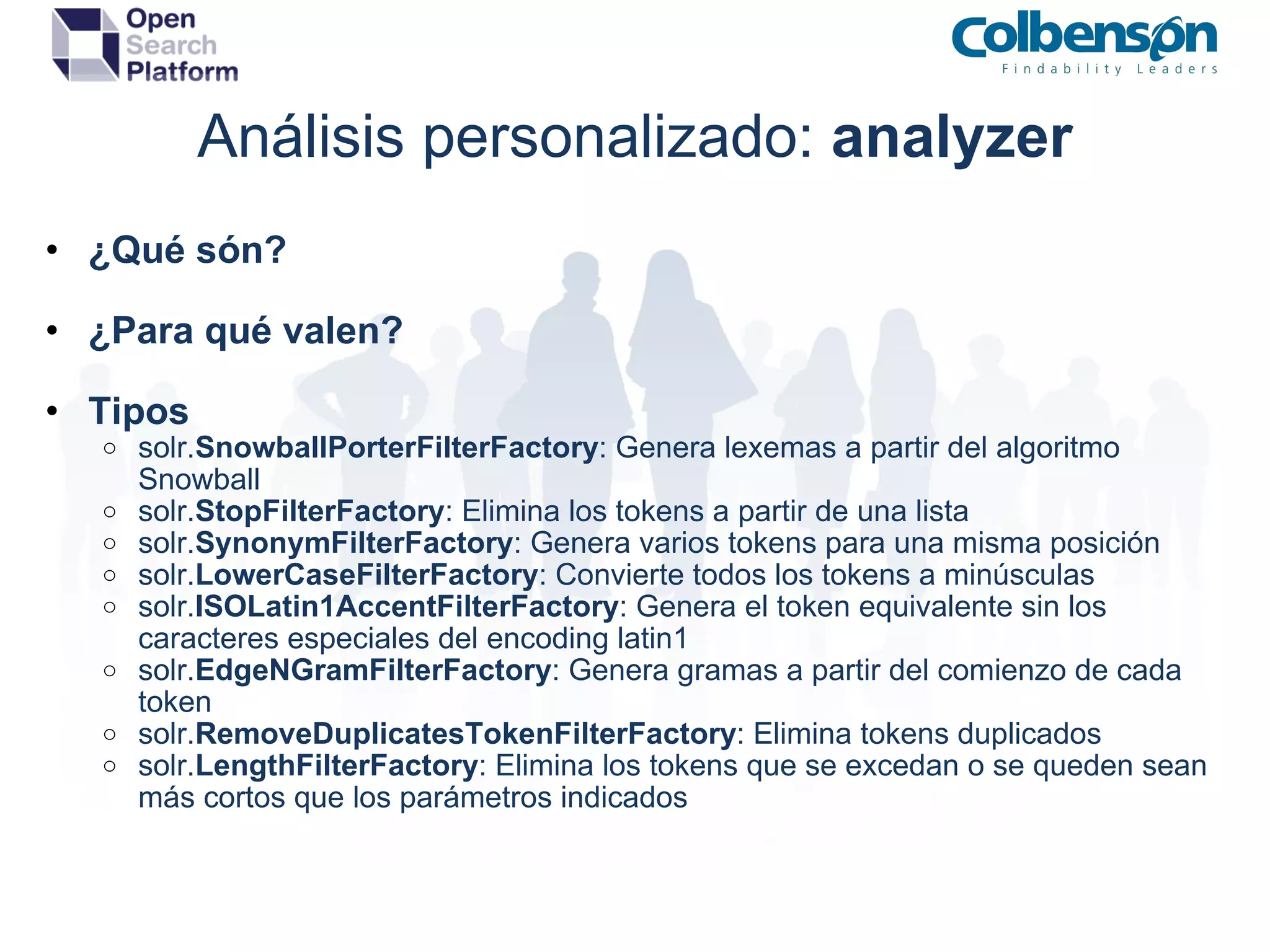
Análisis personalizado:  tokenizers ¿Qué són? ¿Para qué valen? Tipos solr. WhitespaceTokenizerFactory : Genera tokens a partir de espacios en blanco solr. KeywordTokenizerFactory : Genera un único token solr. StandardTokenizerFactory : Genera tokens a partir de espacios en blanco y de los signos de puntuación solr. LowerCaseTokenizerFactory : Convierte todo a minúsculas y elimina cualquier caracter no letra Configuración       <analyzer>              <charFilter class=&quot;solr.HTMLStripCharFilterFactory&quot;/>              < tokenizer  class=&quot;solr. StandardTokenizerFactory &quot;/>       </analyzer>
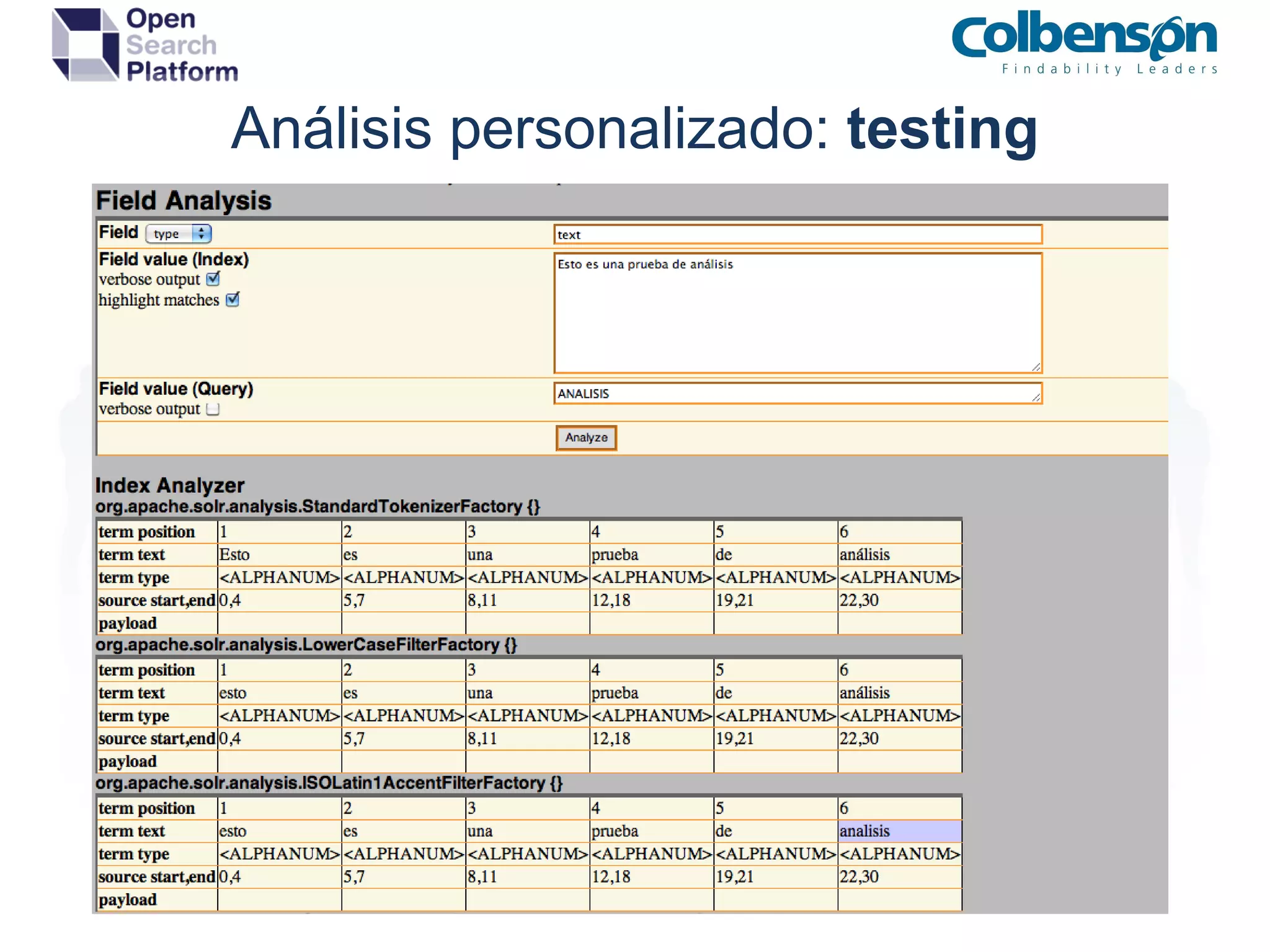
Análisis personalizado:  analyzer ¿Qué són? ¿Para qué valen? Tipos solr. SnowballPorterFilterFactory : Genera lexemas a partir del algoritmo Snowball solr. StopFilterFactory : Elimina los tokens a partir de una lista solr. SynonymFilterFactory : Genera varios tokens para una misma posición solr. LowerCaseFilterFactory : Convierte todos los tokens a minúsculas solr. ISOLatin1AccentFilterFactory : Genera el token equivalente sin los caracteres especiales del encoding latin1 solr. EdgeNGramFilterFactory : Genera gramas a partir del comienzo de cada token solr. RemoveDuplicatesTokenFilterFactory : Elimina tokens duplicados solr. LengthFilterFactory : Elimina los tokens que se excedan o se queden sean más cortos que los parámetros indicados
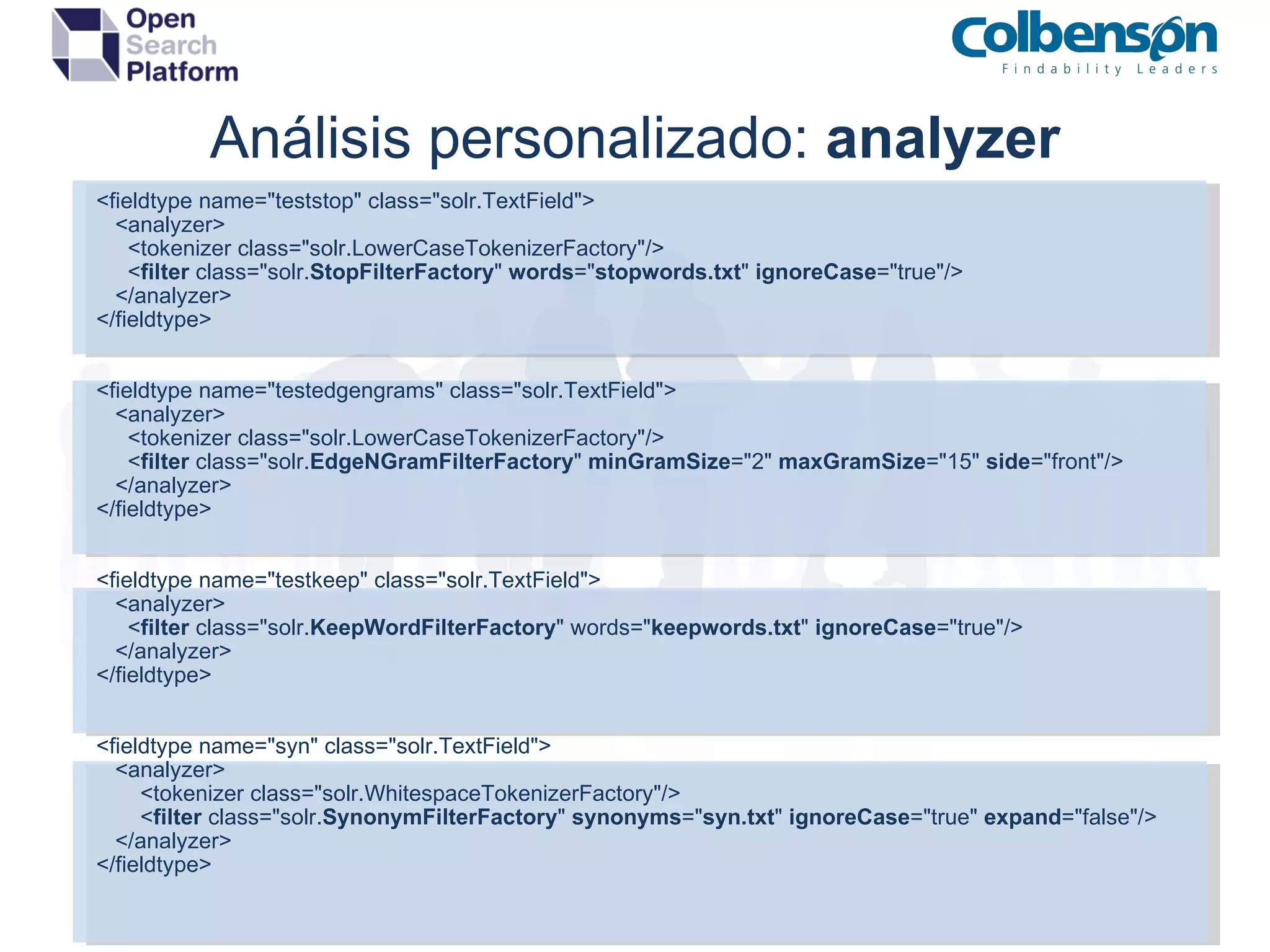
Análisis personalizado:  analyzer <fieldtype name=&quot;teststop&quot; class=&quot;solr.TextField&quot;>     <analyzer>       <tokenizer class=&quot;solr.LowerCaseTokenizerFactory&quot;/>       < filter  class=&quot;solr. StopFilterFactory &quot;  words =&quot; stopwords.txt &quot;  ignoreCase =&quot;true&quot;/>     </analyzer> </fieldtype> <fieldtype name=&quot;testedgengrams&quot; class=&quot;solr.TextField&quot;>     <analyzer>       <tokenizer class=&quot;solr.LowerCaseTokenizerFactory&quot;/>       < filter  class=&quot;solr. EdgeNGramFilterFactory &quot;  minGramSize =&quot;2&quot;  maxGramSize =&quot;15&quot;  side =&quot;front&quot;/>     </analyzer> </fieldtype> <fieldtype name=&quot;testkeep&quot; class=&quot;solr.TextField&quot;>     <analyzer>       < filter  class=&quot;solr. KeepWordFilterFactory &quot; words=&quot; keepwords.txt &quot;  ignoreCase =&quot;true&quot;/>     </analyzer> </fieldtype> <fieldtype name=&quot;syn&quot; class=&quot;solr.TextField&quot;>     <analyzer>         <tokenizer class=&quot;solr.WhitespaceTokenizerFactory&quot;/>         < filter  class=&quot;solr. SynonymFilterFactory &quot;  synonyms =&quot; syn.txt &quot;  ignoreCase =&quot;true&quot;  expand =&quot;false&quot;/>     </analyzer> </fieldtype>
Análisis personalizado:  testing
Clustering:  replicación ¿Qué es la alta disponibilidad? Master / esclavo Repetidores Limitaciones Capacidad de indexación Tiempo de replicación Consideraciones Replicación pasiva Replicación vía HTTP Replicación de ficheros
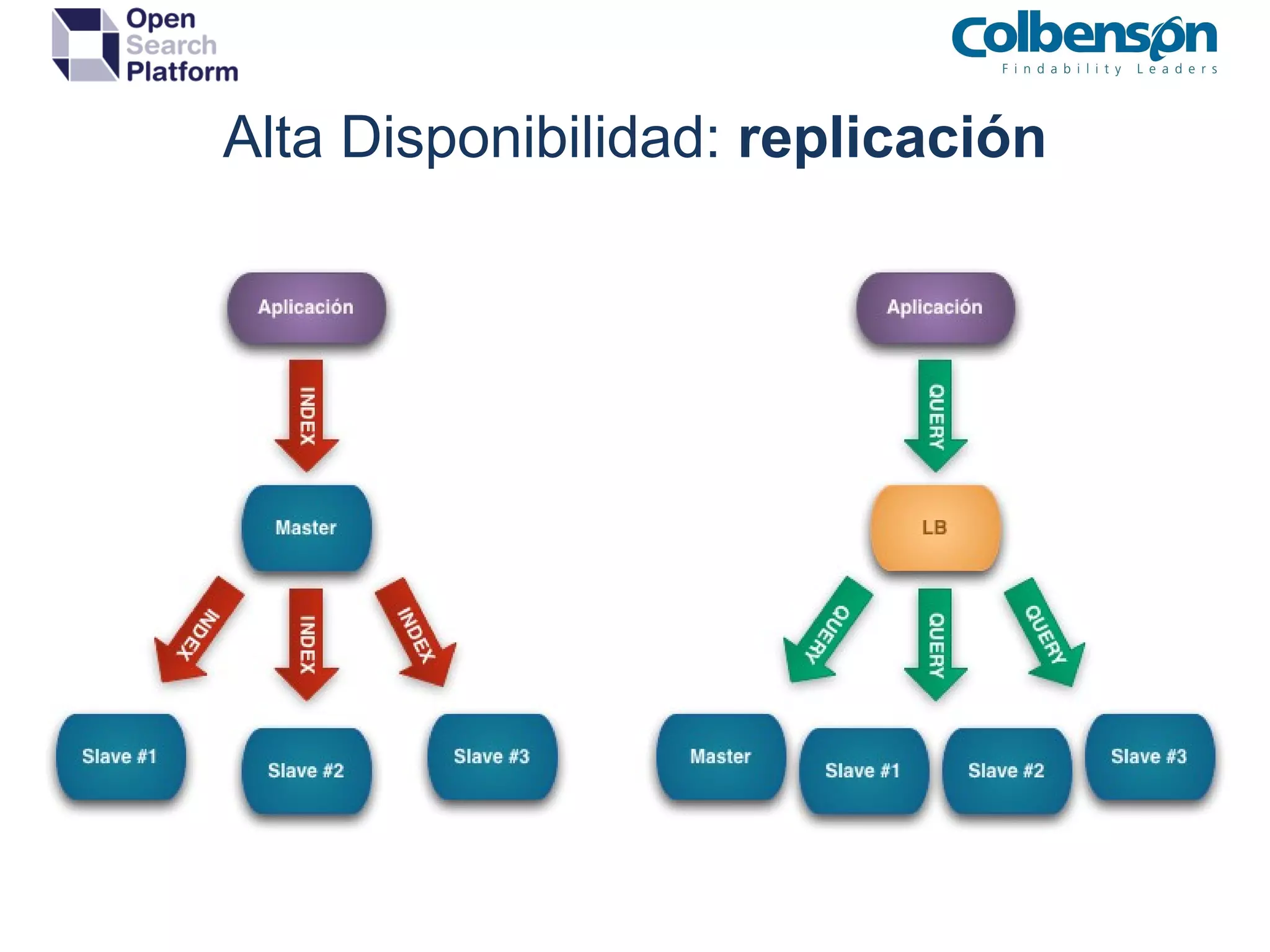
Alta Disponibilidad:  replicación
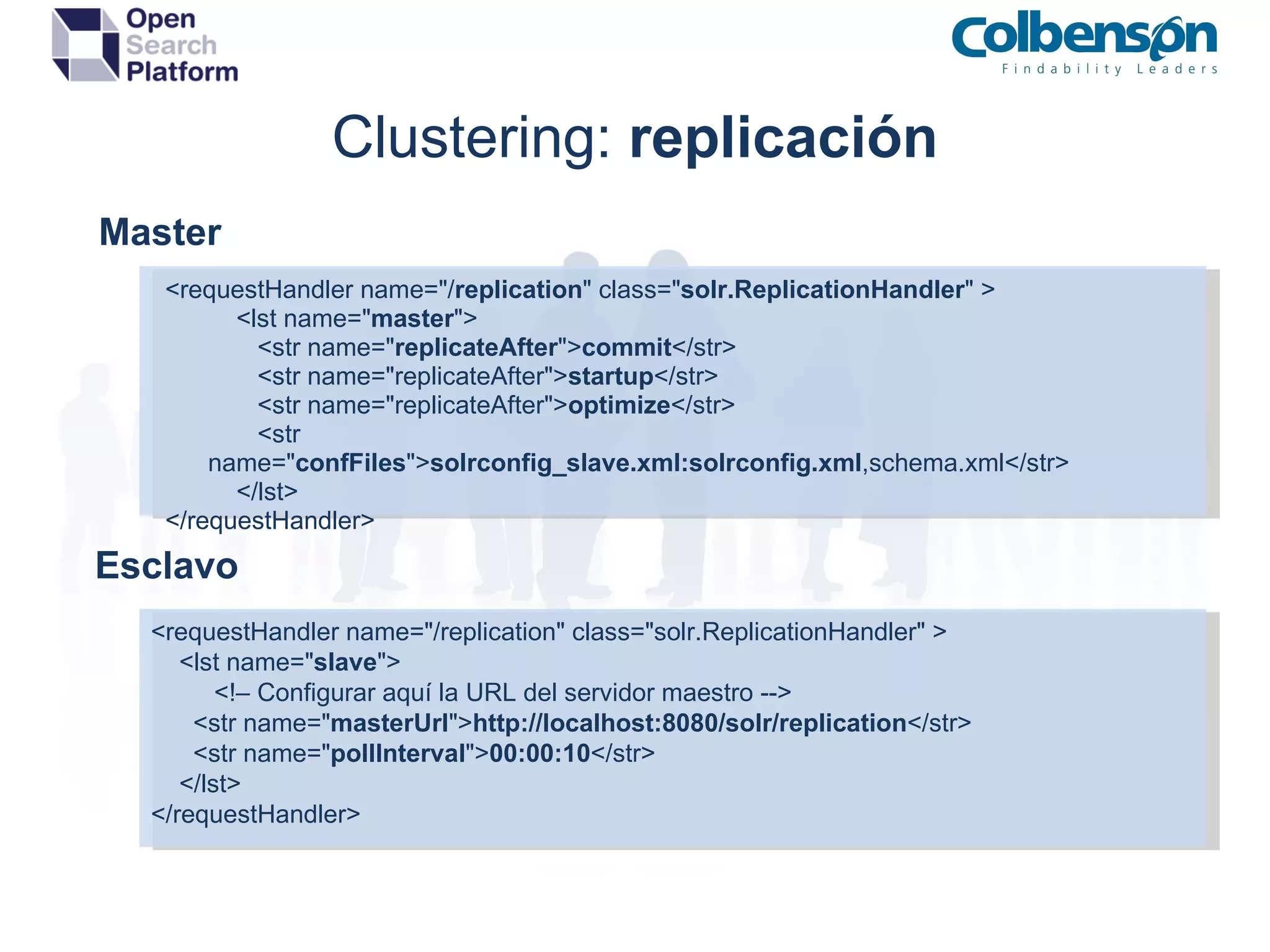
Clustering:  replicación Master <requestHandler name=&quot;/ replication &quot; class=&quot; solr.ReplicationHandler &quot; >   <lst name=&quot; master &quot;>   <str name=&quot; replicateAfter &quot;> commit </str>   <str name=&quot;replicateAfter&quot;> startup </str>   <str name=&quot;replicateAfter&quot;> optimize </str>    <str name=&quot; confFiles &quot;> solrconfig_slave.xml:solrconfig.xml ,schema.xml</str>   </lst> </requestHandler> Esclavo <requestHandler name=&quot;/replication&quot; class=&quot;solr.ReplicationHandler&quot; > <lst name=&quot; slave &quot;> <!– Configurar aquí la URL del servidor maestro --> <str name=&quot; masterUrl &quot;> http://localhost:8080/solr/replication </str> <str name=&quot; pollInterval &quot;> 00:00:10 </str> </lst> </requestHandler>
Clustering:  sharding ¿Qué es el sharding? Búsqueda distribuida Indexación distrbuida Limitaciones Hotspotting Capacidad de crecimiento IDF distribuido Consideraciones SolrCloud Replication factor Autodetección de nodos Cluster block
Mantenimiento OpenSearch:  operaciones Backup Limitaciones No debe hacerse durante otras operaciones Copia íntegra del directorio ${dataDir} Restauración Limitaciones Evitar índices bloqueados Obligatorio parar el servicio Copiar el backup al directorio ${dataDir} Optimize Limitaciones Bloquea el directorio Espacio de disco libre equivalente al del índice http:/local/opensearch/update?stream.body=%3Coptimize/%3E

Curso Formacion Apache Solr

  • 1.
  • 2.
    ¿Quiénes Somos? Expertos en sistemas de búsqueda, repositorios digitales y recomendación . Referencia Relevante : 24Symbols, BBVA o Biblioteca Nacional.
  • 3.
  • 4.
    Índice Conceptos ydescripción de Apache Solr Preparando el terreno ¿Cómo lo instalamos? Configurando Apache Solr Con las manos en la masa Modificando el índice Consultando el índice Análisis personalizado Clustering Operaciones y Mantenimiento
  • 5.
    ¿Qué es ApacheSolr? Es un servidor de búsqueda full-text  basado en Apache Solr Utiliza protocolos estándar de comunicación como HTTP y HTTPS Es  altamente escalable Es  totalmente modular  gracias a su sistema de plugins Ofrece una interfaz (simple) de administración web Está construido utilizando la tecnología de  Apache Lucene
  • 6.
    Componentes Principales RequestHandlers: Procesan la consulta solicitada SearchComponents : Añaden datos (de la consulta) a la respuesta ResponseWriters : Transforman a formato de respuesta concreto. SolrCore : conjunto de configuración y documentos UpdateHandler : Lógica de actualización de documentos Cache : Estrategia de caching.
  • 7.
  • 8.
    Instalando Apache Solr: Requisitos Java 1.5 o posterior (http://www.java.com/es/download) Servidor de Aplicaciones con soporte para Servlets 2.4 Tomcat 5.5.X+
  • 9.
    Instalando Apache Solr: Despliegue Despliegue del fichero WAR en contenedor Configuración del SOLR_HOME JNDI Variable de entorno Estructura del directorio SOLR_HOME solrconfig.xml schema.xml solr.xml ( opcional )
  • 10.
    Configurando Apache Solr: Ficheros solr.xml : configuración de los SolrCores activos schema.xml : Configuración de campos y procesado solrconfig.xml : Configuración de componentes Varios : Ficheros de sinónimos, stopwords, etc.
  • 11.
    Configurando Apache Solr: solr . xml < solr persistent =&quot;true&quot; sharedLib =&quot;lib&quot;>       < cores adminPath =&quot;/admin/cores&quot;>            < core name =&quot;pdg&quot; instanceDir =&quot;/etc/solr/cores/pdg&quot; />           <core name=&quot;geoeuskadi&quot; instanceDir=&quot;/etc/solr/geoeuskadi&quot; />           <core name=&quot;24symbols&quot; instanceDir=&quot;/etc/solr/24symbols&quot; />           <core name=&quot;cmt&quot; instanceDir=&quot;/etc/cores/cmt&quot; />           <core name=&quot;disofic&quot; instanceDir=&quot;/etc/solr/disofic&quot; />           <core name=&quot;cdl&quot; instanceDir=&quot;/etc/solr/cdl&quot; />           <core name=&quot;24sac&quot; instanceDir=&quot;/etc/solr/24symbolsac&quot; />       </cores> </solr>
  • 12.
    Configurando Apache Solr: schema.xml < schema name=&quot;opensearch&quot; version=&quot;1.1&quot;>   < types >     <fieldType name=&quot;string&quot; class=&quot;solr.StrField&quot; sortMissingLast =&quot;true&quot; omitNorms =&quot;true&quot;/>     < fieldType name=&quot;text&quot; class=&quot;solr.TextField&quot; positionIncrementGap =&quot;100&quot;>       < analyzer type=&quot; index &quot;>         < tokenizer class=&quot;solr.HTMLStripStandardTokenizerFactory&quot;/>            < filter class=&quot;solr.LowerCaseFilterFactory&quot;/>         <filter class=&quot;solr.ISOLatin1AccentFilterFactory&quot;/>         <filter class=&quot;solr.StopFilterFactory&quot; ignoreCase=&quot;true&quot; words=&quot;stopwords.txt&quot;/>       </analyzer>       <analyzer type=&quot; query &quot;>         < tokenizer class=&quot;solr.StandardTokenizerFactory&quot;/>         < filter class=&quot;solr.LowerCaseFilterFactory&quot;/>         <filter class=&quot;solr.ISOLatin1AccentFilterFactory&quot;/>         <filter class=&quot;solr.SynonymFilterFactory&quot; ignoreCase=&quot;true&quot; synonyms=&quot;synonyms.txt&quot;/>         <filter class=&quot;solr.StopFilterFactory&quot; ignoreCase=&quot;true&quot; words=&quot;stopwords.txt&quot;/>       </analyzer>     </fieldType>   </types>   < fields >   < field name=&quot;id&quot; type =&quot;string&quot; stored =&quot;true&quot; indexed =&quot;true&quot;/>   <field name=&quot;docName&quot; type=&quot;text&quot; stored=&quot;true&quot; indexed=&quot;true&quot;/>               < dynamicField name=&quot; fecha* &quot; type=&quot;date&quot;  indexed=&quot;true&quot;  stored=&quot;true&quot;/>               <field name=&quot;buscable&quot; type=&quot;text&quot; stored=&quot;false&quot; indexed=&quot;true&quot; multiValued =&quot;true&quot; positionIncrementGap =&quot;50&quot;/>   </fields>   < copyField source=&quot;docName&quot; dest=&quot;buscable&quot;/>   < uniqueKey >id</uniqueKey>   < defaultSearchField >buscable</defaultSearchField>   < solrQueryParser defaultOperator=&quot;AND&quot;/> </schema>
  • 13.
    Configurando Apache Solr: schema.xml field  Type:  Definen el campo y el comportamiento a la hora de indexarlo         <fieldType name=&quot;string&quot; class=&quot;solr.StrField&quot;  sortMissingLast =&quot;true&quot;  omitNorms =&quot;true&quot;/> field:  Instancia de un tipo de campo bajo una clave propia           < field  name=&quot;id&quot;  type =&quot;string&quot;  stored =&quot;true&quot;  indexed =&quot;true&quot;/> dynamicField: Conjunto de campos bajo el mismo tipo y el mismo patrón              < dynamicField  name=&quot; fecha* &quot; type=&quot;date&quot;  indexed=&quot;true&quot;  stored=&quot;true&quot;/>   copyField  :   Copia, antes del procesado, el valor de un campo a otro              < copyField  source=&quot;docName&quot; dest=&quot;buscable&quot;/> uniqueKey:  Campo que se utilizará como identificador principal              < uniqueKey >id</uniqueKey> defaultSearchField:  Campo de búsqueda por defecto                 < defaultSearchField >buscable</defaultSearchField> solrQueryParser:  Indica cómo se agruparán las clausulas de la consulta              < solrQueryParser  defaultOperator=&quot;AND&quot;/>
  • 14.
    Configurando Apache Solr: schema.xml Analyzers:  Se componen de un tokenizer y un conjunto de filtros          < analyzer  type=&quot; index &quot;>                  < analyzer  type=&quot; query &quot;> Tokenizer:  Dividen el texto en un conjunto de tokens                    < tokenizer  class=&quot; solr.StandardTokenizerFactory &quot;/> Filter: Procesan cada uno de los tokens por separado                   < filter class=&quot; solr.ISOLatin1AccentFilterFactory &quot;/>                   < filter class=&quot; solr.SynonymFilterFactory &quot; ignoreCase=&quot;true&quot; synonyms=&quot;synonyms.txt&quot;/>                   < filter class=&quot; solr.StopFilterFactory &quot; ignoreCase=&quot;true&quot; words=&quot;stopwords.txt&quot;/>
  • 15.
    Configurando Apache Solr: solrconfig.xml Propiedades del índice < dataDir >/var/solr/data</dataDir> < indexDefaults >             <!-- Values here affect all index writers and act as a default unless overridden. ->             < useCompoundFile >false</useCompoundFile>            < mergeFactor >10</mergeFactor>            <!-- If both ramBufferSizeMB and maxBufferedDocs is set, then Lucene will flush based on whichever limit is hit first.  --> <!-- <maxBufferedDocs>1000</maxBufferedDocs> --> <!-- Sets the amount of RAM that may be used by Lucene indexing for buffering added documents and deletions before they are flushed to the Directory.  --> < ramBufferSizeMB >32</ramBufferSizeMB> <!-- <maxMergeDocs>2147483647</maxMergeDocs> --> < maxFieldLength >10000</maxFieldLength> < writeLockTimeout >1000</writeLockTimeout> < commitLockTimeout >10000</commitLockTimeout> < lockType >native</lockType> </indexDefaults> < mainIndex > < useCompoundFile >false</useCompoundFile> < ramBufferSizeMB >32</ramBufferSizeMB>   < mergeFactor >10</mergeFactor> </mainIndex>
  • 16.
    Configurando Apache Solr: solrconfig.xml   Configuración de consulta < query >          < maxBooleanClauses >1024</maxBooleanClauses>          < filterCache class=&quot;solr.FastLRUCache&quot; size=&quot;512&quot; initialSize=&quot;512&quot; autowarmCount=&quot;0&quot; />          < queryResultCache class=&quot;solr.LRUCache&quot; size=&quot;512&quot; initialSize=&quot;512&quot; autowarmCount=&quot;0&quot; />          < documentCache class=&quot;solr.LRUCache&quot; size=&quot;512&quot; initialSize=&quot;512&quot; autowarmCount=&quot;0&quot; />          < enableLazyFieldLoading >true</enableLazyFieldLoading>          <cache name=&quot;myUserCache&quot; class=&quot;solr.LRUCache&quot; size=&quot;4096&quot; initialSize=&quot;1024&quot;                      autowarmCount=&quot;1024&quot; regenerator=&quot;org.mycompany.mypackage.MyRegenerator&quot; />          < queryResultWindowSize >20</queryResultWindowSize>          < queryResultMaxDocsCached >200</queryResultMaxDocsCached>          < listener event=&quot; newSearcher &quot; class=&quot;solr.QuerySenderListener&quot;>              <arr name=&quot;queries&quot;>                  <!-- <lst> <str name=&quot;q&quot;>solr</str> <str name=&quot;rows&quot;>10</str> </lst> -->            </arr>          </listener>          < useColdSearcher >false</useColdSearcher>          < maxWarmingSearchers >2</maxWarmingSearchers> </query>
  • 17.
    Configurando Apache Solr: solrconfig.xml Configuración de los RequestHandlers          < requestHandler name=&quot; /spell &quot; class=&quot;solr.SearchHandler&quot; lazy=&quot;true&quot;>               < lst name=&quot;defaults&quot;>                    <!-- omp = Only More Popular -->                   < str name =&quot;spellcheck.onlyMorePopular&quot;> false </str>                   <!-- exr = Extended Results -->                   <str name=&quot;spellcheck.extendedResults&quot;>false</str>                    <!--  The number of suggestions to return -->                   <str name=&quot;spellcheck.count&quot;>1</str>               </lst>               < arr name=&quot; last-components &quot;>                   <str> spellcheck </str>               </arr>          </requestHandler>          < searchComponent name=&quot; spellcheck &quot; class=&quot;solr.SpellCheckComponent&quot;>              <str name=&quot;queryAnalyzerFieldType&quot;>textSpell</str>             <lst name=&quot;spellchecker&quot;>                   <str name=&quot;name&quot;>default</str>                   <str name=&quot;field&quot;>name</str>                   <str name=&quot;spellcheckIndexDir&quot;>./spellchecker</str>             </lst>           </searchComponent>
  • 18.
    Modificando el índice: indexación Formatos admitidos XML : Formato de intercambio por defecto Binario : Serialización Java ( SolrJ ) - commons-codec Ficheros binarios : indexación de ficheros DOC , PDF ,etc utilizando Solr Cell ( Apache Tika )   Limitaciones Visibilidad : no son visibles hasta que suceda el commit (automático o manual) Encoding : solo se soporta indexación en UTF-8 Actualización : No existe tal operación. Se añade un documento bajo mismo id.
  • 19.
    Modificando el índice: indexación      Formato de XML de indexación   <?xml version=&quot;1.0&quot; encoding=&quot;UTF-8&quot;?>   < add >                   < doc >                         < field name =&quot;identificador&quot;>http://url.cualquiera.com/webclient/</field>                         <field name=&quot; pid &quot;> 1865905 </field>                         <field name=&quot;thumbnail&quot;>http://url.cualquiera.com/webclient/Delivery</field>                       <field name=&quot;autor&quot;>Castro, Adolfo de 1823-1898 </field>                       <field name=&quot;autor_facet&quot;>Castro, Adolfo de</field>                       <field name=&quot;autor_abreviada&quot;>Castro, Adolfo de-1823-1898-</field>                       <field name=&quot;autor_completa&quot;>Castro, Adolfo de-1823-1898-#</field>                       <field name=&quot;titulo&quot;>Cádiz en la Guerra de la Independencia  : cuadro histórico</field>                       <field name=&quot;editor&quot;>Cádiz Revista Médica </field>                       <field name=&quot;materia&quot;>Cádiz Historia S.XIX </field>                         …               </doc>                 ...   </add>
  • 20.
    Modificando el índice: borrado Tipos de borrado ID: Permite borrar una colección de documentos indicando sus identificadores Query: Permite especificar una consulta de Lucene. Todos aquellos que satisfagan la consulta serán borrados. Limitaciones Visibilidad : no son visibles hasta que suceda el commit (automático o manual) Encoding: solo se soporta indexación en UTF-8 <?xml version=&quot;1.0&quot; encoding=&quot;UTF-8&quot;?> < delete >          < id >5c9e2d7e-7114-31cf-8582-56f11cefbcce</id>          <id> d0b58756-8a8b-3de2-8327-55023cbdf16f </id>          <id>4d9cb11a-2e2a-34e5-821d-5c7f77a41f8f</id>          <id>fe722eac-d4cb-30f3-b2b5-b9e72630f523</id>          ... </delete> <?xml version=&quot;1.0&quot; encoding=&quot;UTF-8&quot;?> < delete >     < query > category: &quot;Facturas&quot; </query> </delete> Mediante consulta Mediante IDs
  • 21.
    Modificando el índice: operaciones commit:  Las indexaciones y borrados son ejecutados de forma definitiva rollback:  Elimina las indexaciones y borrados pendientes de ejecución optimize:  Reorganiza el índice y construye un solo segmento Consideraciones y limitaciones  Las transacciones no están asociadas a sesiones A mayor número de documentos en sesión, mayor consumo de memoria Bloqueo largo en commits  Degradación paulatina del índice
  • 22.
    Modificando el índice: práctica Indexación/borrado: Envío de XML a Solr                curl http://127.0.0.1:8983/solr/update -H &quot;Content-Type: text/xml&quot; -d @data.xml Commit sin nuevos documentos               curl   http://127.0.0.1:8983/solr/update?commit=true Commit no bloqueante:                 curl http://127.0.0.1:8983/solr/update?commit=true&waitSearcher=false Commit con nuevos documentos                curl http://127.0.0.1:8983/solr/update?commit=true -H &quot;Content-Type: text/xml&quot; -d @data.xml Optimize              curl   http://127.0.0.1:8983/solr/update?optimize=true
  • 23.
    Consultando el índice: básicos El protocolo de comunicación es HTTP Los formatos de respuesta son variados XML  JSON binario  (commons-codec / java serialization) do-it-yourself Aplica teoría de conjuntos  mediante el uso de filterQueries Parámetros básicos q : texto de la consulta q.op : operador por defecto de la consulta start :  offset  del conjunto de resultados rows : número de elementos a recuperar a partir del start sort : campo por el que se realiza la ordenacion fl : campos, separados por coma, que se devolverán fq : consulta de filtro (ocurrencia múltiple)
  • 24.
    Consultando el índice: básicos curl http://host:8983/opensearch/select/?q=Pilar%20rojo&fl=title,contenttype&start=0&rows=10&wt=xml      < response >      <lst name=&quot; responseHeader &quot;> <int name=&quot; status &quot;>0</int> <int name=&quot; QTime &quot;>293</int> <lst name=&quot; params &quot;> <str name=&quot;wt&quot;>xml</str> <str name=&quot; rows &quot;>10</str> <str name=&quot; start &quot;>0</str> <str name=&quot; q &quot;> Pilar rojo </str> </lst> </lst> < result name=&quot;response&quot; numFound =&quot;2894&quot; start =&quot;0&quot;> <doc>...</doc> <doc>...</doc> <doc>...</doc> < doc > <str name=&quot; contenttype &quot;>text/html; charset=utf-8</str> <str name=&quot; title &quot;> Pilar Rojo participa nos actos do Xacobeo 2010</str> </doc> <doc>...</doc> <doc>...</doc> </result>      </response>
  • 25.
    Consultando el índice: avanzada Selección del RequestHandler qt : http://host:8983/opensearch/select?q=Pilar%20rojo&start=0&rows=10& qt=dismax Path : http://host:8983/opensearch /dismax ?q=Pilar%20rojo&start=0&rows=10 Utilización de sintáxis de consulta avanzada phrase slopping :  “jakarta apache”~10 fuzzy queries :  sony~0.9 wildcarding : c?sa OR casa* range queries : [&quot;&quot; to *] term boosting : apache^3 Utilización de SearchComponents Faceting : Búsqueda paramétrica (folding de Amazon, eBay, etc) Highlight : Resaltado de los términos que concuerdan de la búsqueda Spellcheck : Sugerencias de búsqueda con corrección ortográfica MoreLikeThis : Documentos relacionados a partir de uno que actúa de patrón.
  • 26.
  • 27.
    Consultando el índice: faceting      Faceting por valor facet : boolean que activa el componente facet.field : identifica el campo por el cual se realizará el faceting (ocurrencia múltiple) facet.prefix : filtra las facetas que comienzan por este valor facet.sort : &quot;count&quot; para ordenar por valor e &quot;index&quot; para hacerlo alfabeticamente facet.limit : el numero limite de facets que se devuelven facet.offset : offset del conjunto de resultados facet.mincount : especifica la cantidad minima referida para que se incluya en un facet facet.missing : controla si solr debe calcular un recuento de todos los resultados coincidentes que no tienen ningún valor para el campo facet.method : selecciona el algoritmo para realizar el facet (enum o fc)      Faceting arbitrario facet.query : Especifica una consulta para la que se calcularán los resultados que la matchean      Faceting por Fecha facet.date : nombre del campo sobre el que se realizará el facet tratándolo como fecha (múltiple) facet.date.start : Margen inferior del rango. facet.date.end : Margen superior del rango. facet.date.gap:  Expresión que marca el intervalo de fechas que se usará en el faceting facet.date.hardend : En caso de que el último paso del intervalo sea mayor que  facet.date.end  se utilizará dicha fecha como último salto facet.date.other: Intervalos que se deben operar a mayores del especificado con  before, after, between, none y all. facet.date.include: Marca los límites del intervalo con lower , upper, edge, outer, all . 
  • 28.
    Consultando el índice: faceting <lst name=&quot; facet_counts &quot;> <lst name=&quot; facet_queries &quot;> <int name=&quot;l ocale:&quot;es_ES&quot; &quot;>16684</int> <int name=&quot; locale_americano &quot;>844</int> </lst> <lst name=&quot; facet_fields &quot;> <lst name=&quot; locale &quot;>          <int name=&quot;es_ES&quot;>16684</int>          <int name=&quot;en_US&quot;>844</int>          <int name=&quot;ca_ES&quot;>110</int>          <int name=&quot;eu_ES&quot;>110</int>          <int name=&quot;gl_ES&quot;>110</int> </lst> </lst> <lst name=&quot; facet_dates &quot;> <lst name=&quot; fecha_resolucion &quot;>          <int name=&quot;2007-08-31T16:17:37.304Z&quot;>4</int>         <int name=&quot;2008-08-31T16:17:37.304Z&quot;>41</int>         <int name=&quot;2009-08-31T16:17:37.304Z&quot;>49</int>         <str name=&quot;gap&quot;>+1YEARS</str>          <date name=&quot;end&quot;>2010-08-31T16:17:37.304Z</date> </lst> </lst> </lst>
  • 29.
    Consultando el índice: faceting Faceting simple              /select?q=Cervantes& facet=true & facet.field=category Facet múltiple                  /select?q=Cervantes&facet=true& facet.field=category & facet.field=collections Facet con límite y filtrado                   /select?q=vargas+llosa&facet=true&facet.field=category& facet.limit=10 & facet.prefix=Novela Facet con mincount y sort                    /select?q=vargas+llosa&facet=true&facet.field=category& facet.mincount=10 & facet.sort=index Facet por fechas            &facet=true& facet.date.start =-30DAY& facet.date.start = + 30DAY& facet.date.gap =+1DAY Configuración por campo                    &facet=true&facet.field=category&facet.field=locale& f.category.facet.mincount =200   Exclusión de filtros                  /select?q=vargas&fq= {!tag=dt} category:&quot;Novela Histórica&quot;&facet=true&facet.field=category Etiquetado                    /select?q=vargas&facet=true&facet.field= {!ex=dt key=Categoría} category                   
  • 30.
    Consultando el índice: highlighting      Parámetros hl : true para activar el componente hl.fl : Campos, separados por comas, donde se efectuará el highlighting hl.simple.pre : Valor que se situará antes del término matcheado hl.simple.post : Valor que se situará después del término matcheado hl.snippets : Número de snippets devueltos hl.fragsize : Número de caracteres que serán devueltos      Ejemplos   Selección de campos con expresión                  /select?q=exp& hl=true & hl.fl = descripcion_* Código de highlighting personalizado                  /select?q=exp&hl=true& hl.simple.pre =<span>& hl.simple.post =</span> Highlighting de más de 100 caracteres                  /select?q=exp&hl=true& hl.fragsize =1500     
  • 31.
    Consultando el índice: highlighting <lst name=&quot; highlighting &quot;> <lst name=&quot; lp_es_ES2567024 &quot;> <arr name=&quot; titulo &quot;> <str>La CMT abre <span class=&quot;highlight&quot;>expediente</span> sancionador a Proyecto Atarfe</str> </arr> </lst> <lst name=&quot; lp_es_ES2574813 &quot;> <arr name=&quot; asunto &quot;> <str>ACUERDO PARA LA INSCRIPCIÓN DE AUTORIZACIÓN GENERAL EN EL <span class=&quot;highlight&quot;>EXPEDIENTE</span> AUT-001/98 DE</str> </arr> <arr name=&quot; expediente &quot;> <str> <span class=&quot;highlight&quot;>Expediente</span> AUT</str> </arr> </lst> <lst name=&quot; lp_es_ES2627601 &quot;> <arr name=&quot; asunto &quot;> <str>RESOLUCION DEL ARCHIVO DEL <span class=&quot;highlight&quot;> EXPEDIENTE</span> DE LA ENTIDAD GOYA SERVICIOS</str> </arr> </lst> ... </lst>
  • 32.
    Consultando el índice: spellchecking      Configuración       < searchComponent name=&quot;standardSpellcheck&quot; class=&quot; solr.SpellCheckComponent &quot;>        <str name=&quot; queryAnalyzerFieldType &quot;>spellFieldType</str> <lst name=&quot; spellchecker &quot;>         <str name=&quot; name &quot;>default</str>          <str name=&quot; field &quot;>SPELL_FIELD</str>         <str name=&quot; buildOnCommit &quot;>true</str>          <str name=&quot; buildOnOptimize &quot;>true</str>          <str name=&quot; spellcheckIndexDir &quot;>./spellchecker</str> </lst>          </searchComponent>      Parámetros spellcheck:  Activa en componente spellcheck.count:  Número de sugerencias devueltas spellcheck.dictionary:  Selecciona el diccionario a utilizar spellcheck.onlyMorePopular:  Devuelve los elementos con más frecuencia spellcheck.extendedResults:  Añade información adicional a la respuesta spellcheck.collate:   Devuelve la frase con todos los términos corregidos
  • 33.
    Consultando el índice: spellchecking <lst name=&quot; spellcheck &quot;> <lst name=&quot; suggestions &quot;> <lst name=&quot; ipoteca &quot;> <int name=&quot;numFound&quot;>1</int> <int name=&quot;startOffset&quot;>0</int> <int name=&quot;endOffset&quot;>7</int> <arr name=&quot; suggestion &quot;> <str> hipoteca </str> </arr> </lst> <lst name=&quot; vasura &quot;> <int name=&quot;numFound&quot;>1</int> <int name=&quot;startOffset&quot;>8</int> <int name=&quot;endOffset&quot;>14</int> <arr name=&quot; suggestion &quot;> <str> basura </str> </arr> </lst> <str name=&quot; collation &quot;> hipoteca basura </str> </lst> </lst> /select?q= ipoteca%20vasura & spellcheck=true & spellcheck.collate=true & spellcheck.count=1
  • 34.
    Análisis personalizado:  CharFilterFactories¿Qué són? ¿Para qué valen? Tipos solr. PatternReplaceCharFilterFactor solr. HTMLStripCharFilterFactory Configuración              <analyzer>                   < charFilter class=&quot;solr. HTMLStripCharFilterFactory &quot;/>                   <tokenizer class=&quot;solr.StandardTokenizerFactory&quot;/>              </analyzer>
  • 35.
    Análisis personalizado: tokenizers ¿Qué són? ¿Para qué valen? Tipos solr. WhitespaceTokenizerFactory : Genera tokens a partir de espacios en blanco solr. KeywordTokenizerFactory : Genera un único token solr. StandardTokenizerFactory : Genera tokens a partir de espacios en blanco y de los signos de puntuación solr. LowerCaseTokenizerFactory : Convierte todo a minúsculas y elimina cualquier caracter no letra Configuración       <analyzer>             <charFilter class=&quot;solr.HTMLStripCharFilterFactory&quot;/>             < tokenizer class=&quot;solr. StandardTokenizerFactory &quot;/>       </analyzer>
  • 36.
    Análisis personalizado:  analyzer¿Qué són? ¿Para qué valen? Tipos solr. SnowballPorterFilterFactory : Genera lexemas a partir del algoritmo Snowball solr. StopFilterFactory : Elimina los tokens a partir de una lista solr. SynonymFilterFactory : Genera varios tokens para una misma posición solr. LowerCaseFilterFactory : Convierte todos los tokens a minúsculas solr. ISOLatin1AccentFilterFactory : Genera el token equivalente sin los caracteres especiales del encoding latin1 solr. EdgeNGramFilterFactory : Genera gramas a partir del comienzo de cada token solr. RemoveDuplicatesTokenFilterFactory : Elimina tokens duplicados solr. LengthFilterFactory : Elimina los tokens que se excedan o se queden sean más cortos que los parámetros indicados
  • 37.
    Análisis personalizado:  analyzer<fieldtype name=&quot;teststop&quot; class=&quot;solr.TextField&quot;>     <analyzer>       <tokenizer class=&quot;solr.LowerCaseTokenizerFactory&quot;/>       < filter class=&quot;solr. StopFilterFactory &quot; words =&quot; stopwords.txt &quot; ignoreCase =&quot;true&quot;/>     </analyzer> </fieldtype> <fieldtype name=&quot;testedgengrams&quot; class=&quot;solr.TextField&quot;>     <analyzer>       <tokenizer class=&quot;solr.LowerCaseTokenizerFactory&quot;/>       < filter class=&quot;solr. EdgeNGramFilterFactory &quot; minGramSize =&quot;2&quot; maxGramSize =&quot;15&quot; side =&quot;front&quot;/>     </analyzer> </fieldtype> <fieldtype name=&quot;testkeep&quot; class=&quot;solr.TextField&quot;>     <analyzer>       < filter class=&quot;solr. KeepWordFilterFactory &quot; words=&quot; keepwords.txt &quot; ignoreCase =&quot;true&quot;/>     </analyzer> </fieldtype> <fieldtype name=&quot;syn&quot; class=&quot;solr.TextField&quot;>     <analyzer>         <tokenizer class=&quot;solr.WhitespaceTokenizerFactory&quot;/>         < filter class=&quot;solr. SynonymFilterFactory &quot; synonyms =&quot; syn.txt &quot; ignoreCase =&quot;true&quot; expand =&quot;false&quot;/>     </analyzer> </fieldtype>
  • 38.
  • 39.
    Clustering: replicación¿Qué es la alta disponibilidad? Master / esclavo Repetidores Limitaciones Capacidad de indexación Tiempo de replicación Consideraciones Replicación pasiva Replicación vía HTTP Replicación de ficheros
  • 40.
  • 41.
    Clustering: replicaciónMaster <requestHandler name=&quot;/ replication &quot; class=&quot; solr.ReplicationHandler &quot; > <lst name=&quot; master &quot;> <str name=&quot; replicateAfter &quot;> commit </str> <str name=&quot;replicateAfter&quot;> startup </str> <str name=&quot;replicateAfter&quot;> optimize </str> <str name=&quot; confFiles &quot;> solrconfig_slave.xml:solrconfig.xml ,schema.xml</str> </lst> </requestHandler> Esclavo <requestHandler name=&quot;/replication&quot; class=&quot;solr.ReplicationHandler&quot; > <lst name=&quot; slave &quot;> <!– Configurar aquí la URL del servidor maestro --> <str name=&quot; masterUrl &quot;> http://localhost:8080/solr/replication </str> <str name=&quot; pollInterval &quot;> 00:00:10 </str> </lst> </requestHandler>
  • 42.
    Clustering: sharding¿Qué es el sharding? Búsqueda distribuida Indexación distrbuida Limitaciones Hotspotting Capacidad de crecimiento IDF distribuido Consideraciones SolrCloud Replication factor Autodetección de nodos Cluster block
  • 43.
    Mantenimiento OpenSearch: operaciones Backup Limitaciones No debe hacerse durante otras operaciones Copia íntegra del directorio ${dataDir} Restauración Limitaciones Evitar índices bloqueados Obligatorio parar el servicio Copiar el backup al directorio ${dataDir} Optimize Limitaciones Bloquea el directorio Espacio de disco libre equivalente al del índice http:/local/opensearch/update?stream.body=%3Coptimize/%3E