Ejercicios propuestos, HTML

                                                       Ejercicio 1

                                  Modificar las propiedades del documento

Estudiante: Juan Carlos Domínguez              - 902

Ejercicio 1:
-Buscar la etiqueta <body>.

Sustituirla
por <body bgcolor="#0099CC" leftmargin="40" topmargin="40" marginwidth
="40" marginheight="40">.
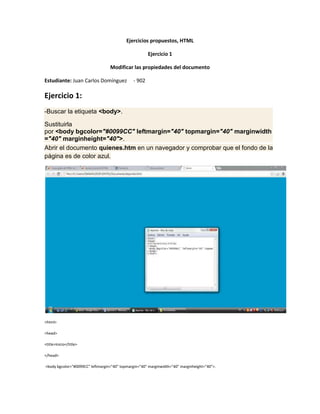
Abrir el documento quienes.htm en un navegador y comprobar que el fondo de la
página es de color azul.


<html>

<head>

<title>Inicio</title>

</head>

<body bgcolor="#0099CC" leftmargin="40" topmargin="40" marginwidth="40" marginheight="40">.
</body>

</html>


Ejercicio 2:

Colocarle imagen de fondo a la página web.

Yo lo hice con un perro.
<html>

<head>

<title>Inicio</title>

</head>

<body background="perro.JPG"</body>

</html>

Ejercicio 1

  • 1.
    Ejercicios propuestos, HTML Ejercicio 1 Modificar las propiedades del documento Estudiante: Juan Carlos Domínguez - 902 Ejercicio 1: -Buscar la etiqueta <body>. Sustituirla por <body bgcolor="#0099CC" leftmargin="40" topmargin="40" marginwidth ="40" marginheight="40">. Abrir el documento quienes.htm en un navegador y comprobar que el fondo de la página es de color azul. <html> <head> <title>Inicio</title> </head> <body bgcolor="#0099CC" leftmargin="40" topmargin="40" marginwidth="40" marginheight="40">.
  • 2.
    </body> </html> Ejercicio 2: Colocarle imagende fondo a la página web. Yo lo hice con un perro. <html> <head> <title>Inicio</title> </head> <body background="perro.JPG"</body> </html>