ESTRUCTURA
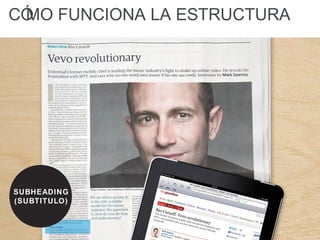
CÓMO FUNCIONA LA ESTRUCTURA
HEADLINE
(ENCABEZADO)
CÓMO FUNCIONA LA ESTRUCTURA
TEXTO
CÓMO FUNCIONA LA ESTRUCTURA
IMAGENES
CÓMO FUNCIONA LA ESTRUCTURA
SUBHEADING
(SUBTITULO)
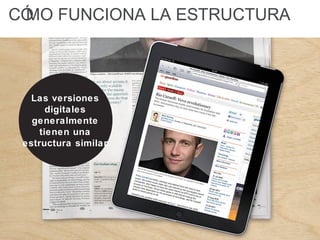
CÓMO FUNCIONA LA ESTRUCTURA
Las versiones
digitales
generalmente
tienen una
estructura similar
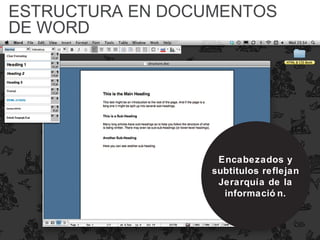
ESTRUCTURA EN DOCUMENTOS
DE WORD
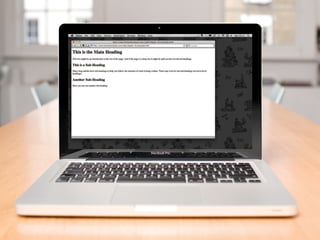
Encabezados y
subtitulos reflejan
Jerarquía de la
informació n.
ESTRUCTURA EN DOCUMENTOS
DE WORD
Encabezados
principales e
informació n
importante se
muestran primero
ESTRUCTURA EN DOCUMENTOS
DE WORD
Para la informació n
de menor jerarquía
se emplean
subtitulos
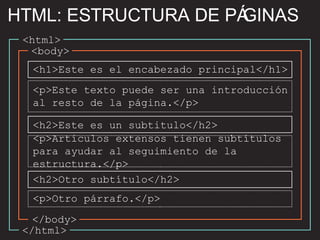
HTML: ESTRUCTURA DE PÁGINAS
<html>
</html>
<body>
</body>
<h1>Este es el encabezado principal</h1>
<h2>Este es un subtitulo</h2>
<h2>Otro subtítulo</h2>
<p>Este texto puede ser una introducción
al resto de la página.</p>
<p>Otro párrafo.</p>
<p>Artículos extensos tienen subtítulos
para ayudar al seguimiento de la
estructura.</p>
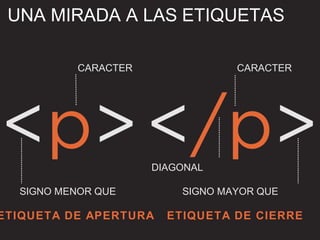
UNA MIRADA A LAS ETIQUETAS
ETIQUETA DE APERTURA ETIQUETA DE CIERRE
CARACTER CARACTER
SIGNO MENOR QUE SIGNO MAYOR QUE
DIAGONAL
langlang en-usen-us
LOS ATRIBUTOS NOS DICEN MÁS
DE LOS ELEMENTOS
<a =" ">Paragraph in English</p>
NOMBRE
DEL ATRIBUTO
VALOR DEL
ATRIBUTO
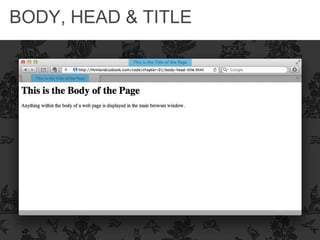
BODY, HEAD & TITLE
<html>
<head>
<title>Este es el título de...</title>
</head>
<body>
<h1>Este es el cuerpo de la página</h1>
<p>Cualquier cosa dentro del cuerpo de
la página web se muestra en la
ventana principal del navegador.</p>
</body>
</html>
BODY, HEAD & TITLE
<html>
<head>
<title>Este es el título de...</title>
</head>
<body>
<h1>Este es el cuerpo de la página</h1>
<p>Cualquier cosa dentro del cuerpo de
la página web se muestra en la
ventana principal del navegador.</p>
</body>
</html>
BODY, HEAD & TITLE
BODY, HEAD & TITLE
<html>
<head>
<title>Este es el título de...</title>
</head>
<body>
<h1>Este es el cuerpo de la página</h1>
<p>Cualquier cosa dentro del cuerpo de
la página web se muestra en la
ventana principal del navegador.</p>
</body>
</html>
BODY, HEAD & TITLE
Las páginas HTML son en
realidad documentos de
texto.
RESUMEN
El HTML utiliza etiquetas
que actuan como
contenedores.
RESUMEN
A las etiquetas se les hace
referencia a menudo como
elementos.
RESUMEN
Las etiquetas generalmente
estan en pares. Etiquetas
de apertura denotan el inicio
de un contenido, y las de
cierre denotan el final.
RESUMEN
Las etiquetas de apertura
pueden contener atributos
que indican informació n
adicional del elemento que
contienen.
RESUMEN
Los atributos requieren
nombre y valor.
RESUMEN
ARCHIVOS HTML
Una página es un archivo donde está
contenido el código HTML en forma de
texto. Estos archivos tienen extensión
.html o .htm (es indiferente cuál
utilizar).
Consejo: Utiliza siempre la misma
extensión en tus archivos HTML. Eso
evitará que te confundas al escribir los
nombres de tus archivos unas veces con
.htm y otras con .html.
ARCHIVOS HTML
Consejo: Utiliza nombres en tus archivos
que tengan algunas normas básicas para
ahorrarte disgustos y líos. No utilices
acentos ni espacios ni otros caracteres
especiales.( !”·$%&/=*ª ñ etc.)
También te ayudará escribir siempre las
letras en minúsculas. Emplea nombres
descriptivos para que te aclaren lo que
hay dentro. Algún caracter como el guión
"-" o el guión bajo "_" te puede ayudar a
separar las palabras.
Por ejemplo quienes_somos.html
01 estructura

01 estructura

  • 2.
  • 3.
    CÓMO FUNCIONA LAESTRUCTURA HEADLINE (ENCABEZADO)
  • 4.
    CÓMO FUNCIONA LAESTRUCTURA TEXTO
  • 5.
    CÓMO FUNCIONA LAESTRUCTURA IMAGENES
  • 6.
    CÓMO FUNCIONA LAESTRUCTURA SUBHEADING (SUBTITULO)
  • 7.
    CÓMO FUNCIONA LAESTRUCTURA Las versiones digitales generalmente tienen una estructura similar
  • 8.
    ESTRUCTURA EN DOCUMENTOS DEWORD Encabezados y subtitulos reflejan Jerarquía de la informació n.
  • 9.
    ESTRUCTURA EN DOCUMENTOS DEWORD Encabezados principales e informació n importante se muestran primero
  • 10.
    ESTRUCTURA EN DOCUMENTOS DEWORD Para la informació n de menor jerarquía se emplean subtitulos
  • 11.
    HTML: ESTRUCTURA DEPÁGINAS <html> </html> <body> </body> <h1>Este es el encabezado principal</h1> <h2>Este es un subtitulo</h2> <h2>Otro subtítulo</h2> <p>Este texto puede ser una introducción al resto de la página.</p> <p>Otro párrafo.</p> <p>Artículos extensos tienen subtítulos para ayudar al seguimiento de la estructura.</p>
  • 12.
    UNA MIRADA ALAS ETIQUETAS ETIQUETA DE APERTURA ETIQUETA DE CIERRE CARACTER CARACTER SIGNO MENOR QUE SIGNO MAYOR QUE DIAGONAL
  • 13.
    langlang en-usen-us LOS ATRIBUTOSNOS DICEN MÁS DE LOS ELEMENTOS <a =" ">Paragraph in English</p> NOMBRE DEL ATRIBUTO VALOR DEL ATRIBUTO
  • 14.
    BODY, HEAD &TITLE <html> <head> <title>Este es el título de...</title> </head> <body> <h1>Este es el cuerpo de la página</h1> <p>Cualquier cosa dentro del cuerpo de la página web se muestra en la ventana principal del navegador.</p> </body> </html>
  • 15.
    BODY, HEAD &TITLE <html> <head> <title>Este es el título de...</title> </head> <body> <h1>Este es el cuerpo de la página</h1> <p>Cualquier cosa dentro del cuerpo de la página web se muestra en la ventana principal del navegador.</p> </body> </html>
  • 16.
  • 17.
    BODY, HEAD &TITLE <html> <head> <title>Este es el título de...</title> </head> <body> <h1>Este es el cuerpo de la página</h1> <p>Cualquier cosa dentro del cuerpo de la página web se muestra en la ventana principal del navegador.</p> </body> </html>
  • 18.
  • 19.
    Las páginas HTMLson en realidad documentos de texto. RESUMEN
  • 20.
    El HTML utilizaetiquetas que actuan como contenedores. RESUMEN
  • 21.
    A las etiquetasse les hace referencia a menudo como elementos. RESUMEN
  • 22.
    Las etiquetas generalmente estanen pares. Etiquetas de apertura denotan el inicio de un contenido, y las de cierre denotan el final. RESUMEN
  • 23.
    Las etiquetas deapertura pueden contener atributos que indican informació n adicional del elemento que contienen. RESUMEN
  • 24.
  • 25.
    ARCHIVOS HTML Una páginaes un archivo donde está contenido el código HTML en forma de texto. Estos archivos tienen extensión .html o .htm (es indiferente cuál utilizar). Consejo: Utiliza siempre la misma extensión en tus archivos HTML. Eso evitará que te confundas al escribir los nombres de tus archivos unas veces con .htm y otras con .html.
  • 26.
    ARCHIVOS HTML Consejo: Utilizanombres en tus archivos que tengan algunas normas básicas para ahorrarte disgustos y líos. No utilices acentos ni espacios ni otros caracteres especiales.( !”·$%&/=*ª ñ etc.) También te ayudará escribir siempre las letras en minúsculas. Emplea nombres descriptivos para que te aclaren lo que hay dentro. Algún caracter como el guión "-" o el guión bajo "_" te puede ayudar a separar las palabras. Por ejemplo quienes_somos.html

Notas del editor

  • #12 Explain: HTML uses tags to act like containers. They indicate the structure of things found inside them. Click: Outlines around &amp;lt;html&amp;gt; Click: Outlines around &amp;lt;body&amp;gt; Click: Outlines around &amp;lt;h1&amp;gt; Click: Outlines around &amp;lt;h2&amp;gt; Click: Outlines around &amp;lt;p&amp;gt;
  • #13 Explain: Most tags come in pairs: an opening and closing tag. Mention use of the term &amp;quot;element&amp;quot;. Click: Opening tag Click: Closing tag Click: Label for character(s) which indicates purposes of tag Click: Label for left-angle bracket Click: Label for right-angle bracket Click: Label for forward slash
  • #14 Explain: Attributes can be used on opening tags. They tell us more about the content of that element. Click: Highlights the attribute name Click: Highlights the attribute value
  • #15 Explain: The overall structure of a page is comprised of two parts: the &amp;lt;head&amp;gt; and the &amp;lt;body&amp;gt;.
  • #16 Explain: The &amp;lt;title&amp;gt; tag sits inside the &amp;lt;head&amp;gt; element.
  • #17 Explain: This highlights where the content of the &amp;lt;title&amp;gt; tag appears.
  • #18 Explain: The &amp;lt;body&amp;gt; comes directly after the &amp;lt;head&amp;gt; and everything inside this element is shown in the main browser window.
  • #19 Explain: This highlights where the content of the &amp;lt;body&amp;gt; tag appears.
  • #20 Clicks: Load individual bullet points.
  • #26 Explain: The &amp;lt;body&amp;gt; comes directly after the &amp;lt;head&amp;gt; and everything inside this element is shown in the main browser window.
  • #27 Explain: The &amp;lt;body&amp;gt; comes directly after the &amp;lt;head&amp;gt; and everything inside this element is shown in the main browser window.