SEGUNDO PERIODO
AHORCADO Primero vamos al menú inicio
Luego todo los  programas
Luego Microsoft  visual Studio 6.0
Y a continuación le damos clic en visual Basic y se abrir  el programa
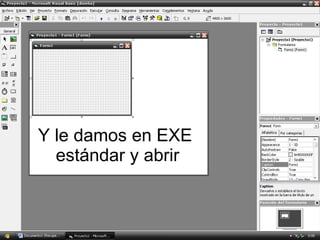
Y le damos en EXE  estándar y abrir
Y empezamos primero tenemos que escoger los text box
Al hacer esto tenemos que tener en Cuentacuentos text box  hay  que hacer en la nuestra tuvimos que hacer 8 labels
Luego hacemos un dibujo para esto utilizamos los shapes que se encuentra en la barra de componentes con el cual haremos la cabeza del muñeco
Luego haremos el cuerpo del muñeco con los line que se encuentra en la barra de componentes
Luego hacemos unos command
Luego de haber hecho los command los nombramos
Ahora tenemos el command anterior cuyo código Será el siguiente Private Sub Command5_Click() If Adodc1.Recordset.EOF And Adodc1.Recordset.BOF Then MsgBox "No hay registros en la base de datos", vbExclamation, "Base de datos vacía Else Adodc1.Recordset.MovePrevious If Adodc1.Recordset.BOF Then Adodc1.Recordset.MoveFirst End If End Sub El del command siguiente cuyo codigo es Select Case No.Text Case 1 If R.Text = clave1.Text Then Adodc1.Recordset.MoveNext If Adodc1.Recordset.EOF Then Adodc1.Recordset.MoveLast End If Else L1.Visible = True Adodc1.Recordset.MoveNext If Adodc1.Recordset.EOF Then Adodc1.Recordset.MoveLast End If End If
Case 2 If R.Text = clave1.Text Then Adodc1.Recordset.MoveNext If Adodc1.Recordset.EOF Then Adodc1.Recordset.MoveLast End If Else L2.Visible = True Adodc1.Recordset.MoveNext If Adodc1.Recordset.EOF Then Adodc1.Recordset.MoveLast End If End If Case 3 If R.Text = clave1.Text Then Adodc1.Recordset.MoveNext If Adodc1.Recordset.EOF Then Adodc1.Recordset.MoveLast End If Else L3.Visible = True Adodc1.Recordset.MoveNext If Adodc1.Recordset.EOF Then Adodc1.Recordset.MoveLast End If End If
Case 4 If R.Text = clave1.Text Then Adodc1.Recordset.MoveNext If Adodc1.Recordset.EOF Then Adodc1.Recordset.MoveLast End If Else L4.Visible = True Adodc1.Recordset.MoveNext If Adodc1.Recordset.EOF Then Adodc1.Recordset.MoveLast End If End If Case 5 If R.Text = clave1.Text Then Adodc1.Recordset.MoveNext If Adodc1.Recordset.EOF Then Adodc1.Recordset.MoveLast End If Else L5.Visible = True Adodc1.Recordset.MoveNext If Adodc1.Recordset.EOF Then Adodc1.Recordset.MoveLast End If End If
Case 6 If R.Text = clave1.Text Then Adodc1.Recordset.MoveNext If Adodc1.Recordset.EOF Then Adodc1.Recordset.MoveLast End If Else L6.Visible = True Adodc1.Recordset.MoveNext If Adodc1.Recordset.EOF Then Adodc1.Recordset.MoveLast End If End If Case 7 If R.Text = clave1.Text Then Adodc1.Recordset.MoveNext If Adodc1.Recordset.EOF Then Adodc1.Recordset.MoveLast End If Else L7.Visible = True Adodc1.Recordset.MoveNext If Adodc1.Recordset.EOF Then Adodc1.Recordset.MoveLast End If End If
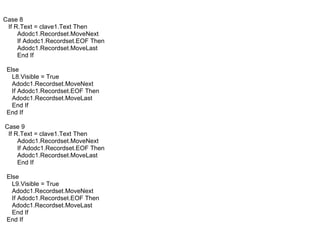
Case 8 If R.Text = clave1.Text Then Adodc1.Recordset.MoveNext If Adodc1.Recordset.EOF Then Adodc1.Recordset.MoveLast End If Else L8.Visible = True Adodc1.Recordset.MoveNext If Adodc1.Recordset.EOF Then Adodc1.Recordset.MoveLast End If End If Case 9 If R.Text = clave1.Text Then Adodc1.Recordset.MoveNext If Adodc1.Recordset.EOF Then Adodc1.Recordset.MoveLast End If Else L9.Visible = True Adodc1.Recordset.MoveNext If Adodc1.Recordset.EOF Then Adodc1.Recordset.MoveLast End If End If
Case 10 If R.Text = clave1.Text Then Adodc1.Recordset.MoveNext If Adodc1.Recordset.EOF Then Adodc1.Recordset.MoveLast End If Else L10.Visible = True Adodc1.Recordset.MoveNext If Adodc1.Recordset.EOF Then Adodc1.Recordset.MoveLast End If End If Case 11 If R.Text = clave1.Text Then Adodc1.Recordset.MoveNext If Adodc1.Recordset.EOF Then Adodc1.Recordset.MoveLast End If Else Line11.Visible = True Adodc1.Recordset.MoveNext If Adodc1.Recordset.EOF Then Adodc1.Recordset.MoveLast End If End If
Case 12 If R.Text = clave1.Text Then Adodc1.Recordset.MoveNext If Adodc1.Recordset.EOF Then Adodc1.Recordset.MoveLast End If Else Line12.Visible = True Adodc1.Recordset.MoveNext If Adodc1.Recordset.EOF Then Adodc1.Recordset.MoveLast End If End If Case 13 If R.Text = clave1.Text Then Adodc1.Recordset.MoveNext If Adodc1.Recordset.EOF Then Adodc1.Recordset.MoveLast End If Else Line13.Visible = True Adodc1.Recordset.MoveNext If Adodc1.Recordset.EOF Then Adodc1.Recordset.MoveLast End If End If
Case 14 If R.Text = clave1.Text Then Adodc1.Recordset.MoveNext If Adodc1.Recordset.EOF Then Adodc1.Recordset.MoveLast MsgBox ("EL JUEGO HA TERMINADO") End End If Else Line14.Visible = True Adodc1.Recordset.MoveNext If Adodc1.Recordset.EOF Then Adodc1.Recordset.MoveLast MsgBox ("EL JUEGO HA TERMINADO") End End If End If Case 15 If R.Text = clave1.Text Then Adodc1.Recordset.MoveNext If Adodc1.Recordset.EOF Then Adodc1.Recordset.MoveLast End If MsgBox ("EL JUEGO HA TERMINADO") End Else Line9.Visible = True Adodc1.Recordset.MoveNext If Adodc1.Recordset.EOF Then Adodc1.Recordset.MoveLast MsgBox ("EL JUEGO HA TERMINADO") End End If End If
Case 16 If R.Text = clave1.Text Then Adodc1.Recordset.MoveNext If Adodc1.Recordset.EOF Then Adodc1.Recordset.MoveLast End If Else Line10.Visible = True Adodc1.Recordset.MoveNext If Adodc1.Recordset.EOF Then Adodc1.Recordset.MoveLast End If End If Case 17 If R.Text = clave1.Text Then Adodc1.Recordset.MoveNext If Adodc1.Recordset.EOF Then Adodc1.Recordset.MoveLast End If Else Line17.Visible = True Adodc1.Recordset.MoveNext If Adodc1.Recordset.EOF Then Adodc1.Recordset.MoveLast End If End If
Case 18 If R.Text = clave1.Text Then Adodc1.Recordset.MoveNext If Adodc1.Recordset.EOF Then Adodc1.Recordset.MoveLast End If Else Line18.Visible = True Adodc1.Recordset.MoveNext If Adodc1.Recordset.EOF Then Adodc1.Recordset.MoveLast End If End If Case 19 If R.Text = clave1.Text Then Adodc1.Recordset.MoveNext If Adodc1.Recordset.EOF Then Adodc1.Recordset.MoveLast End If Else Line19.Visible = True Adodc1.Recordset.MoveNext If Adodc1.Recordset.EOF Then Adodc1.Recordset.MoveLast End If End If
Case 20 If R.Text = clave1.Text Then Adodc1.Recordset.MoveNext If Adodc1.Recordset.EOF Then Adodc1.Recordset.MoveLast End If Else Line20.Visible = True Adodc1.Recordset.MoveNext If Adodc1.Recordset.EOF Then Adodc1.Recordset.MoveLast End If End If End Select End sub.
El  codigo anterior funciona solo funciona con un componente  cuyo nombre es Microsoft ADO data control 6.0 (OLEDB)  este componente se encuentre en la barra de componentes.
Pero hasta este momento todavía no funciona. Lo que haremos es abrir una conexión con una base de datos la cual hicimos anterior mente. Para esto le damos clic derecho en el componente Microsoft ADO data control 6.0 Y luego en propiedades
Al hacer esto  se despliega una venta y le damos en la opción usar cadena de conexión y luego generar
Y se desplegara otra ventana  en donde nos pide seleccionar un proveedor en esta caso utilizamer el Microsoft jet 4.0
Luego en siguiente y nos lleva a la pestaña conexión hay seleccionamos la ubicación de la base de datos
Y luego de darle aceptar volvemos a la ventana pagina de propiedades y vamos a la pestaña origen de registro y desplegamos la opción que dice tipo de comando y le damos en table
Luego desplegamos la opción tabla o nombre de procedimiento almacenado el nombre de la tabla
Luego seleccionamos el muñeco y le damos en propiedades y buscamos la opción visible y le ponemos false

Ahorcado

  • 1.
  • 2.
    AHORCADO Primero vamosal menú inicio
  • 3.
    Luego todo los programas
  • 4.
    Luego Microsoft visual Studio 6.0
  • 5.
    Y a continuaciónle damos clic en visual Basic y se abrir el programa
  • 6.
    Y le damosen EXE estándar y abrir
  • 7.
    Y empezamos primerotenemos que escoger los text box
  • 8.
    Al hacer estotenemos que tener en Cuentacuentos text box hay que hacer en la nuestra tuvimos que hacer 8 labels
  • 9.
    Luego hacemos undibujo para esto utilizamos los shapes que se encuentra en la barra de componentes con el cual haremos la cabeza del muñeco
  • 10.
    Luego haremos elcuerpo del muñeco con los line que se encuentra en la barra de componentes
  • 11.
  • 12.
    Luego de haberhecho los command los nombramos
  • 13.
    Ahora tenemos elcommand anterior cuyo código Será el siguiente Private Sub Command5_Click() If Adodc1.Recordset.EOF And Adodc1.Recordset.BOF Then MsgBox "No hay registros en la base de datos", vbExclamation, "Base de datos vacía Else Adodc1.Recordset.MovePrevious If Adodc1.Recordset.BOF Then Adodc1.Recordset.MoveFirst End If End Sub El del command siguiente cuyo codigo es Select Case No.Text Case 1 If R.Text = clave1.Text Then Adodc1.Recordset.MoveNext If Adodc1.Recordset.EOF Then Adodc1.Recordset.MoveLast End If Else L1.Visible = True Adodc1.Recordset.MoveNext If Adodc1.Recordset.EOF Then Adodc1.Recordset.MoveLast End If End If
  • 14.
    Case 2 IfR.Text = clave1.Text Then Adodc1.Recordset.MoveNext If Adodc1.Recordset.EOF Then Adodc1.Recordset.MoveLast End If Else L2.Visible = True Adodc1.Recordset.MoveNext If Adodc1.Recordset.EOF Then Adodc1.Recordset.MoveLast End If End If Case 3 If R.Text = clave1.Text Then Adodc1.Recordset.MoveNext If Adodc1.Recordset.EOF Then Adodc1.Recordset.MoveLast End If Else L3.Visible = True Adodc1.Recordset.MoveNext If Adodc1.Recordset.EOF Then Adodc1.Recordset.MoveLast End If End If
  • 15.
    Case 4 IfR.Text = clave1.Text Then Adodc1.Recordset.MoveNext If Adodc1.Recordset.EOF Then Adodc1.Recordset.MoveLast End If Else L4.Visible = True Adodc1.Recordset.MoveNext If Adodc1.Recordset.EOF Then Adodc1.Recordset.MoveLast End If End If Case 5 If R.Text = clave1.Text Then Adodc1.Recordset.MoveNext If Adodc1.Recordset.EOF Then Adodc1.Recordset.MoveLast End If Else L5.Visible = True Adodc1.Recordset.MoveNext If Adodc1.Recordset.EOF Then Adodc1.Recordset.MoveLast End If End If
  • 16.
    Case 6 IfR.Text = clave1.Text Then Adodc1.Recordset.MoveNext If Adodc1.Recordset.EOF Then Adodc1.Recordset.MoveLast End If Else L6.Visible = True Adodc1.Recordset.MoveNext If Adodc1.Recordset.EOF Then Adodc1.Recordset.MoveLast End If End If Case 7 If R.Text = clave1.Text Then Adodc1.Recordset.MoveNext If Adodc1.Recordset.EOF Then Adodc1.Recordset.MoveLast End If Else L7.Visible = True Adodc1.Recordset.MoveNext If Adodc1.Recordset.EOF Then Adodc1.Recordset.MoveLast End If End If
  • 17.
    Case 8 IfR.Text = clave1.Text Then Adodc1.Recordset.MoveNext If Adodc1.Recordset.EOF Then Adodc1.Recordset.MoveLast End If Else L8.Visible = True Adodc1.Recordset.MoveNext If Adodc1.Recordset.EOF Then Adodc1.Recordset.MoveLast End If End If Case 9 If R.Text = clave1.Text Then Adodc1.Recordset.MoveNext If Adodc1.Recordset.EOF Then Adodc1.Recordset.MoveLast End If Else L9.Visible = True Adodc1.Recordset.MoveNext If Adodc1.Recordset.EOF Then Adodc1.Recordset.MoveLast End If End If
  • 18.
    Case 10 IfR.Text = clave1.Text Then Adodc1.Recordset.MoveNext If Adodc1.Recordset.EOF Then Adodc1.Recordset.MoveLast End If Else L10.Visible = True Adodc1.Recordset.MoveNext If Adodc1.Recordset.EOF Then Adodc1.Recordset.MoveLast End If End If Case 11 If R.Text = clave1.Text Then Adodc1.Recordset.MoveNext If Adodc1.Recordset.EOF Then Adodc1.Recordset.MoveLast End If Else Line11.Visible = True Adodc1.Recordset.MoveNext If Adodc1.Recordset.EOF Then Adodc1.Recordset.MoveLast End If End If
  • 19.
    Case 12 IfR.Text = clave1.Text Then Adodc1.Recordset.MoveNext If Adodc1.Recordset.EOF Then Adodc1.Recordset.MoveLast End If Else Line12.Visible = True Adodc1.Recordset.MoveNext If Adodc1.Recordset.EOF Then Adodc1.Recordset.MoveLast End If End If Case 13 If R.Text = clave1.Text Then Adodc1.Recordset.MoveNext If Adodc1.Recordset.EOF Then Adodc1.Recordset.MoveLast End If Else Line13.Visible = True Adodc1.Recordset.MoveNext If Adodc1.Recordset.EOF Then Adodc1.Recordset.MoveLast End If End If
  • 20.
    Case 14 IfR.Text = clave1.Text Then Adodc1.Recordset.MoveNext If Adodc1.Recordset.EOF Then Adodc1.Recordset.MoveLast MsgBox ("EL JUEGO HA TERMINADO") End End If Else Line14.Visible = True Adodc1.Recordset.MoveNext If Adodc1.Recordset.EOF Then Adodc1.Recordset.MoveLast MsgBox ("EL JUEGO HA TERMINADO") End End If End If Case 15 If R.Text = clave1.Text Then Adodc1.Recordset.MoveNext If Adodc1.Recordset.EOF Then Adodc1.Recordset.MoveLast End If MsgBox ("EL JUEGO HA TERMINADO") End Else Line9.Visible = True Adodc1.Recordset.MoveNext If Adodc1.Recordset.EOF Then Adodc1.Recordset.MoveLast MsgBox ("EL JUEGO HA TERMINADO") End End If End If
  • 21.
    Case 16 IfR.Text = clave1.Text Then Adodc1.Recordset.MoveNext If Adodc1.Recordset.EOF Then Adodc1.Recordset.MoveLast End If Else Line10.Visible = True Adodc1.Recordset.MoveNext If Adodc1.Recordset.EOF Then Adodc1.Recordset.MoveLast End If End If Case 17 If R.Text = clave1.Text Then Adodc1.Recordset.MoveNext If Adodc1.Recordset.EOF Then Adodc1.Recordset.MoveLast End If Else Line17.Visible = True Adodc1.Recordset.MoveNext If Adodc1.Recordset.EOF Then Adodc1.Recordset.MoveLast End If End If
  • 22.
    Case 18 IfR.Text = clave1.Text Then Adodc1.Recordset.MoveNext If Adodc1.Recordset.EOF Then Adodc1.Recordset.MoveLast End If Else Line18.Visible = True Adodc1.Recordset.MoveNext If Adodc1.Recordset.EOF Then Adodc1.Recordset.MoveLast End If End If Case 19 If R.Text = clave1.Text Then Adodc1.Recordset.MoveNext If Adodc1.Recordset.EOF Then Adodc1.Recordset.MoveLast End If Else Line19.Visible = True Adodc1.Recordset.MoveNext If Adodc1.Recordset.EOF Then Adodc1.Recordset.MoveLast End If End If
  • 23.
    Case 20 IfR.Text = clave1.Text Then Adodc1.Recordset.MoveNext If Adodc1.Recordset.EOF Then Adodc1.Recordset.MoveLast End If Else Line20.Visible = True Adodc1.Recordset.MoveNext If Adodc1.Recordset.EOF Then Adodc1.Recordset.MoveLast End If End If End Select End sub.
  • 24.
    El codigoanterior funciona solo funciona con un componente cuyo nombre es Microsoft ADO data control 6.0 (OLEDB) este componente se encuentre en la barra de componentes.
  • 25.
    Pero hasta estemomento todavía no funciona. Lo que haremos es abrir una conexión con una base de datos la cual hicimos anterior mente. Para esto le damos clic derecho en el componente Microsoft ADO data control 6.0 Y luego en propiedades
  • 26.
    Al hacer esto se despliega una venta y le damos en la opción usar cadena de conexión y luego generar
  • 27.
    Y se desplegaraotra ventana en donde nos pide seleccionar un proveedor en esta caso utilizamer el Microsoft jet 4.0
  • 28.
    Luego en siguientey nos lleva a la pestaña conexión hay seleccionamos la ubicación de la base de datos
  • 29.
    Y luego dedarle aceptar volvemos a la ventana pagina de propiedades y vamos a la pestaña origen de registro y desplegamos la opción que dice tipo de comando y le damos en table
  • 30.
    Luego desplegamos laopción tabla o nombre de procedimiento almacenado el nombre de la tabla
  • 31.
    Luego seleccionamos elmuñeco y le damos en propiedades y buscamos la opción visible y le ponemos false