¿De cuántas formas se puede extender Office 365 mediante
desarrollo?
Adrián Díaz Cervera & Alberto Díaz Martín
¿Quiénes somos?
00
Adrián Díaz Cervera
MVP SharePoint Server
SharePoint Architect en ENCAMINA
http://blogs.encamina.com/desarrollandosobresharepoint
http://geeks.ms/blogs/adiazcervera
adiaz@encamina.com
@AdrianDiaz81
Alberto Diaz Martin
MVP SharePoint Server
SharePoint Team Leader en ENCAMINA
http://blogs.encamina.com/negocios-sharepoint/
http://geeks.ms/blogs/adiazmartin
alberto.diaz@encamina.com
@adiazcan
Evolución del Desarrollo en SharePoint
01
Más de una década de evolución
… el futuro próximo
Formas de Extender
02
• Apps de SharePoint
– Provider Hosted
– SharePoint Hosted
• Apps de Office
– Excel
– Word
– Outlook
• Apps de Cloud
– Aplicaciones interactuando con la nube
– APIS’ Office 365
– AD Azure
Formas de Extender
Apps de SharePoint
03
Tipos de Apps for SharePoint
• Provider Hosted
– Puedes alojarla donde quieras: Azure, Amazon,… o en tus propias infraestructuras
– Puedes utilizar cualquier lenguaje de desarrollo
– C#, Javascript, HTML5, PHP, Perl, Cobol
• SharePoint Hosted
– Alojadas en el propio SharePoint
– Solamente puedes utilizar HTML5, CSS3 y JS
Según su alojamiento
Arquitectura
Remote Web
Azure Web Sites
SharePoint
Online
• Web Project
– ASP.NET Web Forms
– MVC 5
• Authorization
– Azure Access Control Services
– Server-to-Server High Trust
• Programmability
– SharePointContextProvider class
– Managed CSOM or REST
– JavaScript Cross-Domain Library
Creando Provider-Hosted Apps
• App debe de estar registrada en nuestro SharePoint online
– Client ID – generado durante el proceso de registro
– Client Secret – generado durante el proceso de registro
– App Host Domain – el dominio del sitio de Azure donde esta alojada la APP
– Redirect URL – la URL donde se redirige una vez comprobado los permisos
• SharePoint proporciona páginas de gestión de registro
– AppRegNew.aspx – para registrar nuevas app
– AppInv.aspx – para actualizar apps registradas apps
– AppPrincipals.aspx – lista todas las apps registradas
Consideraciones
Registrando una nueva APP
22
Generated value
Generated value
Free text value
Azure domain (e.g.,myapp.azurewebsites.net)
Web address (e.g.,
https://myapp.azurewebsites.net)
DEMO
Apps Cloud
04
Office 365 Device Apps
• Incluido con la subscripción de Office 365
• La administración de los usuarios y grupos desde el Portal de Office 365
– Cambios persisten en el Azure AD
Azure Active Directory (Azure AD)
• Flujo de Autenticación único para Office 365
– Azure AD Graph, Exchange, SharePoint
– Device apps and web sites
– Admin y usuarios dan su consentimiento
• Protocol seguro
– OAuth 2.0
– No captura las credenciales de los usuarios
– Soporta MFA and federación en el login de usuarios
– Acceso mediante token
Azure AD OAuth in Office 365
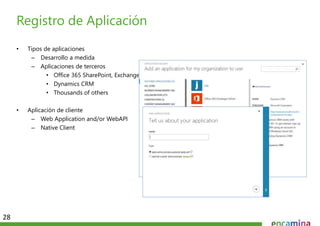
• Tipos de aplicaciones
– Desarrollo a medida
– Aplicaciones de terceros
• Office 365 SharePoint, Exchange
• Dynamics CRM
• Thousands of others
• Aplicación de cliente
– Web Application and/or WebAPI
– Native Client
Registro de Aplicación
28
• Operaciones con la API
– Leer mensajes
– Borrar mensajes
– Enviar mensajes
– Trabajar con Adjuntos
Mail Messages
29
• Operaciones con la API
– Leer eventos de un rango especifigo
– Crear eventos
– Borrar eventos
– Editar eventos
Calendar Events
30
• Operaciones con la API
– Leer contactos
– Buscar contactos
– Crear contactos
– Eliminar contactos
– Editar contactos
Contacts
31
OneDrive for Business
32
Una libreria personal para
almacenar y organizar los
documentos de nuestro trabajo
diario
DEMO
Office Apps
05
• Es una página Web cargada dentro de una Aplicación Office
– Embebida dentro o en un panel sin documentos, mails o tareas.
– Funciona tanto en Aplicaciones de escritorio de Office como en Office Web Apps
• Usa las tecnologías Web
– HTML 5 y CSS se utilizan para la interfaz de usuario
– JavaScript y jQuery se utilizan para añadir lógica a la aplicación y en los event handlers
– App pueden leer/escribrir sobre el contenido de los documentos de Office
– App pueden llamar a Servicos Web alojados en Interner o en tu propia red
¿Como es una App para Office?
• Apps for Office come in three different shapes
– Task Pane App (only shape supported by Microsoft Word)
– Content App
– Mail App
Designing Apps for Office - Shapes
• Cada App para Office esta basada en un
Manifiesto.XML
– Manifiesto define el tipo de App para Office
– Manifiesto define que Aplicaciones soporta
– Manifiesto define los requisitos
Escructura de una App para Office
App for Office
Manifest
<XML>
Web
Page
HTML+JS
App for Office
Catalog Server Web Server
App for Office
DEMO
Conclusiones
06
Apps SharePoint Apps Cloud
Acceso A través de Site Colection Apps Louncher
Autenticación de Office
365/SharePoint
Autenticación de la APP Registrado Azure AD
Hosting Cualquier tipo Cualquier tipo
Registrar la APP Registrado en
SharePoint/Office 365
usando AppRegNew.aspx
Registradp en Azure AD
Comparación de Apps
¿Preguntas?

Extender office365

  • 1.
    ¿De cuántas formasse puede extender Office 365 mediante desarrollo? Adrián Díaz Cervera & Alberto Díaz Martín
  • 2.
  • 3.
    Adrián Díaz Cervera MVPSharePoint Server SharePoint Architect en ENCAMINA http://blogs.encamina.com/desarrollandosobresharepoint http://geeks.ms/blogs/adiazcervera adiaz@encamina.com @AdrianDiaz81
  • 4.
    Alberto Diaz Martin MVPSharePoint Server SharePoint Team Leader en ENCAMINA http://blogs.encamina.com/negocios-sharepoint/ http://geeks.ms/blogs/adiazmartin alberto.diaz@encamina.com @adiazcan
  • 6.
    Evolución del Desarrolloen SharePoint 01
  • 7.
    Más de unadécada de evolución
  • 8.
    … el futuropróximo
  • 9.
  • 10.
    • Apps deSharePoint – Provider Hosted – SharePoint Hosted • Apps de Office – Excel – Word – Outlook • Apps de Cloud – Aplicaciones interactuando con la nube – APIS’ Office 365 – AD Azure Formas de Extender
  • 11.
  • 12.
    Tipos de Appsfor SharePoint
  • 14.
    Tipos de Appsfor SharePoint
  • 16.
    Tipos de Appsfor SharePoint
  • 18.
    • Provider Hosted –Puedes alojarla donde quieras: Azure, Amazon,… o en tus propias infraestructuras – Puedes utilizar cualquier lenguaje de desarrollo – C#, Javascript, HTML5, PHP, Perl, Cobol • SharePoint Hosted – Alojadas en el propio SharePoint – Solamente puedes utilizar HTML5, CSS3 y JS Según su alojamiento
  • 19.
    Arquitectura Remote Web Azure WebSites SharePoint Online
  • 20.
    • Web Project –ASP.NET Web Forms – MVC 5 • Authorization – Azure Access Control Services – Server-to-Server High Trust • Programmability – SharePointContextProvider class – Managed CSOM or REST – JavaScript Cross-Domain Library Creando Provider-Hosted Apps
  • 21.
    • App debede estar registrada en nuestro SharePoint online – Client ID – generado durante el proceso de registro – Client Secret – generado durante el proceso de registro – App Host Domain – el dominio del sitio de Azure donde esta alojada la APP – Redirect URL – la URL donde se redirige una vez comprobado los permisos • SharePoint proporciona páginas de gestión de registro – AppRegNew.aspx – para registrar nuevas app – AppInv.aspx – para actualizar apps registradas apps – AppPrincipals.aspx – lista todas las apps registradas Consideraciones
  • 22.
    Registrando una nuevaAPP 22 Generated value Generated value Free text value Azure domain (e.g.,myapp.azurewebsites.net) Web address (e.g., https://myapp.azurewebsites.net)
  • 23.
  • 24.
  • 25.
  • 26.
    • Incluido conla subscripción de Office 365 • La administración de los usuarios y grupos desde el Portal de Office 365 – Cambios persisten en el Azure AD Azure Active Directory (Azure AD)
  • 27.
    • Flujo deAutenticación único para Office 365 – Azure AD Graph, Exchange, SharePoint – Device apps and web sites – Admin y usuarios dan su consentimiento • Protocol seguro – OAuth 2.0 – No captura las credenciales de los usuarios – Soporta MFA and federación en el login de usuarios – Acceso mediante token Azure AD OAuth in Office 365
  • 28.
    • Tipos deaplicaciones – Desarrollo a medida – Aplicaciones de terceros • Office 365 SharePoint, Exchange • Dynamics CRM • Thousands of others • Aplicación de cliente – Web Application and/or WebAPI – Native Client Registro de Aplicación 28
  • 29.
    • Operaciones conla API – Leer mensajes – Borrar mensajes – Enviar mensajes – Trabajar con Adjuntos Mail Messages 29
  • 30.
    • Operaciones conla API – Leer eventos de un rango especifigo – Crear eventos – Borrar eventos – Editar eventos Calendar Events 30
  • 31.
    • Operaciones conla API – Leer contactos – Buscar contactos – Crear contactos – Eliminar contactos – Editar contactos Contacts 31
  • 32.
    OneDrive for Business 32 Unalibreria personal para almacenar y organizar los documentos de nuestro trabajo diario
  • 33.
  • 34.
  • 35.
    • Es unapágina Web cargada dentro de una Aplicación Office – Embebida dentro o en un panel sin documentos, mails o tareas. – Funciona tanto en Aplicaciones de escritorio de Office como en Office Web Apps • Usa las tecnologías Web – HTML 5 y CSS se utilizan para la interfaz de usuario – JavaScript y jQuery se utilizan para añadir lógica a la aplicación y en los event handlers – App pueden leer/escribrir sobre el contenido de los documentos de Office – App pueden llamar a Servicos Web alojados en Interner o en tu propia red ¿Como es una App para Office?
  • 36.
    • Apps forOffice come in three different shapes – Task Pane App (only shape supported by Microsoft Word) – Content App – Mail App Designing Apps for Office - Shapes
  • 37.
    • Cada Apppara Office esta basada en un Manifiesto.XML – Manifiesto define el tipo de App para Office – Manifiesto define que Aplicaciones soporta – Manifiesto define los requisitos Escructura de una App para Office App for Office Manifest <XML> Web Page HTML+JS App for Office Catalog Server Web Server App for Office
  • 38.
  • 39.
  • 40.
    Apps SharePoint AppsCloud Acceso A través de Site Colection Apps Louncher Autenticación de Office 365/SharePoint Autenticación de la APP Registrado Azure AD Hosting Cualquier tipo Cualquier tipo Registrar la APP Registrado en SharePoint/Office 365 usando AppRegNew.aspx Registradp en Azure AD Comparación de Apps
  • 41.

Notas del editor

  • #2  Versión de portada para Ofertas. Si utilizas esta, elimina las otras tres.
  • #3  Si el documento lleva más de tres secciones, repite los bloques de color por el mismo orden: azul, verde, morado.
  • #13 The new SharePoint App Model gives developers three different ways to surface their app customizations within SharePoint sites. The first option, a full page, is required for all apps. Think of this as the immersive experience where you can create an app that takes over the entire screen. Even if your app is designed to only use the App Part or UI command extension options (both explained in a moment), you must still have a full page implementation. However this can simply be an “about me” or FAQ style page for your app customizations.
  • #14 This is an example of what the full page immersive experience would look like. Notice the traditional SharePoint experience is missing… all we see is a familiar SharePoint app bar at the top, but everything else is custom. Microsoft does provide some controls & tools to ingest the parent site’s styles so that your app can have a similar look & feel as the parent site.
  • #15 The new SharePoint App Model gives developers three different ways to surface their app customizations within SharePoint sites. The first option, a full page, is required for all apps. Think of this as the immersive experience where you can create an app that takes over the entire screen. Even if your app is designed to only use the App Part or UI command extension options (both explained in a moment), you must still have a full page implementation. However this can simply be an “about me” or FAQ style page for your app customizations.
  • #16 Here is an example of an app part. Notice adding it to the existing page is very similar to adding a web part. When it’s rendered, it looks like a standard web part, as in the screenshot showing the weather for Reston, Virginia… except that content is actually coming from the app.
  • #17 The new SharePoint App Model gives developers three different ways to surface their app customizations within SharePoint sites. The first option, a full page, is required for all apps. Think of this as the immersive experience where you can create an app that takes over the entire screen. Even if your app is designed to only use the App Part or UI command extension options (both explained in a moment), you must still have a full page implementation. However this can simply be an “about me” or FAQ style page for your app customizations.
  • #18 Here is an example of a command UI extension. You see that this app has created a new tab in the ribbon called TIMELINE that contains it’s own tab groups and controls to interact with the page.
  • #20 Remote web is deployed on separate infrastructure Typically this is Azure web sites, but can be anything Solution may or may not have an App Web depending upon whether anything is deployed (like lists or libraries in the App Web) Host web can be accessed by remote web using OAuth or cross-domain library Additional assets like SQL Azure or web-based REST services can be accessed from the remote web and incorporated into the solution
  • #23 Apps must be registered with SharePoint. This page will generate a new client ID and secret for the app. If deployed to Azure, use that information to fill out the rest of the form.
  • #26 Prior to the release of the Office 365 APIs, device apps had to prompt users for credentials for the service, and in some cases the location of the resources. Storing credentials is very risky, and a worst practice.
  • #27 Although an Azure AD is included with Office 365, accessing it via the Azure Management Portal requires a “sign-up.” However, there are no charges from Azure for using AD. (Charges will occur if other services are used.)
  • #28 With the Office 365 APIs, which leverage the Azure AD Oauth service, device apps no longer need to store user credentials. Azure AD has implemented a “Common Consent” dialog, providing a consistent interface for permission grants. Typically, OAuth is used to access a single resource. Common Consent is unique in that it can provide a token to Exchange Mail/Calendar/Contacts as well as SharePoint lists and files in OneDrive .
  • #33 OneDrive for Business is a personal library intended for storing and organizing your work documents. As an integral part of Office 365 or SharePoint Server 2013, OneDrive for Business lets you work within the context of your organization, with features such as direct access to your organization’s address book.  Note    OneDrive for Business is different from OneDrive, which is intended for personal storage separate from your workplace. OneDrive for Business is also different from your team site, which is intended for storing team or project-related documents.
  • #36 An App for Office can be seen as a Web page loaded inside an Office Application. In some cases it will appear embedded inline within the document. In other cases it might appear as a task pane or within a message in Outlook. Note that the architecture for Apps for Office has been designed to work in both Office Applications and Office Web Applications. WEF and Apps for Office allow Office applications to be extended in such as way so that they can leverage Web technologies such as HTML 5 and CSS for rendering user interface as well as JavaScript and jQuery to add behavior. When you write the JavaScript code for an App for Office, you can call REST APIs such as those added to SharePoint 2013 to retrieve and update data from across network.
  • #37 When you begin to design an app, you must pick one of the three different shapes. You can create a document-based app as either a Task Pane App or a Content App. Alternatively, you can create a Mail App that targets Outlook and Outlook OWA.
  • #38 Every App for Office must be distributed with an XML-based manifest which contains information about the app itself. For example, the app manifest contains an address to a Web page on the Internet which is used to load the app. The app manifest also includes information which indicates which Office applications it supports. The app manifest also defines the required capabilities which represent the set of permissions that the app needs in order to run and complete its work.