I.S.T. “F.P.G.V.”
       Computación e Informática                                                    Taller de Aplicaciones Móviles


                                  GUÍA DE LABORATORIO N° 02
OBJETIVOS:
 Desarrollo de Aplicaciones Móviles con .NET Compact Framework de .NET 2005.
 Uso de Arrays, Estructuras, propiedades
 Creación de variables de memoria con diferentes ámbitos.
 Uso de procedimientos creados por el usuario.
 Manejo de estructuras de control y repetitivas.

1.1   CONSIDERACIONES INICIALES

      Debe abrir su proyecto de la guía de laboratorio Nº 01, y deberá agregar formularios para las aplicaciones
      siguientes:

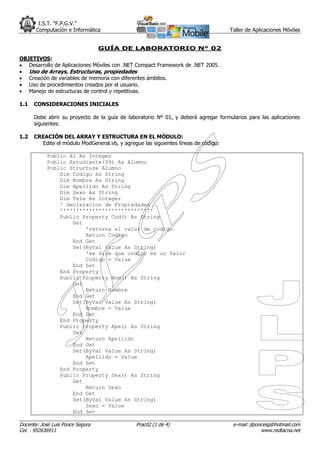
1.2   CREACIÓN DEL ARRAY Y ESTRUCTURA EN EL MÓDULO:
        Edite el módulo ModGeneral.vb, y agregue las siguientes líneas de código:

            Public Al As Integer
            Public Estudiante(99) As Alumno
            Public Structure Alumno
                Dim Codigo As String
                Dim Nombre As String
                Dim Apellido As String
                Dim Sexo As String
                Dim Tele As Integer
                ' declaracion de Propiedades
                '''''''''''''''''''''''''''''
                Public Property Cod() As String
                    Get
                        'retorna el valor de codigo
                        Return Codigo
                    End Get
                    Set(ByVal Value As String)
                        'se dice que codigo es un Valor
                        Codigo = Value
                    End Set
                End Property
                Public Property Nom() As String
                    Get
                        Return Nombre
                    End Get
                    Set(ByVal Value As String)
                        Nombre = Value
                    End Set
                End Property
                Public Property Ape() As String
                    Get
                        Return Apellido
                    End Get
                    Set(ByVal Value As String)
                        Apellido = Value
                    End Set
                End Property
                Public Property Sex() As String
                    Get
                        Return Sexo
                    End Get
                    Set(ByVal Value As String)
                        Sexo = Value
                    End Set

Docente: José Luis Ponce Segura                Prac02 (1 de 4)                       e-mail: jlponcesg@hotmail.com
Cel. : 952636911                                                                                  www.redtacna.net
I.S.T. “F.P.G.V.”
       Computación e Informática                                               Taller de Aplicaciones Móviles

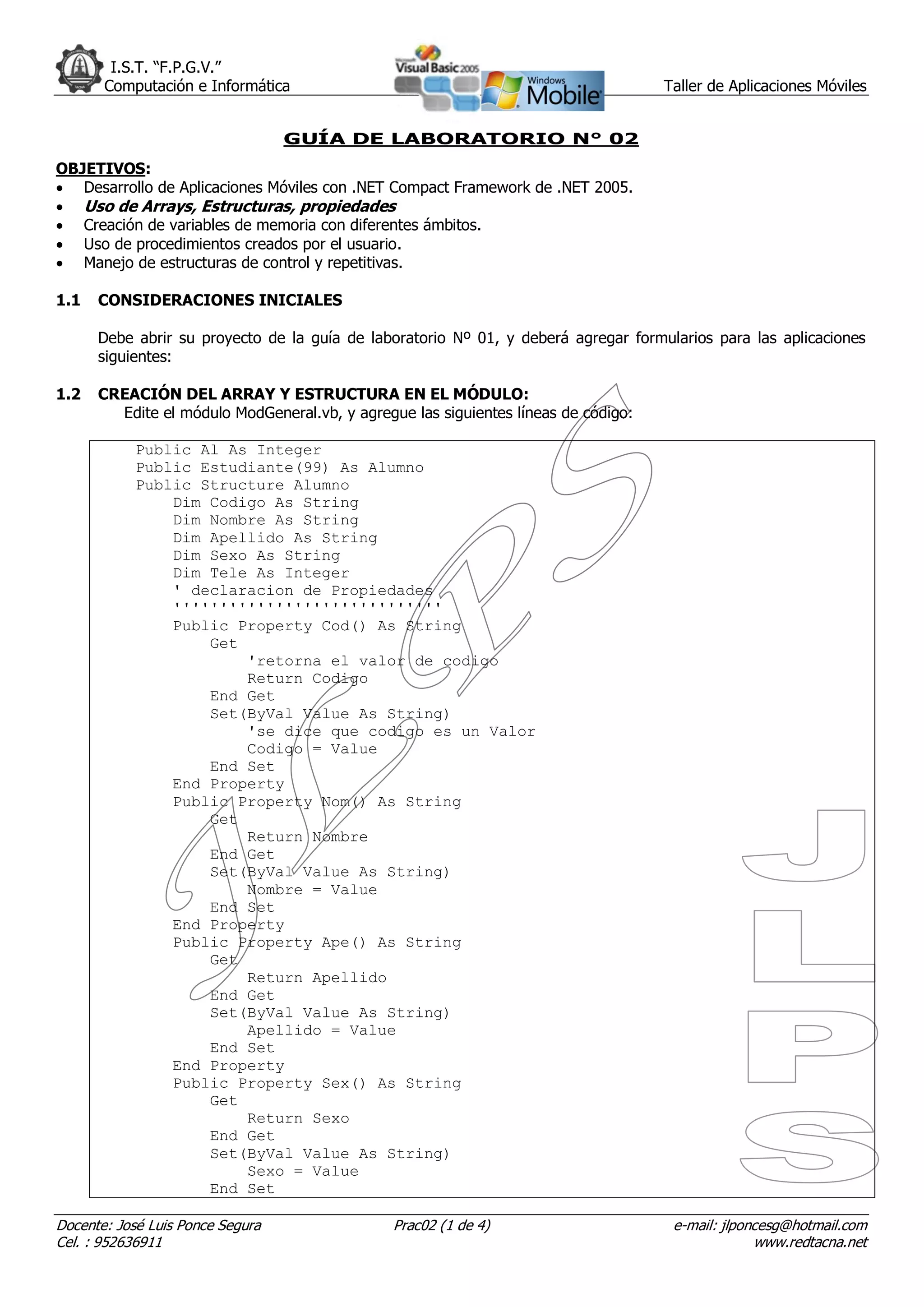
                End Property
                Public Property Telf() As Integer
                    Get
                        Return Tele
                    End Get
                    Set(ByVal Value As Integer)
                        Tele = Value
                    End Set
                End Property
            End Structure


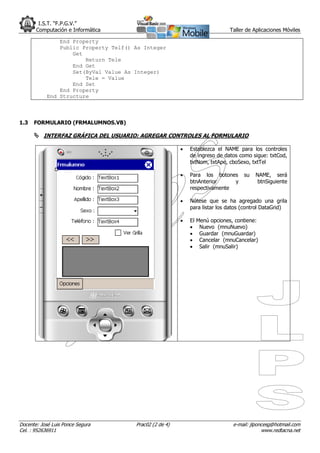
1.3   FORMULARIO (FRMALUMNOS.VB)

       INTERFAZ GRÁFICA DEL USUARIO: AGREGAR CONTROLES AL FORMULARIO

                                                            Establezca el NAME para los controles
                                                             de ingreso de datos como sigue: txtCod,
                                                             txtNom, txtApe, cboSexo, txtTel

                                                            Para los botones        su   NAME, será
                                                             btnAnterior     y             btnSiguiente
                                                             respectivamente

                                                            Nótese que se ha agregado una grila
                                                             para listar los datos (control DataGrid)

                                                            El   Menú opciones, contiene:
                                                                  Nuevo (mnuNuevo)
                                                                  Guardar (mnuGuardar)
                                                                  Cancelar (mnuCancelar)
                                                                  Salir (mnuSalir)


Docente: José Luis Ponce Segura        Prac02 (2 de 4)                          e-mail: jlponcesg@hotmail.com
Cel. : 952636911                                                                             www.redtacna.net
I.S.T. “F.P.G.V.”
       Computación e Informática                                 Taller de Aplicaciones Móviles


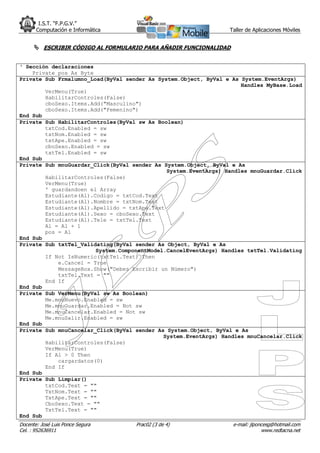
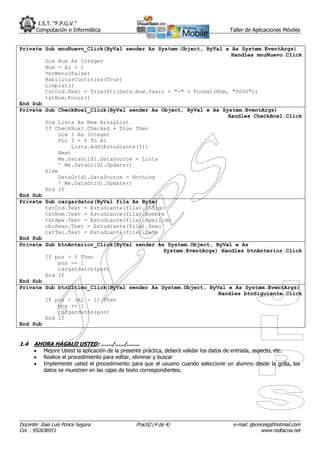
       ESCRIBIR CÓDIGO AL FORMULARIO PARA AÑADIR FUNCIONALIDAD


‘ Sección declaraciones
    Private pos As Byte
Private Sub Frmalumno_Load(ByVal sender As System.Object, ByVal e As System.EventArgs)
                                                                     Handles MyBase.Load
        VerMenu(True)
        HabilitarControles(False)
        cboSexo.Items.Add("Masculino")
        cboSexo.Items.Add("Femenino")
End Sub
Private Sub HabilitarControles(ByVal sw As Boolean)
        txtCod.Enabled = sw
        txtNom.Enabled = sw
        txtApe.Enabled = sw
        cboSexo.Enabled = sw
        txtTel.Enabled = sw
End Sub
Private Sub mnuGuardar_Click(ByVal sender As System.Object, ByVal e As
                                              System.EventArgs) Handles mnuGuardar.Click
        HabilitarControles(False)
        VerMenu(True)
        ' guardandoen el Array
        Estudiante(Al).Codigo = txtCod.Text
        Estudiante(Al).Nombre = txtNom.Text
        Estudiante(Al).Apellido = txtApe.Text
        Estudiante(Al).Sexo = cboSexo.Text
        Estudiante(Al).Tele = txtTel.Text
        Al = Al + 1
        pos = Al
End Sub
Private Sub txtTel_Validating(ByVal sender As Object, ByVal e As
                        System.ComponentModel.CancelEventArgs) Handles txtTel.Validating
        If Not IsNumeric(txtTel.Text) Then
            e.Cancel = True
            MessageBox.Show("Debes Escribir un Número")
            txtTel.Text = ""
        End If
End Sub
Private Sub VerMenu(ByVal sw As Boolean)
        Me.mnuNuevo.Enabled = sw
        Me.mnuGuardar.Enabled = Not sw
        Me.mnuCancelar.Enabled = Not sw
        Me.mnuSalir.Enabled = sw
End Sub
Private Sub mnuCancelar_Click(ByVal sender As System.Object, ByVal e As
                                             System.EventArgs) Handles mnuCancelar.Click
        HabilitarControles(False)
        VerMenu(True)
        If Al > 0 Then
            cargardatos(0)
        End If
End Sub
Private Sub Limpiar()
        txtCod.Text = ""
        TxtNom.Text = ""
        TxtApe.Text = ""
        CboSexo.Text = ""
        TxtTel.Text = ""
End Sub
Docente: José Luis Ponce Segura     Prac02 (3 de 4)               e-mail: jlponcesg@hotmail.com
Cel. : 952636911                                                               www.redtacna.net
I.S.T. “F.P.G.V.”
       Computación e Informática                                                    Taller de Aplicaciones Móviles


Private Sub mnuNuevo_Click(ByVal sender As System.Object, ByVal e As System.EventArgs)
                                                                  Handles mnuNuevo.Click
        Dim Num As Integer
        Num = Al + 1
        VerMenu(False)
        HabilitarControles(True)
        Limpiar()
        txtCod.Text = Trim(Str(Date.Now.Year) + "-" + Format(Num, "0000"))
        txtNom.Focus()
End Sub
Private Sub CheckBox1_Click(ByVal sender As Object, ByVal e As System.EventArgs)
                                                                 Handles CheckBox1.Click
        Dim Lista As New ArrayList
        If CheckBox1.Checked = True Then
            Dim I As Integer
            For I = 0 To Al
                Lista.Add(Estudiante(I))
            Next
            Me.DataGrid1.DataSource = Lista
            ' Me.DataGrid1.Update()
        Else
            DataGrid1.DataSource = Nothing
            ' Me.DataGrid1.Update()
        End If
End Sub
Private Sub cargardatos(ByVal fila As Byte)
        txtCod.Text = Estudiante(fila).Codigo
        txtNom.Text = Estudiante(fila).Nombre
        txtApe.Text = Estudiante(fila).Apellido
        cboSexo.Text = Estudiante(fila).Sexo
        txtTel.Text = Estudiante(fila).Tele
End Sub
Private Sub btnAnterior_Click(ByVal sender As System.Object, ByVal e As
                                             System.EventArgs) Handles btnAnterior.Click
        If pos > 0 Then
            pos -= 1
            cargardatos(pos)
        End If
End Sub
Private Sub btnUltimo_Click(ByVal sender As System.Object, ByVal e As System.EventArgs)
                                                              Handles btnSiguiente.Click
        If pos < (Al - 1) Then
            pos += 1
            cargardatos(pos)
        End If
End Sub


1.4   AHORA HÁGALO USTED: ……/…../…….
         Mejore Usted la aplicación de la presente práctica, deberá validar los datos de entrada, aspecto, etc.
         Realice el procedimiento para editar, eliminar y buscar
         Implemente usted el procedimiento para que el usuario cuando seleccione un alumno desde la grilla, los
          datos se muestren en las cajas de texto correspondientes.


Docente: José Luis Ponce Segura               Prac02 (4 de 4)                        e-mail: jlponcesg@hotmail.com
Cel. : 952636911                                                                                  www.redtacna.net

Guia n2 tam 2009 1

  • 1.
    I.S.T. “F.P.G.V.” Computación e Informática Taller de Aplicaciones Móviles GUÍA DE LABORATORIO N° 02 OBJETIVOS:  Desarrollo de Aplicaciones Móviles con .NET Compact Framework de .NET 2005.  Uso de Arrays, Estructuras, propiedades  Creación de variables de memoria con diferentes ámbitos.  Uso de procedimientos creados por el usuario.  Manejo de estructuras de control y repetitivas. 1.1 CONSIDERACIONES INICIALES Debe abrir su proyecto de la guía de laboratorio Nº 01, y deberá agregar formularios para las aplicaciones siguientes: 1.2 CREACIÓN DEL ARRAY Y ESTRUCTURA EN EL MÓDULO: Edite el módulo ModGeneral.vb, y agregue las siguientes líneas de código: Public Al As Integer Public Estudiante(99) As Alumno Public Structure Alumno Dim Codigo As String Dim Nombre As String Dim Apellido As String Dim Sexo As String Dim Tele As Integer ' declaracion de Propiedades ''''''''''''''''''''''''''''' Public Property Cod() As String Get 'retorna el valor de codigo Return Codigo End Get Set(ByVal Value As String) 'se dice que codigo es un Valor Codigo = Value End Set End Property Public Property Nom() As String Get Return Nombre End Get Set(ByVal Value As String) Nombre = Value End Set End Property Public Property Ape() As String Get Return Apellido End Get Set(ByVal Value As String) Apellido = Value End Set End Property Public Property Sex() As String Get Return Sexo End Get Set(ByVal Value As String) Sexo = Value End Set Docente: José Luis Ponce Segura Prac02 (1 de 4) e-mail: jlponcesg@hotmail.com Cel. : 952636911 www.redtacna.net
  • 2.
    I.S.T. “F.P.G.V.” Computación e Informática Taller de Aplicaciones Móviles End Property Public Property Telf() As Integer Get Return Tele End Get Set(ByVal Value As Integer) Tele = Value End Set End Property End Structure 1.3 FORMULARIO (FRMALUMNOS.VB)  INTERFAZ GRÁFICA DEL USUARIO: AGREGAR CONTROLES AL FORMULARIO  Establezca el NAME para los controles de ingreso de datos como sigue: txtCod, txtNom, txtApe, cboSexo, txtTel  Para los botones su NAME, será btnAnterior y btnSiguiente respectivamente  Nótese que se ha agregado una grila para listar los datos (control DataGrid)  El Menú opciones, contiene:  Nuevo (mnuNuevo)  Guardar (mnuGuardar)  Cancelar (mnuCancelar)  Salir (mnuSalir) Docente: José Luis Ponce Segura Prac02 (2 de 4) e-mail: jlponcesg@hotmail.com Cel. : 952636911 www.redtacna.net
  • 3.
    I.S.T. “F.P.G.V.” Computación e Informática Taller de Aplicaciones Móviles  ESCRIBIR CÓDIGO AL FORMULARIO PARA AÑADIR FUNCIONALIDAD ‘ Sección declaraciones Private pos As Byte Private Sub Frmalumno_Load(ByVal sender As System.Object, ByVal e As System.EventArgs) Handles MyBase.Load VerMenu(True) HabilitarControles(False) cboSexo.Items.Add("Masculino") cboSexo.Items.Add("Femenino") End Sub Private Sub HabilitarControles(ByVal sw As Boolean) txtCod.Enabled = sw txtNom.Enabled = sw txtApe.Enabled = sw cboSexo.Enabled = sw txtTel.Enabled = sw End Sub Private Sub mnuGuardar_Click(ByVal sender As System.Object, ByVal e As System.EventArgs) Handles mnuGuardar.Click HabilitarControles(False) VerMenu(True) ' guardandoen el Array Estudiante(Al).Codigo = txtCod.Text Estudiante(Al).Nombre = txtNom.Text Estudiante(Al).Apellido = txtApe.Text Estudiante(Al).Sexo = cboSexo.Text Estudiante(Al).Tele = txtTel.Text Al = Al + 1 pos = Al End Sub Private Sub txtTel_Validating(ByVal sender As Object, ByVal e As System.ComponentModel.CancelEventArgs) Handles txtTel.Validating If Not IsNumeric(txtTel.Text) Then e.Cancel = True MessageBox.Show("Debes Escribir un Número") txtTel.Text = "" End If End Sub Private Sub VerMenu(ByVal sw As Boolean) Me.mnuNuevo.Enabled = sw Me.mnuGuardar.Enabled = Not sw Me.mnuCancelar.Enabled = Not sw Me.mnuSalir.Enabled = sw End Sub Private Sub mnuCancelar_Click(ByVal sender As System.Object, ByVal e As System.EventArgs) Handles mnuCancelar.Click HabilitarControles(False) VerMenu(True) If Al > 0 Then cargardatos(0) End If End Sub Private Sub Limpiar() txtCod.Text = "" TxtNom.Text = "" TxtApe.Text = "" CboSexo.Text = "" TxtTel.Text = "" End Sub Docente: José Luis Ponce Segura Prac02 (3 de 4) e-mail: jlponcesg@hotmail.com Cel. : 952636911 www.redtacna.net
  • 4.
    I.S.T. “F.P.G.V.” Computación e Informática Taller de Aplicaciones Móviles Private Sub mnuNuevo_Click(ByVal sender As System.Object, ByVal e As System.EventArgs) Handles mnuNuevo.Click Dim Num As Integer Num = Al + 1 VerMenu(False) HabilitarControles(True) Limpiar() txtCod.Text = Trim(Str(Date.Now.Year) + "-" + Format(Num, "0000")) txtNom.Focus() End Sub Private Sub CheckBox1_Click(ByVal sender As Object, ByVal e As System.EventArgs) Handles CheckBox1.Click Dim Lista As New ArrayList If CheckBox1.Checked = True Then Dim I As Integer For I = 0 To Al Lista.Add(Estudiante(I)) Next Me.DataGrid1.DataSource = Lista ' Me.DataGrid1.Update() Else DataGrid1.DataSource = Nothing ' Me.DataGrid1.Update() End If End Sub Private Sub cargardatos(ByVal fila As Byte) txtCod.Text = Estudiante(fila).Codigo txtNom.Text = Estudiante(fila).Nombre txtApe.Text = Estudiante(fila).Apellido cboSexo.Text = Estudiante(fila).Sexo txtTel.Text = Estudiante(fila).Tele End Sub Private Sub btnAnterior_Click(ByVal sender As System.Object, ByVal e As System.EventArgs) Handles btnAnterior.Click If pos > 0 Then pos -= 1 cargardatos(pos) End If End Sub Private Sub btnUltimo_Click(ByVal sender As System.Object, ByVal e As System.EventArgs) Handles btnSiguiente.Click If pos < (Al - 1) Then pos += 1 cargardatos(pos) End If End Sub 1.4 AHORA HÁGALO USTED: ……/…../…….  Mejore Usted la aplicación de la presente práctica, deberá validar los datos de entrada, aspecto, etc.  Realice el procedimiento para editar, eliminar y buscar  Implemente usted el procedimiento para que el usuario cuando seleccione un alumno desde la grilla, los datos se muestren en las cajas de texto correspondientes. Docente: José Luis Ponce Segura Prac02 (4 de 4) e-mail: jlponcesg@hotmail.com Cel. : 952636911 www.redtacna.net