UNIVERSIDAD CÉSAR VALLEJO
Escuela Profesional de Ingeniería de Sistemas
GESTIÓN DE DATOS E INFORMACIÓN II – B1
“GUIA DE LA LABORATORIO N° 13”
Autor:
ALCOSER SUAREZ LUIS IMANOL
Docente:
HENRY MILLER GARCÍA VARGAS
Piura – Perú
2023
INDICE
I. CREAR PROYECTO ......................................................................................................... 3
II. DISEÑAR FOMULARIO.................................................................................................... 7
III. REALIZAR CONEXIÓN BASE DE DATOS .............................................................. 8
IV. PROGRAMAR CONTROLES.................................................................................... 14
V. FUNCIONALIDAD – RESULTADOS............................................................................ 17
VI. CONCLUSIONES......................................................................................................... 18
I. CREAR PROYECTO
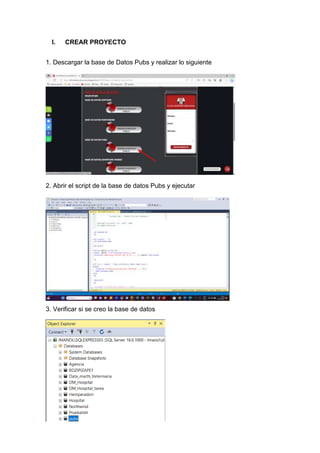
1. Descargar la base de Datos Pubs y realizar lo siguiente
2. Abrir el script de la base de datos Pubs y ejecutar
3. Verificar si se creo la base de datos
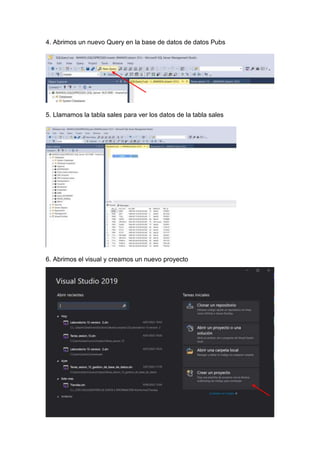
4. Abrimos un nuevo Query en la base de datos de datos Pubs
5. Llamamos la tabla sales para ver los datos de la tabla sales
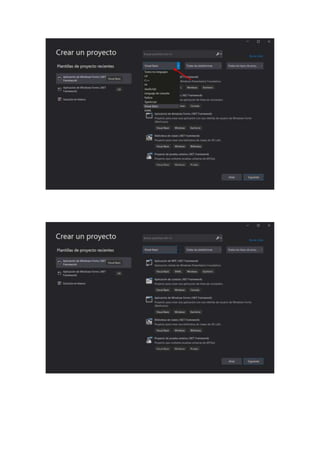
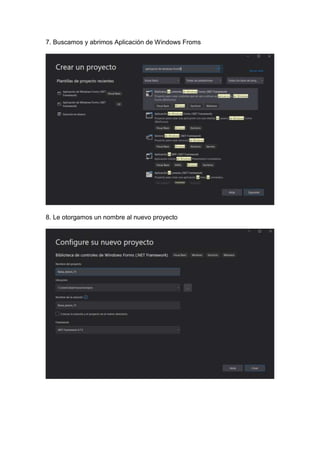
6. Abrimos el visual y creamos un nuevo proyecto
7. Buscamos y abrimos Aplicación de Windows Froms
8. Le otorgamos un nombre al nuevo proyecto
II. DISEÑAR FOMULARIO
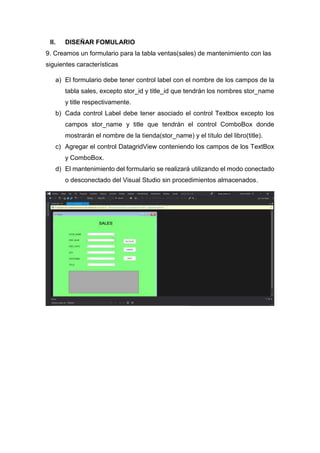
9. Creamos un formulario para la tabla ventas(sales) de mantenimiento con las
siguientes características
a) El formulario debe tener control label con el nombre de los campos de la
tabla sales, excepto stor_id y title_id que tendrán los nombres stor_name
y title respectivamente.
b) Cada control Label debe tener asociado el control Textbox excepto los
campos stor_name y title que tendrán el control ComboBox donde
mostrarán el nombre de la tienda(stor_name) y el título del libro(title).
c) Agregar el control DatagridView conteniendo los campos de los TextBox
y ComboBox.
d) El mantenimiento del formulario se realizará utilizando el modo conectado
o desconectado del Visual Studio sin procedimientos almacenados.
III. REALIZAR CONEXIÓN BASE DE DATOS
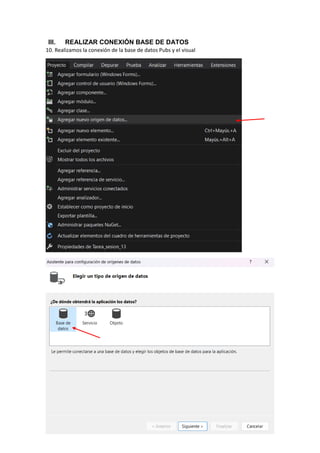
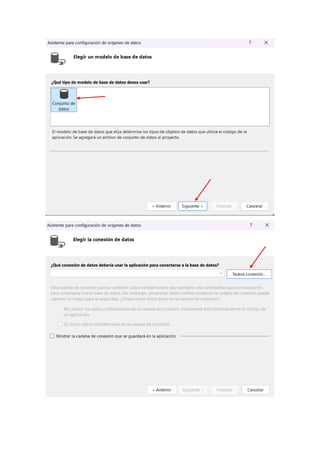
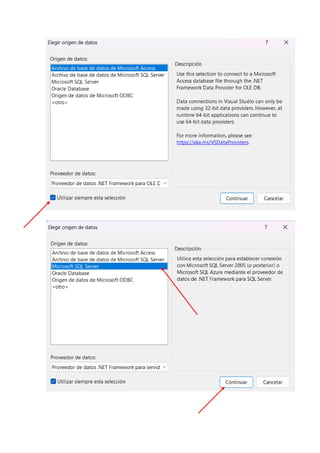
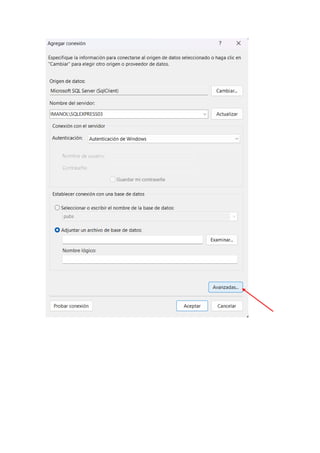
10. Realizamos la conexión de la base de datos Pubs y el visual
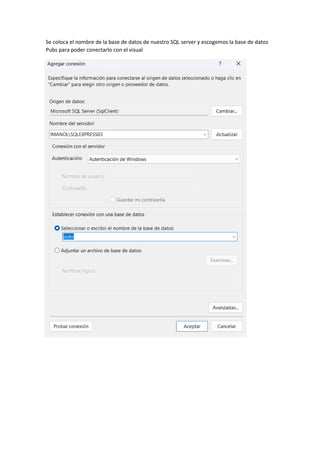
Se coloca el nombre de la base de datos de nuestro SQL server y escogemos la base de datos
Pubs para poder conectarlo con el visual
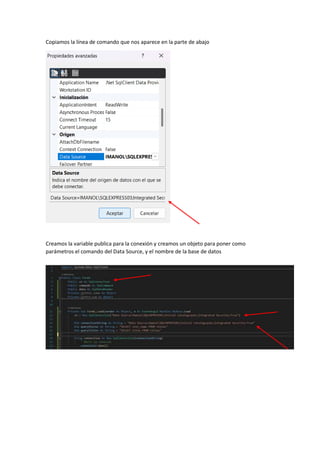
Copiamos la línea de comando que nos aparece en la parte de abajo
Creamos la variable publica para la conexión y creamos un objeto para poner como
parámetros el comando del Data Source, y el nombre de la base de datos
IV. PROGRAMAR CONTROLES
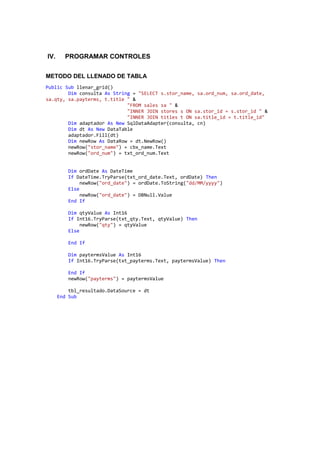
METODO DEL LLENADO DE TABLA
Public Sub llenar_grid()
Dim consulta As String = "SELECT s.stor_name, sa.ord_num, sa.ord_date,
sa.qty, sa.payterms, t.title " &
"FROM sales sa " &
"INNER JOIN stores s ON sa.stor_id = s.stor_id " &
"INNER JOIN titles t ON sa.title_id = t.title_id"
Dim adaptador As New SqlDataAdapter(consulta, cn)
Dim dt As New DataTable
adaptador.Fill(dt)
Dim newRow As DataRow = dt.NewRow()
newRow("stor_name") = cbx_name.Text
newRow("ord_num") = txt_ord_num.Text
Dim ordDate As DateTime
If DateTime.TryParse(txt_ord_date.Text, ordDate) Then
newRow("ord_date") = ordDate.ToString("dd/MM/yyyy")
Else
newRow("ord_date") = DBNull.Value
End If
Dim qtyValue As Int16
If Int16.TryParse(txt_qty.Text, qtyValue) Then
newRow("qty") = qtyValue
Else
End If
Dim paytermsValue As Int16
If Int16.TryParse(txt_payterms.Text, paytermsValue) Then
End If
newRow("payterms") = paytermsValue
tbl_resultado.DataSource = dt
End Sub
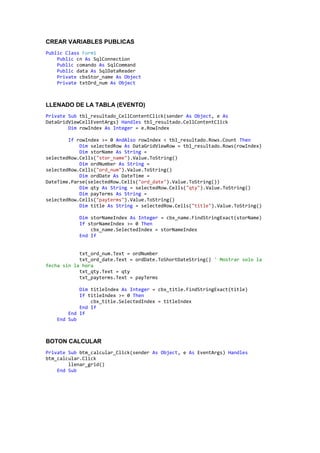
CREAR VARIABLES PUBLICAS
Public Class Form1
Public cn As SqlConnection
Public comando As SqlCommand
Public data As SqlDataReader
Private cbxStor_name As Object
Private txtOrd_num As Object
LLENADO DE LA TABLA (EVENTO)
Private Sub tbl_resultado_CellContentClick(sender As Object, e As
DataGridViewCellEventArgs) Handles tbl_resultado.CellContentClick
Dim rowIndex As Integer = e.RowIndex
If rowIndex >= 0 AndAlso rowIndex < tbl_resultado.Rows.Count Then
Dim selectedRow As DataGridViewRow = tbl_resultado.Rows(rowIndex)
Dim storName As String =
selectedRow.Cells("stor_name").Value.ToString()
Dim ordNumber As String =
selectedRow.Cells("ord_num").Value.ToString()
Dim ordDate As DateTime =
DateTime.Parse(selectedRow.Cells("ord_date").Value.ToString())
Dim qty As String = selectedRow.Cells("qty").Value.ToString()
Dim payTerms As String =
selectedRow.Cells("payterms").Value.ToString()
Dim title As String = selectedRow.Cells("title").Value.ToString()
Dim storNameIndex As Integer = cbx_name.FindStringExact(storName)
If storNameIndex >= 0 Then
cbx_name.SelectedIndex = storNameIndex
End If
txt_ord_num.Text = ordNumber
txt_ord_date.Text = ordDate.ToShortDateString() ' Mostrar solo la
fecha sin la hora
txt_qty.Text = qty
txt_payterms.Text = payTerms
Dim titleIndex As Integer = cbx_title.FindStringExact(title)
If titleIndex >= 0 Then
cbx_title.SelectedIndex = titleIndex
End If
End If
End Sub
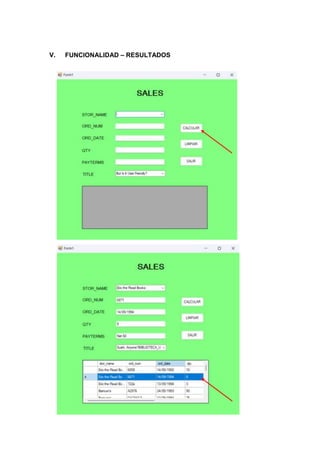
BOTON CALCULAR
Private Sub btm_calcular_Click(sender As Object, e As EventArgs) Handles
btm_calcular.Click
llenar_grid()
End Sub
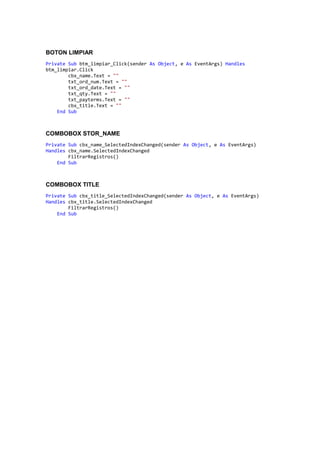
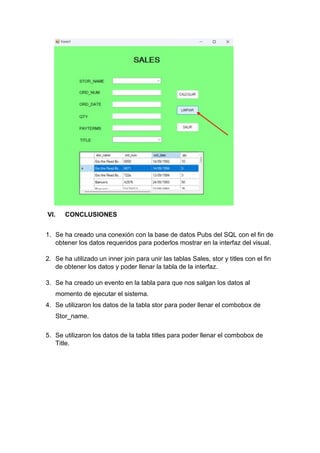
BOTON LIMPIAR
Private Sub btm_limpiar_Click(sender As Object, e As EventArgs) Handles
btm_limpiar.Click
cbx_name.Text = ""
txt_ord_num.Text = ""
txt_ord_date.Text = ""
txt_qty.Text = ""
txt_payterms.Text = ""
cbx_title.Text = ""
End Sub
COMBOBOX STOR_NAME
Private Sub cbx_name_SelectedIndexChanged(sender As Object, e As EventArgs)
Handles cbx_name.SelectedIndexChanged
FiltrarRegistros()
End Sub
COMBOBOX TITLE
Private Sub cbx_title_SelectedIndexChanged(sender As Object, e As EventArgs)
Handles cbx_title.SelectedIndexChanged
FiltrarRegistros()
End Sub
V. FUNCIONALIDAD – RESULTADOS
VI. CONCLUSIONES
1. Se ha creado una conexión con la base de datos Pubs del SQL con el fin de
obtener los datos requeridos para poderlos mostrar en la interfaz del visual.
2. Se ha utilizado un inner join para unir las tablas Sales, stor y titles con el fin
de obtener los datos y poder llenar la tabla de la interfaz.
3. Se ha creado un evento en la tabla para que nos salgan los datos al
momento de ejecutar el sistema.
4. Se utilizaron los datos de la tabla stor para poder llenar el combobox de
Stor_name.
5. Se utilizaron los datos de la tabla titles para poder llenar el combobox de
Title.
LAB 13.docx

LAB 13.docx

  • 1.
    UNIVERSIDAD CÉSAR VALLEJO EscuelaProfesional de Ingeniería de Sistemas GESTIÓN DE DATOS E INFORMACIÓN II – B1 “GUIA DE LA LABORATORIO N° 13” Autor: ALCOSER SUAREZ LUIS IMANOL Docente: HENRY MILLER GARCÍA VARGAS Piura – Perú 2023
  • 2.
    INDICE I. CREAR PROYECTO......................................................................................................... 3 II. DISEÑAR FOMULARIO.................................................................................................... 7 III. REALIZAR CONEXIÓN BASE DE DATOS .............................................................. 8 IV. PROGRAMAR CONTROLES.................................................................................... 14 V. FUNCIONALIDAD – RESULTADOS............................................................................ 17 VI. CONCLUSIONES......................................................................................................... 18
  • 3.
    I. CREAR PROYECTO 1.Descargar la base de Datos Pubs y realizar lo siguiente 2. Abrir el script de la base de datos Pubs y ejecutar 3. Verificar si se creo la base de datos
  • 4.
    4. Abrimos unnuevo Query en la base de datos de datos Pubs 5. Llamamos la tabla sales para ver los datos de la tabla sales 6. Abrimos el visual y creamos un nuevo proyecto
  • 6.
    7. Buscamos yabrimos Aplicación de Windows Froms 8. Le otorgamos un nombre al nuevo proyecto
  • 7.
    II. DISEÑAR FOMULARIO 9.Creamos un formulario para la tabla ventas(sales) de mantenimiento con las siguientes características a) El formulario debe tener control label con el nombre de los campos de la tabla sales, excepto stor_id y title_id que tendrán los nombres stor_name y title respectivamente. b) Cada control Label debe tener asociado el control Textbox excepto los campos stor_name y title que tendrán el control ComboBox donde mostrarán el nombre de la tienda(stor_name) y el título del libro(title). c) Agregar el control DatagridView conteniendo los campos de los TextBox y ComboBox. d) El mantenimiento del formulario se realizará utilizando el modo conectado o desconectado del Visual Studio sin procedimientos almacenados.
  • 8.
    III. REALIZAR CONEXIÓNBASE DE DATOS 10. Realizamos la conexión de la base de datos Pubs y el visual
  • 11.
    Se coloca elnombre de la base de datos de nuestro SQL server y escogemos la base de datos Pubs para poder conectarlo con el visual
  • 13.
    Copiamos la líneade comando que nos aparece en la parte de abajo Creamos la variable publica para la conexión y creamos un objeto para poner como parámetros el comando del Data Source, y el nombre de la base de datos
  • 14.
    IV. PROGRAMAR CONTROLES METODODEL LLENADO DE TABLA Public Sub llenar_grid() Dim consulta As String = "SELECT s.stor_name, sa.ord_num, sa.ord_date, sa.qty, sa.payterms, t.title " & "FROM sales sa " & "INNER JOIN stores s ON sa.stor_id = s.stor_id " & "INNER JOIN titles t ON sa.title_id = t.title_id" Dim adaptador As New SqlDataAdapter(consulta, cn) Dim dt As New DataTable adaptador.Fill(dt) Dim newRow As DataRow = dt.NewRow() newRow("stor_name") = cbx_name.Text newRow("ord_num") = txt_ord_num.Text Dim ordDate As DateTime If DateTime.TryParse(txt_ord_date.Text, ordDate) Then newRow("ord_date") = ordDate.ToString("dd/MM/yyyy") Else newRow("ord_date") = DBNull.Value End If Dim qtyValue As Int16 If Int16.TryParse(txt_qty.Text, qtyValue) Then newRow("qty") = qtyValue Else End If Dim paytermsValue As Int16 If Int16.TryParse(txt_payterms.Text, paytermsValue) Then End If newRow("payterms") = paytermsValue tbl_resultado.DataSource = dt End Sub
  • 15.
    CREAR VARIABLES PUBLICAS PublicClass Form1 Public cn As SqlConnection Public comando As SqlCommand Public data As SqlDataReader Private cbxStor_name As Object Private txtOrd_num As Object LLENADO DE LA TABLA (EVENTO) Private Sub tbl_resultado_CellContentClick(sender As Object, e As DataGridViewCellEventArgs) Handles tbl_resultado.CellContentClick Dim rowIndex As Integer = e.RowIndex If rowIndex >= 0 AndAlso rowIndex < tbl_resultado.Rows.Count Then Dim selectedRow As DataGridViewRow = tbl_resultado.Rows(rowIndex) Dim storName As String = selectedRow.Cells("stor_name").Value.ToString() Dim ordNumber As String = selectedRow.Cells("ord_num").Value.ToString() Dim ordDate As DateTime = DateTime.Parse(selectedRow.Cells("ord_date").Value.ToString()) Dim qty As String = selectedRow.Cells("qty").Value.ToString() Dim payTerms As String = selectedRow.Cells("payterms").Value.ToString() Dim title As String = selectedRow.Cells("title").Value.ToString() Dim storNameIndex As Integer = cbx_name.FindStringExact(storName) If storNameIndex >= 0 Then cbx_name.SelectedIndex = storNameIndex End If txt_ord_num.Text = ordNumber txt_ord_date.Text = ordDate.ToShortDateString() ' Mostrar solo la fecha sin la hora txt_qty.Text = qty txt_payterms.Text = payTerms Dim titleIndex As Integer = cbx_title.FindStringExact(title) If titleIndex >= 0 Then cbx_title.SelectedIndex = titleIndex End If End If End Sub BOTON CALCULAR Private Sub btm_calcular_Click(sender As Object, e As EventArgs) Handles btm_calcular.Click llenar_grid() End Sub
  • 16.
    BOTON LIMPIAR Private Subbtm_limpiar_Click(sender As Object, e As EventArgs) Handles btm_limpiar.Click cbx_name.Text = "" txt_ord_num.Text = "" txt_ord_date.Text = "" txt_qty.Text = "" txt_payterms.Text = "" cbx_title.Text = "" End Sub COMBOBOX STOR_NAME Private Sub cbx_name_SelectedIndexChanged(sender As Object, e As EventArgs) Handles cbx_name.SelectedIndexChanged FiltrarRegistros() End Sub COMBOBOX TITLE Private Sub cbx_title_SelectedIndexChanged(sender As Object, e As EventArgs) Handles cbx_title.SelectedIndexChanged FiltrarRegistros() End Sub
  • 17.
  • 18.
    VI. CONCLUSIONES 1. Seha creado una conexión con la base de datos Pubs del SQL con el fin de obtener los datos requeridos para poderlos mostrar en la interfaz del visual. 2. Se ha utilizado un inner join para unir las tablas Sales, stor y titles con el fin de obtener los datos y poder llenar la tabla de la interfaz. 3. Se ha creado un evento en la tabla para que nos salgan los datos al momento de ejecutar el sistema. 4. Se utilizaron los datos de la tabla stor para poder llenar el combobox de Stor_name. 5. Se utilizaron los datos de la tabla titles para poder llenar el combobox de Title.