Universidad de Oviedo   Programa de extensión universitaria


     CLOUD COMPUTING.
DESARROLLO DE APLICACIONES Y
        MINERÍA WEB


                               Miguel Fernández Fernández
                                miguelff@innova.uniovi.es
Web en Tiempo Real
XMPP, Websockets, et al.
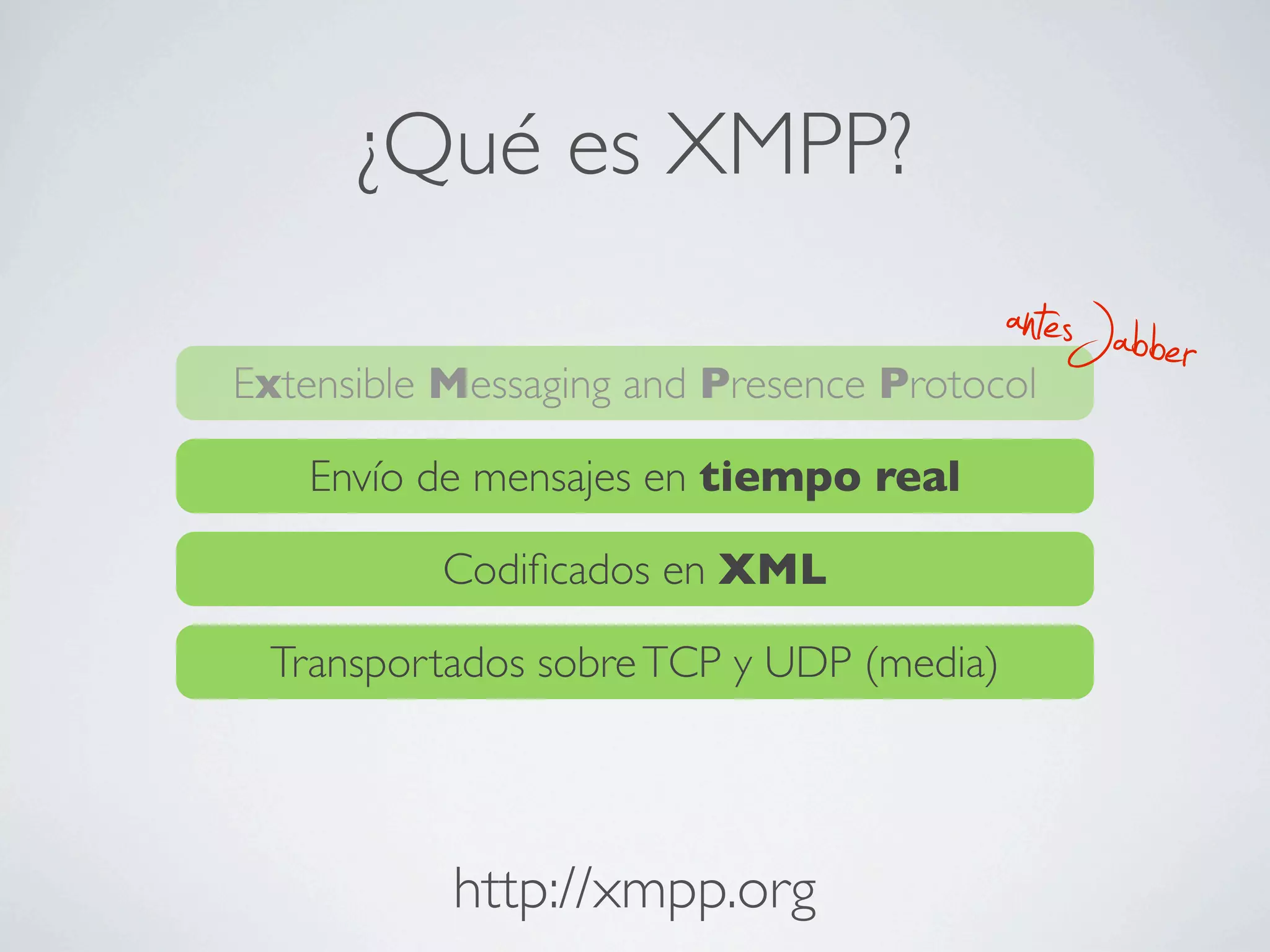
¿Qué es XMPP?
                                         antesJabber
Extensible Messaging and Presence Protocol

   Envío de mensajes en tiempo real

          Codificados en XML

 Transportados sobre TCP y UDP (media)


           http://xmpp.org
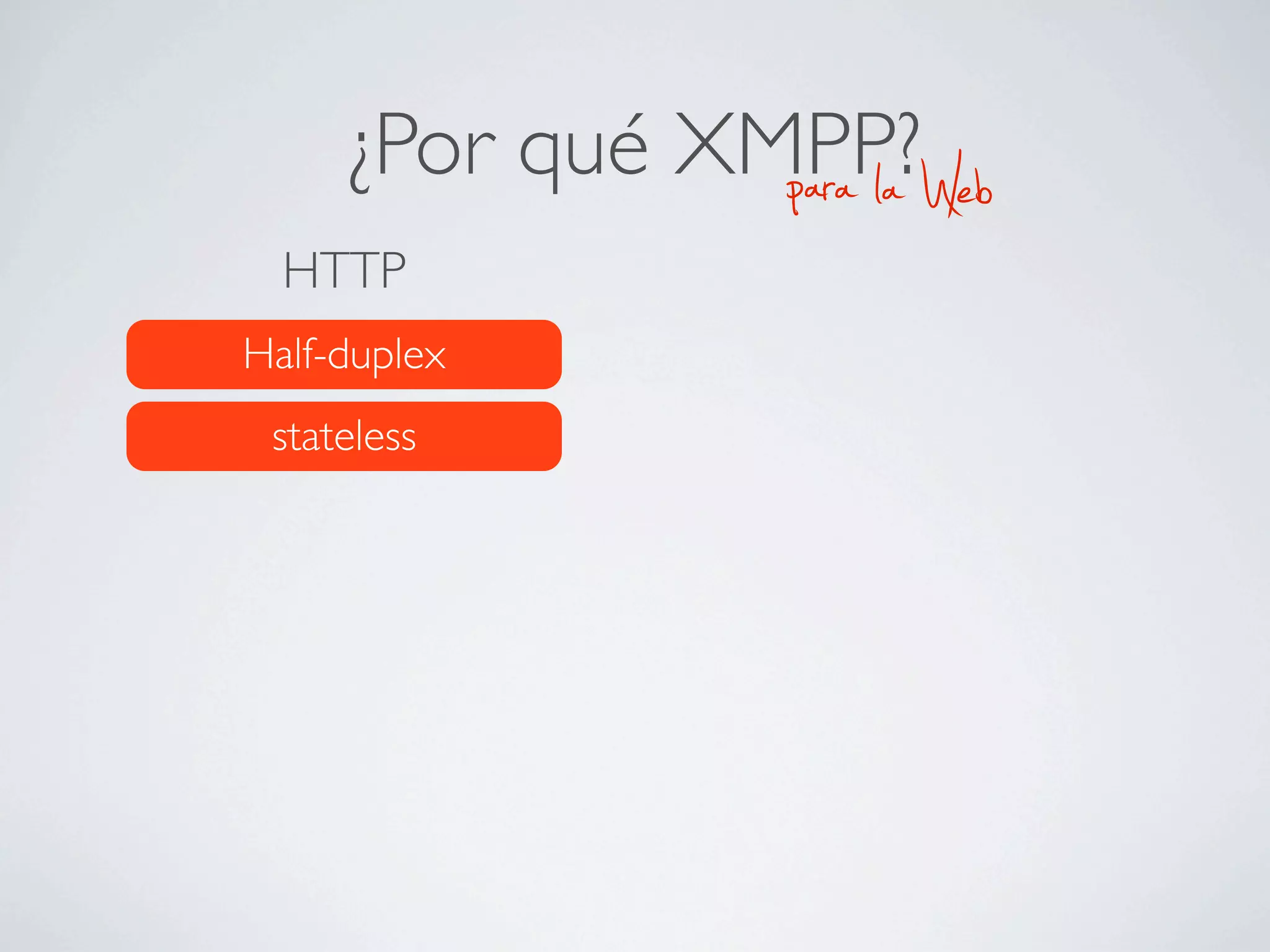
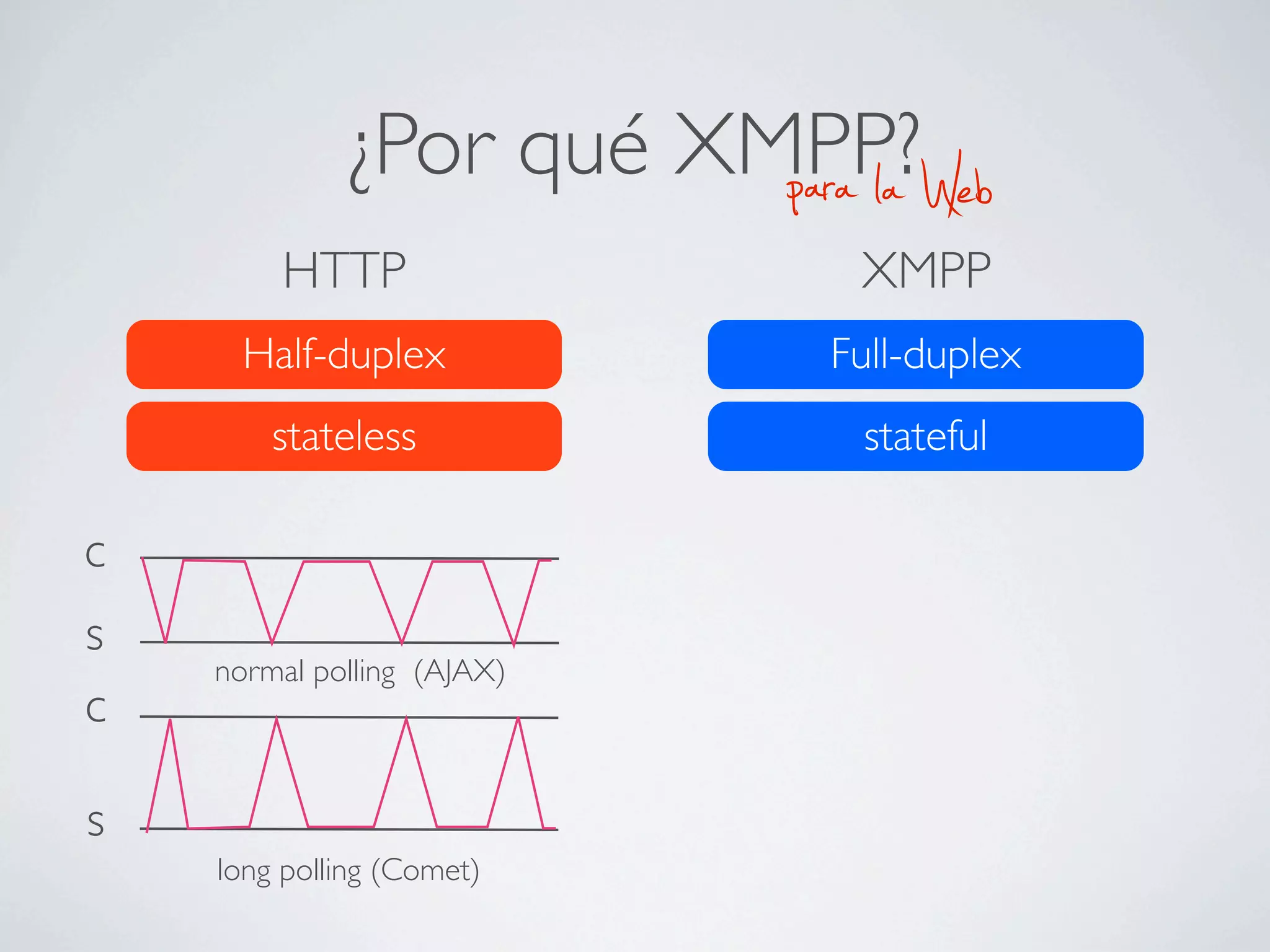
¿Por qué XMPP?
                para la   Web
  HTTP
Half-duplex
 stateless
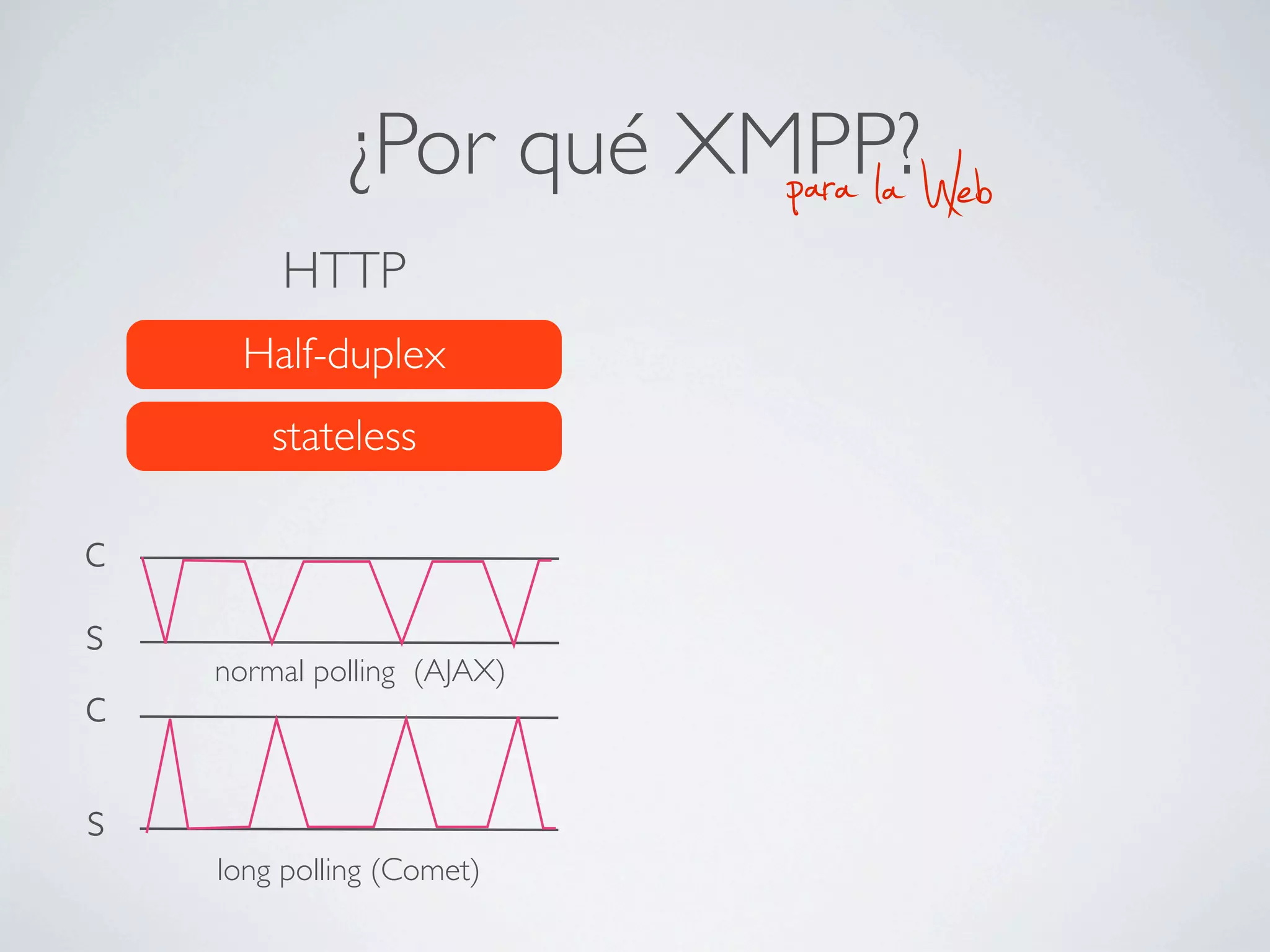
¿Por qué XMPP?
                        para la   Web
        HTTP
      Half-duplex
        stateless

c
s
    normal polling (AJAX)
c

s
    long polling (Comet)
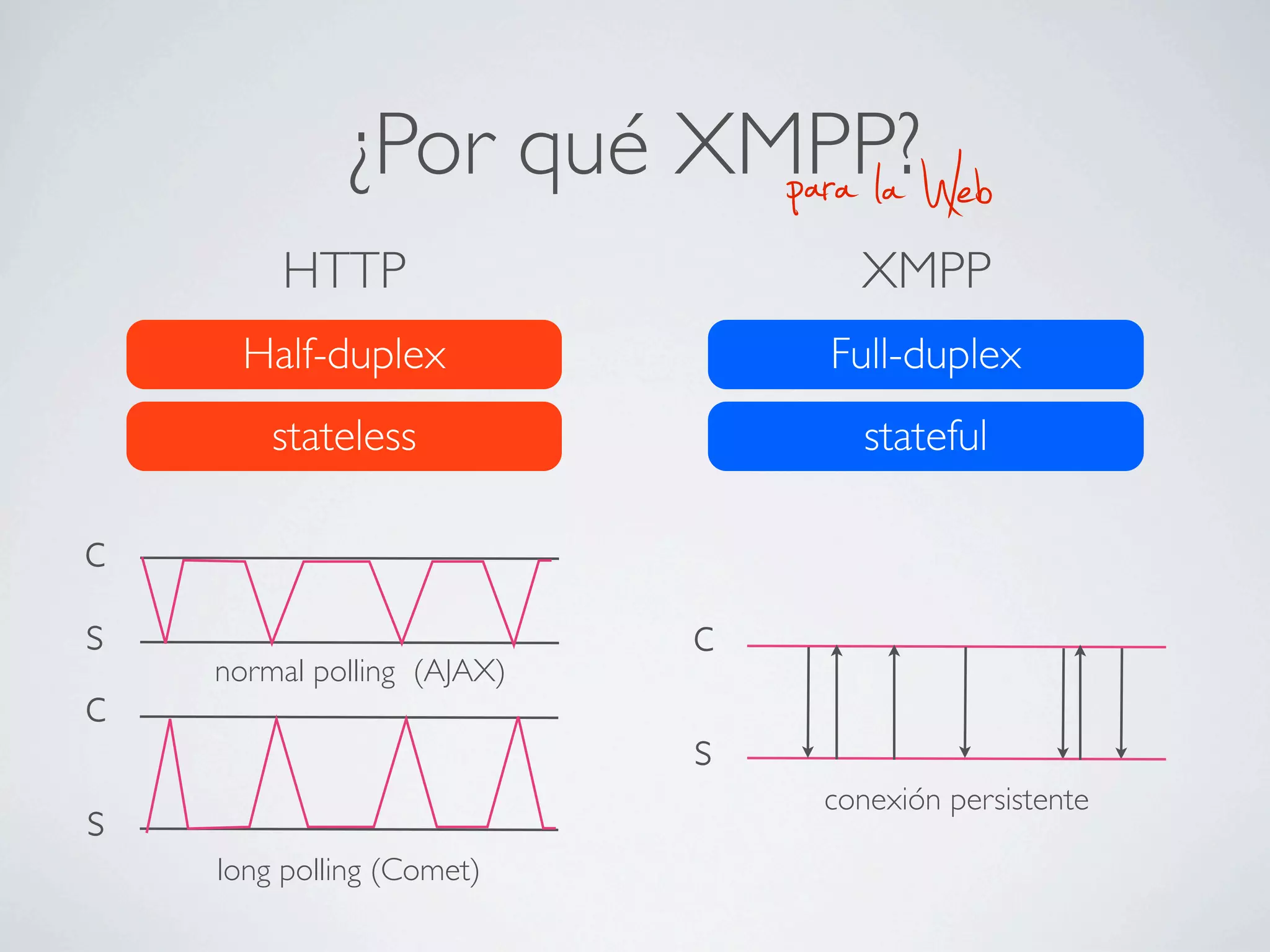
¿Por qué XMPP?
                        para la   Web
        HTTP                 XMPP
      Half-duplex           Full-duplex
        stateless            stateful

c
s
    normal polling (AJAX)
c

s
    long polling (Comet)
¿Por qué XMPP?
                        para la        Web
        HTTP                      XMPP
      Half-duplex               Full-duplex
        stateless                 stateful

c
s                           c
    normal polling (AJAX)
c
                            s
                                conexión persistente
s
    long polling (Comet)
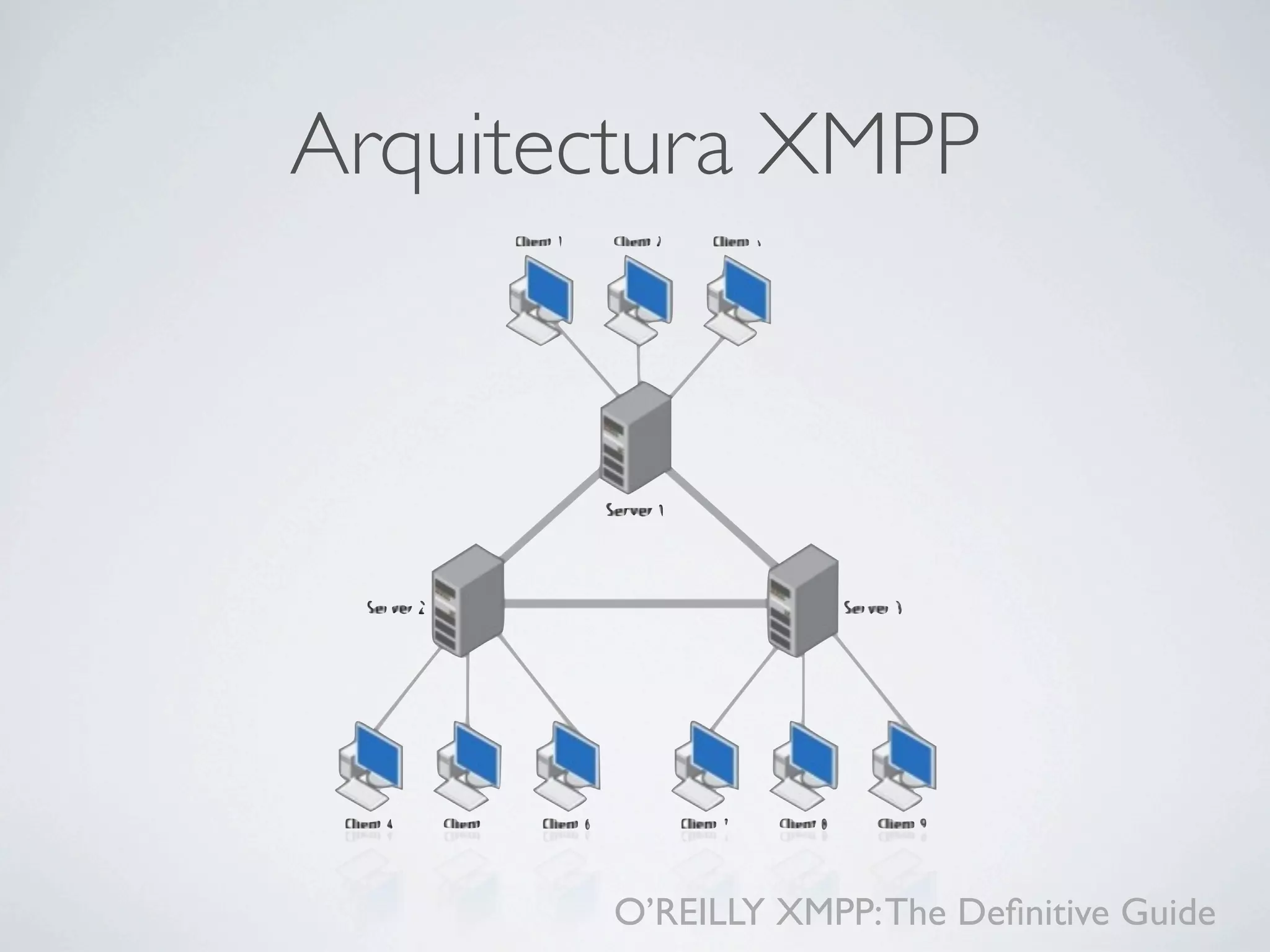
Arquitectura XMPP


       O’REILLY XMPP: The Definitive Guide
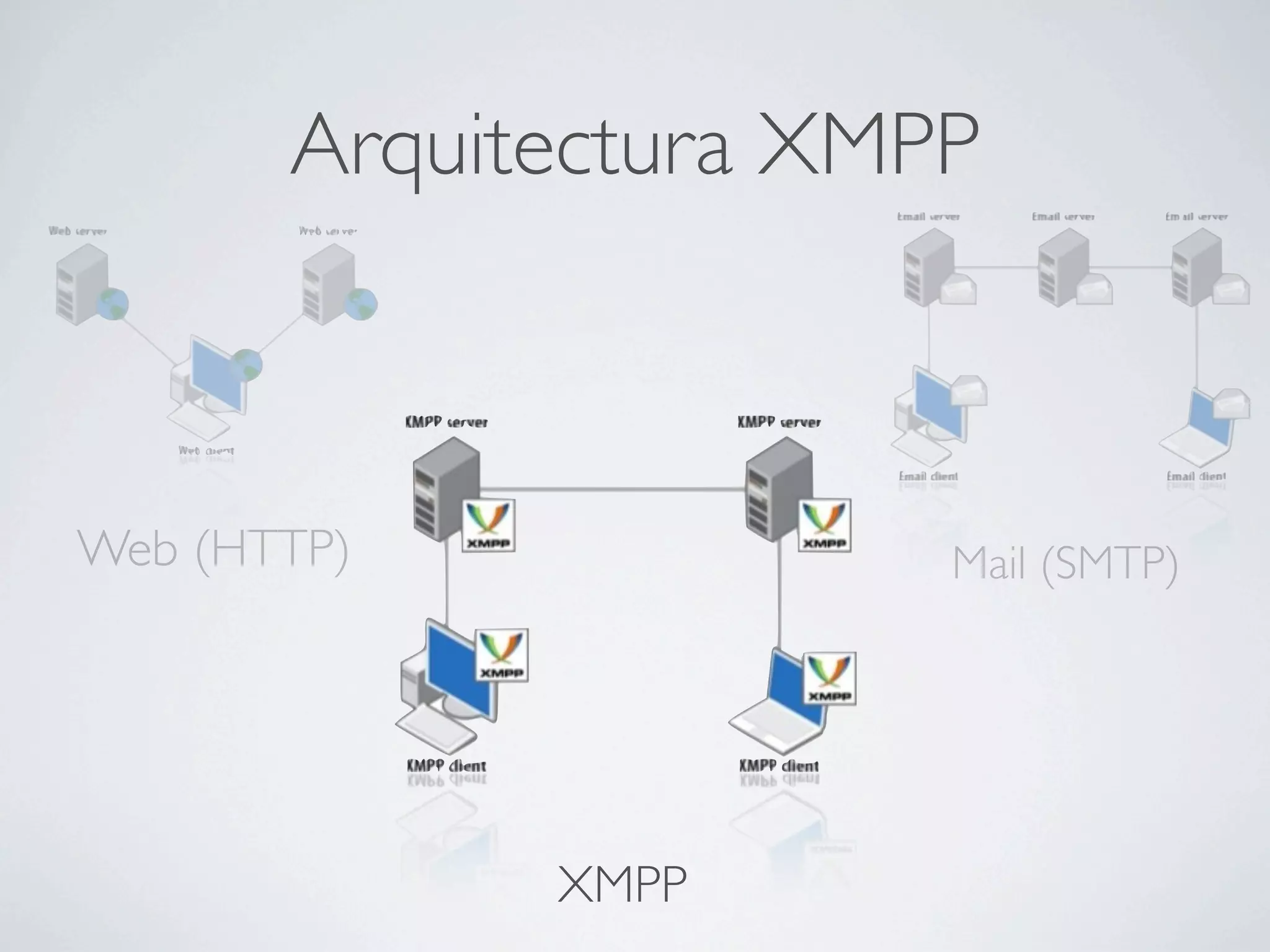
Arquitectura XMPP


Web (HTTP)             Mail (SMTP)


             XMPP
La red XMPP: Entidades

        Servidores
         Clientes
       Componentes
         Plugins
Servidores


          Enrutan mensajes
Hablan con clientes y otros servidores
  FOSS: Ejabberd, Openfire, Tigase
Clientes


   Humanos y robots

Protocolo cliente-servidor
Componentes

Extienden la funcionalidad del servidor

Tienen su propia identidad y dirección
    Se ejecutan fuera del mismo
Se comunican con un protocolo específico

        Ejemplo típico: Multichat
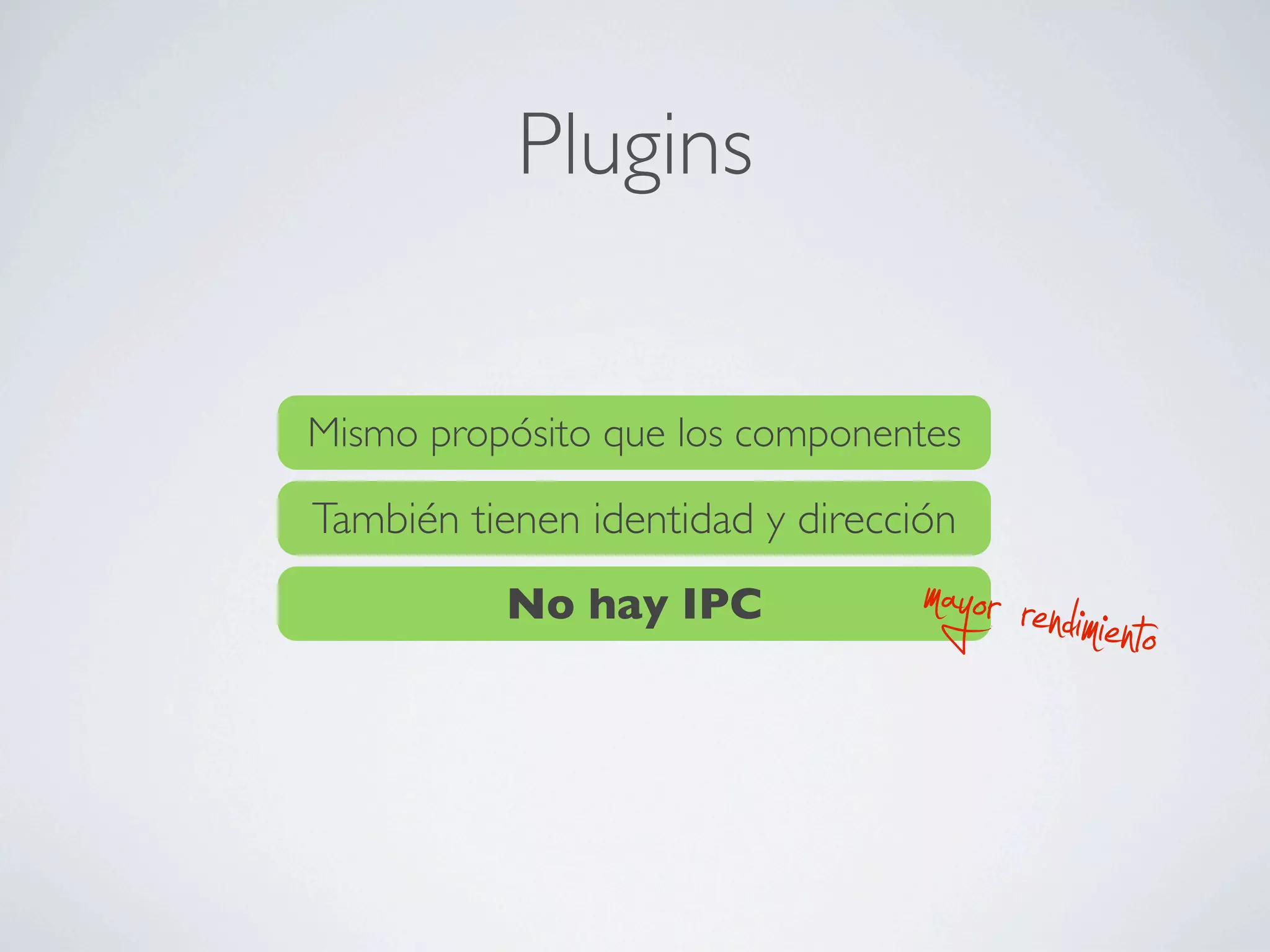
Plugins


Mismo propósito que los componentes

También tienen identidad y dirección
          No hay IPC              mayor rendimiento
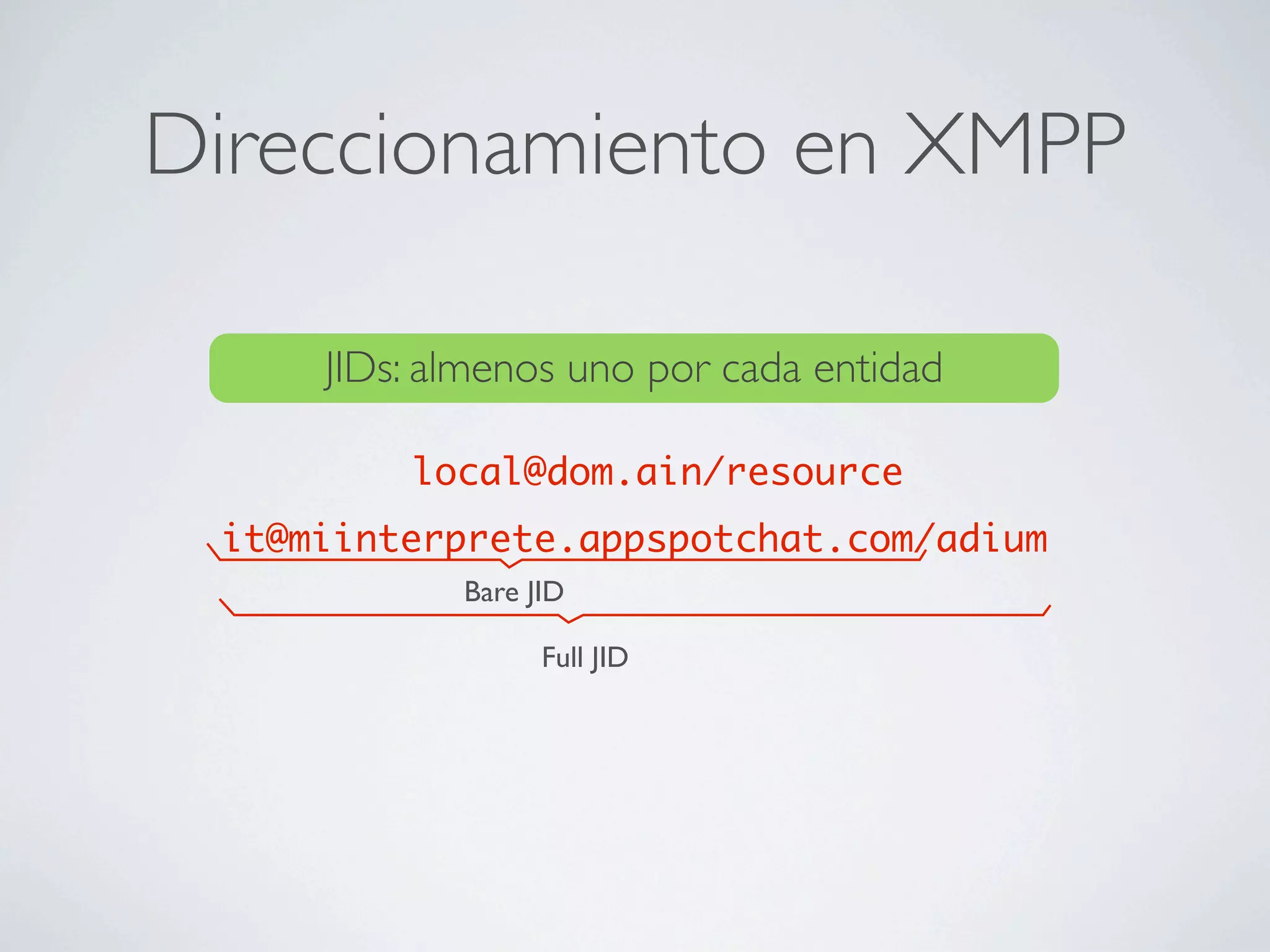
Direccionamiento en XMPP

     JIDs: almenos uno por cada entidad

         local@dom.ain/resource
 it@miinterprete.appspotchat.com/adium
            Bare JID

                  Full JID
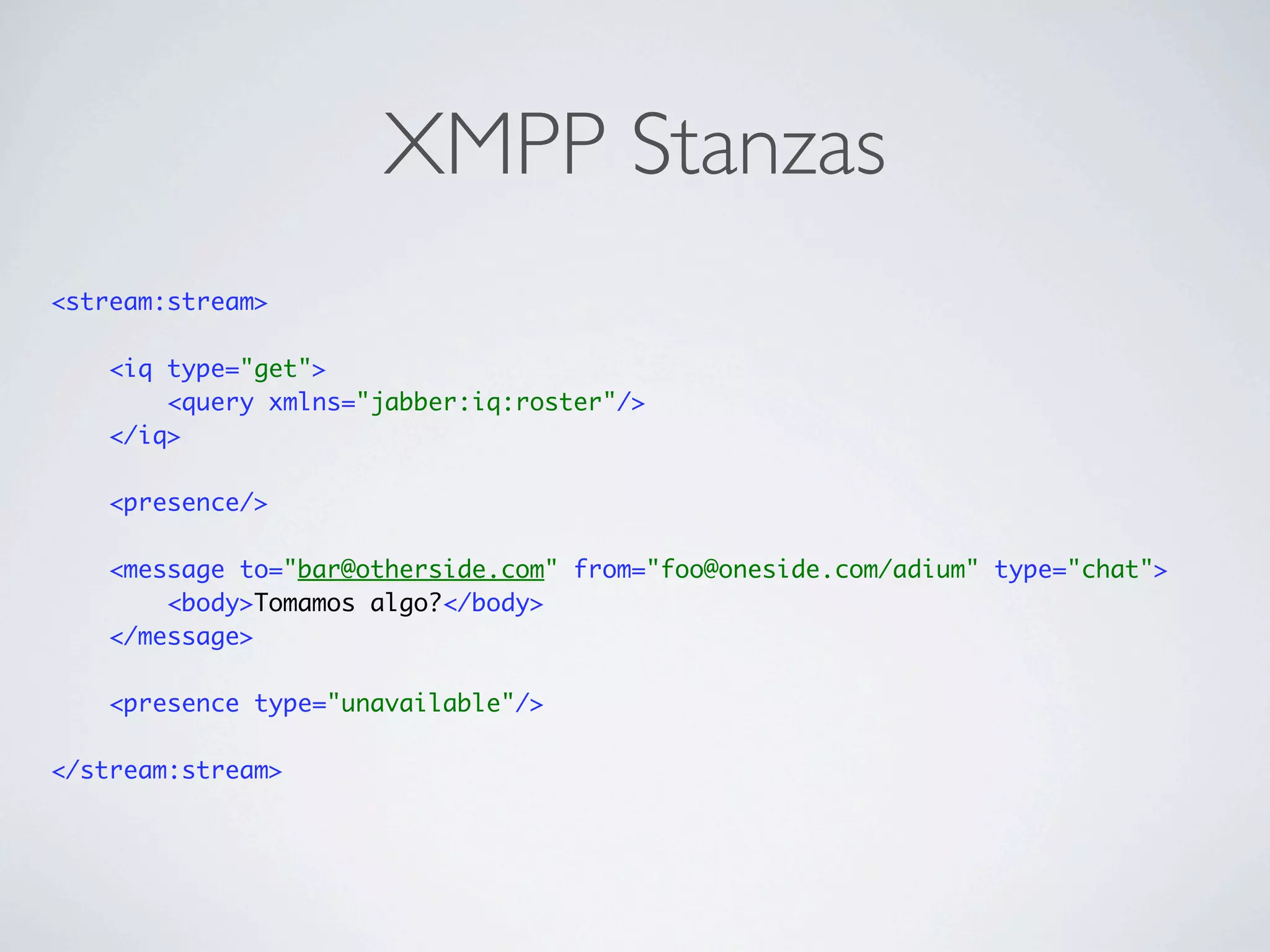
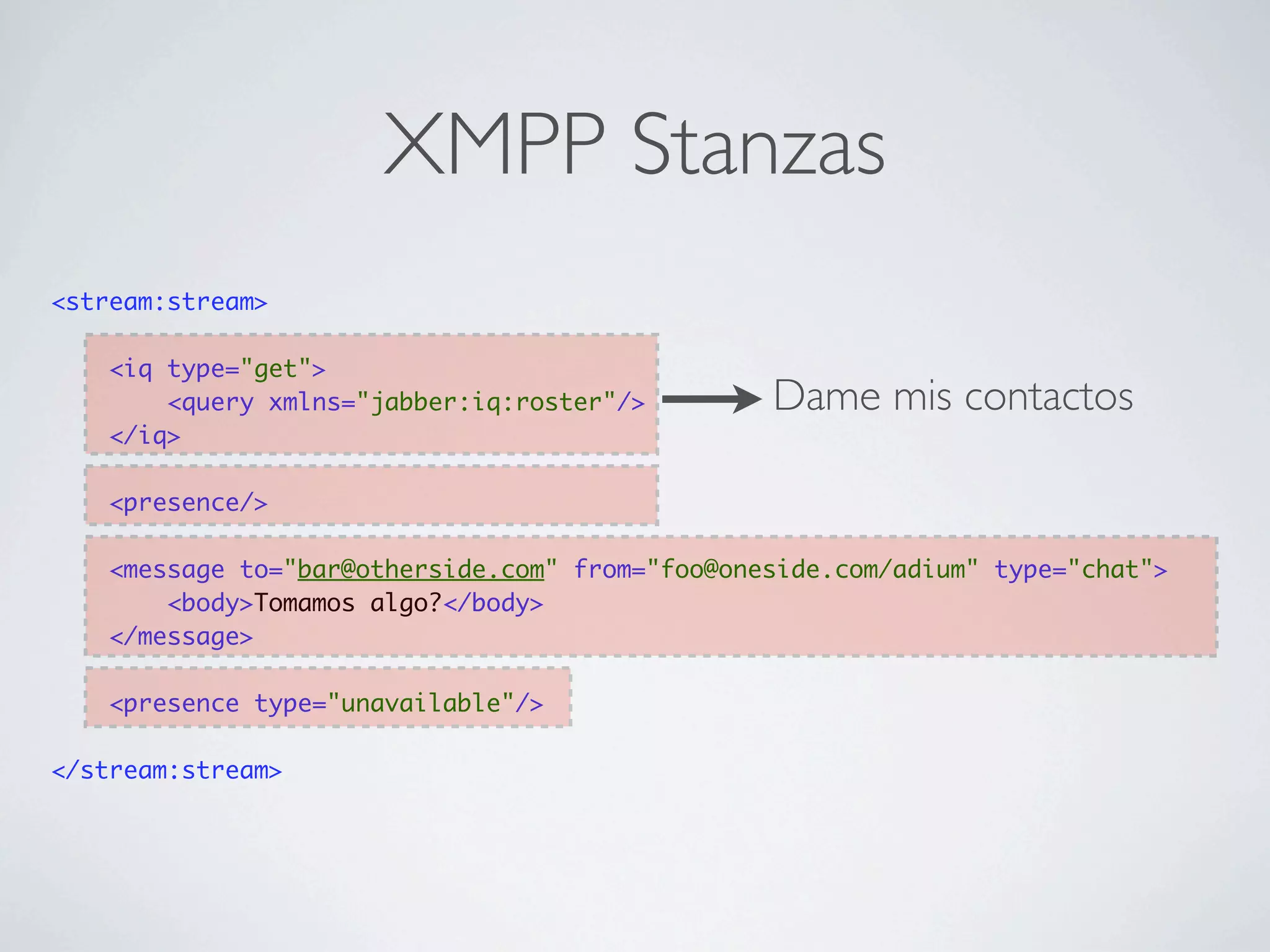
XMPP Stanzas
<stream:stream>

    <iq type="get">
        <query xmlns="jabber:iq:roster"/>
    </iq>

    <presence/>

    <message to="bar@otherside.com" from="foo@oneside.com/adium" type="chat">
        <body>Tomamos algo?</body>
    </message>

    <presence type="unavailable"/>

</stream:stream>
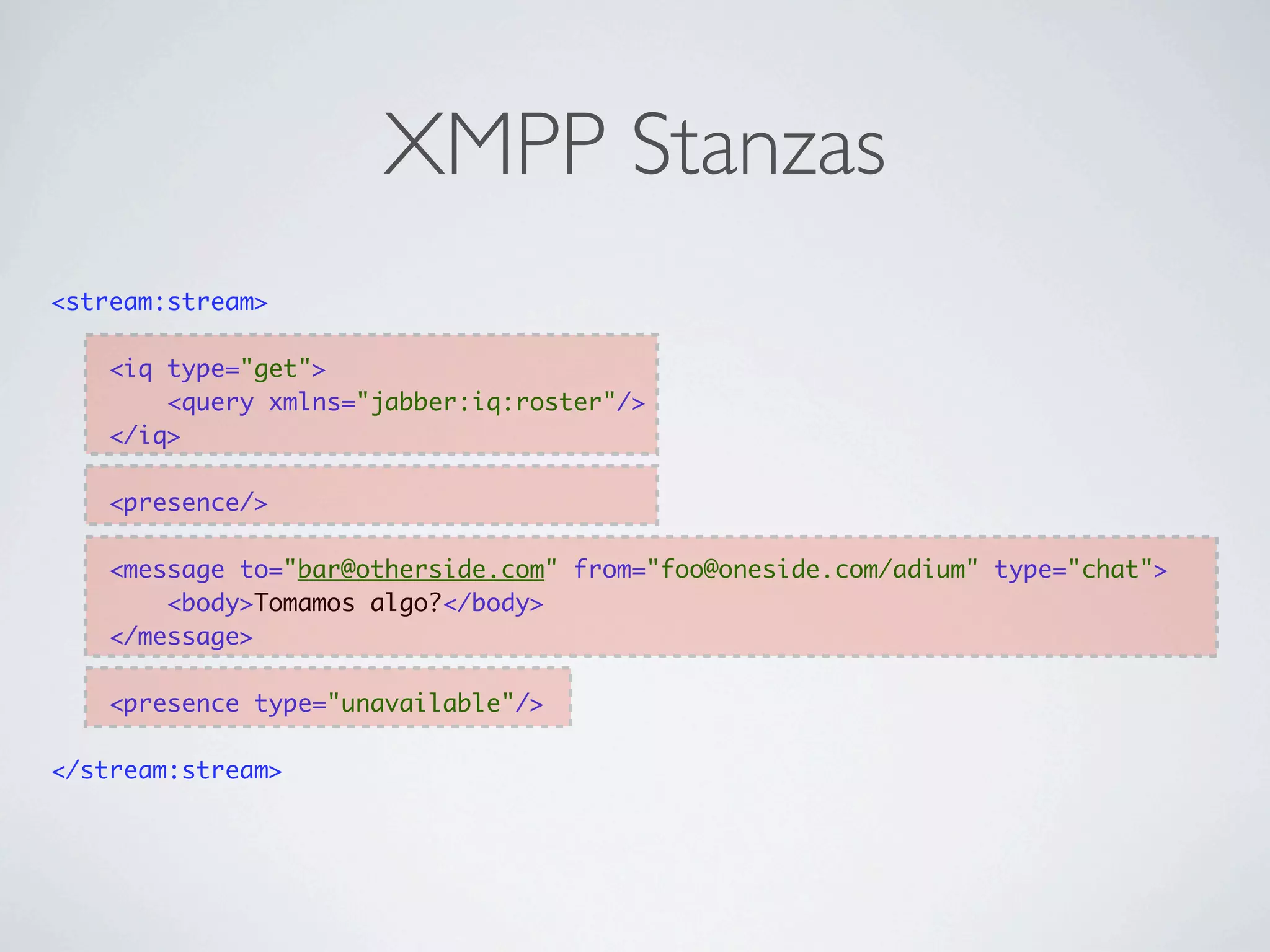
XMPP Stanzas
<stream:stream>

    <iq type="get">
        <query xmlns="jabber:iq:roster"/>
    </iq>

    <presence/>

    <message to="bar@otherside.com" from="foo@oneside.com/adium" type="chat">
        <body>Tomamos algo?</body>
    </message>

    <presence type="unavailable"/>

</stream:stream>
XMPP Stanzas
<stream:stream>

    <iq type="get">
        <query xmlns="jabber:iq:roster"/>        Dame mis contactos
    </iq>

    <presence/>

    <message to="bar@otherside.com" from="foo@oneside.com/adium" type="chat">
        <body>Tomamos algo?</body>
    </message>

    <presence type="unavailable"/>

</stream:stream>
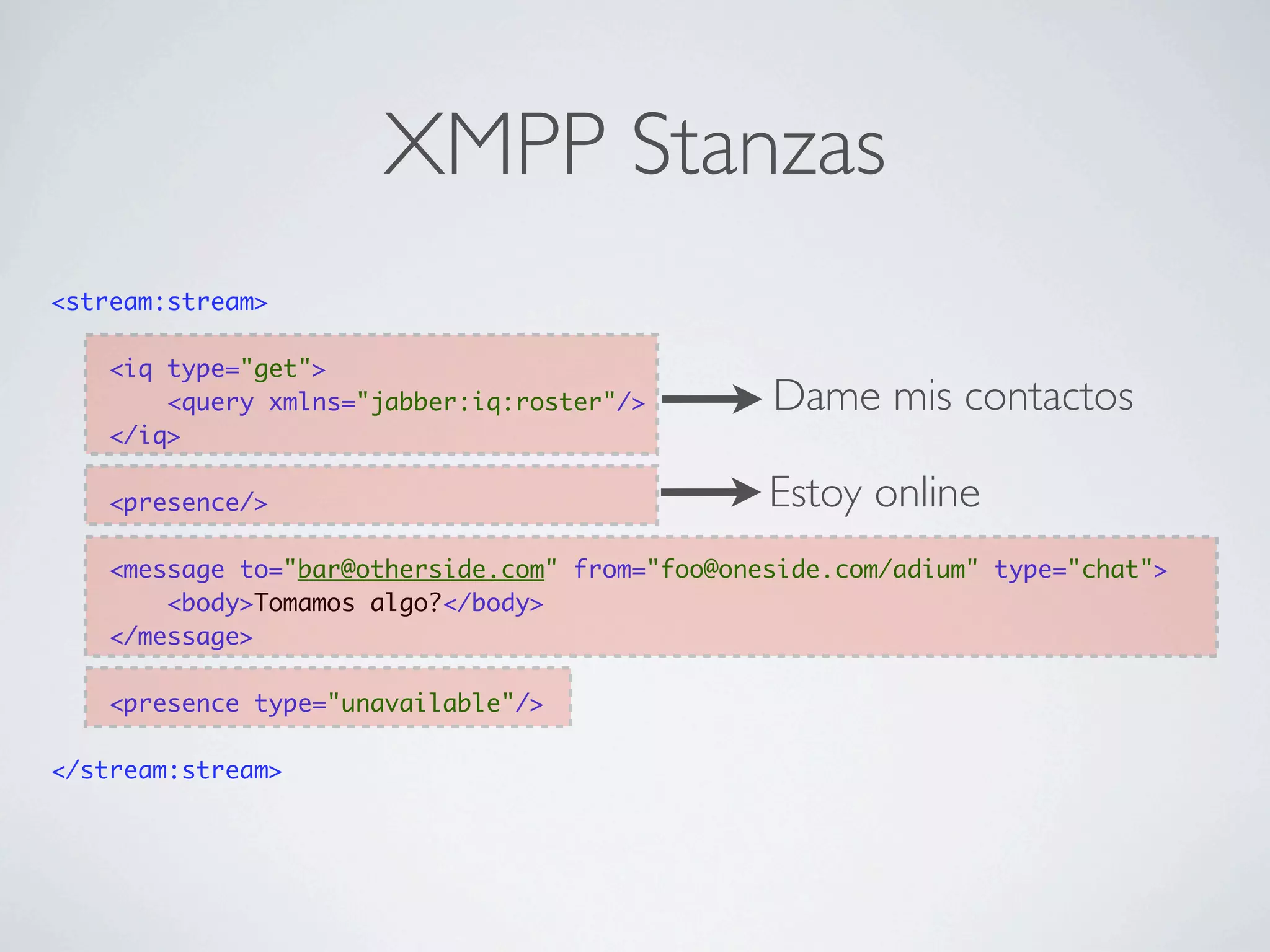
XMPP Stanzas
<stream:stream>

    <iq type="get">
        <query xmlns="jabber:iq:roster"/>        Dame mis contactos
    </iq>

    <presence/>                                  Estoy online
    <message to="bar@otherside.com" from="foo@oneside.com/adium" type="chat">
        <body>Tomamos algo?</body>
    </message>

    <presence type="unavailable"/>

</stream:stream>
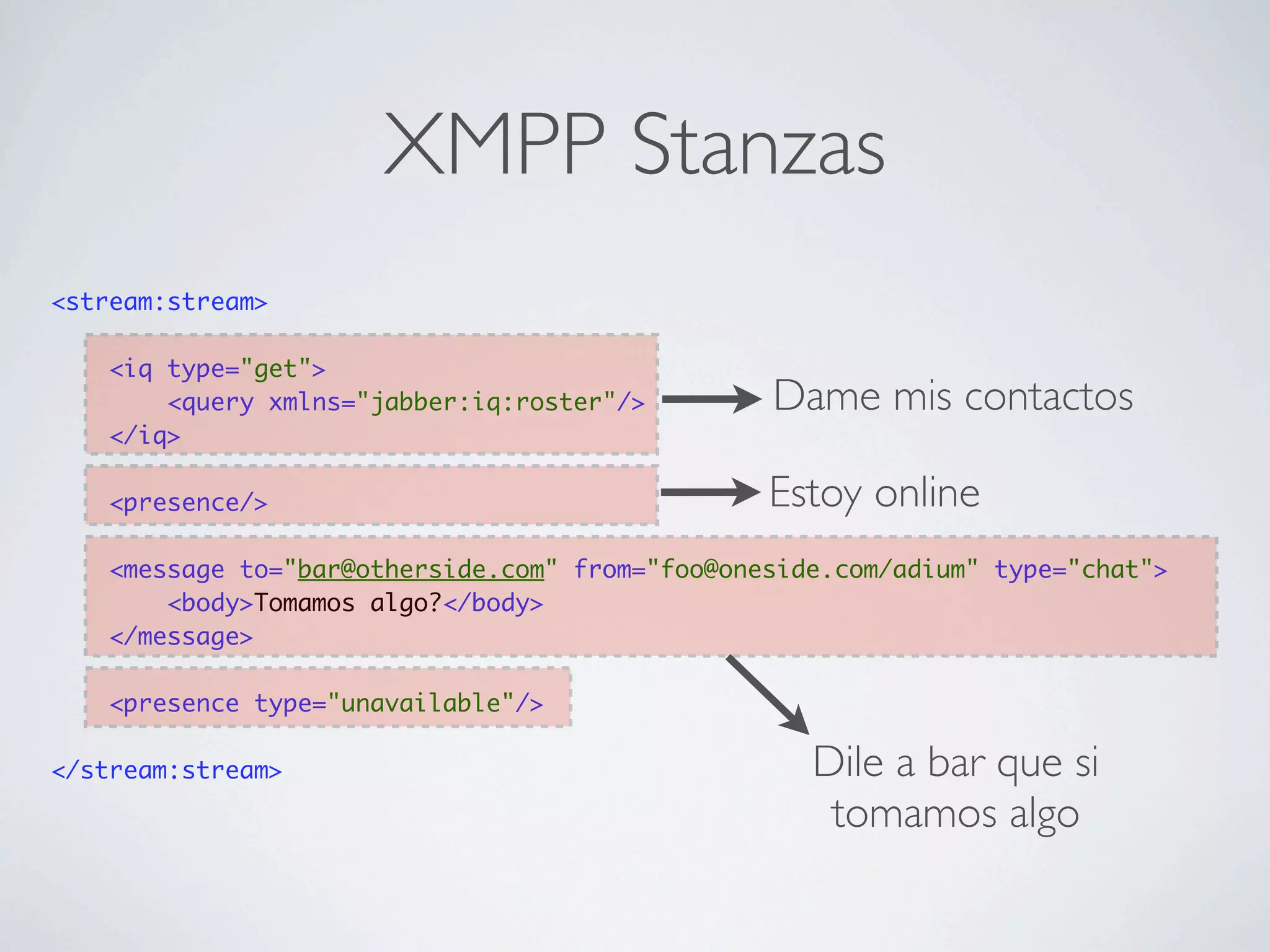
XMPP Stanzas
<stream:stream>

    <iq type="get">
        <query xmlns="jabber:iq:roster"/>        Dame mis contactos
    </iq>

    <presence/>                                  Estoy online
    <message to="bar@otherside.com" from="foo@oneside.com/adium" type="chat">
        <body>Tomamos algo?</body>
    </message>

    <presence type="unavailable"/>

</stream:stream>                                    Dile a bar que si
                                                     tomamos algo
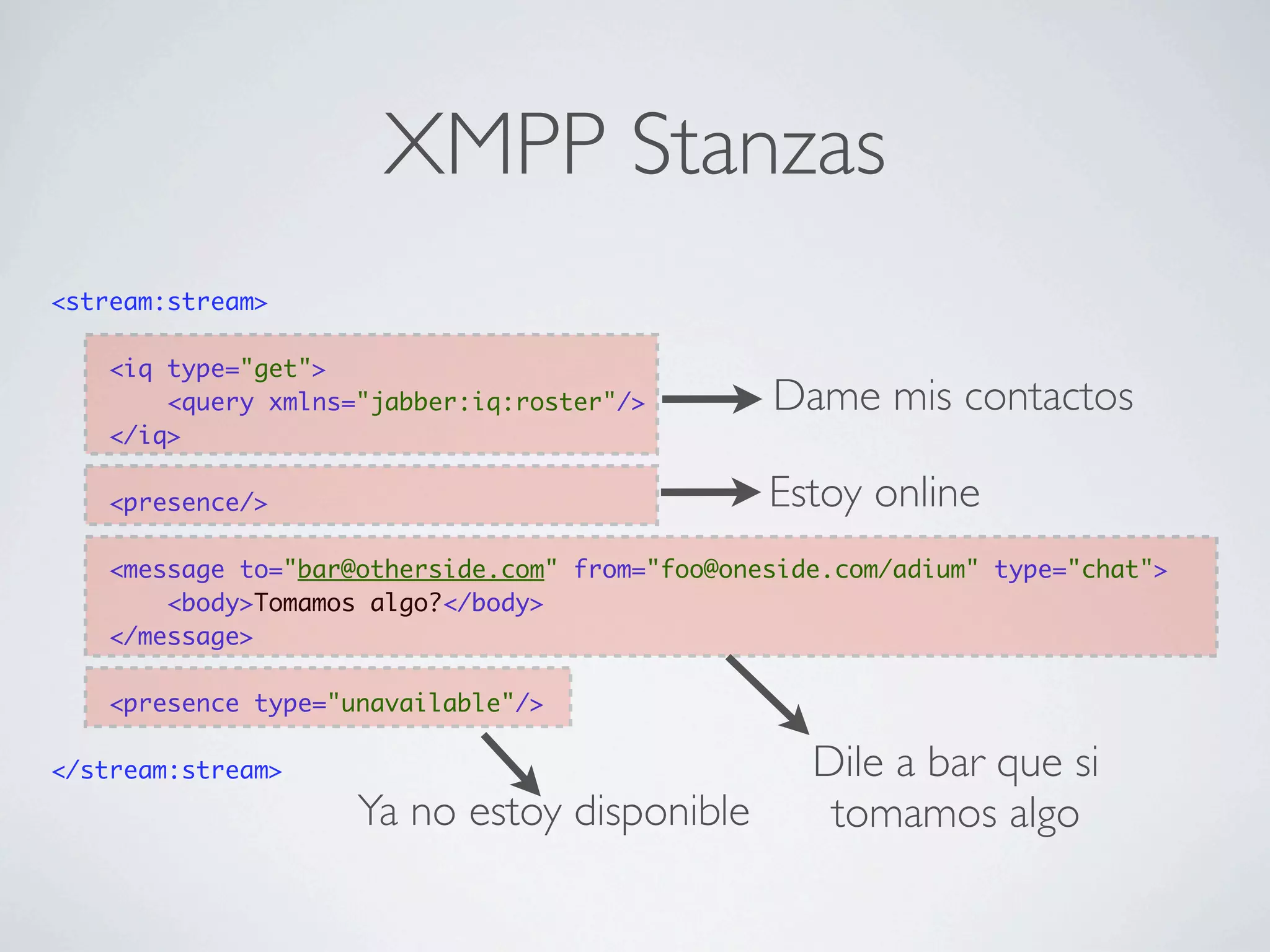
XMPP Stanzas
<stream:stream>

    <iq type="get">
        <query xmlns="jabber:iq:roster"/>        Dame mis contactos
    </iq>

    <presence/>                                  Estoy online
    <message to="bar@otherside.com" from="foo@oneside.com/adium" type="chat">
        <body>Tomamos algo?</body>
    </message>

    <presence type="unavailable"/>

</stream:stream>                                    Dile a bar que si
                     Ya no estoy disponible          tomamos algo
Tiempo real en La Web
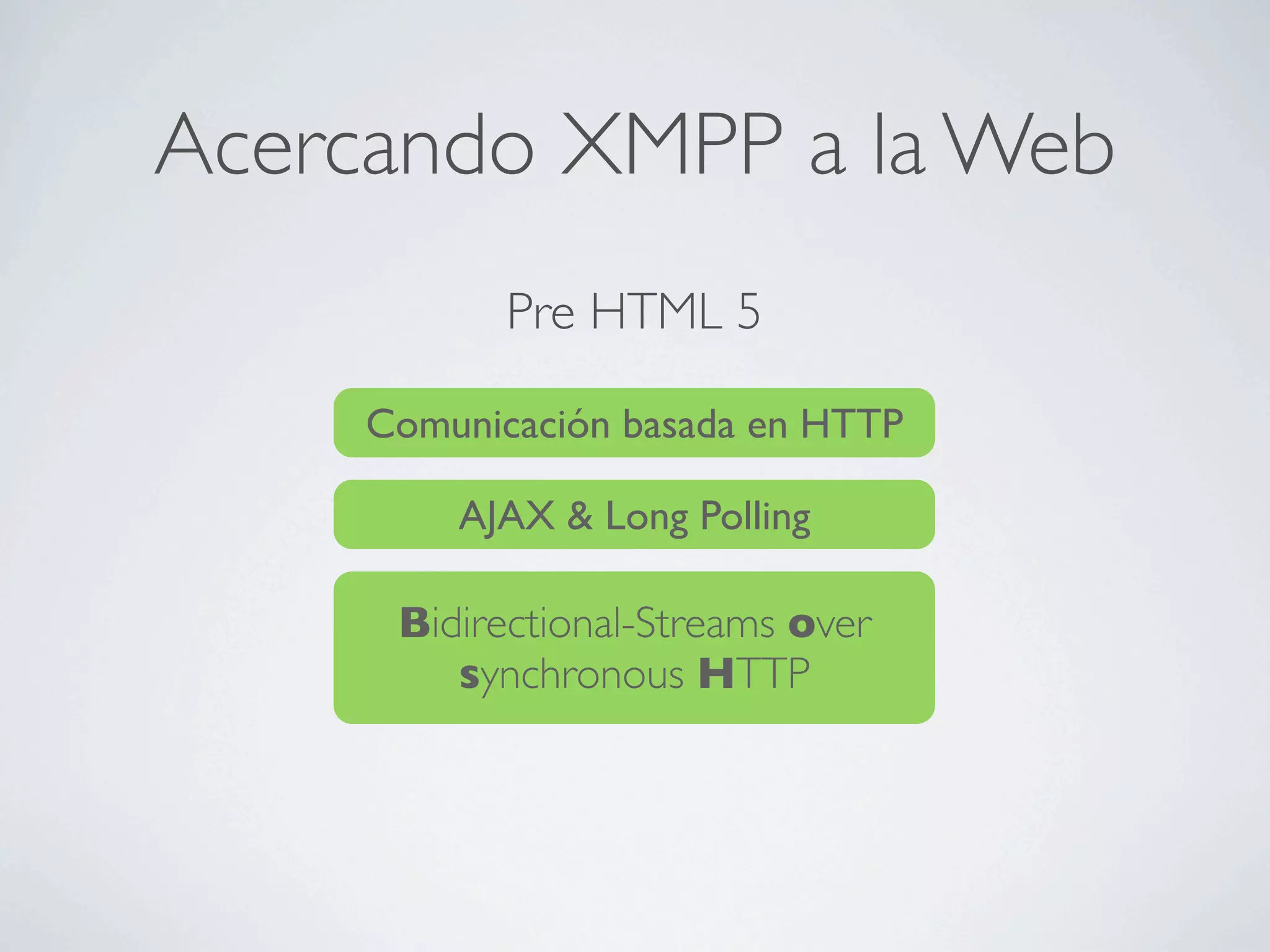
Acercando XMPP a la Web
            Pre HTML 5

     Comunicación basada en HTTP

         AJAX & Long Polling

      Bidirectional-Streams over
         synchronous HTTP
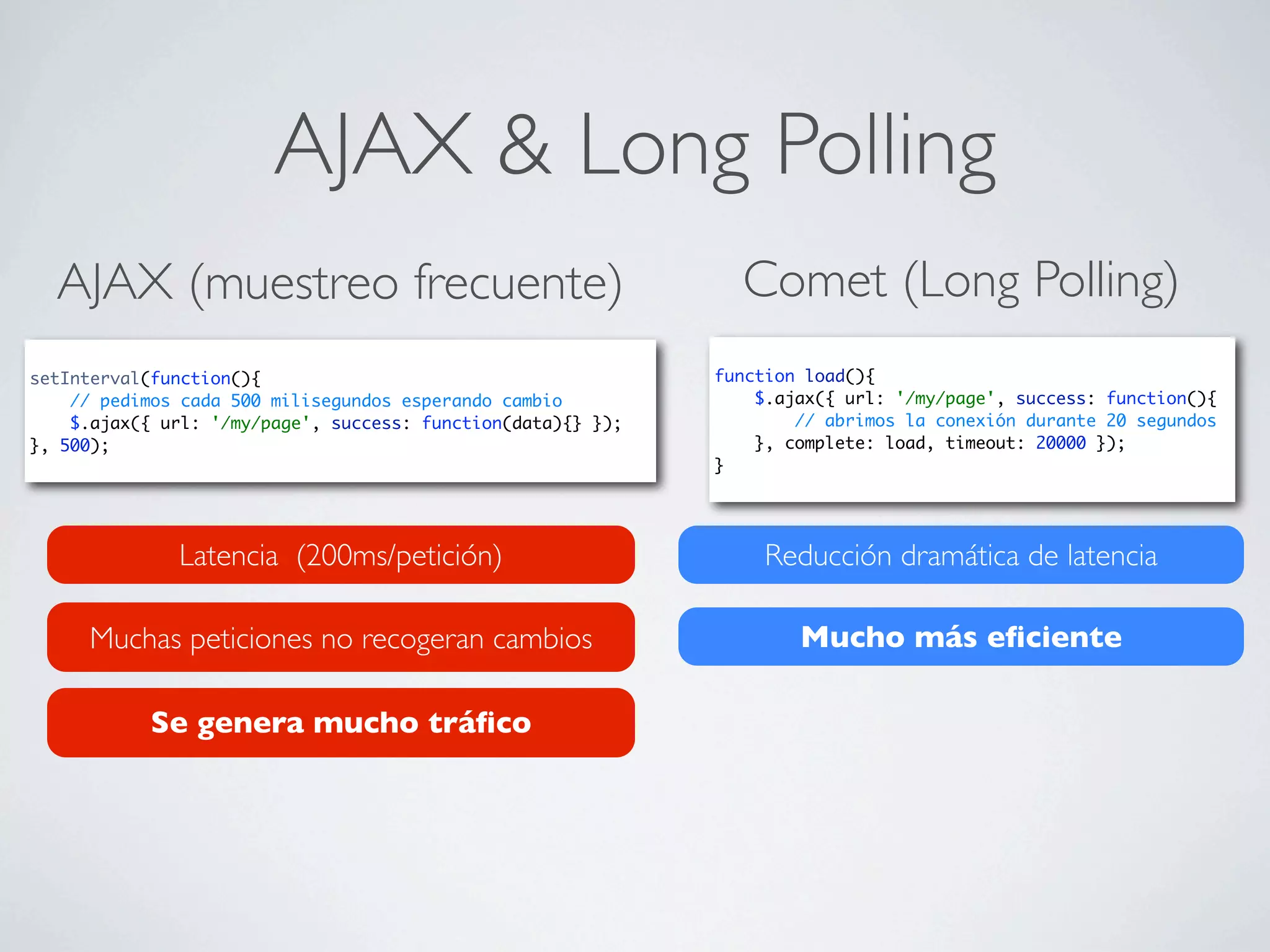
AJAX & Long Polling
  AJAX (muestreo frecuente)                                     Comet (Long Polling)
setInterval(function(){                                       function load(){
    // pedimos cada 500 milisegundos esperando cambio             $.ajax({ url: '/my/page', success: function(){
    $.ajax({ url: '/my/page', success: function(data){} });           // abrimos la conexión durante 20 segundos
}, 500);                                                          }, complete: load, timeout: 20000 });
                                                              }


              Latencia (200ms/petición)                            Reducción dramática de latencia

     Muchas peticiones no recogeran cambios                           Mucho más eficiente

            Se genera mucho tráfico
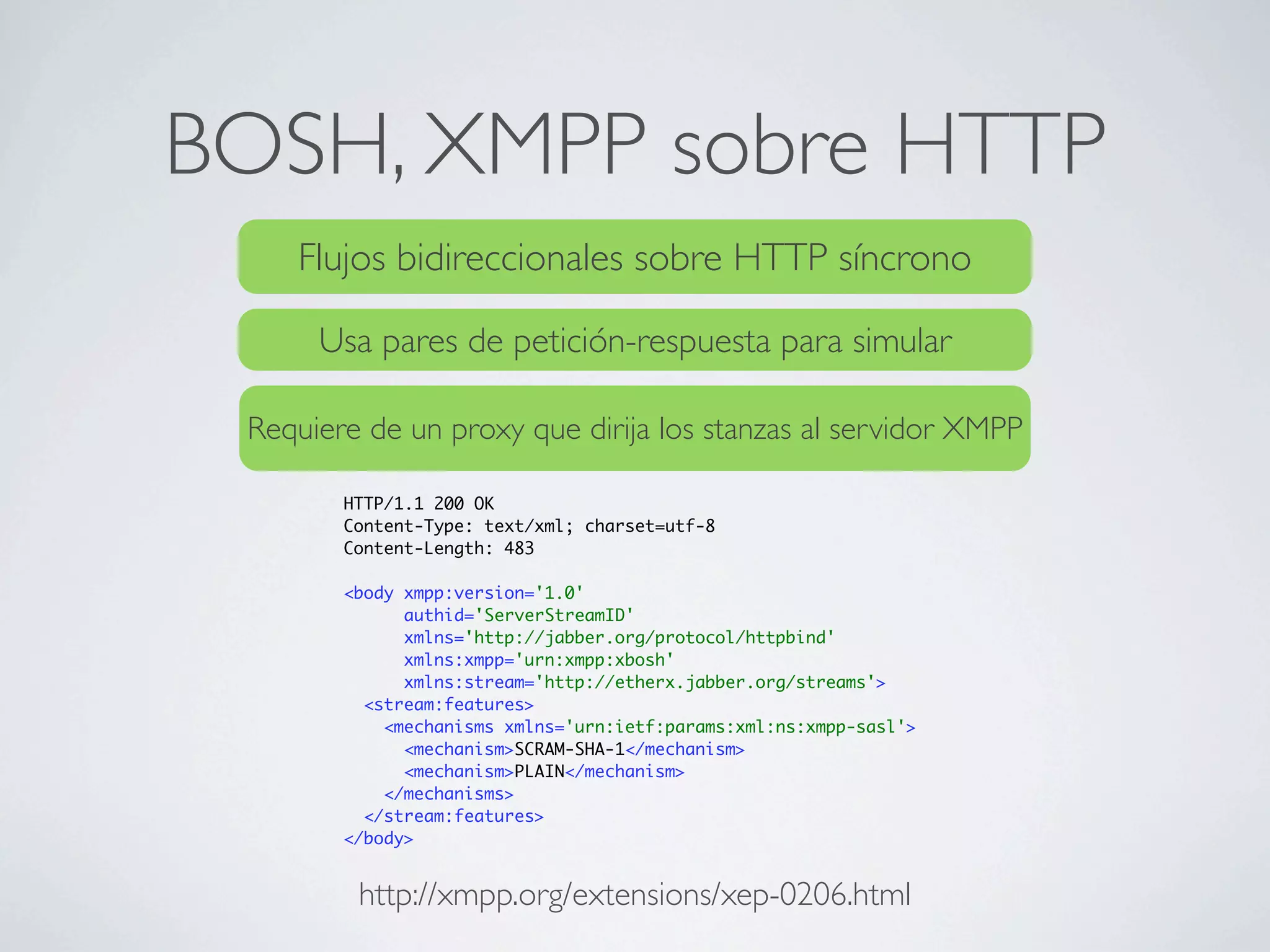
BOSH, XMPP sobre HTTP
    Flujos bidireccionales sobre HTTP síncrono

      Usa pares de petición-respuesta para simular

 Requiere de un proxy que dirija los stanzas al servidor XMPP

        HTTP/1.1 200 OK
        Content-Type: text/xml; charset=utf-8
        Content-Length: 483

        <body xmpp:version='1.0'
              authid='ServerStreamID'
              xmlns='http://jabber.org/protocol/httpbind'
              xmlns:xmpp='urn:xmpp:xbosh'
              xmlns:stream='http://etherx.jabber.org/streams'>
          <stream:features>
            <mechanisms xmlns='urn:ietf:params:xml:ns:xmpp-sasl'>
              <mechanism>SCRAM-SHA-1</mechanism>
              <mechanism>PLAIN</mechanism>
            </mechanisms>
          </stream:features>
        </body>


         http://xmpp.org/extensions/xep-0206.html
HTML5 Websockets
                          HTML 5

                        WebSockets
          To enable Web applications to maintain bidirectional
             communications with server-side processes, this
            specification introduces the WebSocket interface.


                  Gecko 2.0b4 (24/08/2010) (Firefox 4 Nighties)
Soportado en:     Webkit 333 (Safari 4, Chrome >4)
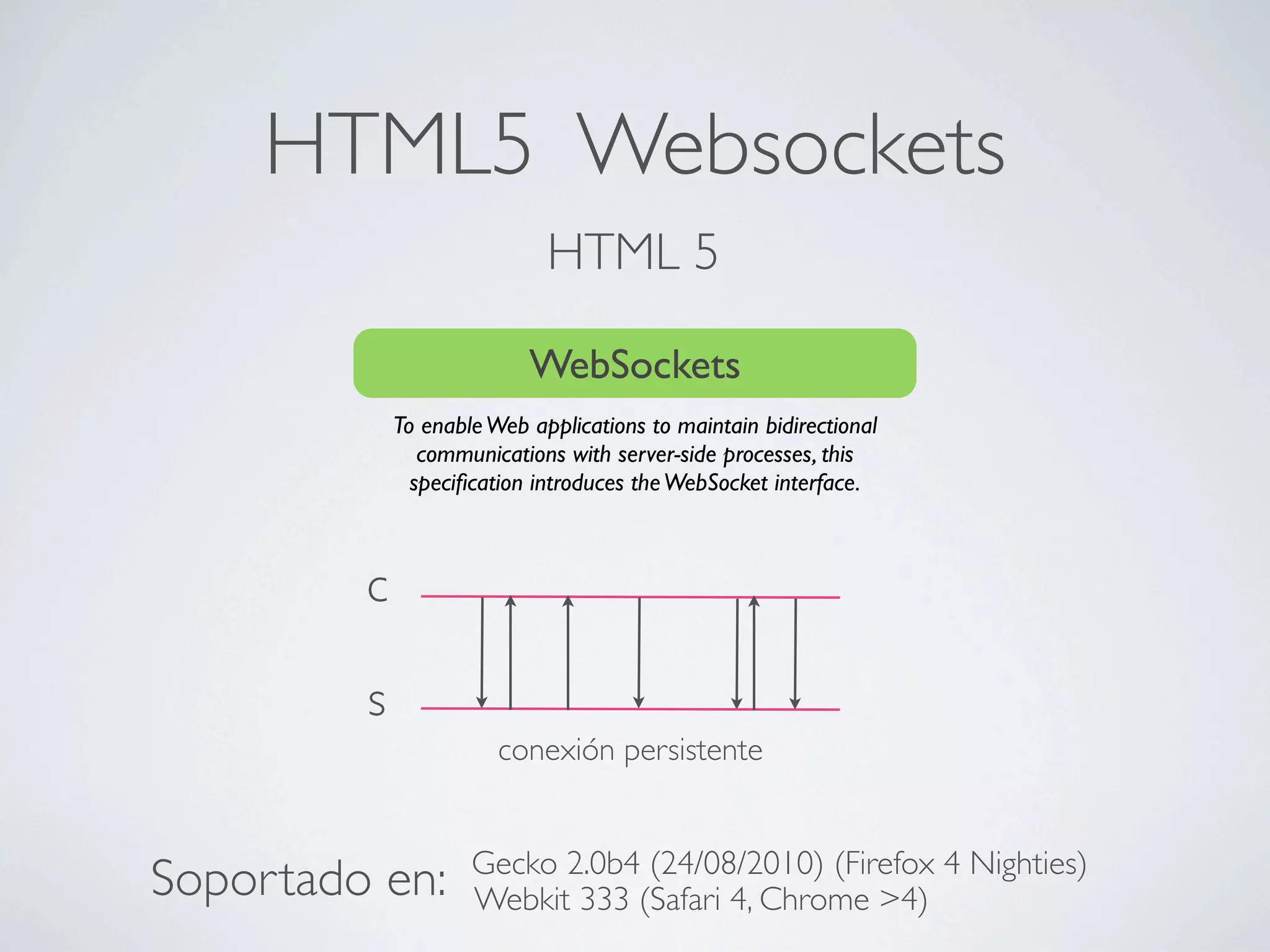
HTML5 Websockets
                             HTML 5

                           WebSockets
             To enable Web applications to maintain bidirectional
                communications with server-side processes, this
               specification introduces the WebSocket interface.


         c

         s
                        conexión persistente


                     Gecko 2.0b4 (24/08/2010) (Firefox 4 Nighties)
Soportado en:        Webkit 333 (Safari 4, Chrome >4)
El contrato Websocket
[Constructor(in DOMString url, in optional DOMString protocols)]
[Constructor(in DOMString url, in optional DOMString[] protocols)]
interface WebSocket {
  readonly attribute DOMString url; ws://services.com/service

  // ready state
  const unsigned short CONNECTING = 0;
  const unsigned short OPEN = 1;
  const unsigned short CLOSING = 2;
  const unsigned short CLOSED = 3;
  readonly attribute unsigned short readyState;         estado de
  readonly attribute unsigned long bufferedAmount;     la conexión

  // networking
  attribute Function onopen;
  attribute Function onmessage;
                                          Recepción de eventos
  attribute Function onerror;
  attribute Function onclose;
  readonly attribute DOMString protocol;
  void send(in DOMString data);          Envío de mensajes
  void close();
};
WebSocket implements EventTarget;
Web en tiempo real con
    Websockets
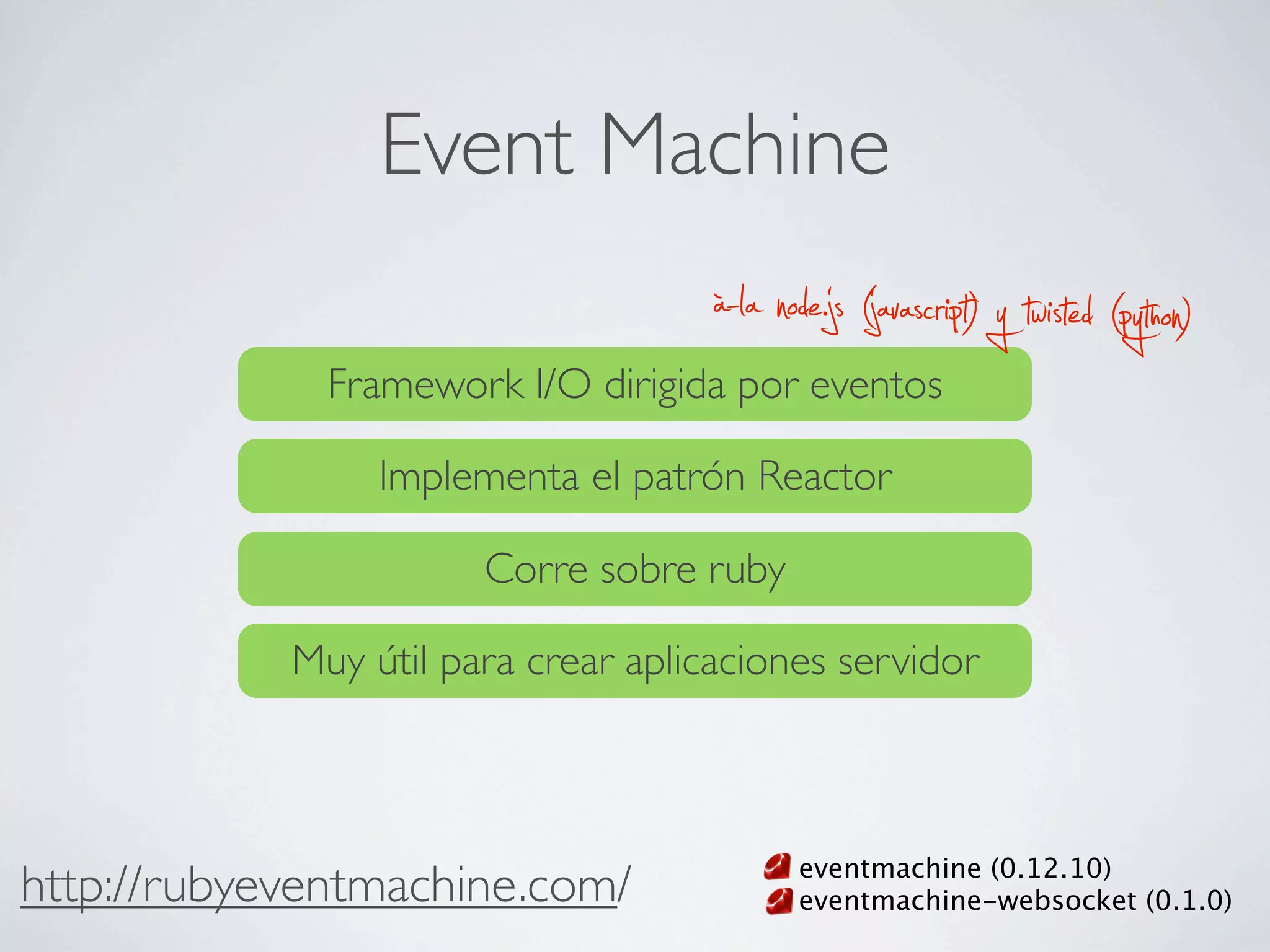
Event Machine
                                     à-la node.js (javascript) y twisted (python)
              Framework I/O dirigida por eventos

                 Implementa el patrón Reactor

                       Corre sobre ruby

            Muy útil para crear aplicaciones servidor


                                            eventmachine (0.12.10)
http://rubyeventmachine.com/                eventmachine-websocket (0.1.0)
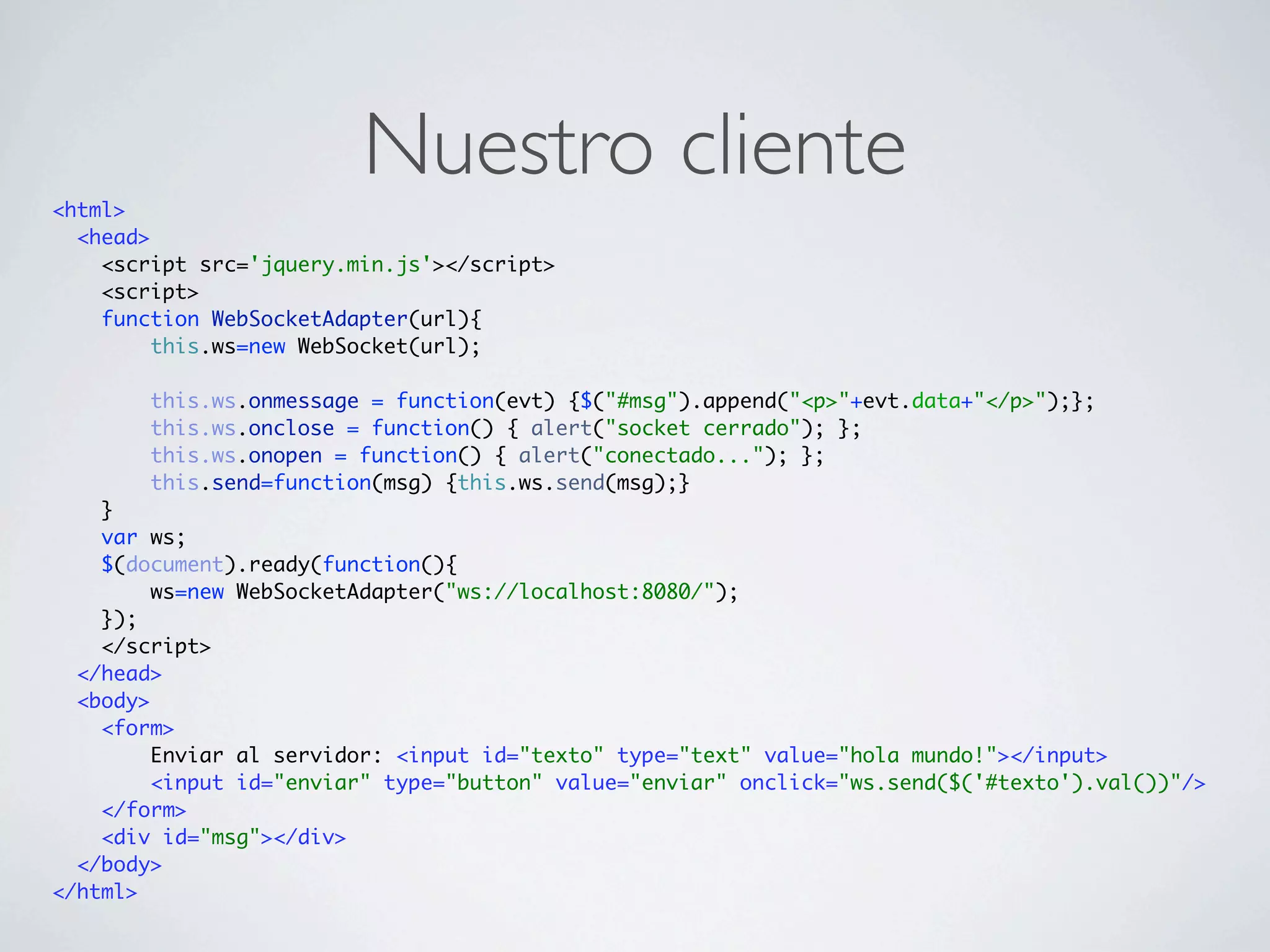
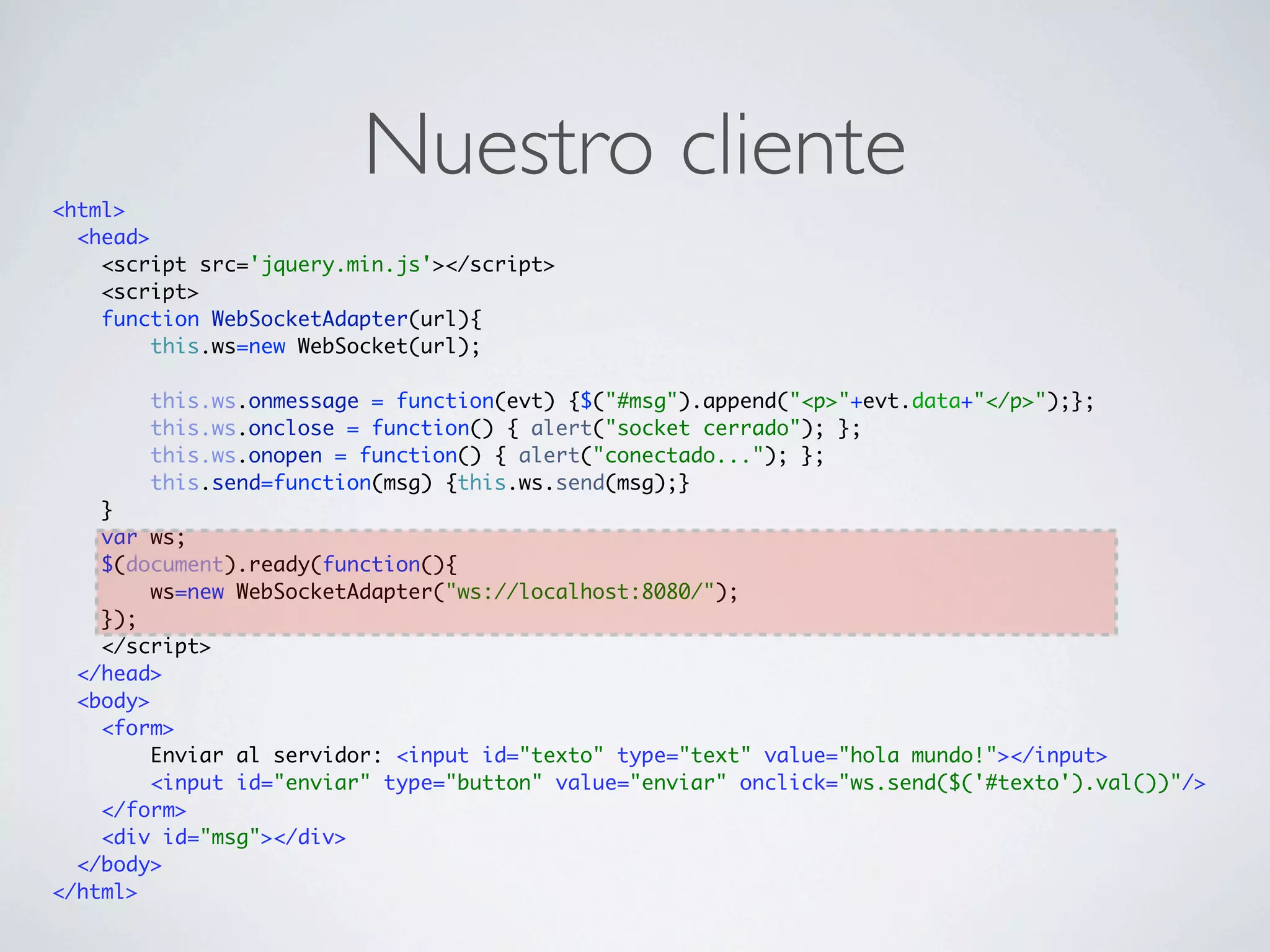
<html>
                         Nuestro cliente
  <head>
    <script src='jquery.min.js'></script>
    <script>
    function WebSocketAdapter(url){
         this.ws=new WebSocket(url);

        this.ws.onmessage = function(evt) {$("#msg").append("<p>"+evt.data+"</p>");};
        this.ws.onclose = function() { alert("socket cerrado"); };
        this.ws.onopen = function() { alert("conectado..."); };
        this.send=function(msg) {this.ws.send(msg);}
    }
    var ws;
    $(document).ready(function(){
         ws=new WebSocketAdapter("ws://localhost:8080/");
    });
    </script>
  </head>
  <body>
    <form>
         Enviar al servidor: <input id="texto" type="text" value="hola mundo!"></input>
         <input id="enviar" type="button" value="enviar" onclick="ws.send($('#texto').val())"/>
    </form>
    <div id="msg"></div>
  </body>
</html>
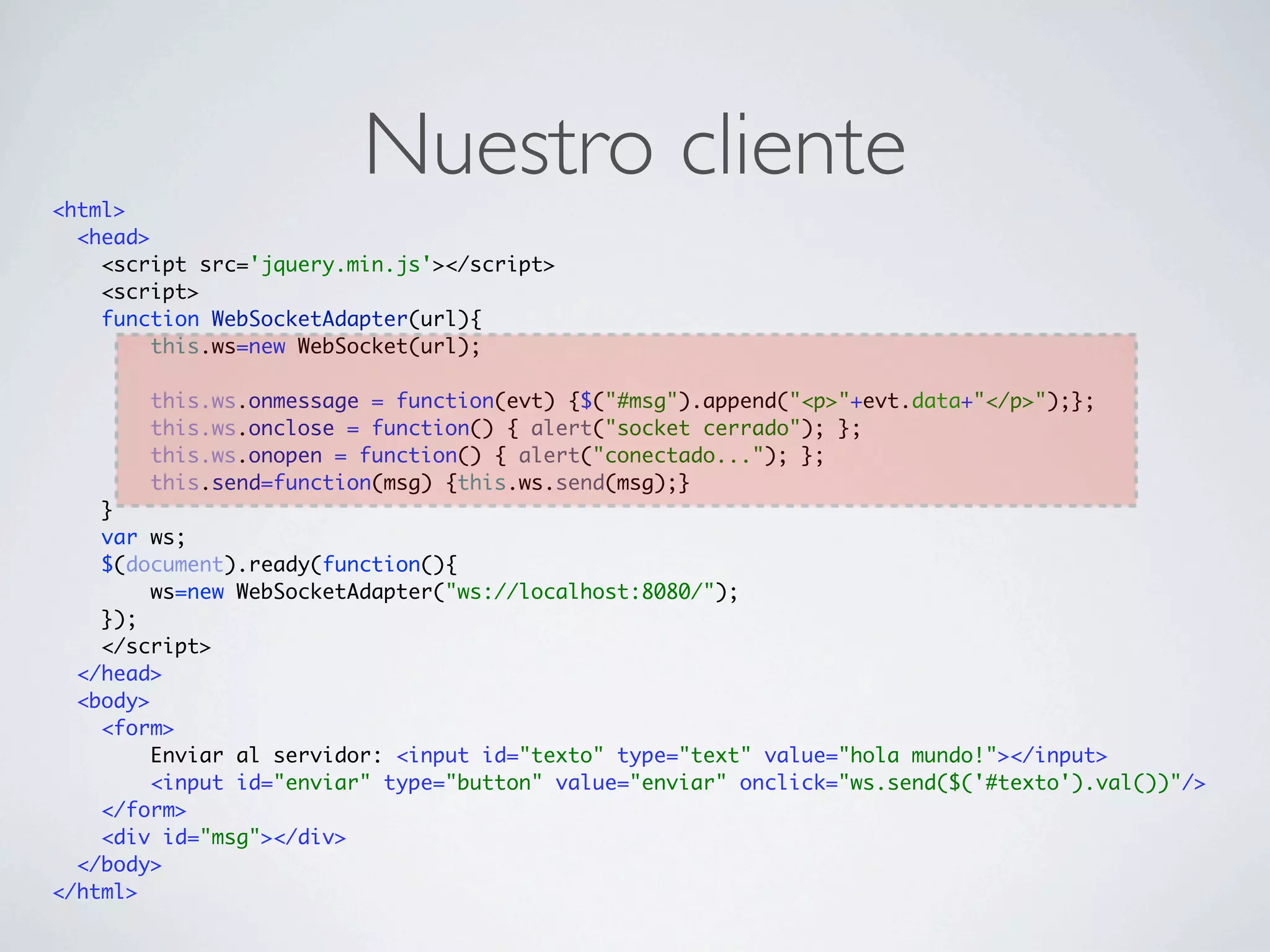
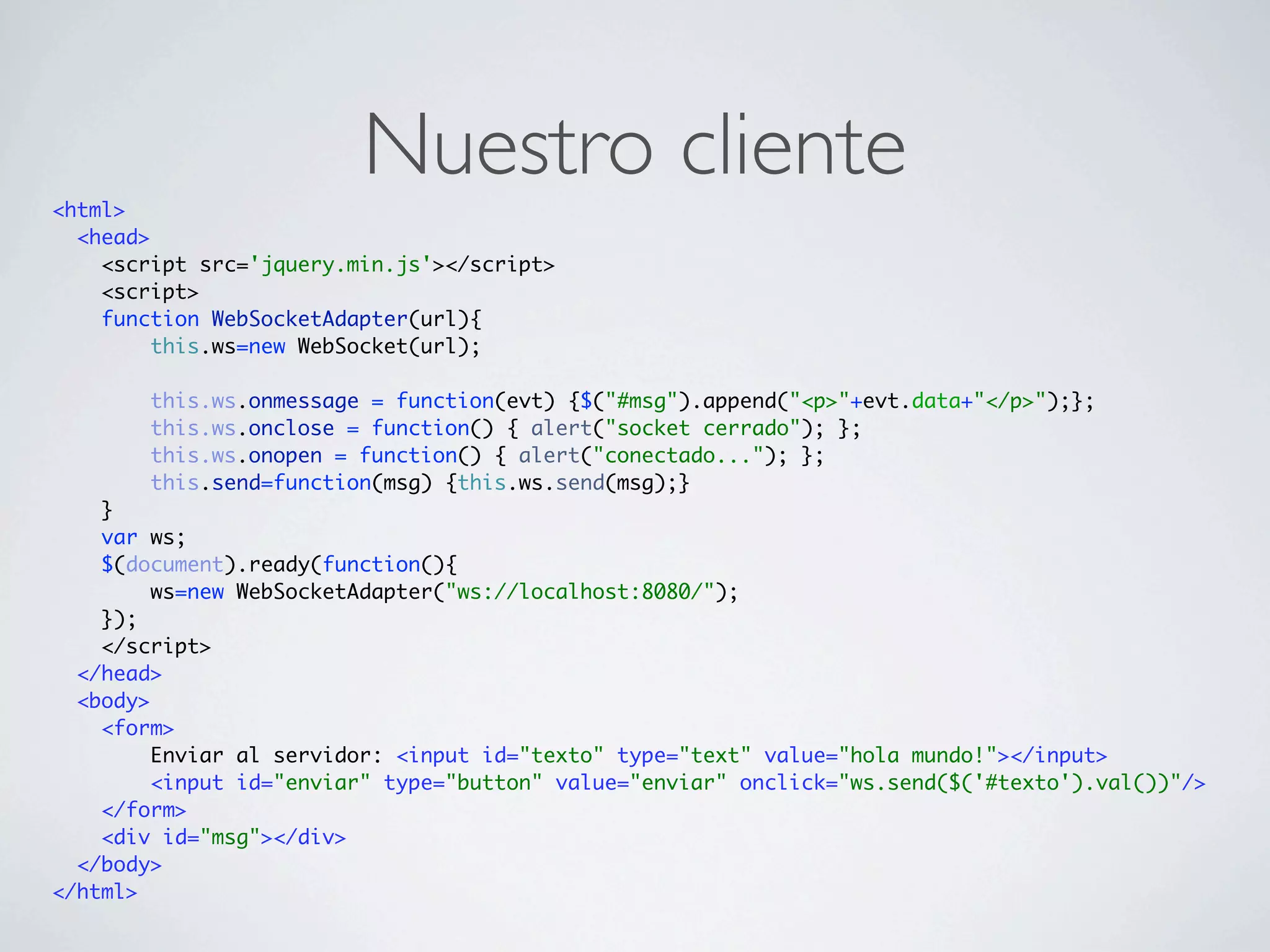
<html>
                         Nuestro cliente
  <head>
    <script src='jquery.min.js'></script>
    <script>
    function WebSocketAdapter(url){
         this.ws=new WebSocket(url);

        this.ws.onmessage = function(evt) {$("#msg").append("<p>"+evt.data+"</p>");};
        this.ws.onclose = function() { alert("socket cerrado"); };
        this.ws.onopen = function() { alert("conectado..."); };
        this.send=function(msg) {this.ws.send(msg);}
    }
    var ws;
    $(document).ready(function(){
         ws=new WebSocketAdapter("ws://localhost:8080/");
    });
    </script>
  </head>
  <body>
    <form>
         Enviar al servidor: <input id="texto" type="text" value="hola mundo!"></input>
         <input id="enviar" type="button" value="enviar" onclick="ws.send($('#texto').val())"/>
    </form>
    <div id="msg"></div>
  </body>
</html>
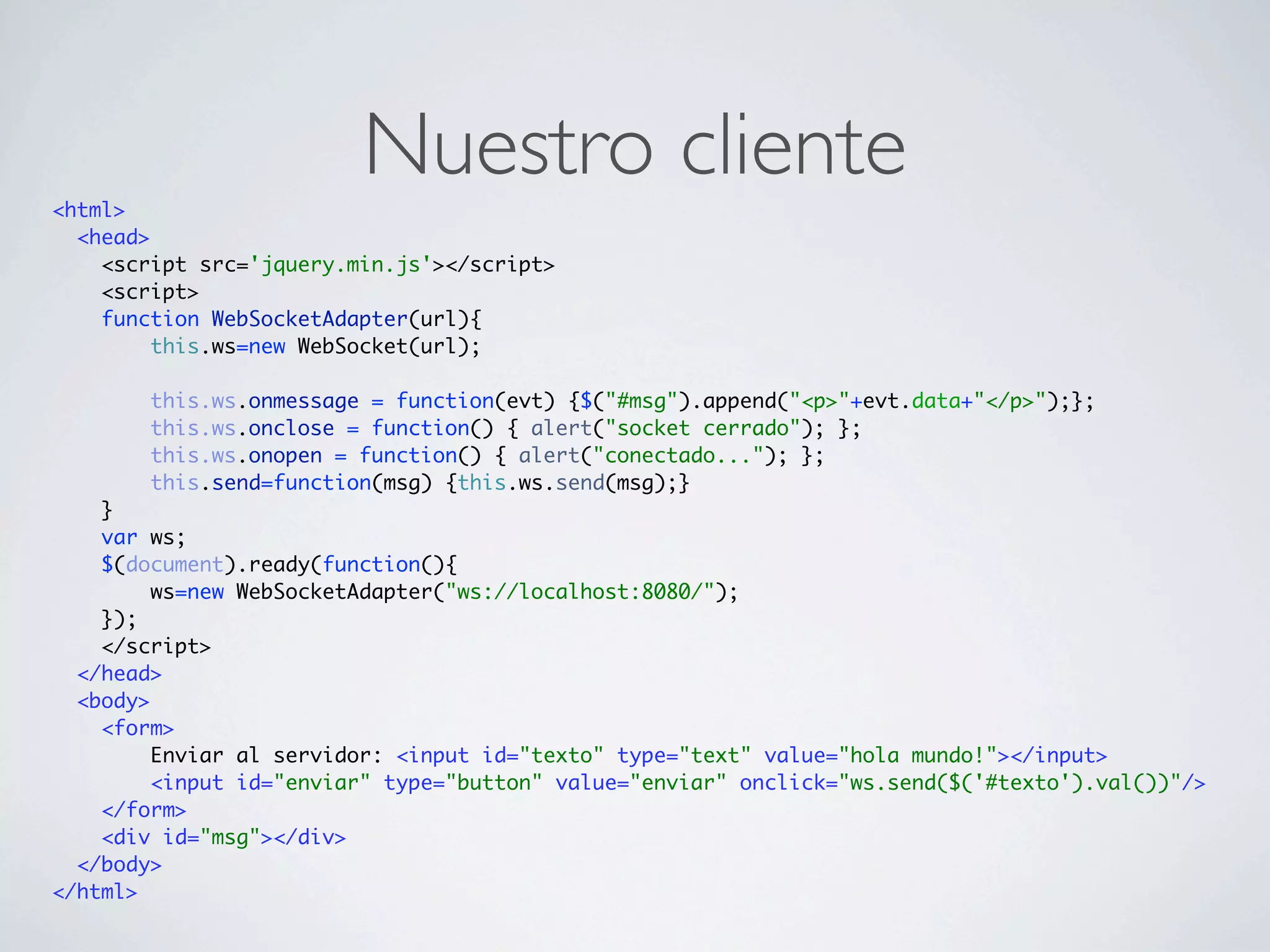
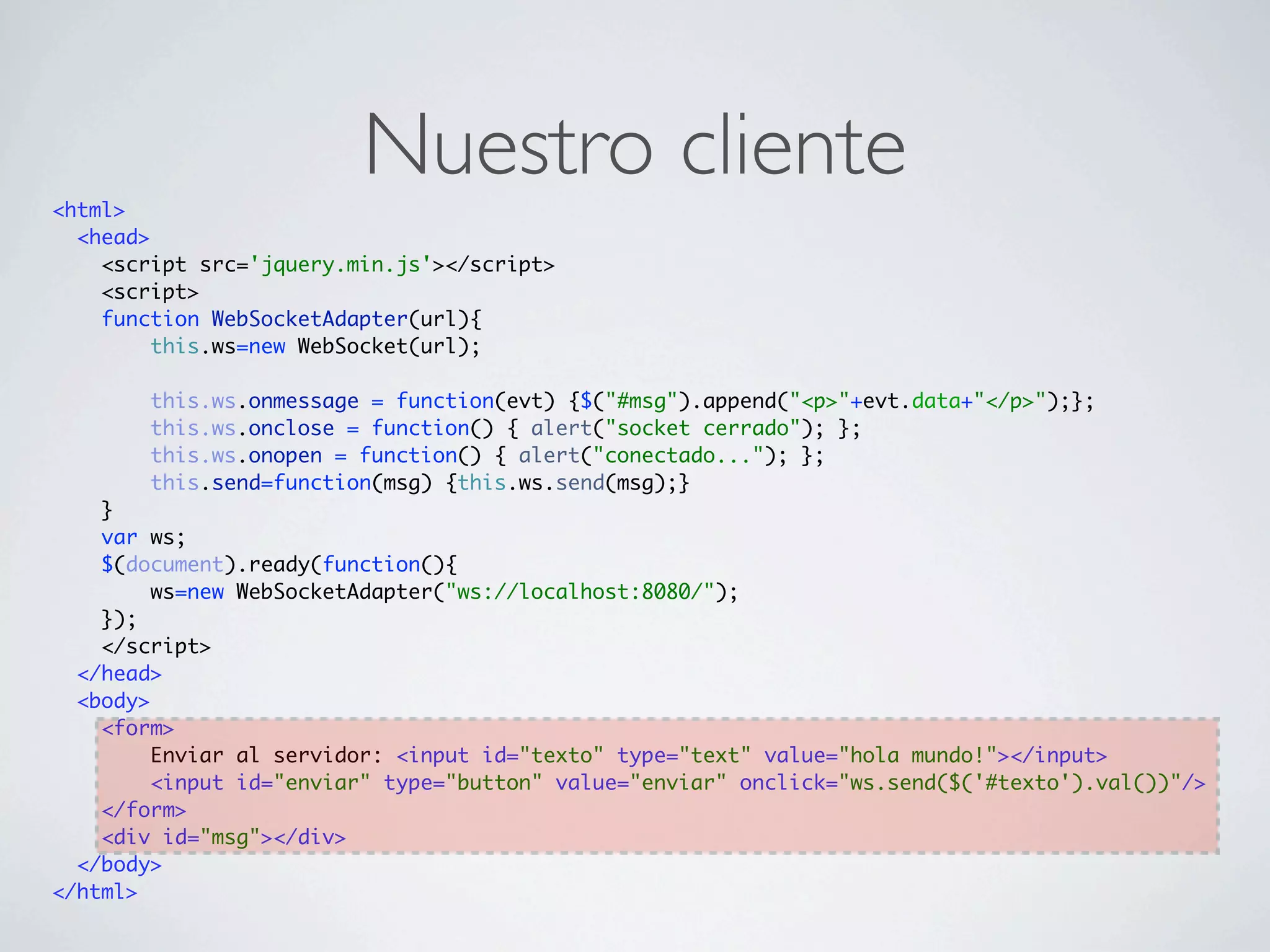
<html>
                         Nuestro cliente
  <head>
    <script src='jquery.min.js'></script>
    <script>
    function WebSocketAdapter(url){
         this.ws=new WebSocket(url);

        this.ws.onmessage = function(evt) {$("#msg").append("<p>"+evt.data+"</p>");};
        this.ws.onclose = function() { alert("socket cerrado"); };
        this.ws.onopen = function() { alert("conectado..."); };
        this.send=function(msg) {this.ws.send(msg);}
    }
    var ws;
    $(document).ready(function(){
         ws=new WebSocketAdapter("ws://localhost:8080/");
    });
    </script>
  </head>
  <body>
    <form>
         Enviar al servidor: <input id="texto" type="text" value="hola mundo!"></input>
         <input id="enviar" type="button" value="enviar" onclick="ws.send($('#texto').val())"/>
    </form>
    <div id="msg"></div>
  </body>
</html>
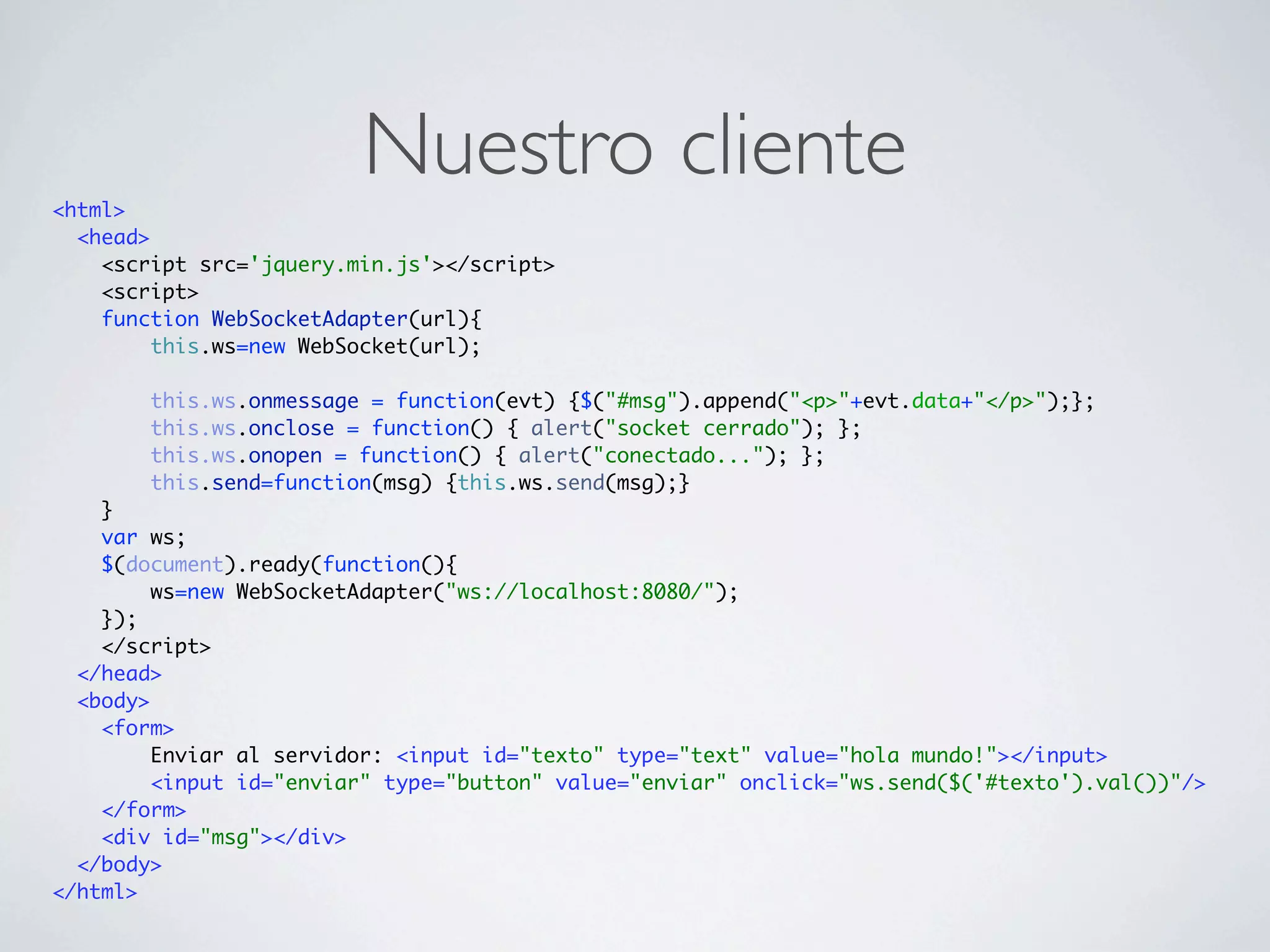
<html>
                         Nuestro cliente
  <head>
    <script src='jquery.min.js'></script>
    <script>
    function WebSocketAdapter(url){
         this.ws=new WebSocket(url);

        this.ws.onmessage = function(evt) {$("#msg").append("<p>"+evt.data+"</p>");};
        this.ws.onclose = function() { alert("socket cerrado"); };
        this.ws.onopen = function() { alert("conectado..."); };
        this.send=function(msg) {this.ws.send(msg);}
    }
    var ws;
    $(document).ready(function(){
         ws=new WebSocketAdapter("ws://localhost:8080/");
    });
    </script>
  </head>
  <body>
    <form>
         Enviar al servidor: <input id="texto" type="text" value="hola mundo!"></input>
         <input id="enviar" type="button" value="enviar" onclick="ws.send($('#texto').val())"/>
    </form>
    <div id="msg"></div>
  </body>
</html>
<html>
                         Nuestro cliente
  <head>
    <script src='jquery.min.js'></script>
    <script>
    function WebSocketAdapter(url){
         this.ws=new WebSocket(url);

        this.ws.onmessage = function(evt) {$("#msg").append("<p>"+evt.data+"</p>");};
        this.ws.onclose = function() { alert("socket cerrado"); };
        this.ws.onopen = function() { alert("conectado..."); };
        this.send=function(msg) {this.ws.send(msg);}
    }
    var ws;
    $(document).ready(function(){
         ws=new WebSocketAdapter("ws://localhost:8080/");
    });
    </script>
  </head>
  <body>
    <form>
         Enviar al servidor: <input id="texto" type="text" value="hola mundo!"></input>
         <input id="enviar" type="button" value="enviar" onclick="ws.send($('#texto').val())"/>
    </form>
    <div id="msg"></div>
  </body>
</html>
<html>
                         Nuestro cliente
  <head>
    <script src='jquery.min.js'></script>
    <script>
    function WebSocketAdapter(url){
         this.ws=new WebSocket(url);

        this.ws.onmessage = function(evt) {$("#msg").append("<p>"+evt.data+"</p>");};
        this.ws.onclose = function() { alert("socket cerrado"); };
        this.ws.onopen = function() { alert("conectado..."); };
        this.send=function(msg) {this.ws.send(msg);}
    }
    var ws;
    $(document).ready(function(){
         ws=new WebSocketAdapter("ws://localhost:8080/");
    });
    </script>
  </head>
  <body>
    <form>
         Enviar al servidor: <input id="texto" type="text" value="hola mundo!"></input>
         <input id="enviar" type="button" value="enviar" onclick="ws.send($('#texto').val())"/>
    </form>
    <div id="msg"></div>
  </body>
</html>
<html>
                         Nuestro cliente
  <head>
    <script src='jquery.min.js'></script>
    <script>
    function WebSocketAdapter(url){
         this.ws=new WebSocket(url);

        this.ws.onmessage = function(evt) {$("#msg").append("<p>"+evt.data+"</p>");};
        this.ws.onclose = function() { alert("socket cerrado"); };
        this.ws.onopen = function() { alert("conectado..."); };
        this.send=function(msg) {this.ws.send(msg);}
    }
    var ws;
    $(document).ready(function(){
         ws=new WebSocketAdapter("ws://localhost:8080/");
    });
    </script>
  </head>
  <body>
    <form>
         Enviar al servidor: <input id="texto" type="text" value="hola mundo!"></input>
         <input id="enviar" type="button" value="enviar" onclick="ws.send($('#texto').val())"/>
    </form>
    <div id="msg"></div>
  </body>
</html>
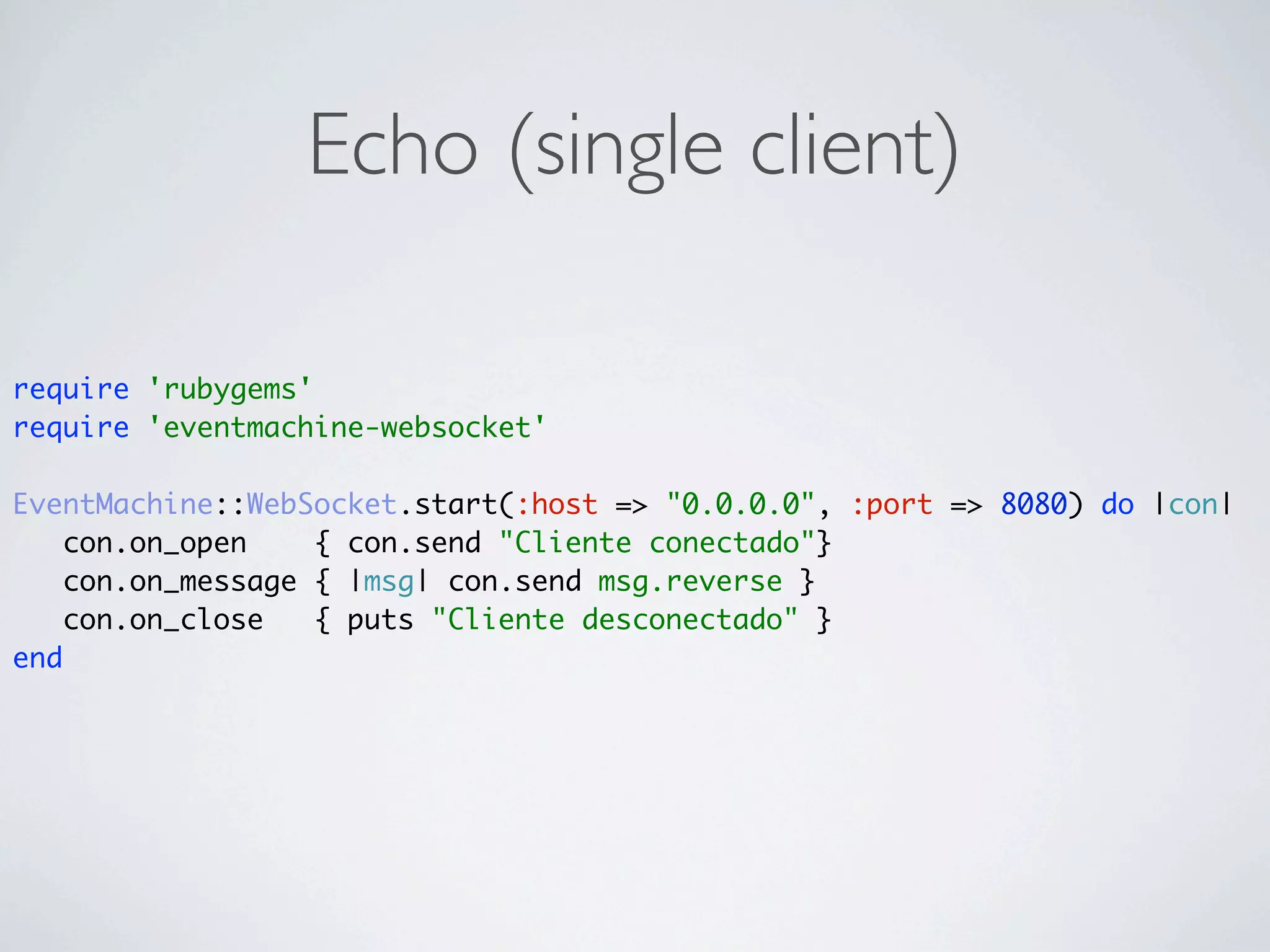
Echo (single client)

require 'rubygems'
require 'eventmachine-websocket'

EventMachine::WebSocket.start(:host => "0.0.0.0", :port => 8080) do |con|
    con.on_open    { con.send "Cliente conectado"}
    con.on_message { |msg| con.send msg.reverse }
    con.on_close   { puts "Cliente desconectado" }
end
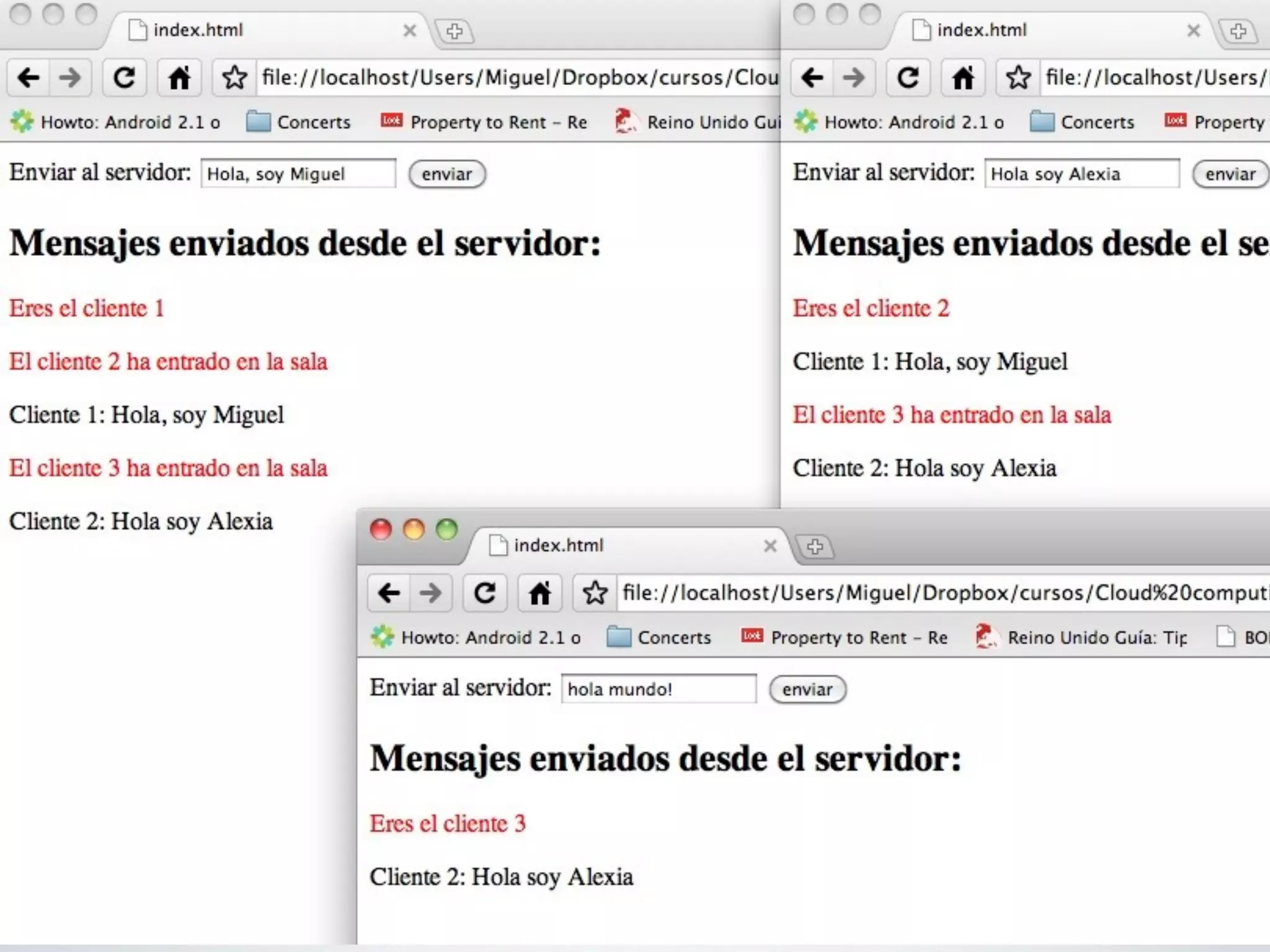
Multichat en 23LOC
require 'rubygems'
require 'eventmachine-websocket'

connections=[]
indexes={}

EventMachine::WebSocket.start(:host => "0.0.0.0", :port => 8080) do |con|

      con.on_open     do
        indexes[con]=connections.size+1
        con.send "<p class="highlight">Eres el cliente #{indexes[con]}<p>"
        connections.each{ |c| c.send "<p class="highlight">El cliente #{indexes[con]} ha entrado en la sala<p>" }
        connections << con
      end
      con.on_message do |msg|
        connections.each{ |c| c.send "<p><span class="cliente">Cliente #{indexes[con]}:</span> #{msg}</p>" }
      end
      con.on_close do
        c.send "<p class="highlight">Has abandonado la sala</p>"
        connections.delete con
        indexes.delete con
      end
end
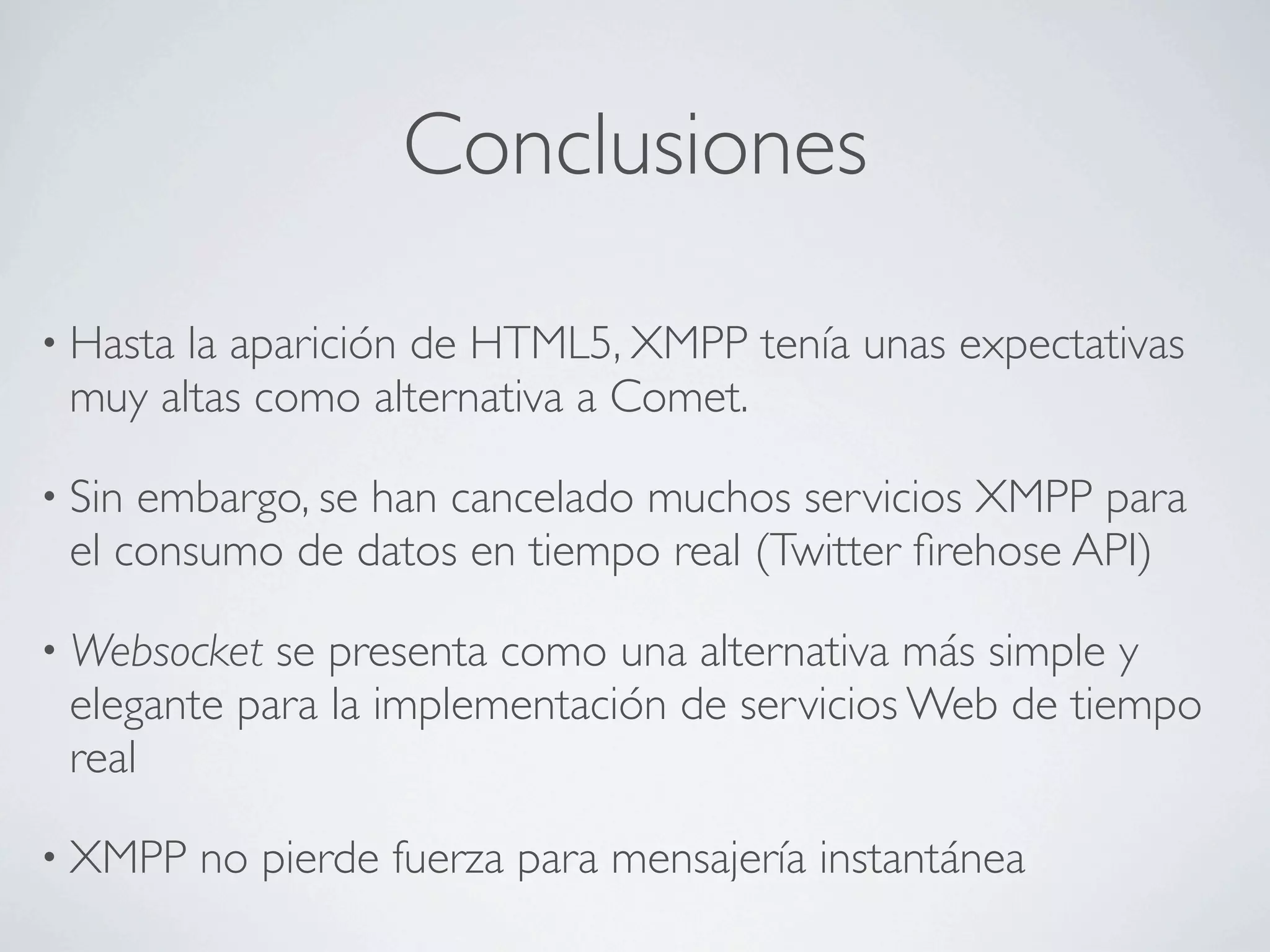
Conclusiones

• Hastala aparición de HTML5, XMPP tenía unas expectativas
 muy altas como alternativa a Comet.

• Sinembargo, se han cancelado muchos servicios XMPP para
 el consumo de datos en tiempo real (Twitter firehose API)

• Websocket se presenta como una alternativa más simple y
 elegante para la implementación de servicios Web de tiempo
 real

• XMPP    no pierde fuerza para mensajería instantánea
Bilbiografía
Gracias
Universidad de Oviedo   Programa de extensión universitaria


     CLOUD COMPUTING.
DESARROLLO DE APLICACIONES Y
        MINERÍA WEB


                               Miguel Fernández Fernández
                                miguelff@innova.uniovi.es

Real-time web

  • 1.
    Universidad de Oviedo Programa de extensión universitaria CLOUD COMPUTING. DESARROLLO DE APLICACIONES Y MINERÍA WEB Miguel Fernández Fernández miguelff@innova.uniovi.es
  • 2.
    Web en TiempoReal XMPP, Websockets, et al.
  • 3.
    ¿Qué es XMPP? antesJabber Extensible Messaging and Presence Protocol Envío de mensajes en tiempo real Codificados en XML Transportados sobre TCP y UDP (media) http://xmpp.org
  • 4.
    ¿Por qué XMPP? para la Web HTTP Half-duplex stateless
  • 5.
    ¿Por qué XMPP? para la Web HTTP Half-duplex stateless c s normal polling (AJAX) c s long polling (Comet)
  • 6.
    ¿Por qué XMPP? para la Web HTTP XMPP Half-duplex Full-duplex stateless stateful c s normal polling (AJAX) c s long polling (Comet)
  • 7.
    ¿Por qué XMPP? para la Web HTTP XMPP Half-duplex Full-duplex stateless stateful c s c normal polling (AJAX) c s conexión persistente s long polling (Comet)
  • 8.
    Arquitectura XMPP O’REILLY XMPP: The Definitive Guide
  • 9.
  • 10.
    La red XMPP:Entidades Servidores Clientes Componentes Plugins
  • 11.
    Servidores Enrutan mensajes Hablan con clientes y otros servidores FOSS: Ejabberd, Openfire, Tigase
  • 12.
    Clientes Humanos y robots Protocolo cliente-servidor
  • 13.
    Componentes Extienden la funcionalidaddel servidor Tienen su propia identidad y dirección Se ejecutan fuera del mismo Se comunican con un protocolo específico Ejemplo típico: Multichat
  • 14.
    Plugins Mismo propósito quelos componentes También tienen identidad y dirección No hay IPC mayor rendimiento
  • 15.
    Direccionamiento en XMPP JIDs: almenos uno por cada entidad local@dom.ain/resource it@miinterprete.appspotchat.com/adium Bare JID Full JID
  • 16.
    XMPP Stanzas <stream:stream> <iq type="get"> <query xmlns="jabber:iq:roster"/> </iq> <presence/> <message to="bar@otherside.com" from="foo@oneside.com/adium" type="chat"> <body>Tomamos algo?</body> </message> <presence type="unavailable"/> </stream:stream>
  • 17.
    XMPP Stanzas <stream:stream> <iq type="get"> <query xmlns="jabber:iq:roster"/> </iq> <presence/> <message to="bar@otherside.com" from="foo@oneside.com/adium" type="chat"> <body>Tomamos algo?</body> </message> <presence type="unavailable"/> </stream:stream>
  • 18.
    XMPP Stanzas <stream:stream> <iq type="get"> <query xmlns="jabber:iq:roster"/> Dame mis contactos </iq> <presence/> <message to="bar@otherside.com" from="foo@oneside.com/adium" type="chat"> <body>Tomamos algo?</body> </message> <presence type="unavailable"/> </stream:stream>
  • 19.
    XMPP Stanzas <stream:stream> <iq type="get"> <query xmlns="jabber:iq:roster"/> Dame mis contactos </iq> <presence/> Estoy online <message to="bar@otherside.com" from="foo@oneside.com/adium" type="chat"> <body>Tomamos algo?</body> </message> <presence type="unavailable"/> </stream:stream>
  • 20.
    XMPP Stanzas <stream:stream> <iq type="get"> <query xmlns="jabber:iq:roster"/> Dame mis contactos </iq> <presence/> Estoy online <message to="bar@otherside.com" from="foo@oneside.com/adium" type="chat"> <body>Tomamos algo?</body> </message> <presence type="unavailable"/> </stream:stream> Dile a bar que si tomamos algo
  • 21.
    XMPP Stanzas <stream:stream> <iq type="get"> <query xmlns="jabber:iq:roster"/> Dame mis contactos </iq> <presence/> Estoy online <message to="bar@otherside.com" from="foo@oneside.com/adium" type="chat"> <body>Tomamos algo?</body> </message> <presence type="unavailable"/> </stream:stream> Dile a bar que si Ya no estoy disponible tomamos algo
  • 22.
  • 23.
    Acercando XMPP ala Web Pre HTML 5 Comunicación basada en HTTP AJAX & Long Polling Bidirectional-Streams over synchronous HTTP
  • 24.
    AJAX & LongPolling AJAX (muestreo frecuente) Comet (Long Polling) setInterval(function(){ function load(){ // pedimos cada 500 milisegundos esperando cambio $.ajax({ url: '/my/page', success: function(){ $.ajax({ url: '/my/page', success: function(data){} }); // abrimos la conexión durante 20 segundos }, 500); }, complete: load, timeout: 20000 }); } Latencia (200ms/petición) Reducción dramática de latencia Muchas peticiones no recogeran cambios Mucho más eficiente Se genera mucho tráfico
  • 25.
    BOSH, XMPP sobreHTTP Flujos bidireccionales sobre HTTP síncrono Usa pares de petición-respuesta para simular Requiere de un proxy que dirija los stanzas al servidor XMPP HTTP/1.1 200 OK Content-Type: text/xml; charset=utf-8 Content-Length: 483 <body xmpp:version='1.0' authid='ServerStreamID' xmlns='http://jabber.org/protocol/httpbind' xmlns:xmpp='urn:xmpp:xbosh' xmlns:stream='http://etherx.jabber.org/streams'> <stream:features> <mechanisms xmlns='urn:ietf:params:xml:ns:xmpp-sasl'> <mechanism>SCRAM-SHA-1</mechanism> <mechanism>PLAIN</mechanism> </mechanisms> </stream:features> </body> http://xmpp.org/extensions/xep-0206.html
  • 26.
    HTML5 Websockets HTML 5 WebSockets To enable Web applications to maintain bidirectional communications with server-side processes, this specification introduces the WebSocket interface. Gecko 2.0b4 (24/08/2010) (Firefox 4 Nighties) Soportado en: Webkit 333 (Safari 4, Chrome >4)
  • 27.
    HTML5 Websockets HTML 5 WebSockets To enable Web applications to maintain bidirectional communications with server-side processes, this specification introduces the WebSocket interface. c s conexión persistente Gecko 2.0b4 (24/08/2010) (Firefox 4 Nighties) Soportado en: Webkit 333 (Safari 4, Chrome >4)
  • 28.
    El contrato Websocket [Constructor(inDOMString url, in optional DOMString protocols)] [Constructor(in DOMString url, in optional DOMString[] protocols)] interface WebSocket { readonly attribute DOMString url; ws://services.com/service // ready state const unsigned short CONNECTING = 0; const unsigned short OPEN = 1; const unsigned short CLOSING = 2; const unsigned short CLOSED = 3; readonly attribute unsigned short readyState; estado de readonly attribute unsigned long bufferedAmount; la conexión // networking attribute Function onopen; attribute Function onmessage; Recepción de eventos attribute Function onerror; attribute Function onclose; readonly attribute DOMString protocol; void send(in DOMString data); Envío de mensajes void close(); }; WebSocket implements EventTarget;
  • 29.
    Web en tiemporeal con Websockets
  • 30.
    Event Machine à-la node.js (javascript) y twisted (python) Framework I/O dirigida por eventos Implementa el patrón Reactor Corre sobre ruby Muy útil para crear aplicaciones servidor eventmachine (0.12.10) http://rubyeventmachine.com/ eventmachine-websocket (0.1.0)
  • 31.
    <html> Nuestro cliente <head> <script src='jquery.min.js'></script> <script> function WebSocketAdapter(url){ this.ws=new WebSocket(url); this.ws.onmessage = function(evt) {$("#msg").append("<p>"+evt.data+"</p>");}; this.ws.onclose = function() { alert("socket cerrado"); }; this.ws.onopen = function() { alert("conectado..."); }; this.send=function(msg) {this.ws.send(msg);} } var ws; $(document).ready(function(){ ws=new WebSocketAdapter("ws://localhost:8080/"); }); </script> </head> <body> <form> Enviar al servidor: <input id="texto" type="text" value="hola mundo!"></input> <input id="enviar" type="button" value="enviar" onclick="ws.send($('#texto').val())"/> </form> <div id="msg"></div> </body> </html>
  • 32.
    <html> Nuestro cliente <head> <script src='jquery.min.js'></script> <script> function WebSocketAdapter(url){ this.ws=new WebSocket(url); this.ws.onmessage = function(evt) {$("#msg").append("<p>"+evt.data+"</p>");}; this.ws.onclose = function() { alert("socket cerrado"); }; this.ws.onopen = function() { alert("conectado..."); }; this.send=function(msg) {this.ws.send(msg);} } var ws; $(document).ready(function(){ ws=new WebSocketAdapter("ws://localhost:8080/"); }); </script> </head> <body> <form> Enviar al servidor: <input id="texto" type="text" value="hola mundo!"></input> <input id="enviar" type="button" value="enviar" onclick="ws.send($('#texto').val())"/> </form> <div id="msg"></div> </body> </html>
  • 33.
    <html> Nuestro cliente <head> <script src='jquery.min.js'></script> <script> function WebSocketAdapter(url){ this.ws=new WebSocket(url); this.ws.onmessage = function(evt) {$("#msg").append("<p>"+evt.data+"</p>");}; this.ws.onclose = function() { alert("socket cerrado"); }; this.ws.onopen = function() { alert("conectado..."); }; this.send=function(msg) {this.ws.send(msg);} } var ws; $(document).ready(function(){ ws=new WebSocketAdapter("ws://localhost:8080/"); }); </script> </head> <body> <form> Enviar al servidor: <input id="texto" type="text" value="hola mundo!"></input> <input id="enviar" type="button" value="enviar" onclick="ws.send($('#texto').val())"/> </form> <div id="msg"></div> </body> </html>
  • 34.
    <html> Nuestro cliente <head> <script src='jquery.min.js'></script> <script> function WebSocketAdapter(url){ this.ws=new WebSocket(url); this.ws.onmessage = function(evt) {$("#msg").append("<p>"+evt.data+"</p>");}; this.ws.onclose = function() { alert("socket cerrado"); }; this.ws.onopen = function() { alert("conectado..."); }; this.send=function(msg) {this.ws.send(msg);} } var ws; $(document).ready(function(){ ws=new WebSocketAdapter("ws://localhost:8080/"); }); </script> </head> <body> <form> Enviar al servidor: <input id="texto" type="text" value="hola mundo!"></input> <input id="enviar" type="button" value="enviar" onclick="ws.send($('#texto').val())"/> </form> <div id="msg"></div> </body> </html>
  • 35.
    <html> Nuestro cliente <head> <script src='jquery.min.js'></script> <script> function WebSocketAdapter(url){ this.ws=new WebSocket(url); this.ws.onmessage = function(evt) {$("#msg").append("<p>"+evt.data+"</p>");}; this.ws.onclose = function() { alert("socket cerrado"); }; this.ws.onopen = function() { alert("conectado..."); }; this.send=function(msg) {this.ws.send(msg);} } var ws; $(document).ready(function(){ ws=new WebSocketAdapter("ws://localhost:8080/"); }); </script> </head> <body> <form> Enviar al servidor: <input id="texto" type="text" value="hola mundo!"></input> <input id="enviar" type="button" value="enviar" onclick="ws.send($('#texto').val())"/> </form> <div id="msg"></div> </body> </html>
  • 36.
    <html> Nuestro cliente <head> <script src='jquery.min.js'></script> <script> function WebSocketAdapter(url){ this.ws=new WebSocket(url); this.ws.onmessage = function(evt) {$("#msg").append("<p>"+evt.data+"</p>");}; this.ws.onclose = function() { alert("socket cerrado"); }; this.ws.onopen = function() { alert("conectado..."); }; this.send=function(msg) {this.ws.send(msg);} } var ws; $(document).ready(function(){ ws=new WebSocketAdapter("ws://localhost:8080/"); }); </script> </head> <body> <form> Enviar al servidor: <input id="texto" type="text" value="hola mundo!"></input> <input id="enviar" type="button" value="enviar" onclick="ws.send($('#texto').val())"/> </form> <div id="msg"></div> </body> </html>
  • 37.
    <html> Nuestro cliente <head> <script src='jquery.min.js'></script> <script> function WebSocketAdapter(url){ this.ws=new WebSocket(url); this.ws.onmessage = function(evt) {$("#msg").append("<p>"+evt.data+"</p>");}; this.ws.onclose = function() { alert("socket cerrado"); }; this.ws.onopen = function() { alert("conectado..."); }; this.send=function(msg) {this.ws.send(msg);} } var ws; $(document).ready(function(){ ws=new WebSocketAdapter("ws://localhost:8080/"); }); </script> </head> <body> <form> Enviar al servidor: <input id="texto" type="text" value="hola mundo!"></input> <input id="enviar" type="button" value="enviar" onclick="ws.send($('#texto').val())"/> </form> <div id="msg"></div> </body> </html>
  • 38.
    Echo (single client) require'rubygems' require 'eventmachine-websocket' EventMachine::WebSocket.start(:host => "0.0.0.0", :port => 8080) do |con| con.on_open { con.send "Cliente conectado"} con.on_message { |msg| con.send msg.reverse } con.on_close { puts "Cliente desconectado" } end
  • 39.
    Multichat en 23LOC require'rubygems' require 'eventmachine-websocket' connections=[] indexes={} EventMachine::WebSocket.start(:host => "0.0.0.0", :port => 8080) do |con| con.on_open do indexes[con]=connections.size+1 con.send "<p class="highlight">Eres el cliente #{indexes[con]}<p>" connections.each{ |c| c.send "<p class="highlight">El cliente #{indexes[con]} ha entrado en la sala<p>" } connections << con end con.on_message do |msg| connections.each{ |c| c.send "<p><span class="cliente">Cliente #{indexes[con]}:</span> #{msg}</p>" } end con.on_close do c.send "<p class="highlight">Has abandonado la sala</p>" connections.delete con indexes.delete con end end
  • 41.
    Conclusiones • Hastala apariciónde HTML5, XMPP tenía unas expectativas muy altas como alternativa a Comet. • Sinembargo, se han cancelado muchos servicios XMPP para el consumo de datos en tiempo real (Twitter firehose API) • Websocket se presenta como una alternativa más simple y elegante para la implementación de servicios Web de tiempo real • XMPP no pierde fuerza para mensajería instantánea
  • 42.
  • 43.
  • 44.
    Universidad de Oviedo Programa de extensión universitaria CLOUD COMPUTING. DESARROLLO DE APLICACIONES Y MINERÍA WEB Miguel Fernández Fernández miguelff@innova.uniovi.es