Gutenberg sin
miedo
Me presento
Ignacio Cruz @igmoweb
Web Engineer en Human Made
Profesor de Domestika
Repositorio
https://github.com/igmoweb/gutenberg-meetup-jun-2019
Objetivos de la charla
¿Qué necesitas para empezar con Gutenberg?
1. JavaScript ES5
¿Qué necesitas para empezar con Gutenberg?
1. JavaScript ES5
2. Node y npm
¿Qué necesitas para empezar con Gutenberg?
1. JavaScript ES5
2. Node y npm
3. JavaScript ESNext (ES6)
¿Qué necesitas para empezar con Gutenberg?
1. JavaScript ES5
2. Node y npm
3. JavaScript ESNext (ES6)
4. Babel
¿Qué necesitas para empezar con Gutenberg?
1. JavaScript ES5
2. Node y npm
3. JavaScript ESNext (ES6)
4. Babel
5. Webpack
¿Qué necesitas para empezar con Gutenberg?
1. JavaScript ES5
2. Node y npm
3. JavaScript ESNext (ES6)
4. Babel
5. Webpack
6. React y JSX
¿Qué necesitas para empezar con Gutenberg?
1. JavaScript ES5
2. Node y npm
3. JavaScript ESNext (ES6)
4. Babel
5. Webpack
6. React y JSX
7. Gutenberg
¿Qué necesitas para empezar con Gutenberg?
1. JavaScript ES5
2. Node y npm
3. JavaScript ESNext (ES6)
4. Babel
5. Webpack
6. React y JSX
7. Gutenberg
Node y npm
Node: JS en el servidor
npm: Como composer pero para node.
JS ESNext (también conocido
como ES6)
JS de nueva generación
No lo entienden los navegadores al 100%
http://es6-features.org/#Constants
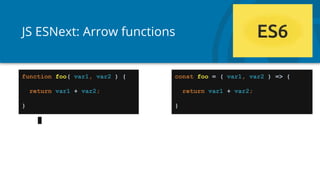
JS ESNext: Arrow functions
function foo( var1, var2 ) {
return var1 + var2;
}
const foo = ( var1, var2 ) => {
return var1 + var2;
}
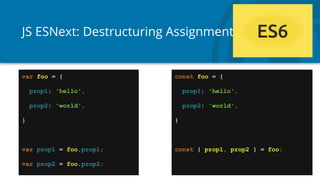
JS ESNext: Destructuring Assignment
var foo = {
prop1: 'hello',
prop2: 'world',
}
var prop1 = foo.prop1;
var prop2 = foo.prop2;
const foo = {
prop1: 'hello',
prop2: 'world',
}
const { prop1, prop2 } = foo;
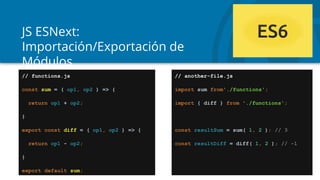
JS ESNext:
Importación/Exportación de
Módulos
// functions.js
const sum = ( op1, op2 ) => {
return op1 + op2;
}
export const diff = ( op1, op2 ) => {
return op1 - op2;
}
export default sum;
// another-file.js
import sum from'./functions';
import { diff } from './functions';
const resultSum = sum( 1, 2 ); // 3
const resultDiff = diff( 1, 2 ); // -1
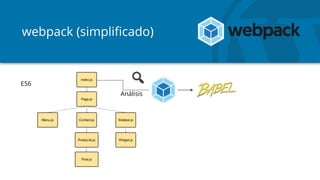
Babel
Convierte ES5 a ESNext
https://babeljs.io/
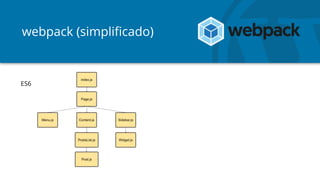
webpack
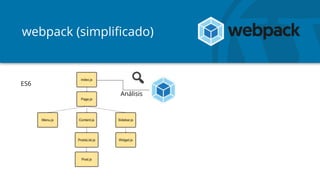
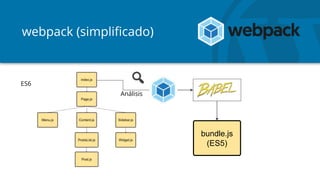
- Agrupador de dependencias (module bundler).
- Por defecto sólo entiende JS.
- Puede entender también Sass, SVGs y lo que le eches.
webpack
- Agrupador de dependencias (module bundler).
- Por defecto sólo entiende JS.
- Puede entender también Sass, SVGs y lo que le eches.
- Es un infierno configurable (extremadamente difícil)
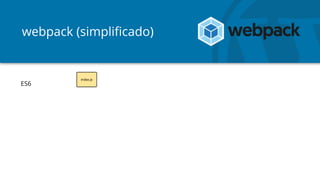
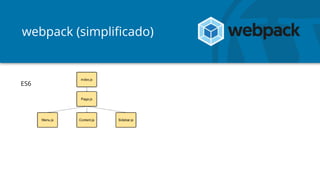
webpack (simplificado)
ES6
webpack (simplificado)
ES6
webpack (simplificado)
ES6
webpack (simplificado)
Análisis
ES6
webpack (simplificado)
Análisis
ES6
webpack (simplificado)
Análisis
bundle.js
(ES5)
ES6
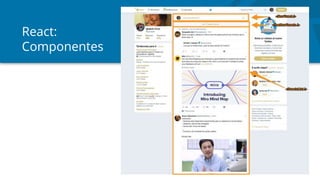
React
React
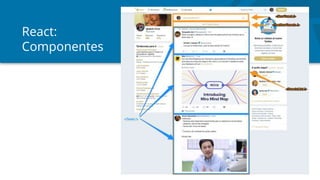
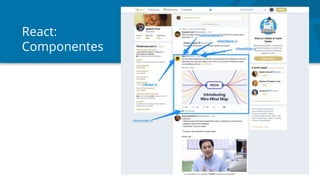
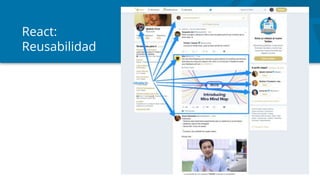
- Librería de JS basada en componentes
- Renderizado inteligente
- Simplifica mucho el desarrollo de UI
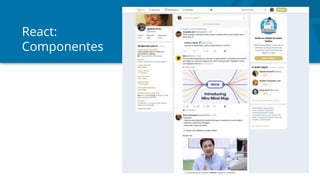
React:
Componentes
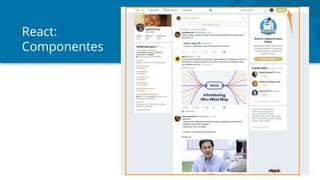
React:
Componentes
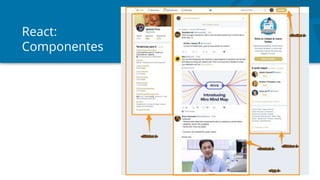
React:
Componentes
React:
Componentes
React:
Componentes
React:
Componentes
React:
Reusabilidad
React:
Props
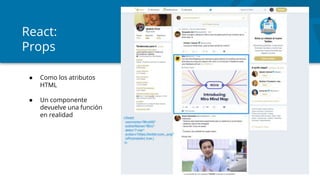
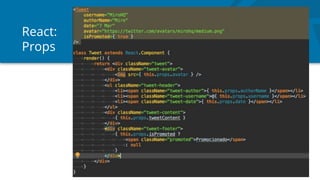
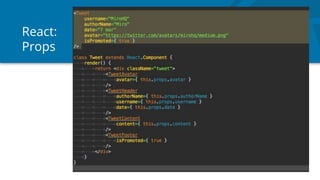
● Como los atributos
HTML
● Un componente
devuelve una función
en realidad
React:
Props
React:
Props
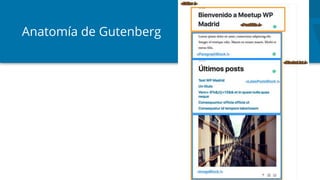
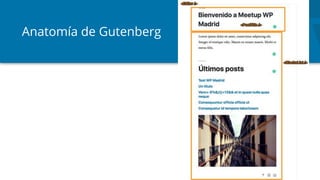
Anatomía de Gutenberg
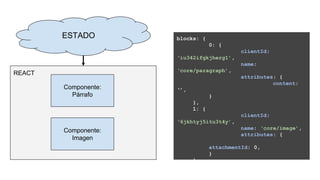
Estado global en Gutenberg
ESTADO
Componente:
Párrafo
Componente:
Imagen
REACT
blocks: {
0: {
clientId:
‘iu342ifgkjherg1’,
name:
‘core/paragraph’,
attributes: {
content:
‘’,
}
},
1: {
clientId:
‘6jkhtyj5itu3t4y’,
name: ‘core/image’,
attributes: {
attachmentId: 0,
}
}
}
ESTADO
Componente:
Párrafo
Componente:
Imagen
REACT
blocks: {
0: {
clientId:
‘iu342ifgkjherg1’,
name:
‘core/paragraph’,
attributes: {
content:
‘’,
}
},
1: {
clientId:
‘6jkhtyj5itu3t4y’,
name: ‘core/image’,
attributes: {
attachmentId: 0,
}
}
}
ESTADO
Componente:
Párrafo
Componente:
Imagen
REACT
blocks: {
0: {
clientId:
‘iu342ifgkjherg1’,
name:
‘core/paragraph’,
attributes: {
content:
‘HOLA MUNDO’,
}
},
1: {
clientId:
‘6jkhtyj5itu3t4y’,
name: ‘core/image’,
attributes: {
attachmentId: 0,
}
}
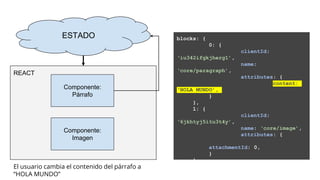
}El usuario cambia el contenido del párrafo a
“HOLA MUNDO”
ESTADO
Componente:
Párrafo
Componente:
Imagen
REACT
ESTADO
Componente:
Párrafo
Componente:
Imagen
REACT
ESTADO
Componente:
Párrafo renderizado
de nuevo
Componente:
Imagen
REACT
blocks: {
0: {
clientId:
‘iu342ifgkjherg1’,
name:
‘core/paragraph’,
attributes: {
content:
‘HOLA MUNDO’,
}
},
1: {
clientId:
‘6jkhtyj5itu3t4y’,
name: ‘core/image’,
attributes: {
attachmentId: 0,
}
}
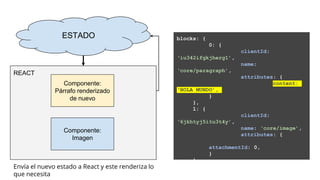
}Envía el nuevo estado a React y este renderiza lo
que necesita
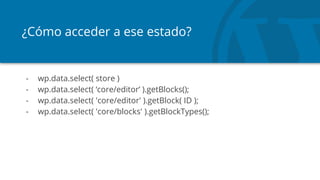
¿Cómo acceder a ese estado?
- wp.data.select( store )
- wp.data.select( ‘core/editor’ ).getBlocks();
- wp.data.select( 'core/editor' ).getBlock( ID );
- wp.data.select( 'core/blocks' ).getBlockTypes();
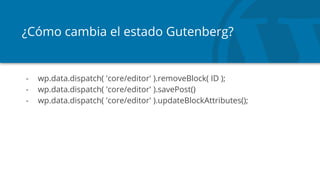
¿Cómo cambia el estado Gutenberg?
- wp.data.dispatch( 'core/editor' ).removeBlock( ID );
- wp.data.dispatch( 'core/editor' ).savePost()
- wp.data.dispatch( 'core/editor' ).updateBlockAttributes();
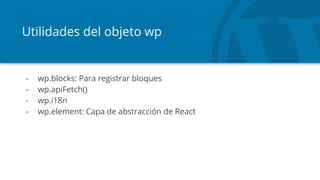
Utilidades del objeto wp
- wp.blocks: Para registrar bloques
- wp.apiFetch()
- wp.i18n
- wp.element: Capa de abstracción de React
Bloques
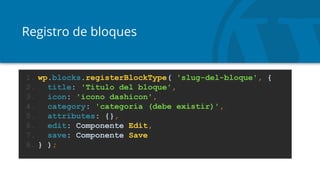
Registro de bloques
1. wp.blocks.registerBlockType( 'slug-del-bloque', {
2. title: 'Título del bloque',
3. icon: 'icono dashicon',
4. category: 'categoría (debe existir)',
5. attributes: {},
6. edit: Componente Edit,
7. save: Componente Save
8. } );
Registro de bloques: Componente Edit
- Estructura HTML del componente cuando lo vemos en el editor
Registro de bloques: Componente Save
- Define la estructura HTML que Gutenberg guardará en
post_content
Registro de bloques: Componente Save
- Define la estructura HTML que Gutenberg guardará en
post_content
- Debe retornar HTML estático, nada de usar interacciones JS o
cosas así.
Registro de bloques: Componente Save
- Define la estructura HTML que Gutenberg guardará en
post_content
- Debe retornar HTML estático, nada de usar interacciones JS o
cosas así.
- Ejecutado al cargar el bloque y al guardarlo para comparaciones.
Registro de bloques: Componente Save
- Define la estructura HTML que Gutenberg guardará en
post_content
- Debe retornar HTML estático, nada de usar interacciones JS o
cosas así.
- Ejecutado al cargar el bloque y al guardarlo para comparaciones.
- Si Save no coincide con lo que había guardado => Bloque roto
Registro de bloques: Hooks importantes
- enqueue_block_editor_assets: Encola estilos/JS sólo en la
pantalla del editor
- enqueue_block_assets: Encola estilos/JS en frontend y editor
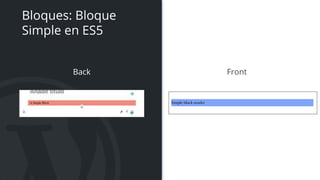
Bloques: Bloque
Simple en ES5
Rama: 01-simple-block-es5
Back Front
Bloques: Bloque
Simple en ES5
Bloques en ES6
- Necesitamos Babel + webpack
- Paquete muy sencillo: @wordpress/scripts
https://www.npmjs.com/package/@wordpress/scripts
- Completo framework de desarrollo de bloques:
https://github.com/ahmadawais/create-guten-block
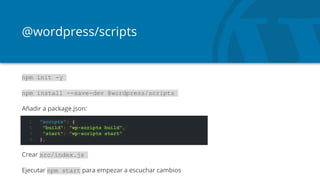
@wordpress/scripts
npm init -y
npm install --save-dev @wordpress/scripts
Añadir a package.json:
Crear src/index.js
Ejecutar npm start para empezar a escuchar cambios
1. "scripts": {
2. "build": "wp-scripts build",
3. "start": "wp-scripts start"
4. },
Bloques: Bloque
Simple en ES6
Rama: 02-simple-block-es6
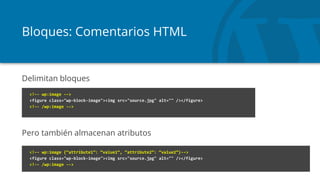
Bloques: Comentarios HTML
Delimitan bloques
Pero también almacenan atributos
<!-- wp:image -->
<figure class="wp-block-image"><img src="source.jpg" alt="" /></figure>
<!-- /wp:image -->
<!-- wp:image {“attribute1”: “value1”, “attribute2”: “value2”}-->
<figure class="wp-block-image"><img src="source.jpg" alt="" /></figure>
<!-- /wp:image -->
Bloques: Atributos
- Necesidad de definir cómo se extrae el valor de un atributo de un
bloque dentro de post_content
- attributes convierten la información del bloque en una
representación de los atributos en JS
- Nos permiten añadir opciones a los bloques. Sin ellos, todos los
bloques serían estáticos en el editor
- https://developer.wordpress.org/block-editor/developers/block-
api/block-attributes/
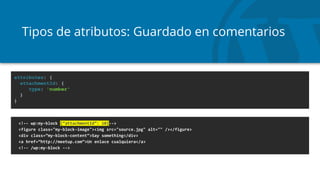
Tipos de atributos: Guardado en comentarios
<!-- wp:my-block {“attachmentId”: 10}-->
<figure class="my-block-image"><img src="source.jpg" alt="" /></figure>
<div class=”my-block-content”>Say something</div>
<a href=”http://meetup.com”>Un enlace cualquiera</a>
<!-- /wp:my-block -->
attributes: {
attachmentId: {
type: 'number'
}
}
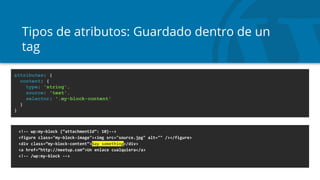
Tipos de atributos: Guardado dentro de un
tag
<!-- wp:my-block {“attachmentId”: 10}-->
<figure class="my-block-image"><img src="source.jpg" alt="" /></figure>
<div class=”my-block-content”>Say something</div>
<a href=”http://meetup.com”>Un enlace cualquiera</a>
<!-- /wp:my-block -->
attributes: {
content: {
type: 'string',
source: 'text',
selector: '.my-block-content'
}
}
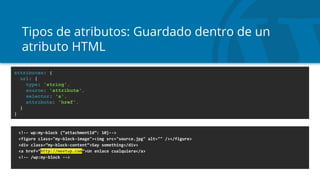
Tipos de atributos: Guardado dentro de un
atributo HTML
<!-- wp:my-block {“attachmentId”: 10}-->
<figure class="my-block-image"><img src="source.jpg" alt="" /></figure>
<div class=”my-block-content”>Say something</div>
<a href=”http://meetup.com”>Un enlace cualquiera</a>
<!-- /wp:my-block -->
attributes: {
url: {
type: 'string',
source: 'attribute',
selector: 'a',
attribute: 'href',
}
}
Bloques: Call To
Action
Rama: 03-call-to-action
Back Front
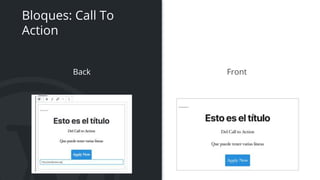
Bloques: Call To
Action
Bloques obsoletos
- Si cambias el save, el bloque se rompe
- deprecated es tu amigo
Bloques: Latest
Posts
Con Server Side Rendering
Rama: 04-latest-posts
Plugins
¿Plugins? Pues lo de toda la vida ¿No?
¡ERROR!
Confucio es el que inventó la confusión
¿Plugins? Pues lo de toda la vida ¿No?
¡ERROR!
Confucio es el que inventó la confusión
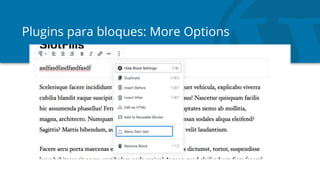
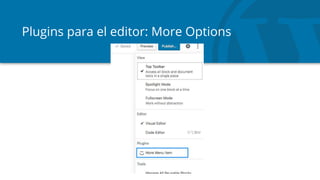
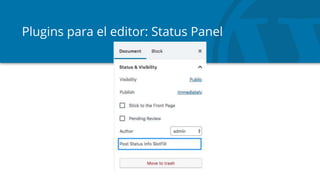
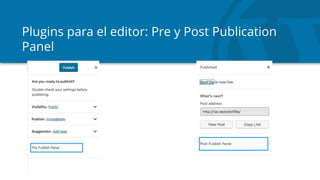
https://developer.wordpress.org/block-editor/developers/slotfills/
Plugins para bloques: More Options
Plugins para el editor: More Options
Plugins para el editor: Status Panel
Plugins para el editor: Pre y Post Publication
Panel
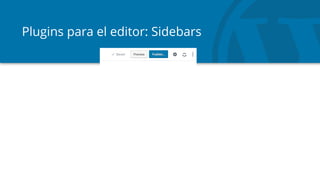
Plugins para el editor: Sidebars
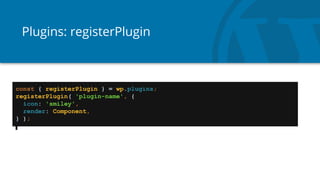
Plugins: registerPlugin
const { registerPlugin } = wp.plugins;
registerPlugin( 'plugin-name', {
icon: 'smiley',
render: Component,
} );
Plugins: Contador
de palabras
Rama: 04-paragraphs-count
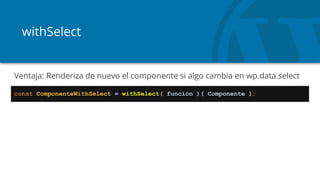
withSelect
const ComponenteWithSelect = withSelect( función )( Componente );
Ventaja: Renderiza de nuevo el componente si algo cambia en wp.data.select
Plugins: Sidebar
Con Server Side Rendering
Rama: 05-sidebar
Bloques dinámicos:
Latest Posts
Con Server Side Rendering
Rama: 06-latest-posts
GRACIAS

Gutenberg sin miedo

Notas del editor

  • #40 wp.apiFetch( { path: '/wp/v2/posts' } ).then( function( response ) { console.log( response ) } ); wp.apiFetch( { path: '/wp/v2/posts/1' } ).then( function( response ) { console.log( response ) } ); wp.blocks.getBlockTypes() wp.components wp.data.select( 'core/blocks' ).getBlockTypes() wp.data.select( 'core/editor' ).getBlocks() wp.data.select( 'core/editor' ).getBlock( ID )
  • #41 wp.apiFetch( { path: '/wp/v2/posts' } ).then( function( response ) { console.log( response ) } ); wp.apiFetch( { path: '/wp/v2/posts/1' } ).then( function( response ) { console.log( response ) } ); wp.blocks.getBlockTypes() wp.components wp.data.select( 'core/blocks' ).getBlockTypes() wp.data.select( 'core/editor' ).getBlocks() wp.data.select( 'core/editor' ).getBlock( ID )
  • #42 wp.data.select( 'core/editor' ).getBlocks() wp.apiFetch( { path: '/wp/v2/posts' } ).then( function( response ) { console.log( response ) } ); wp.apiFetch( { path: '/wp/v2/posts/1' } ).then( function( response ) { console.log( response ) } ); wp.blocks.getBlockTypes() wp.components wp.data.select( 'core/blocks' ).getBlockTypes() wp.data.select( 'core/editor' ).getBlocks() wp.data.select( 'core/editor' ).getBlock( ID )
  • #46 wp.data.select( 'core/editor' ).getBlocks() wp.apiFetch( { path: '/wp/v2/posts' } ).then( function( response ) { console.log( response ) } ); wp.apiFetch( { path: '/wp/v2/posts/1' } ).then( function( response ) { console.log( response ) } ); wp.blocks.getBlockTypes() wp.components wp.data.select( 'core/blocks' ).getBlockTypes() wp.data.select( 'core/editor' ).getBlocks() wp.data.select( 'core/editor' ).getBlock( ID )
  • #47 wp.data.select( 'core/editor' ).getBlocks() wp.apiFetch( { path: '/wp/v2/posts' } ).then( function( response ) { console.log( response ) } ); wp.apiFetch( { path: '/wp/v2/posts/1' } ).then( function( response ) { console.log( response ) } ); wp.blocks.getBlockTypes() wp.components wp.data.select( 'core/blocks' ).getBlockTypes() wp.data.select( 'core/editor' ).getBlocks() wp.data.select( 'core/editor' ).getBlock( ID )
  • #48 wp.data.select( 'core/editor' ).getBlocks() wp.apiFetch( { path: '/wp/v2/posts' } ).then( function( response ) { console.log( response ) } ); wp.apiFetch( { path: '/wp/v2/posts/1' } ).then( function( response ) { console.log( response ) } ); wp.blocks.getBlockTypes() wp.components wp.data.select( 'core/blocks' ).getBlockTypes() wp.data.select( 'core/editor' ).getBlocks() wp.data.select( 'core/editor' ).getBlock( ID )