Alberto Torreblanca
                        @albert1t0


Selenium & Drupal

Drupal Camp Lima 2011
"Sale el sol"
El poRque de los test
➔
    Se ha convertido en un
    estándar de calidad.
➔
    Ahorra tiempo de
    tiempo.
➔
    Pruebas en diferentes
    navegadores.
➔
    Protege los
    'Workflows'.
Algunas pautas - testing

             ➔
                 Todos los tests tienen
                 que tener un punto de
                 partida.
             ➔
                 Un test no tiene que
                 depender de otros,
                 para existir.
             ➔
                 Un test debe evaluar
                 una sola funcionalidad.
             ➔
                 Un test debe recoger
                 su basura al terminar.
                 (Cuando sea posible)
Algunos datos de
selenium IDE ...
➔
    Entorno para el
    desarrollo de pruebas
    automatizadas
➔
    Pruebas de tipo
    funcional a través de
    un navegador.
➔
    Open source,
    desarrollado en
    Javascript.
➔
    Extensión para Firefox.
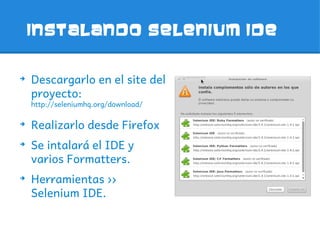
Instalando Selenium IDE


➔
    Descargarlo en el site del
    proyecto:
    http://seleniumhq.org/download/

➔
    Realizarlo desde Firefox
➔
    Se intalará el IDE y
    varios Formatters.
➔
    Herramientas ››
    Selenium IDE.
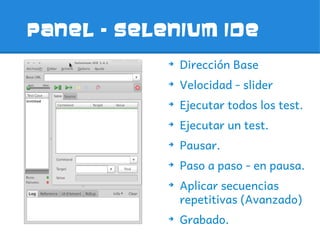
Panel – selenium ide
            ➔
                Dirección Base
            ➔
                Velocidad - slider
            ➔
                Ejecutar todos los test.
            ➔
                Ejecutar un test.
            ➔
                Pausar.
            ➔
                Paso a paso - en pausa.
            ➔
                Aplicar secuencias
                repetitivas (Avanzado)
            ➔
                Grabado.
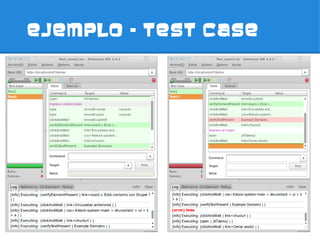
EJEMPLO – TEST CASE
Verify & assert
           ➔
               verifyElementPresent
           ➔
               verifyElementNotPrese
               nt
           ➔
               verifyText
           ➔
               verifyAttribute
           ➔
               verifyChecked
           ➔
               verifyAlert
           ➔
               verifyTitle
LOCALIZANDO

➔
    ID
➔
    Name
➔
    Link
➔
    Xpath
➔
    CSS
XPATH
➔
    //div[contains(text(),'
    Tiene un nombre')]
➔
    //div[@class='leftdiv']
    /input[2]
➔
    //input[@value='Butto
    n with ID']/following-
    sibling::input[@value='
    Sibling Button']
MISCELANEA - SELECTOR
           ➔
               link=Pertineo Quidne Si
               Validus
           ➔
               css=h2 > a (con Value)
           ➔
               //a[contains(text(),'Pert
               ineo Quidne Si Validus')]
           ➔
               //div[@id='node-
               97']/h2/a
           ➔
               //a[contains(@href,
               '/d7demo/node/97')]
           ➔
               //h2/a (con Value)
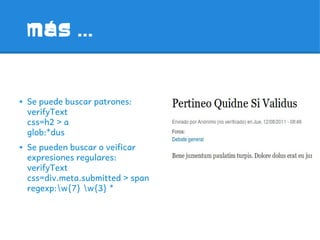
MáS ...


➔   Se puede buscar patrones:
    verifyText
    css=h2 > a
    glob:*dus
➔   Se pueden buscar o veificar
    expresiones regulares:
    verifyText
    css=div.meta.submitted > span
    regexp:w{7} w{3} *
JavaScript
➔
    javascript{ 10 * 10 }
➔
    javascript{ d = new
    Date();d.getHours()}
➔
    Acceso al DOM a través del
    objeto browserbot
    var window =
    this.browserbot.getUserWi
    ndow();
➔
    Fireevents en los test
    (onFocus, onBlur,
    onChange, onSubmit,
    onMouseOut,
    onMouseOver
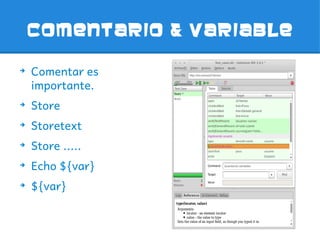
Comentario & variable

➔
    Comentar es
    importante.
➔
    Store
➔
    Storetext
➔
    Store .....
➔
    Echo ${var}
➔
    ${var}
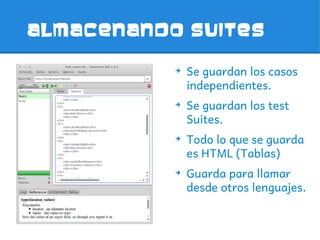
ALMACENANDO SUITES

           ➔
               Se guardan los casos
               independientes.
           ➔
               Se guardan los test
               Suites.
           ➔
               Todo lo que se guarda
               es HTML (Tablas)
           ➔
               Guarda para llamar
               desde otros lenguajes.
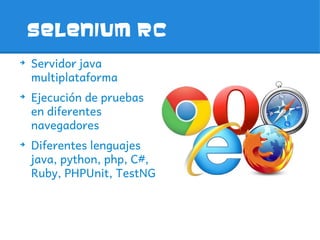
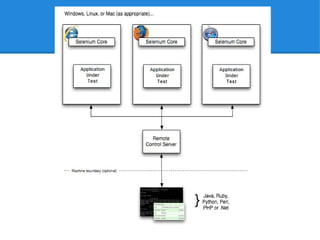
Selenium rc
➔
    Servidor java
    multiplataforma
➔
    Ejecución de pruebas
    en diferentes
    navegadores
➔
    Diferentes lenguajes
    java, python, php, C#,
    Ruby, PHPUnit, TestNG
Lanzando el server
➔   FIREFOX
    java -jar selenium-server-standalone-2.15.0.jar -htmlSuite
    *firefox http://localhost/d7demo
    ruta_completa/Test_suite.html ruta_completa/result.html
➔   CHROME
    java -jar selenium-server-standalone-2.15.0.jar -htmlSuite
    *chrome http://localhost/d7demo
    ruta_completa/Test_suite.html ruta_completa/result.html
➔   IEXPLORER
    java -jar selenium-server-standalone-2.15.0.jar -htmlSuite
    *firefox http://localhost/d7demo
    ruta_completa/Test_suite.html ruta_completa/result.html
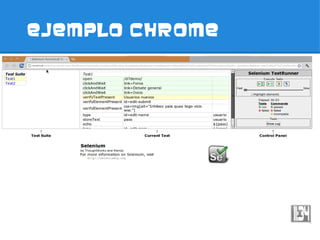
EJEMPLO CHROME
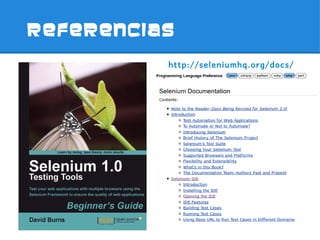
REFERENCIAS
          http://seleniumhq.org/docs/
GRACIAS
alberto.torreblanca@gmail.com
          @albert1t0

Selenium & Drupal

  • 1.
    Alberto Torreblanca @albert1t0 Selenium & Drupal Drupal Camp Lima 2011 "Sale el sol"
  • 2.
    El poRque delos test ➔ Se ha convertido en un estándar de calidad. ➔ Ahorra tiempo de tiempo. ➔ Pruebas en diferentes navegadores. ➔ Protege los 'Workflows'.
  • 3.
    Algunas pautas -testing ➔ Todos los tests tienen que tener un punto de partida. ➔ Un test no tiene que depender de otros, para existir. ➔ Un test debe evaluar una sola funcionalidad. ➔ Un test debe recoger su basura al terminar. (Cuando sea posible)
  • 4.
    Algunos datos de seleniumIDE ... ➔ Entorno para el desarrollo de pruebas automatizadas ➔ Pruebas de tipo funcional a través de un navegador. ➔ Open source, desarrollado en Javascript. ➔ Extensión para Firefox.
  • 5.
    Instalando Selenium IDE ➔ Descargarlo en el site del proyecto: http://seleniumhq.org/download/ ➔ Realizarlo desde Firefox ➔ Se intalará el IDE y varios Formatters. ➔ Herramientas ›› Selenium IDE.
  • 6.
    Panel – seleniumide ➔ Dirección Base ➔ Velocidad - slider ➔ Ejecutar todos los test. ➔ Ejecutar un test. ➔ Pausar. ➔ Paso a paso - en pausa. ➔ Aplicar secuencias repetitivas (Avanzado) ➔ Grabado.
  • 7.
  • 8.
    Verify & assert ➔ verifyElementPresent ➔ verifyElementNotPrese nt ➔ verifyText ➔ verifyAttribute ➔ verifyChecked ➔ verifyAlert ➔ verifyTitle
  • 9.
    LOCALIZANDO ➔ ID ➔ Name ➔ Link ➔ Xpath ➔ CSS
  • 10.
    XPATH ➔ //div[contains(text(),' Tiene un nombre')] ➔ //div[@class='leftdiv'] /input[2] ➔ //input[@value='Butto n with ID']/following- sibling::input[@value=' Sibling Button']
  • 11.
    MISCELANEA - SELECTOR ➔ link=Pertineo Quidne Si Validus ➔ css=h2 > a (con Value) ➔ //a[contains(text(),'Pert ineo Quidne Si Validus')] ➔ //div[@id='node- 97']/h2/a ➔ //a[contains(@href, '/d7demo/node/97')] ➔ //h2/a (con Value)
  • 12.
    MáS ... ➔ Se puede buscar patrones: verifyText css=h2 > a glob:*dus ➔ Se pueden buscar o veificar expresiones regulares: verifyText css=div.meta.submitted > span regexp:w{7} w{3} *
  • 13.
    JavaScript ➔ javascript{ 10 * 10 } ➔ javascript{ d = new Date();d.getHours()} ➔ Acceso al DOM a través del objeto browserbot var window = this.browserbot.getUserWi ndow(); ➔ Fireevents en los test (onFocus, onBlur, onChange, onSubmit, onMouseOut, onMouseOver
  • 14.
    Comentario & variable ➔ Comentar es importante. ➔ Store ➔ Storetext ➔ Store ..... ➔ Echo ${var} ➔ ${var}
  • 15.
    ALMACENANDO SUITES ➔ Se guardan los casos independientes. ➔ Se guardan los test Suites. ➔ Todo lo que se guarda es HTML (Tablas) ➔ Guarda para llamar desde otros lenguajes.
  • 16.
    Selenium rc ➔ Servidor java multiplataforma ➔ Ejecución de pruebas en diferentes navegadores ➔ Diferentes lenguajes java, python, php, C#, Ruby, PHPUnit, TestNG
  • 18.
    Lanzando el server ➔ FIREFOX java -jar selenium-server-standalone-2.15.0.jar -htmlSuite *firefox http://localhost/d7demo ruta_completa/Test_suite.html ruta_completa/result.html ➔ CHROME java -jar selenium-server-standalone-2.15.0.jar -htmlSuite *chrome http://localhost/d7demo ruta_completa/Test_suite.html ruta_completa/result.html ➔ IEXPLORER java -jar selenium-server-standalone-2.15.0.jar -htmlSuite *firefox http://localhost/d7demo ruta_completa/Test_suite.html ruta_completa/result.html
  • 19.
  • 20.
    REFERENCIAS http://seleniumhq.org/docs/
  • 21.