• Introducción al Azure App Service
• Web App con Linux
• Introducción al Web App con Containers
• Desarollar e Instalar su container
• Integración con Azure DevOps
• Preguntas & Respuestas
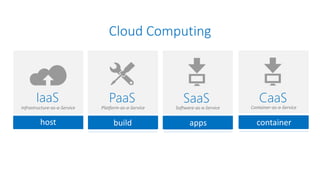
Cloud Computing
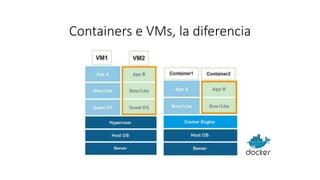
Containers e VMs, la diferencia
¿Qué es el docker?
• Líder mundial en plataforma de contenedores
• Los contenedores están aislados, pero el sistema
operativo es compartido (disco, memoria, CPU)
• Los contenedores son independientes del entorno en el
que se encuentran (centro de datos, máquina, red)
• Técnicamente están aislados "del mundo exterior"
• Esto se traduce en una instalación rápida, una migración
fácil y un reinicio rápido.
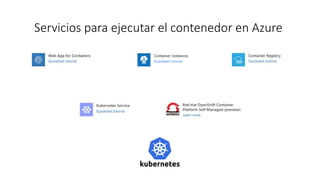
Servicios para ejecutar el contenedor en Azure
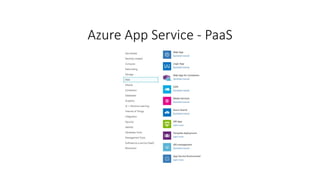
Azure App Service - PaaS
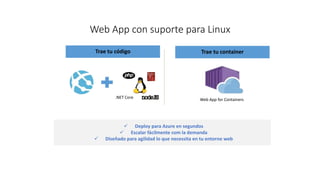
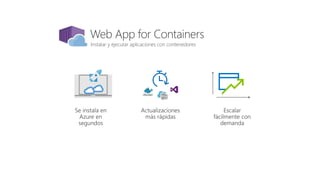
Web App con suporte para Linux
Trae tu código Trae tu container
 Deploy para Azure en segundos
 Escalar fácilmente com la demanda
 Diseñado para agilidad lo que necessita en tu entorno web
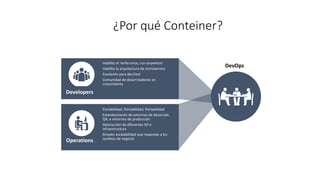
¿Por qué Conteiner?
Developers
Habilita el ‘write-once, run-anywhere’
Habilita la arquitectura de microservice
Excelente para dev/test
Comunidad de desarroladores en
crescimiento
Operations
Portabilidad, Portabilidad, Portabilidad
Estandarización de entornos de desarrolo,
QA, e entornos de producción
Abstracción de diferentes SO e
infraestructura
Simples escalabilidad que responde a los
cambios de negocio
DevOps
Terminologia Docker
• Docker images son plantillas que se usan para crear los contenedores.
Cada imagen continiene un conjunto de intrucciones para crear el
contenedor, por exemplo, como qué programas necesitan instalar, qué
volume montarm qué puerta exporter y mucho más
• Docker Container es una plataforma de applicación aislada, que se crea
a partir de una imagem. Hay contenedores de Linux y Windows
Instalar y ejecutar aplicaciones con contenedores
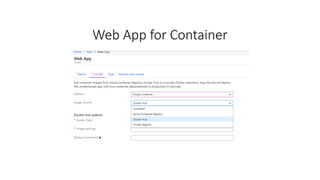
Web App for Container
Demo
Web App con Container
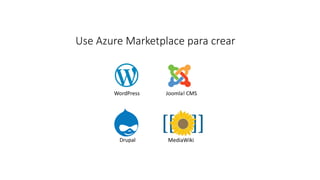
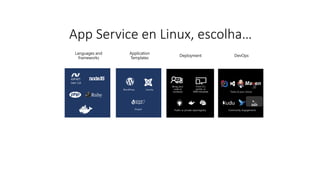
App Service en Linux, escolha…
Deployment DevOps
Application
Templates
Languages and
frameworks
Ma en
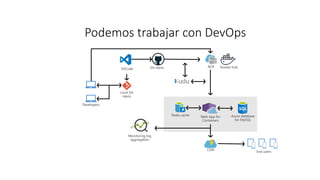
Podemos trabajar con DevOps
Demo
Web App con Container e DevOps
Aprende más…
• Docs: https://azure.microsoft.com/services/app-service/containers/
• Kubernetes Service: https://azure.microsoft.com/en-us/free/kubernetes-service/
¿Quieres contribuir? Es de código abierto
• Docker Files: https://aka.ms/linux-github
¿¿¿Preguntas???
Carlos dos Santos
CDS Informática Ltda.
carlos@cdsinformatica.com.br
www.carloscds.net
@cdssoftware
Web App Container

Web App Container

  • 3.
    • Introducción alAzure App Service • Web App con Linux • Introducción al Web App con Containers • Desarollar e Instalar su container • Integración con Azure DevOps • Preguntas & Respuestas
  • 4.
  • 5.
    Containers e VMs,la diferencia
  • 6.
    ¿Qué es eldocker? • Líder mundial en plataforma de contenedores • Los contenedores están aislados, pero el sistema operativo es compartido (disco, memoria, CPU) • Los contenedores son independientes del entorno en el que se encuentran (centro de datos, máquina, red) • Técnicamente están aislados "del mundo exterior" • Esto se traduce en una instalación rápida, una migración fácil y un reinicio rápido.
  • 7.
    Servicios para ejecutarel contenedor en Azure
  • 8.
  • 9.
    Web App consuporte para Linux Trae tu código Trae tu container  Deploy para Azure en segundos  Escalar fácilmente com la demanda  Diseñado para agilidad lo que necessita en tu entorno web
  • 10.
    ¿Por qué Conteiner? Developers Habilitael ‘write-once, run-anywhere’ Habilita la arquitectura de microservice Excelente para dev/test Comunidad de desarroladores en crescimiento Operations Portabilidad, Portabilidad, Portabilidad Estandarización de entornos de desarrolo, QA, e entornos de producción Abstracción de diferentes SO e infraestructura Simples escalabilidad que responde a los cambios de negocio DevOps
  • 11.
    Terminologia Docker • Dockerimages son plantillas que se usan para crear los contenedores. Cada imagen continiene un conjunto de intrucciones para crear el contenedor, por exemplo, como qué programas necesitan instalar, qué volume montarm qué puerta exporter y mucho más • Docker Container es una plataforma de applicación aislada, que se crea a partir de una imagem. Hay contenedores de Linux y Windows
  • 12.
    Instalar y ejecutaraplicaciones con contenedores
  • 13.
    Web App forContainer
  • 14.
  • 16.
    App Service enLinux, escolha… Deployment DevOps Application Templates Languages and frameworks Ma en
  • 17.
  • 18.
    Demo Web App conContainer e DevOps
  • 19.
    Aprende más… • Docs:https://azure.microsoft.com/services/app-service/containers/ • Kubernetes Service: https://azure.microsoft.com/en-us/free/kubernetes-service/ ¿Quieres contribuir? Es de código abierto • Docker Files: https://aka.ms/linux-github
  • 20.
    ¿¿¿Preguntas??? Carlos dos Santos CDSInformática Ltda. carlos@cdsinformatica.com.br www.carloscds.net @cdssoftware

Notas del editor

  • #5 Slide Objectives: Explain the three established industry terms for serviços de nuvem Speaker Notes: There is a lot of talk in the industry about different terms like Platform as a Service, Infrastructure as a Service, and Software as a Service. Since PDC08 when we first announced the Windows Azure our focus has been on delivering a platform as a service offering where you can build applications. Where the platform abstracts you from the complexities of building and running applications. We fundamentally believe that the future path forward for development is by providing a platform. In fact, as you’ll see in a few minutes, we believe that there are a number of new capabilities that should be delivered as services to the platform. Notes: There is a lot of confusion in the industry when it comes to the cloud. It’s important that you understand both what is happening in the industry and how we think about the cloud. This is the most commonly used taxonomy for differentiating between types of serviços de nuvem. The industry has defined three categories of services: IaaS – a set of infrastructure level capabilities such as an operating system, network connectivity, etc. that are delivered as pay for use services and can be used to host applications. PaaS – higher level sets of functionality that are delivered as consumable services for developers who are building applications. PaaS is about abstracting developers from the underlying infrastructure to enable applications to quickly be composed. SaaS – applications that are delivered using a service delivery model where organizations can simply consume and use the application. Typically an organization would pay for the use of the application or the application could be monetized through ad revenue. It is important to note that these 3 types of services may exist independently of one another or combined with one another.
  • #7 Containers have similar resource isolation and allocation benefits as virtual machines but a different architectural approach allows them to be much more portable and efficient. What is a container? On the left side of the slide, there is a representation of a virtual machine environment. We all understand how they work. They bring all guest operating systems with it. You get less densities and also slow start and stop because you have to load all the operating systems. You cannot start a VM in a second but you do get really good isolation. Each of those operating systems is almost completely isolated. Containers, shown on the right side, are quite similar to VMs, but instead of the hypervisor, there is an engine that runs the containers. In this case, we talk about the Docker engine and the implementation of that. On top, you have binaries and libraries and these can be shared across different containers. The application is what unique to your container. You get much more density because containers are smaller. We get slower stop and start time because they do not have a guest operating system. You have less isolation because these reach done into the host OS in order to be functional and if you break through the security of the container itself you’re actually in the kernel at that point. Less isolation, but more density more performance more agility. Containers How do they differ from virtual machines? Dependencies: Each virtualized app includes the app itself, required binaries and libraries, and a guest OS, which might consist of multiple gigabytes of data. Independent OS: Each VM can have a different OS from other VMs, along with a different OS to the host itself. Flexible: VMs can be migrated to other hosts to balance resource usage and for host maintenance without downtime. Secure: High levels of resource and security isolation for key virtualized workloads.
  • #12 Docker Engine is the program that enables containers to be built, shipped, and run. It is also referred to as a Docker Daemon on Linux
  • #13 Pervasive Take containers deploy them from one platform to another. So powerful Have services to build and support containers natively. Goal: customers can choose whatever platform they want, don't have to change your processes or tools. Containers everywhere
  • #14 Pervasive Take containers deploy them from one platform to another. So powerful Have services to build and support containers natively. Goal: customers can choose whatever platform they want, don't have to change your processes or tools. Containers everywhere
  • #15 Easiest way to deploy and run containerized web application
  • #23 Pervasive Take containers deploy them from one platform to another. So powerful Have services to build and support containers natively. Goal: customers can choose whatever platform they want, don't have to change your processes or tools. Containers everywhere