FORMULARIO CON TRANSPARENCIA


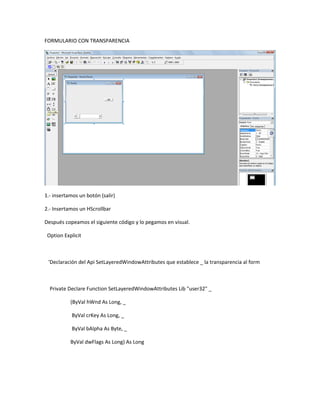
1.- insertamos un botón (salir)

2.- Insertamos un HScrollbar

Después copeamos el siguiente código y lo pegamos en visual.

 Option Explicit


 'Declaración del Api SetLayeredWindowAttributes que establece _ la transparencia al form


  Private Declare Function SetLayeredWindowAttributes Lib "user32" _

           (ByVal hWnd As Long, _

           ByVal crKey As Long, _

           ByVal bAlpha As Byte, _

           ByVal dwFlags As Long) As Long
'Recupera el estilo de la ventana

 Private Declare Function GetWindowLong Lib "user32" Alias "GetWindowLongA" _

          (ByVal hWnd As Long, _

           ByVal nIndex As Long) As Long


 'Declaración del Api SetWindowLong necesaria para aplicar un estilo _ al form antes de usar el
Api SetLayeredWindowAttributes


 Private Declare Function SetWindowLong Lib "user32" Alias "SetWindowLongA" _

         (ByVal hWnd As Long, _

          ByVal nIndex As Long, _

          ByVal dwNewLong As Long) As Long


 Private Const GWL_EXSTYLE = (-20)

 Private Const LWA_ALPHA = &H2

 Private Const WS_EX_LAYERED = &H80000

 'Función para saber si formulario ya es transparente. _ Se le pasa el Hwnd del formulario en
cuestión


 Public Function Is_Transparent(ByVal hWnd As Long) As Boolean


 End Function

 On Error Resume Next
Dim Msg As Long


  Msg = GetWindowLong(hWnd, GWL_EXSTYLE)


   If (Msg And WS_EX_LAYERED) = WS_EX_LAYERED Then

     Is_Transparent = True

   Else

     Is_Transparent = False

   End If

   If Err Then

   Is_Transparent = False

  End If


End Function


'Función que aplica la transparencia, se le pasa el hwnd del form y un valor de 0 a 255

Public Function Aplicar_Transparencia(ByVal hWnd As Long, Valor As Integer) As Long


Dim Msg As Long


On Error Resume Next


If Valor < 0 Or Valor > 255 Then

 Aplicar_Transparencia = 1
Else

   Msg = GetWindowLong(hWnd, GWL_EXSTYLE)

   Msg = Msg Or WS_EX_LAYERED


   SetWindowLong hWnd, GWL_EXSTYLE, Msg


   'Establece la transparencia

   SetLayeredWindowAttributes hWnd, 0, Valor, LWA_ALPHA


   Aplicar_Transparencia = 0


 End If


 If Err Then

   Aplicar_Transparencia = 2

 End If


 End Function


Private Sub Command1_Click()

End

End Sub


  Private Sub Form_Load()
'Valores máximos y mínimos para el ScrollBar

  HScroll1.Max = 255

  HScroll1.Min = 50


  ' Le establecemos un valor por defecto _

  a la barra apenas carga el form


  HScroll1.Value = 150


End Sub


Private Sub HScroll1_Change()


  'Llamamos a la función pasándole el handle del form _

 y el valor de la transparencia, que es el de la barra


  Call Aplicar_Transparencia(Me.hWnd, CByte(HScroll1.Value))


End Sub

Formulario con transparencia

  • 1.
    FORMULARIO CON TRANSPARENCIA 1.-insertamos un botón (salir) 2.- Insertamos un HScrollbar Después copeamos el siguiente código y lo pegamos en visual. Option Explicit 'Declaración del Api SetLayeredWindowAttributes que establece _ la transparencia al form Private Declare Function SetLayeredWindowAttributes Lib "user32" _ (ByVal hWnd As Long, _ ByVal crKey As Long, _ ByVal bAlpha As Byte, _ ByVal dwFlags As Long) As Long
  • 2.
    'Recupera el estilode la ventana Private Declare Function GetWindowLong Lib "user32" Alias "GetWindowLongA" _ (ByVal hWnd As Long, _ ByVal nIndex As Long) As Long 'Declaración del Api SetWindowLong necesaria para aplicar un estilo _ al form antes de usar el Api SetLayeredWindowAttributes Private Declare Function SetWindowLong Lib "user32" Alias "SetWindowLongA" _ (ByVal hWnd As Long, _ ByVal nIndex As Long, _ ByVal dwNewLong As Long) As Long Private Const GWL_EXSTYLE = (-20) Private Const LWA_ALPHA = &H2 Private Const WS_EX_LAYERED = &H80000 'Función para saber si formulario ya es transparente. _ Se le pasa el Hwnd del formulario en cuestión Public Function Is_Transparent(ByVal hWnd As Long) As Boolean End Function On Error Resume Next
  • 3.
    Dim Msg AsLong Msg = GetWindowLong(hWnd, GWL_EXSTYLE) If (Msg And WS_EX_LAYERED) = WS_EX_LAYERED Then Is_Transparent = True Else Is_Transparent = False End If If Err Then Is_Transparent = False End If End Function 'Función que aplica la transparencia, se le pasa el hwnd del form y un valor de 0 a 255 Public Function Aplicar_Transparencia(ByVal hWnd As Long, Valor As Integer) As Long Dim Msg As Long On Error Resume Next If Valor < 0 Or Valor > 255 Then Aplicar_Transparencia = 1
  • 4.
    Else Msg = GetWindowLong(hWnd, GWL_EXSTYLE) Msg = Msg Or WS_EX_LAYERED SetWindowLong hWnd, GWL_EXSTYLE, Msg 'Establece la transparencia SetLayeredWindowAttributes hWnd, 0, Valor, LWA_ALPHA Aplicar_Transparencia = 0 End If If Err Then Aplicar_Transparencia = 2 End If End Function Private Sub Command1_Click() End End Sub Private Sub Form_Load()
  • 5.
    'Valores máximos ymínimos para el ScrollBar HScroll1.Max = 255 HScroll1.Min = 50 ' Le establecemos un valor por defecto _ a la barra apenas carga el form HScroll1.Value = 150 End Sub Private Sub HScroll1_Change() 'Llamamos a la función pasándole el handle del form _ y el valor de la transparencia, que es el de la barra Call Aplicar_Transparencia(Me.hWnd, CByte(HScroll1.Value)) End Sub