Catedrático
Melvin Quezada
Tema
Hipervínculos Css.
Grupo
N° 1
Integrantes
Evelin Hernández
Haylin Vásquez
Katherine Varela
Wendy Gutiérrez
Jorge Roque
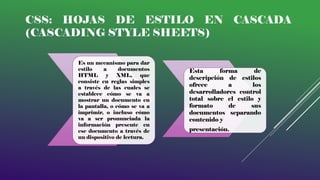
CSS: HOJAS DE ESTILO EN CASCADA
(CASCADING STYLE SHEETS)
Es un mecanismo para dar
estilo a documentos
HTML y XML, que
consiste en reglas simples
a través de las cuales se
establece cómo se va a
mostrar un documento en
la pantalla, o cómo se va a
imprimir, o incluso cómo
va a ser pronunciada la
información presente en
ese documento a través de
un dispositivo de lectura.
Esta forma de
descripción de estilos
ofrece a los
desarrolladores control
total sobre el estilo y
formato de sus
documentos separando
contenido y
presentación.
EJEMPLOS DE HIPERVÍNCULOS CSS.
<Html>
<head>
<style type="text/Css">
.uno a {
text-align:center;
font-family: Arial, Helvetica, sans-serif;
font-size: 18px;
background-color: #CCCCCC;
text-decoration: none;
color: #000000;
}
.uno a:hover {
font-family: Arial, Helvetica, sans-serif;
font-size: 18px;
background-color: #000000;
text-decoration: none;
color: #FF0000;
}
</style>
</head>
<body><center>
<div class="uno">
<a href="#">hipervículo
</a> <a href="#">enlace
</a> <a href="#">link </a>
</div>
</body>
</html>
<html>
<head>
<style type="text/Css">
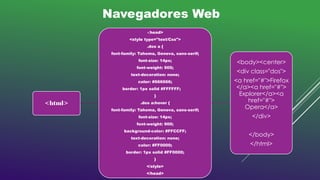
.dos a {
font-family: Tahoma, Geneva, sans-serif;
font-size: 14px;
font-weight: 900;
text-decoration: none;
color: #666666;
border: 1px solid #FFFFFF;
}
.dos a:hover {
font-family: Tahoma, Geneva, sans-serif;
font-size: 14px;
font-weight: 900;
background-color: #FFCCFF;
text-decoration: none;
color: #FF0000;
border: 1px solid #FF0000;
}
</style>
</head>
<body><center>
<div class="dos">
<a href="#">Firefox
</a><a href="#">
Explorer</a><a
href="#">
Opera</a>
</div>
</body>
</html>
Navegadores Web
<html>
<head>
<style type="text/Css">
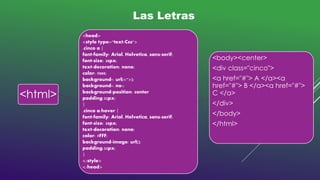
.cinco a {
font-family: Arial, Helvetica, sans-serif;
font-size: 28px;
text-decoration: none;
color: #000;
background-: url(<">);
background-: no-;
background-position: center
padding:32px;
}
.cinco a:hover {
font-family: Arial, Helvetica, sans-serif;
font-size: 28px;
text-decoration: none;
color: #FFF;
background-image: url();
padding:32px;
}
</style>
</head>
<body><center>
<div class="cinco">
<a href="#"> A </a><a
href="#"> B </a><a href="#">
C </a>
</div>
</body>
</html>
Las Letras
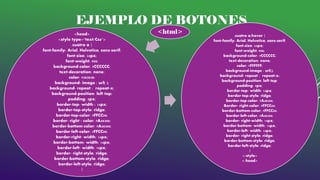
EJEMPLO DE BOTONES
<head>
<style type="text/Css">
.cuatro a {
font-family: Arial, Helvetica, sans-serif;
font-size: 24px;
font-weight: 900;
background-color: #CCCCCC;
text-decoration: none;
color: #383838;
background- image : url( );
background- repeat : repeat-x;
background-position: left top;
padding: 5px;
border-top- width : 14px;
border-top-style: ridge;
border-top-color: #FFCC00;
border- right - color: #A48300;
border-bottom-color: #A48300;
border-left-color: #FFCC00;
border-right- width: 14px;
border-bottom- width: 14px;
border-left- width: 14px;
border- right-style: ridge;
border-bottom-style: ridge;
border-left-style: ridge;
}
<html> .cuatro a:hover {
font-family: Arial, Helvetica, sans-serif;
font-size: 24px;
font-weight: 900;
background-color: #CCCCCC;
text-decoration: none;
color: #FFFFFF;
background-image : url();
background- repeat : repeat-x;
background-position: left top;
padding: 5px;
border-top- width: 14px;
border-top-style: ridge;
border-top-color: #A48300;
Border- right-color: #FFCC00;
border-bottom-color: #FFCC00;
border-left-color: #A48300;
border- right-width: 14px;
border-bottom- width: 14px;
border-left- width: 14px;
border- right-style: ridge;
border-bottom-style: ridge;
border-left-style: ridge;
}
</style>
</head>
EJEMPLO DE BOTONES
<body><center>
<div class="cuatro">
<a href="#"> Imágenes </a><a
href="#"> Videos </a><a
href="#"> Música </a>
</div>
</body>
</html>
QUITAR EL SUBRAYADO
<Html>
<head>
<style type="text/Css">
a {
font-family: Trebuchet MS;
font-size: 12px;
color: #FF0000;
}
a:link {
text-decoration: underline;
}
a:visited {
text-decoration: underline ;
color: #FF0000;
}
a:hover {
text-decoration: none;
color: #FF0000;
}
a:active {
text-decoration: underline ;
color: #FF0000;
}
</style>
</head>
<body><center>
<a href="#"> Amigos
</a><a href="#"> Mejores
Amigos </a><a href="#">
Conocidos </a>
</div>
</body>
</html>

Hipervinculos

  • 1.
    Catedrático Melvin Quezada Tema Hipervínculos Css. Grupo N°1 Integrantes Evelin Hernández Haylin Vásquez Katherine Varela Wendy Gutiérrez Jorge Roque
  • 2.
    CSS: HOJAS DEESTILO EN CASCADA (CASCADING STYLE SHEETS) Es un mecanismo para dar estilo a documentos HTML y XML, que consiste en reglas simples a través de las cuales se establece cómo se va a mostrar un documento en la pantalla, o cómo se va a imprimir, o incluso cómo va a ser pronunciada la información presente en ese documento a través de un dispositivo de lectura. Esta forma de descripción de estilos ofrece a los desarrolladores control total sobre el estilo y formato de sus documentos separando contenido y presentación.
  • 3.
    EJEMPLOS DE HIPERVÍNCULOSCSS. <Html> <head> <style type="text/Css"> .uno a { text-align:center; font-family: Arial, Helvetica, sans-serif; font-size: 18px; background-color: #CCCCCC; text-decoration: none; color: #000000; } .uno a:hover { font-family: Arial, Helvetica, sans-serif; font-size: 18px; background-color: #000000; text-decoration: none; color: #FF0000; } </style> </head> <body><center> <div class="uno"> <a href="#">hipervículo </a> <a href="#">enlace </a> <a href="#">link </a> </div> </body> </html>
  • 4.
    <html> <head> <style type="text/Css"> .dos a{ font-family: Tahoma, Geneva, sans-serif; font-size: 14px; font-weight: 900; text-decoration: none; color: #666666; border: 1px solid #FFFFFF; } .dos a:hover { font-family: Tahoma, Geneva, sans-serif; font-size: 14px; font-weight: 900; background-color: #FFCCFF; text-decoration: none; color: #FF0000; border: 1px solid #FF0000; } </style> </head> <body><center> <div class="dos"> <a href="#">Firefox </a><a href="#"> Explorer</a><a href="#"> Opera</a> </div> </body> </html> Navegadores Web
  • 5.
    <html> <head> <style type="text/Css"> .cinco a{ font-family: Arial, Helvetica, sans-serif; font-size: 28px; text-decoration: none; color: #000; background-: url(<">); background-: no-; background-position: center padding:32px; } .cinco a:hover { font-family: Arial, Helvetica, sans-serif; font-size: 28px; text-decoration: none; color: #FFF; background-image: url(); padding:32px; } </style> </head> <body><center> <div class="cinco"> <a href="#"> A </a><a href="#"> B </a><a href="#"> C </a> </div> </body> </html> Las Letras
  • 6.
    EJEMPLO DE BOTONES <head> <styletype="text/Css"> .cuatro a { font-family: Arial, Helvetica, sans-serif; font-size: 24px; font-weight: 900; background-color: #CCCCCC; text-decoration: none; color: #383838; background- image : url( ); background- repeat : repeat-x; background-position: left top; padding: 5px; border-top- width : 14px; border-top-style: ridge; border-top-color: #FFCC00; border- right - color: #A48300; border-bottom-color: #A48300; border-left-color: #FFCC00; border-right- width: 14px; border-bottom- width: 14px; border-left- width: 14px; border- right-style: ridge; border-bottom-style: ridge; border-left-style: ridge; } <html> .cuatro a:hover { font-family: Arial, Helvetica, sans-serif; font-size: 24px; font-weight: 900; background-color: #CCCCCC; text-decoration: none; color: #FFFFFF; background-image : url(); background- repeat : repeat-x; background-position: left top; padding: 5px; border-top- width: 14px; border-top-style: ridge; border-top-color: #A48300; Border- right-color: #FFCC00; border-bottom-color: #FFCC00; border-left-color: #A48300; border- right-width: 14px; border-bottom- width: 14px; border-left- width: 14px; border- right-style: ridge; border-bottom-style: ridge; border-left-style: ridge; } </style> </head>
  • 7.
    EJEMPLO DE BOTONES <body><center> <divclass="cuatro"> <a href="#"> Imágenes </a><a href="#"> Videos </a><a href="#"> Música </a> </div> </body> </html>
  • 8.
    QUITAR EL SUBRAYADO <Html> <head> <styletype="text/Css"> a { font-family: Trebuchet MS; font-size: 12px; color: #FF0000; } a:link { text-decoration: underline; } a:visited { text-decoration: underline ; color: #FF0000; } a:hover { text-decoration: none; color: #FF0000; } a:active { text-decoration: underline ; color: #FF0000; } </style> </head> <body><center> <a href="#"> Amigos </a><a href="#"> Mejores Amigos </a><a href="#"> Conocidos </a> </div> </body> </html>