BASE DE DATOS
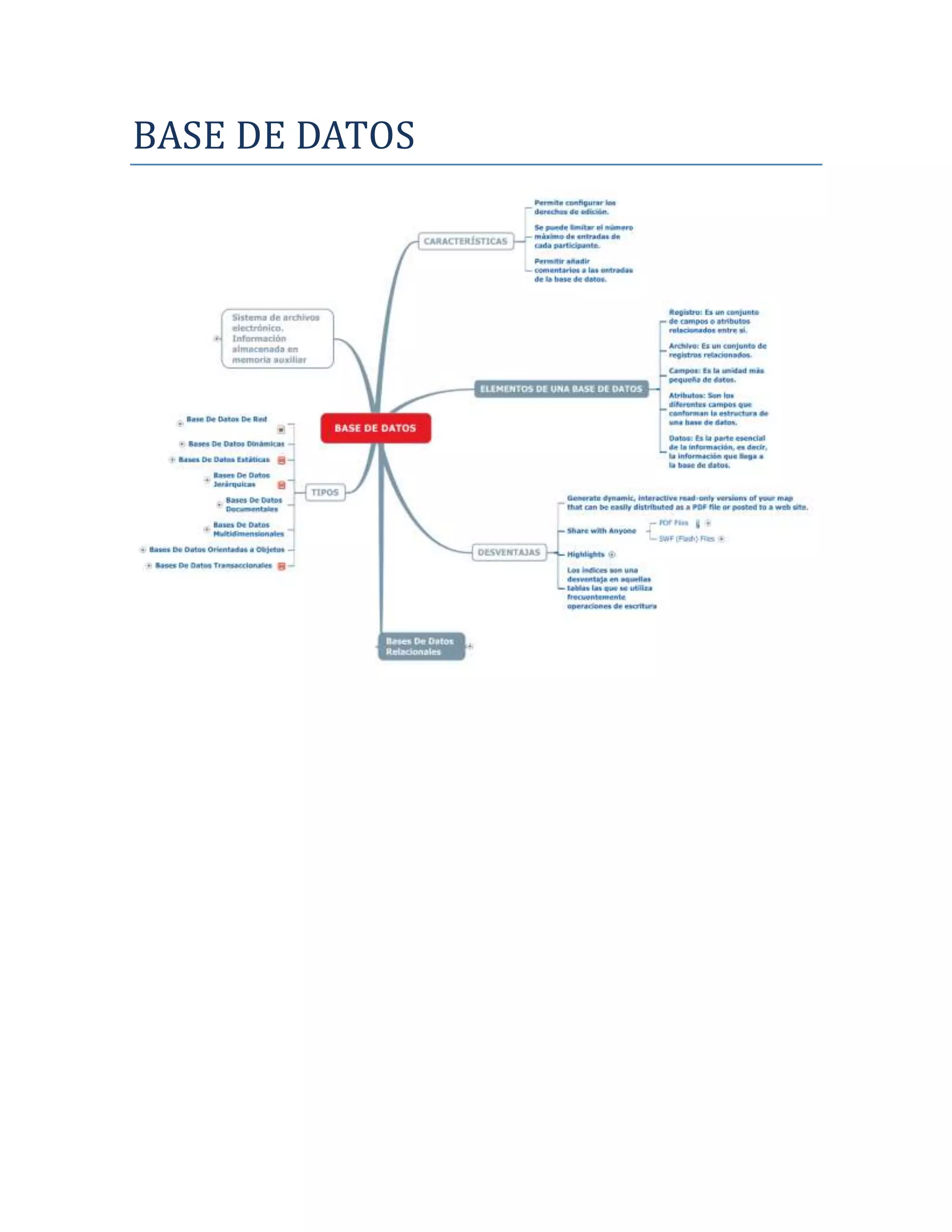
1 CARACTERÍSTICAS

1.1 Permite configurar los derechos de edición.

1.2 Se puede limitar el número máximo de entradas de cada participante.

1.3 Permitir añadir comentarios a las entradas de la base de datos.


2 ELEMENTOS DE UNA BASE DE DATOS
2.1 Registro: Es un conjunto de campos o atributos relacionados entre sí.

2.2 Archivo: Es un conjunto de registros relacionados.

2.3 Campos: Es la unidad más pequeña de datos.

2.4 Atributos: Son los diferentes campos que conforman la estructura de
una base de datos.

2.5 Datos: Es la parte esencial de la información, es decir, la información
que llega a la base de datos.


3 DESVENTAJAS
3.1 Generate dynamic, interactive read-only versions of your map that
can be easily distributed as a PDF file or posted to a web site.

3.2 Share with Anyone
3.2.1 PDF Files
See attachment(s): MindjetPlayerSample.pdf
A PDF file contains an embedded interactive map that provides you with the convenience
of a PDF file with the interactivity of a MindManager map.

3.2.2 SWF (Flash) Files

Post an interactive Flash version of your map to your website or blog to share interactive
content with our viewers.

3.3 Highlights
3.3.1 No Special Viewer Required

3.3.2 Interactive Read/Only

3.3.3 Expand/Collapse Branches

3.3.4 Hyperlinks

3.3.5 Find Content in Topics

3.3.6 Zoom Control

3.4 Los índices son una desventaja en aquellas tablas las que se utiliza
frecuentemente operaciones de escritura


4 Bases De Datos Relacionales
4.1 utilizado en la actualidad para modelar problemas reales y
administrar datos dinámicamente.


5 TIPOS
5.1 Base De Datos De Red
See document: forum.us.mindjet.com
5.1.1 Permite que un mismo nodo tenga varios padres (posibilidad no permitida en el
modelo jerárquico).

5.2 Bases De Datos Dinámicas
5.2.1 Informacion almacenada se modifica con el tiempo, permitiendo operaciones
como actualizacion, borrado y adicion de datos, ademas de las operaciones
fundamentales de consulta.

5.3 Bases De Datos Estáticas
See document: support.aspx

5.3.1 Solo lectura, utilizadas primordialmente para almacenar datos historicos para
estudiar el comportamiento de un conjunto de datos a traves del tiempo, realizar
proyecciones y tomar deciciones.

5.4 Bases De Datos Jerárquicas
See document: support.aspx

5.4.1 Almacenan su información en una estructura jerárquica.

5.5 Bases De Datos Documentales
5.5.1 Permiten la indexación a texto completo, y en líneas generales realizar búsquedas
más potentes

5.6 Bases De Datos Multidimensionales
5.6.1 Para desarrollar aplicaciones muy concretas, como creación de cubos olap

5.7 Bases De Datos Orientadas a Objetos
5.7.1 Bastante reciente, y propio de los modelos informaticos enfocado a objetos, trata
de almacenar en la base de datos los objetos completos (estado y comportamiento).

5.8 Bases De Datos Transaccionales
See document: default.aspx
5.8.1 Único fin es el envío y recepción de datos a grandes velocidades


6 Sistema de archivos electrónico. Información almacenada en
memoria auxiliar
6.1 Get Connected with
6.1.1 Take MindManager 8 to the next level with this powerful add-on solution.

Share and edit MindManager maps with your team simultaneously

Secure online workspaces for MindManager maps and other files

Conduct team meetings with fully integrated web conferences

6.1.2   Create Your Mindjet Connect Account

Create Your Account

Click icon for help
See document: d_create_a_mindjet_connect_account.htm

Click icon to watch a short tutorial
See document: MJC_create_acct_mm_skin.swf

Sign in to Mindjet Connect

Click icon for help
See document: d_sign_in_to_mindjet_connect.htm

Click icon to watch a short tutorial
See document: MJC_MM_sign_in_mm_skin.swf

Invite Users to Your Account

Click icon for help
See document: d_create_a_mindjet_connect_account.htm

Click icon to watch a short tutorial
See document: MJC_invite_users_mm_skin.swf

6.1.3   Share Maps and Documents in Online Workspaces

Create Workspaces

Click icon for help
See document: d_create_and_open_workspaces.htm
Click icon to watch a short tutorial
See document: MJC_create_WS_mm_skin.swf

Add Members to Your Workspaces

Click icon for help
See document: d_add_or_remove_workspace_members.htm

Click icon to watch a short tutorial
See document: MJC_WS_members_mm_skin.swf

Add MindManager Maps and Files into Your Workspaces

Click icon for help
See document: d_add_documents_to_workspaces.htm

Click icon to watch a short tutorial
See document: MJC_WS_docs_mm_skin.swf

6.1.4   View and Edit MindManager Maps with Others Simultaneously

Click icon for help
See document: d_view_and_edit_workspace_maps.htm

Click icon to watch a short tutorial
See document: MJC_coedit_maps_mm_skin.swf

6.1.5   Launch Web Conferences

Click icon for help
See document: im_begin_a_meeting.htm

Click icon to watch a short tutorial
See document: MJC_IM_mm_skin.swf
Once the meeting has started you can:

Invite additional participants

Choose which applications to display to other participants.

Grant another participant Show rights

Grant another participant Remote Control rights

6.2 See Your Plans with
6.2.1 JCVGantt Pro 3 provides an easy to use, yet powerful solution to visualize and
track projects and tasks.

6.2.2 Visualize plans and improve the accuracy of time and cost estimating while
decreasing the time it takes to plan a new project.

6.2.3 Key Features

Display maps as Gantt charts with all the data instantly synchronized in both the
JCVGantt and MindManager

Instantly identify the project’s critical path and calculate project costs

Perform 'what if' analysis and assess budgetary risks before they become problems

Quickly create plans with drag-and-drop GanttParts™, thinking through a project
schedule once, and then reusing it again and again

Easily assign the same resources to multiple projects

Full ink support enables hand-written projects on Tablet PCs

6.2.4 Try It
See document: click.aspx

6.2.5 Buy It
See document: click.aspx

6.3 Partner Solutions
See document: Default.aspx

Base de datos

  • 1.
  • 2.
    1 CARACTERÍSTICAS 1.1 Permiteconfigurar los derechos de edición. 1.2 Se puede limitar el número máximo de entradas de cada participante. 1.3 Permitir añadir comentarios a las entradas de la base de datos. 2 ELEMENTOS DE UNA BASE DE DATOS 2.1 Registro: Es un conjunto de campos o atributos relacionados entre sí. 2.2 Archivo: Es un conjunto de registros relacionados. 2.3 Campos: Es la unidad más pequeña de datos. 2.4 Atributos: Son los diferentes campos que conforman la estructura de una base de datos. 2.5 Datos: Es la parte esencial de la información, es decir, la información que llega a la base de datos. 3 DESVENTAJAS 3.1 Generate dynamic, interactive read-only versions of your map that can be easily distributed as a PDF file or posted to a web site. 3.2 Share with Anyone 3.2.1 PDF Files See attachment(s): MindjetPlayerSample.pdf
  • 3.
    A PDF filecontains an embedded interactive map that provides you with the convenience of a PDF file with the interactivity of a MindManager map. 3.2.2 SWF (Flash) Files Post an interactive Flash version of your map to your website or blog to share interactive content with our viewers. 3.3 Highlights 3.3.1 No Special Viewer Required 3.3.2 Interactive Read/Only 3.3.3 Expand/Collapse Branches 3.3.4 Hyperlinks 3.3.5 Find Content in Topics 3.3.6 Zoom Control 3.4 Los índices son una desventaja en aquellas tablas las que se utiliza frecuentemente operaciones de escritura 4 Bases De Datos Relacionales 4.1 utilizado en la actualidad para modelar problemas reales y administrar datos dinámicamente. 5 TIPOS 5.1 Base De Datos De Red See document: forum.us.mindjet.com
  • 4.
    5.1.1 Permite queun mismo nodo tenga varios padres (posibilidad no permitida en el modelo jerárquico). 5.2 Bases De Datos Dinámicas 5.2.1 Informacion almacenada se modifica con el tiempo, permitiendo operaciones como actualizacion, borrado y adicion de datos, ademas de las operaciones fundamentales de consulta. 5.3 Bases De Datos Estáticas See document: support.aspx 5.3.1 Solo lectura, utilizadas primordialmente para almacenar datos historicos para estudiar el comportamiento de un conjunto de datos a traves del tiempo, realizar proyecciones y tomar deciciones. 5.4 Bases De Datos Jerárquicas See document: support.aspx 5.4.1 Almacenan su información en una estructura jerárquica. 5.5 Bases De Datos Documentales 5.5.1 Permiten la indexación a texto completo, y en líneas generales realizar búsquedas más potentes 5.6 Bases De Datos Multidimensionales 5.6.1 Para desarrollar aplicaciones muy concretas, como creación de cubos olap 5.7 Bases De Datos Orientadas a Objetos 5.7.1 Bastante reciente, y propio de los modelos informaticos enfocado a objetos, trata de almacenar en la base de datos los objetos completos (estado y comportamiento). 5.8 Bases De Datos Transaccionales See document: default.aspx
  • 5.
    5.8.1 Único fines el envío y recepción de datos a grandes velocidades 6 Sistema de archivos electrónico. Información almacenada en memoria auxiliar 6.1 Get Connected with 6.1.1 Take MindManager 8 to the next level with this powerful add-on solution. Share and edit MindManager maps with your team simultaneously Secure online workspaces for MindManager maps and other files Conduct team meetings with fully integrated web conferences 6.1.2 Create Your Mindjet Connect Account Create Your Account Click icon for help See document: d_create_a_mindjet_connect_account.htm Click icon to watch a short tutorial See document: MJC_create_acct_mm_skin.swf Sign in to Mindjet Connect Click icon for help See document: d_sign_in_to_mindjet_connect.htm Click icon to watch a short tutorial See document: MJC_MM_sign_in_mm_skin.swf Invite Users to Your Account Click icon for help See document: d_create_a_mindjet_connect_account.htm Click icon to watch a short tutorial See document: MJC_invite_users_mm_skin.swf 6.1.3 Share Maps and Documents in Online Workspaces Create Workspaces Click icon for help See document: d_create_and_open_workspaces.htm
  • 6.
    Click icon towatch a short tutorial See document: MJC_create_WS_mm_skin.swf Add Members to Your Workspaces Click icon for help See document: d_add_or_remove_workspace_members.htm Click icon to watch a short tutorial See document: MJC_WS_members_mm_skin.swf Add MindManager Maps and Files into Your Workspaces Click icon for help See document: d_add_documents_to_workspaces.htm Click icon to watch a short tutorial See document: MJC_WS_docs_mm_skin.swf 6.1.4 View and Edit MindManager Maps with Others Simultaneously Click icon for help See document: d_view_and_edit_workspace_maps.htm Click icon to watch a short tutorial See document: MJC_coedit_maps_mm_skin.swf 6.1.5 Launch Web Conferences Click icon for help See document: im_begin_a_meeting.htm Click icon to watch a short tutorial See document: MJC_IM_mm_skin.swf
  • 7.
    Once the meetinghas started you can: Invite additional participants Choose which applications to display to other participants. Grant another participant Show rights Grant another participant Remote Control rights 6.2 See Your Plans with 6.2.1 JCVGantt Pro 3 provides an easy to use, yet powerful solution to visualize and track projects and tasks. 6.2.2 Visualize plans and improve the accuracy of time and cost estimating while decreasing the time it takes to plan a new project. 6.2.3 Key Features Display maps as Gantt charts with all the data instantly synchronized in both the JCVGantt and MindManager Instantly identify the project’s critical path and calculate project costs Perform 'what if' analysis and assess budgetary risks before they become problems Quickly create plans with drag-and-drop GanttParts™, thinking through a project schedule once, and then reusing it again and again Easily assign the same resources to multiple projects Full ink support enables hand-written projects on Tablet PCs 6.2.4 Try It See document: click.aspx 6.2.5 Buy It See document: click.aspx 6.3 Partner Solutions See document: Default.aspx