Memorama
Interactivo Digital
Aquí es donde comienza la presentación
Contenido de esta plantilla
Fuentes Para ver las tipografías correctas en PowerPoint, descárgalas e instálalas en tu equipo
Recursos usados y alternativos Una variedad de recursos gráficos acordes al estilo de nuestro diseño
Diapositiva de agradecimientos La debes conservar para dar los créditos correspondientes a nuestro diseño
Colores Todos los colores que se han usado en esta presentación
Recursos infográficos Su tamaño y color se pueden editar
Iconos personalizables Están clasificados por temas para que puedas utilizarlos en todo tipo de presentaciones
Una estructura de diapositivas basada en presentación multi-purpose para educación
Puedes eliminar esta diapositiva cuando hayas terminado de editar la presentación
Más información:
SLIDESGO | SLIDESGO SCHOOL | FAQS
Visita nuestros proyectos:
FREEPIK | FLATICON | STORYSET | WEPIK | VIDFY
Juego de animales
Juego de frutas
Puedes describir en qué
consiste la sección aquí
Puedes describir en qué
consiste la sección aquí
Introducción
Puedes describir en qué
consiste la sección aquí
02
01
03
Tabla de contenidos
Los “Memoramas” o “Cartas de memoria” son juegos pedagógicos,
este tipo de juegos tienen un componente lúdico y además ayudan
a desarrollar las capacidades mentales encargadas de resolver, de
manera consciente, voluntaria y eficaz, muchos de los problemas
que se le presentan al individuo
Introducción
¿Cómo se juega?
Se puede jugar en solitario o en grupos de 2 a 4 personas.
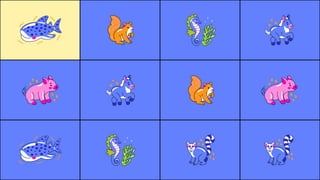
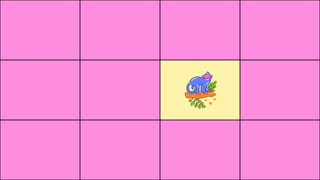
● Bajo las casillas de la tabla hay una serie de parejas dadas.
● El objetivo es buscar estas parejas.
● Se descubrirán sucesivamente dos casillas, memorizando la
ubicación de las mismas.
● Cuando se encuentren dos cartas idénticas que formen pareja, el
jugador se las suma
● Si se acierta una pareja continúa jugando el mismo jugador
● La partida terminará cuando estén todas las parejas encontradas.
● Ganará aquel jugador que haya conseguido llevarse más fichas
Describe en qué consiste esta sección si lo necesitas
Animales
01
Palabras asombrosas
Describe en qué consiste esta sección si lo necesitas
Frutas y vegetales
02
CREDITS: This presentation template was created by Slidesgo, and
includes icons by Flaticon, and infographics & images by Freepik
Thanks!
Do you have any questions?
youremail@freepik.com
+91 620 421 838
yourwebsite.com
Please keep this slide for attribution
Resources
Did you like the resources used in this template? Get them for free at our other websites:
Vectors:
● Fruits and Vegetables stickers pack
● Animals stickers pack
● Nature stickers pack
For more information about editing slides, please read our FAQs or visit Slidesgo School:
https://slidesgo.com/faqs and https://slidesgo.com/slidesgo-school
Instructions for use
If you have a free account, in order to use this template, you must credit Slidesgo by keeping the Thanks slide. Please
refer to the next slide to read the instructions for premium users.
As a Free user, you are allowed to:
- Modify this template.
- Use it for both personal and commercial projects.
You are not allowed to:
- Sublicense, sell or rent any of Slidesgo Content (or a modified version of Slidesgo Content).
- Distribute Slidesgo Content unless it has been expressly authorized by Slidesgo.
- Include Slidesgo Content in an online or offline database or file.
- Offer Slidesgo templates (or modified versions of Slidesgo templates) for download.
- Acquire the copyright of Slidesgo Content.
As a Premium user, you can use this template without attributing Slidesgo or keeping the "Thanks" slide.
You are allowed to:
● Modify this template.
● Use it for both personal and commercial purposes.
● Hide or delete the “Thanks” slide and the mention to Slidesgo in the credits.
● Share this template in an editable format with people who are not part of your team.
You are not allowed to:
● Sublicense, sell or rent this Slidesgo Template (or a modified version of this Slidesgo Template).
● Distribute this Slidesgo Template (or a modified version of this Slidesgo Template) or include it in a database or in
any other product or service that offers downloadable images, icons or presentations that may be subject to
distribution or resale.
● Use any of the elements that are part of this Slidesgo Template in an isolated and separated way from this
Template.
● Register any of the elements that are part of this template as a trademark or logo, or register it as a work in an
intellectual property registry or similar.
For more information about editing slides, please read our FAQs or visit Slidesgo School:
https://slidesgo.com/faqs and https://slidesgo.com/slidesgo-school
Instructions for use (premium users)
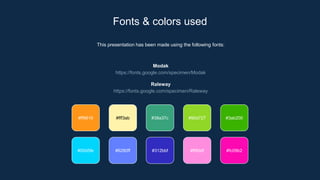
This presentation has been made using the following fonts:
Modak
https://fonts.google.com/specimen/Modak
Raleway
https://fonts.google.com/specimen/Raleway
Fonts & colors used
#ff9619 #fff3ab #38a37c #90d727
#00d5fe #6280ff #312bbf #ff8ddf
#3ab200
#fc09b2
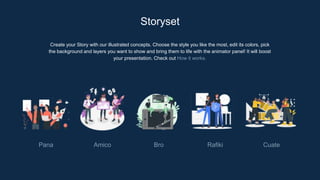
Create your Story with our illustrated concepts. Choose the style you like the most, edit its colors, pick
the background and layers you want to show and bring them to life with the animator panel! It will boost
your presentation. Check out How it works.
Storyset
Pana Amico Bro Rafiki Cuate
You can easily resize these resources without losing quality. To change the color, just ungroup the resource
and click on the object you want to change. Then, click on the paint bucket and select the color you want.
Group the resource again when you’re done. You can also look for more infographics on Slidesgo.
Use our editable graphic resources...
JANUARY FEBRUARY MARCH APRIL MAY JUNE
PHASE 1
PHASE 2
Task 1
Task 2
Task 1
Task 2
JANUARY FEBRUARY MARCH APRIL
PHASE 1
Task 1
Task 2
You can resize these icons without losing quality.
You can change the stroke and fill color; just select the icon and click on the paint bucket/pen.
In Google Slides, you can also use Flaticon’s extension, allowing you to customize and add even more icons.
...and our sets of editable icons
Educational Icons Medical Icons
Business Icons Teamwork Icons
Help & Support Icons Avatar Icons
Creative Process Icons Performing Arts Icons
Nature Icons
SEO & Marketing Icons
Digital Interactive Memory Match Game by Slidesgo.pptx

Digital Interactive Memory Match Game by Slidesgo.pptx

  • 1.
    Memorama Interactivo Digital Aquí esdonde comienza la presentación
  • 2.
    Contenido de estaplantilla Fuentes Para ver las tipografías correctas en PowerPoint, descárgalas e instálalas en tu equipo Recursos usados y alternativos Una variedad de recursos gráficos acordes al estilo de nuestro diseño Diapositiva de agradecimientos La debes conservar para dar los créditos correspondientes a nuestro diseño Colores Todos los colores que se han usado en esta presentación Recursos infográficos Su tamaño y color se pueden editar Iconos personalizables Están clasificados por temas para que puedas utilizarlos en todo tipo de presentaciones Una estructura de diapositivas basada en presentación multi-purpose para educación Puedes eliminar esta diapositiva cuando hayas terminado de editar la presentación Más información: SLIDESGO | SLIDESGO SCHOOL | FAQS Visita nuestros proyectos: FREEPIK | FLATICON | STORYSET | WEPIK | VIDFY
  • 3.
    Juego de animales Juegode frutas Puedes describir en qué consiste la sección aquí Puedes describir en qué consiste la sección aquí Introducción Puedes describir en qué consiste la sección aquí 02 01 03 Tabla de contenidos
  • 4.
    Los “Memoramas” o“Cartas de memoria” son juegos pedagógicos, este tipo de juegos tienen un componente lúdico y además ayudan a desarrollar las capacidades mentales encargadas de resolver, de manera consciente, voluntaria y eficaz, muchos de los problemas que se le presentan al individuo Introducción
  • 5.
    ¿Cómo se juega? Sepuede jugar en solitario o en grupos de 2 a 4 personas. ● Bajo las casillas de la tabla hay una serie de parejas dadas. ● El objetivo es buscar estas parejas. ● Se descubrirán sucesivamente dos casillas, memorizando la ubicación de las mismas. ● Cuando se encuentren dos cartas idénticas que formen pareja, el jugador se las suma ● Si se acierta una pareja continúa jugando el mismo jugador ● La partida terminará cuando estén todas las parejas encontradas. ● Ganará aquel jugador que haya conseguido llevarse más fichas
  • 6.
    Describe en quéconsiste esta sección si lo necesitas Animales 01
  • 15.
  • 16.
    Describe en quéconsiste esta sección si lo necesitas Frutas y vegetales 02
  • 23.
    CREDITS: This presentationtemplate was created by Slidesgo, and includes icons by Flaticon, and infographics & images by Freepik Thanks! Do you have any questions? youremail@freepik.com +91 620 421 838 yourwebsite.com Please keep this slide for attribution
  • 24.
    Resources Did you likethe resources used in this template? Get them for free at our other websites: Vectors: ● Fruits and Vegetables stickers pack ● Animals stickers pack ● Nature stickers pack
  • 25.
    For more informationabout editing slides, please read our FAQs or visit Slidesgo School: https://slidesgo.com/faqs and https://slidesgo.com/slidesgo-school Instructions for use If you have a free account, in order to use this template, you must credit Slidesgo by keeping the Thanks slide. Please refer to the next slide to read the instructions for premium users. As a Free user, you are allowed to: - Modify this template. - Use it for both personal and commercial projects. You are not allowed to: - Sublicense, sell or rent any of Slidesgo Content (or a modified version of Slidesgo Content). - Distribute Slidesgo Content unless it has been expressly authorized by Slidesgo. - Include Slidesgo Content in an online or offline database or file. - Offer Slidesgo templates (or modified versions of Slidesgo templates) for download. - Acquire the copyright of Slidesgo Content.
  • 26.
    As a Premiumuser, you can use this template without attributing Slidesgo or keeping the "Thanks" slide. You are allowed to: ● Modify this template. ● Use it for both personal and commercial purposes. ● Hide or delete the “Thanks” slide and the mention to Slidesgo in the credits. ● Share this template in an editable format with people who are not part of your team. You are not allowed to: ● Sublicense, sell or rent this Slidesgo Template (or a modified version of this Slidesgo Template). ● Distribute this Slidesgo Template (or a modified version of this Slidesgo Template) or include it in a database or in any other product or service that offers downloadable images, icons or presentations that may be subject to distribution or resale. ● Use any of the elements that are part of this Slidesgo Template in an isolated and separated way from this Template. ● Register any of the elements that are part of this template as a trademark or logo, or register it as a work in an intellectual property registry or similar. For more information about editing slides, please read our FAQs or visit Slidesgo School: https://slidesgo.com/faqs and https://slidesgo.com/slidesgo-school Instructions for use (premium users)
  • 27.
    This presentation hasbeen made using the following fonts: Modak https://fonts.google.com/specimen/Modak Raleway https://fonts.google.com/specimen/Raleway Fonts & colors used #ff9619 #fff3ab #38a37c #90d727 #00d5fe #6280ff #312bbf #ff8ddf #3ab200 #fc09b2
  • 28.
    Create your Storywith our illustrated concepts. Choose the style you like the most, edit its colors, pick the background and layers you want to show and bring them to life with the animator panel! It will boost your presentation. Check out How it works. Storyset Pana Amico Bro Rafiki Cuate
  • 29.
    You can easilyresize these resources without losing quality. To change the color, just ungroup the resource and click on the object you want to change. Then, click on the paint bucket and select the color you want. Group the resource again when you’re done. You can also look for more infographics on Slidesgo. Use our editable graphic resources...
  • 32.
    JANUARY FEBRUARY MARCHAPRIL MAY JUNE PHASE 1 PHASE 2 Task 1 Task 2 Task 1 Task 2 JANUARY FEBRUARY MARCH APRIL PHASE 1 Task 1 Task 2
  • 35.
    You can resizethese icons without losing quality. You can change the stroke and fill color; just select the icon and click on the paint bucket/pen. In Google Slides, you can also use Flaticon’s extension, allowing you to customize and add even more icons. ...and our sets of editable icons
  • 36.
  • 37.
  • 38.
    Help & SupportIcons Avatar Icons
  • 39.
    Creative Process IconsPerforming Arts Icons
  • 40.
  • 41.