CLASSROOM 3
ENVIAR LA TAREA
XABIER MENDOZA
ÍNDICE
• EL ALUMNO RECIBE LA TAREA
• EL ALUMNO REALIZA LA TAREA
• EL ALUMNO PRESENTA LA TAREA
• DIFERENTES FORMAS DE PRESENTAR LA
TAREA:
– AÑADIR: Google Drive, Añadir enlace, Subir
archivo.
– CREAR: Documento, Presentación, Hoja de cálculo,
Dibujo
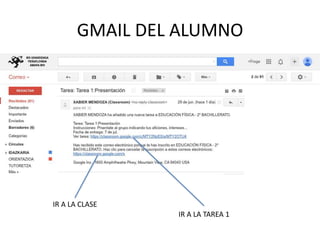
GMAIL DEL ALUMNO
IR A LA CLASE
IR A LA TAREA 1
LAS CLASES DEL ALUMNO
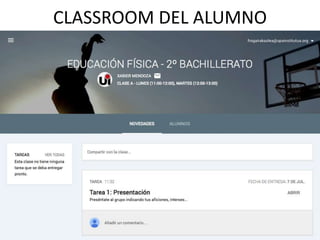
CLASSROOM DEL ALUMNO
TAREAS
EL ALUMNO
REALIZA LA
TAREA 1
PRESENTACIÓN DE LA TAREA
CLASSROOM DEL PROFESOR
SIGUIENTE PASO: EVALUAR TAREA
YA HAS CREADO LA TAREA Y LA HAS ENVIADO AL PROFESOR
Creative Commons License
• CLASSROOM 3: ENVIAR LA TAREA by Xabier
Mendoza Michelena is licensed under a
Creative Commons Reconocimiento-
NoComercial-CompartirIgual 3.0 Unported
License.
• Permissions beyond the scope of this license
may be available at hezikate@gmail.com.

Classroom 3: Enviar la tarea