Mejores prácticas BIM:
1. Entendiendo la ISO-19650
2. Creando el Plan de Ejecución BIM perfecto
3. Mejores prácticas en alcances colaborativos BIM
4. Gestionando tus plantillas BIM
5. Gestionando tus proyectos con Plannerly
6. Cómo verificar tus entregables BIM
● Desafíos con las plantillas
● Demo
● Mejores prácticas para gestionar
plantillas
Gestionando plantillas de proyecto:
Tu cuentas con plantillas
para tus proyectos
…¿Cierto?
ehh... ¿sí?
y las utilizas
...¿cierto’?
bueno, ahm...
¿No las utilizas?
…¿por qué no?
Falta de confianza
¿Por qué crees que
pasa eso?
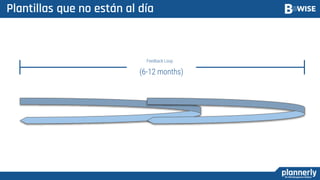
Plantillas que no están al día
(6-12 months)
Feedback Loop
¿Por qué?
13
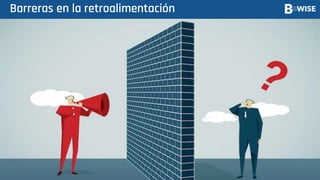
Barreras en la retroalimentación
¿Cómo damos/recibimos
retroalimentación?
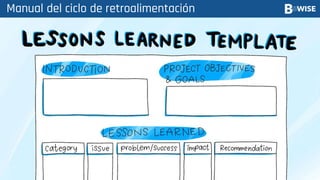
Manual del ciclo de retroalimentación
¿Qué ocurre con ese
documento?
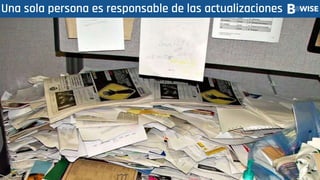
Una sola persona es responsable de las actualizaciones
Deben estar en la playa
…¿cierto?
Sin tiempo para actualizaciones
¿y qué haces?
Usualmente copiamos y pegamos de proyectos anteriores
¿Entonces qué
pasa?
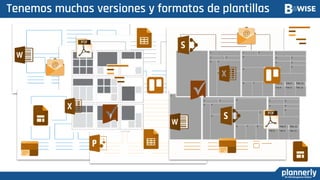
Tenemos muchas versiones y formatos de plantillas
¿No es un poco
riesgoso eso?
Ahm… ¿Sí?
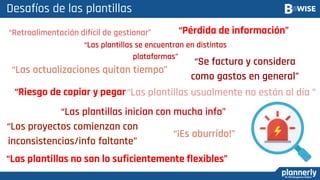
“Las actualizaciones quitan tiempo”
“Las plantillas se encuentran en distintas
plataformas”
“Se factura y considera
como gastos en general”
“Riesgo de copiar y pegar
“Los proyectos comienzan con
inconsistencias/info faltante”
“Las plantillas usualmente no están al día ”
“Retroalimentación difícil de gestionar”
Desafíos de las plantillas
“Las plantillas no son lo suficientemente flexibles”
“Las plantillas inician con mucha info”
“¡Es aburrido!”
“Pérdida de información”
¡¡¡Hablemos de las mejores
prácticas
Plantillas de Plan + Alcance!!!
Resumen de las
mejores prácticas
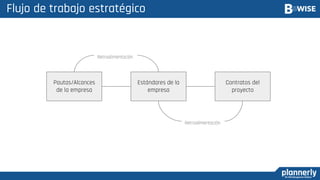
Flujo de trabajo estratégico
Pautas/Alcances
de la empresa
Estándares de la
empresa
Contratos del
proyecto
Retroalimentación
Retroalimentación
¿Entorno en común?
Involucra a los miembros del equipo correctos
32
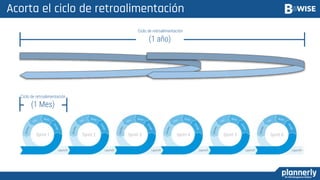
Acorta el ciclo de retroalimentación
(1 Mes)
(1 año)
Sprint 1 Sprint 2 Sprint 3 Sprint 4 Sprint 5 Sprint 6
Ciclo de retroalimentación
Construye confianza
En conclusión:
- Comenzar a partir de una plantilla reduce significativamente las
tareas administrativas
- Sin embargo, como hemos visto, existen ciertos retos
- Un espacio de trabajo común nos ayuda a mitigar muchos de estos
retos
- creando un proceso continuo donde se integra a los miembros del
equipo y se propicia una retroalimentación rápida construye
confianza dentro de la empresa
- Obtendremos como resultado mayor calidad en nuestras entregas y
equipos más felices
P&R
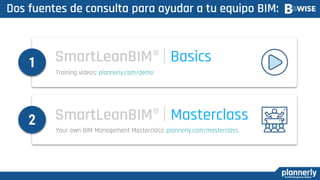
Dos fuentes de consulta para ayudar a tu equipo BIM:
Training videos: plannerly.com/demo
Your own BIM Management Masterclass: plannerly.com/masterclass
1
2
Descubre más: www.bwisebim.com/plannerly
¡MUCHAS GRACIAS!
Episodio 5:
Gestionando tus
proyectos con Plannerly
Miércoles 10 de Marzo

Gestionando tus plantillas BIM

Notas del editor

  • #3 NEW Series!
  • #5 Todo el mundo tiene plantillas, es decir, yo tengo plantillas, tú tienes algunas plantillas.
  • #6 Uhh yes
  • #10 I just don’t trust them - I’ve had some bad experiences
  • #12 I always seem to be working on outdated templates
  • #14 My feedback does not get incorporated - there always seems to be some barrier
  • #15 Is there no official feedback loop?
  • #16 Yes - we have a sheet we fill out but it’s very manual
  • #17 What happens to it?
  • #18 They tend to pile up on one person
  • #19 Are they on vacation?
  • #20 No, they also work on real projects They usually don’t have time to update
  • #21 So what do you do when a new project comes up?
  • #22 We do what most people do - we copy n paste
  • #23 And then what
  • #24 We end up with many more!
  • #25 Isn’t that a bit risky for the project??
  • #27 And that’s just a few challenges But the implications of those challenges. It’s not lean. We’ve talked about implementing bite-sized workflows to be able to be lean, but those unlean workflows that create bottlenecks, create misunderstandings, that create confusion and blame and finger pointing. There’s a lot of liability and a lot of risk in that workflow (Click)
  • #28 So let’s talk about some tips for radically better BIM templates!!! Create PLAN Template Login to Admin Account Create a Plan template called “_My Company Plan Template” Use Global Standards - USIBD Linear Method - Drag Industry Standards Create New Section “ISO 19650 Core Principals” Add Image from Whimsical Name Category “Standards” Name the plan “General Templates” Publish “ISO 19650 Core Principles” Section Only Set Template LIVE Michelle creates “New Project” Use PLAN Template to drag in published “ISO 19650 Core Principals Section Create SCOPE Template Login to Admin Account Create a SCOPE template called “_My Company Scope Template” SHOW Global Standards - Uniformat Create folder by discipline - “Structural Scope” Drag in concrete Stairs Drag Steel Structures Create “Coordination” Milestone Create “Handover” Milestone Assign Scope Set Template LIVE Michelle and access same project Scope Settings to include milestones Use Scope Template to drag in Structural Folder Manage Templates Login to Admin Account Invite “Louie@plannerly.com” Louie comments “This workflow worked great for us on my last project!” Louie comments in Stairs Element “Concrete Finish” and “Concrete Compression Strength” requirements need at Handover” UPDATES: Add Information Requirements
  • #29 Let’s start a BEP on the right foot by asking some questions that need to be clear
  • #34 Trust is the foundation of teamwork Building trust takes time but the process can be greatly accelerated with the right platform
  • #37 MA Your tasks: watch the “Basics” videos and let us know when you would like to schedule your SmartLeanBIM® Masterclass!
  • #38 REMEMBER NEXT WEBINAR!!