Septiembre 12, 2015
Bogota Colombia
#sqlsatBogota
Capítulos Organizadores del SQL Saturday
12/9/2015 | SQL Saturday #448 – Bogotá, Colombia7 |
Patrocinadores del SQL Saturday
12/9/2015 | SQL Saturday #448 – Bogotá, Colombia8 |
Ing. Eduardo Castro, PhD
MVP de Microsoft SQL Server
PASS Regional de Mentor
PASS Board of Directors
ecastro@simsasys.com
http://www.youtube.com/eduardocastrom
SQL Server 2016 Vistazo a todo lo nuevo!
Evaluación
Sesión: http://www.sqlsaturday.com/448/sessions/sessionevaluation.aspx
Evento: http://www.sqlsaturday.com/448/eventeval.aspx
#sqlsatBogota
12/9/2015 | SQL Saturday #448 – Bogotá, Colombia12 |
Material de Referencia
SQL Server Evolution. SQL 2016 new innovations. Lindsey Allen Principal Group Program Manager, Borko Novakovic
Program Manager
New in Master Data Services and Integration Services in SQL Server 2016. Matt Masson
SQL Server Evolution. Shawn Bice Engineering Partner Director
Operational Analytics in SQL Server. Sunil Agarwal Principal Program Manager
¿Qué hay en esta sesión
 SQL 2016 qué hay de Nuevo!
 Scaling up aumentado – 16 sockets
 Mejoras en el In-memory Engine
 Query flight recorder - Query Store
 Time travel y auditoria con Temporal database
 Advanced Analytics en la base de datos OLTP
Mejoras en Column Store
 Artículo de Microsoft
http://bit.ly/sql2016-columnstore
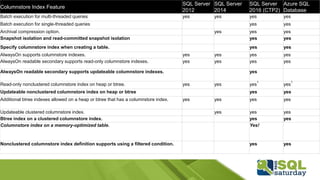
Columnstore Index Feature
SQL Server
2012
SQL Server
2014
SQL Server
2016 (CTP2)
Azure SQL
Database
Batch execution for multi-threaded queries yes yes yes yes
Batch execution for single-threaded queries yes yes
Archival compression option. yes yes yes
Snapshot isolation and read-committed snapshot isolation yes yes
Specify columnstore index when creating a table. yes yes
AlwaysOn supports columnstore indexes. yes yes yes yes
AlwaysOn readable secondary supports read-only columnstore indexes. yes yes yes yes
AlwaysOn readable secondary supports updateable columnstore indexes. yes
Read-only nonclustered columnstore index on heap or btree. yes yes yes
1
yes
1
Updateable nonclustered columnstore index on heap or btree yes yes
Additional btree indexes allowed on a heap or btree that has a columnstore index. yes yes yes yes
Updateable clustered columnstore index. yes yes yes
Btree index on a clustered columnstore index. yes yes
Columnstore index on a memory-optimized table. Yes!
Nonclustered columnstore index definition supports using a filtered condition. yes yes
InMemory OLTP Mejoras
 Artículo de referenci:
http: //bit.ly/sql2016-in-memory-oltp
 Aaron Bertrand Blog:
http: //sqlperformance.com/2015/05/sql-server-
2016/in-memory-oltp-enhancements
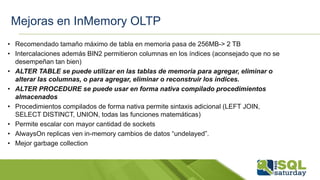
Mejoras en InMemory OLTP
• Recomendado tamaño máximo de tabla en memoria pasa de 256MB-> 2 TB
• Intercalaciones además BIN2 permitieron columnas en los índices (aconsejado que no se
desempeñan tan bien)
• ALTER TABLE se puede utilizar en las tablas de memoria para agregar, eliminar o
alterar las columnas, o para agregar, eliminar o reconstruir los índices.
• ALTER PROCEDURE se puede usar en forma nativa compilado procedimientos
almacenados
• Procedimientos compilados de forma nativa permite sintaxis adicional (LEFT JOIN,
SELECT DISTINCT, UNION, todas las funciones matemáticas)
• Permite escalar con mayor cantidad de sockets
• AlwaysOn replicas ven in-memory cambios de datos “undelayed”.
• Mejor garbage collection
Mejoras en InMemory OLTP
Feature/Limit SQL Server 2014 SQL Server 2016
Maximum size of durable table 256 GB 2 TB
LOB (varbinary(max), [n]varchar(max)) Not supported Supported*
Transparent Data Encryption (TDE) Not supported Supported
Offline Checkpoint Threads 1 1 per container
ALTER PROCEDURE / sp_recompile Not supported Supported (fully online)
Nested native procedure calls Not supported Supported
Natively-compiled scalar UDFs Not supported Supported
ALTER TABLE
Not supported
(DROP / re-CREATE)
Partially supported
(offline – details below)
DML triggers Not supported
Partially supported
(AFTER, natively compiled)
Indexes on NULLable columns Not supported Supported
Non-BIN2 collations in index key
columns
Not supported Supported
Non-Latin codepages for [var]char
columns
Not supported Supported
Non-BIN2 comparison / sorting in
native modules
Not supported Supported
Foreign Keys Not supported Supported
Check/Unique Constraints Not supported Supported
Parallelism Not supported Supported
OUTER JOIN, OR, NOT, UNION [ALL],
DISTINCT, EXISTS, IN
Not supported Supported
Multiple Active Result Sets (MARS)
(Means better Entity Framework
support.)
Not supported Supported
SSMS Table Designer Not supported Supported
Fuente: http: //sqlperformance.com/2015/05/sql-server-2016/in-memory-oltp-enhancements
ColumnStore + In Memory OLTP
= OPERATIONAL ANALYTICS
 In-memory, updateable, non-clustered
columnstore index ya sea sobre disk-based or
in-memory tables.
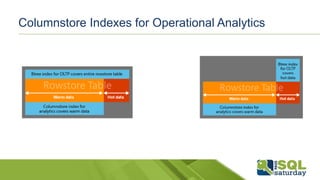
Columnstore Indexes for Operational Analytics
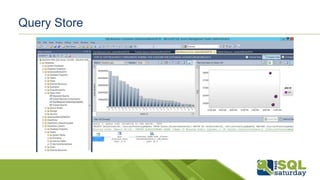
Query Store
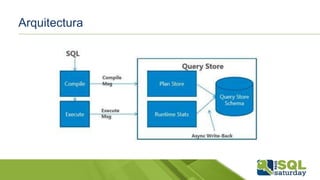
Qué es el Query Store
 Almacenar el historial de los planes de ejecución
 Capturar el desempeño de los planes a través del tiempo
 Identificar consultas que se han vuelto lentas
 Permitir forzar planes de forma fácil
 Hacer que funcione aunque se reinicie el servidor
Arquitectura
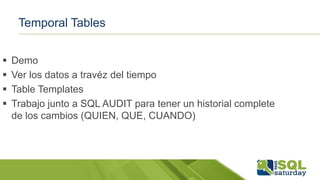
Temporal Tables
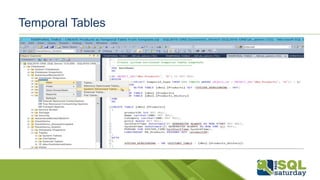
 Demo
 Ver los datos a travéz del tiempo
 Table Templates
 Trabajo junto a SQL AUDIT para tener un historial complete
de los cambios (QUIEN, QUE, CUANDO)
Temporal Tables
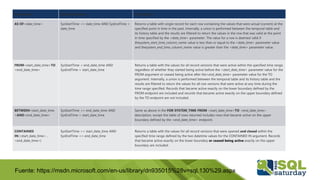
Fuente: https://msdn.microsoft.com/en-us/library/dn935015%28v=sql.130%29.aspx
Expression Qualifying Rows Description
AS OF<date_time> SysStartTime <= date_time AND SysEndTime >
date_time
Returns a table with single record for each row containing the values that were actual (current) at the
specified point in time in the past. Internally, a union is performed between the temporal table and
its history table and the results are filtered to return the values in the row that was valid at the point
in time specified by the <date_time> parameter. The value for a row is deemed valid if
thesystem_start_time_column_name value is less than or equal to the <date_time> parameter value
and thesystem_end_time_column_name value is greater than the <date_time> parameter value.
FROM<start_date_time>TO
<end_date_time>
SysStartTime < end_date_time AND
SysEndTime > start_date_time
Returns a table with the values for all record versions that were active within the specified time range,
regardless of whether they started being active before the <start_date_time> parameter value for the
FROM argument or ceased being active after the<end_date_time> parameter value for the TO
argument. Internally, a union is performed between the temporal table and its history table and the
results are filtered to return the values for all row versions that were active at any time during the
time range specified. Records that became active exactly on the lower boundary defined by the
FROM endpoint are included and records that became active exactly on the upper boundary defined
by the TO endpoint are not included.
BETWEEN<start_date_time
>AND<end_date_time>
SysStartTime <= end_date_time AND
SysEndTime > start_date_time
Same as above in the FOR SYSTEM_TIME FROM <start_date_time>TO <end_date_time>
description, except the table of rows returned includes rows that became active on the upper
boundary defined by the <end_date_time> endpoint.
CONTAINED
IN(<start_date_time> ,
<end_date_time>)
SysStartTime >= start_date_time AND
SysEndTime <= end_date_time
Returns a table with the values for all record versions that were opened and closed within the
specified time range defined by the two datetime values for the CONTAINED IN argument. Records
that became active exactly on the lower boundary or ceased being active exactly on the upper
boundary are included.
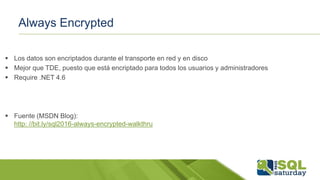
Always Encrypted
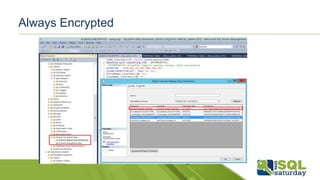
 Los datos son encriptados durante el transporte en red y en disco
 Mejor que TDE, puesto que está encriptado para todos los usuarios y administradores
 Require .NET 4.6
 Fuente (MSDN Blog):
http: //bit.ly/sql2016-always-encrypted-walkthru
Always Encrypted
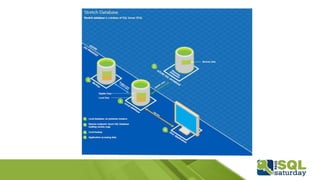
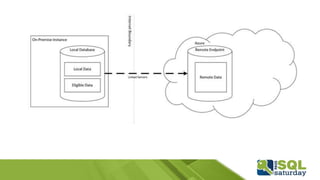
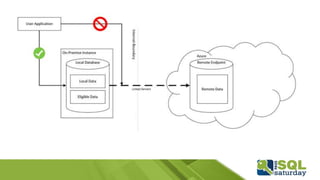
Stretch Database
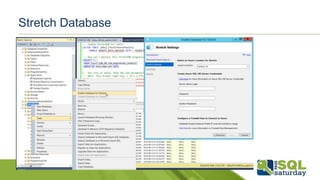
 Solución que permite almacenar datos históricos en la nube
 Permite liberar espacio de discos locales o de SAN
 No requiere cambios en los TSQL
 El engine de SQL Server realiza un procesamiento “distribuido”
de las consultas
Stretch Database
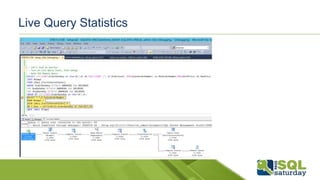
Live Query Statistics
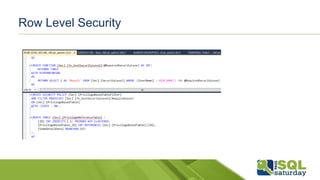
Row Level Security
 Ya está en la versión V12 de SQL Azure Base de datos
 Permite control granular a nivel de fila
Row Level Security
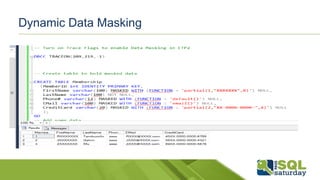
Dynamic Data Masking
 Permite que los datos sensible no sean guardados de
forma literal sino que mediante una máscara
 Ya está disponible en la versión V12 de SQL Azure Base
de datos
 Efectivamente protege datos sensibles en la capa de
aplicación, no revela los datos a los administradores o
usuarios con derechos SELECT.
Dynamic Data Masking
Otras cosas
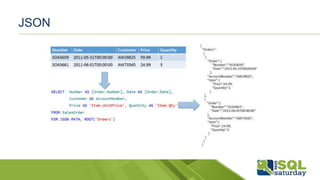
 SELECT * FROM Table FOR JSON AUTO
 PolyBase
 Managed Backup & Backup to Azure Improvements (Backup to Blob)
 Multiple TempDBs upon install
 Online ALTER COLUMN
 Para saber más:
http: //bit.ly/sql2016-whats-new-db-engine
JSON
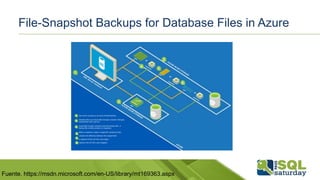
File-Snapshot Backups for Database Files in Azure
Fuente. https://msdn.microsoft.com/en-US/library/mt169363.aspx
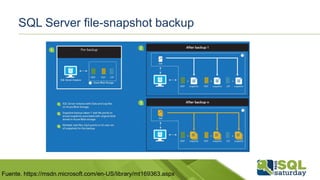
SQL Server file-snapshot backup
Fuente. https://msdn.microsoft.com/en-US/library/mt169363.aspx
• EXTRAS
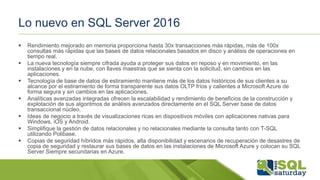
Lo nuevo en SQL Server 2016
 Rendimiento mejorado en memoria proporciona hasta 30x transacciones más rápidas, más de 100x
consultas más rápidas que las bases de datos relacionales basados ​​en disco y análisis de operaciones en
tiempo real.
 La nueva tecnología siempre cifrada ayuda a proteger sus datos en reposo y en movimiento, en las
instalaciones y en la nube, con llaves maestras que se sienta con la solicitud, sin cambios en las
aplicaciones.
 Tecnología de base de datos de estiramiento mantiene más de los datos históricos de sus clientes a su
alcance por el estiramiento de forma transparente sus datos OLTP fríos y calientes a Microsoft Azure de
forma segura y sin cambios en las aplicaciones.
 Analíticas avanzadas integradas ofrecen la escalabilidad y rendimiento de beneficios de la construcción y
explotación de sus algoritmos de análisis avanzados directamente en el SQL Server base de datos
transaccional núcleo.
 Ideas de negocio a través de visualizaciones ricas en dispositivos móviles con aplicaciones nativas para
Windows, iOS y Android.
 Simplifique la gestión de datos relacionales y no relacionales mediante la consulta tanto con T-SQL
utilizando Polibase.
 Copias de seguridad híbridos más rápidos, alta disponibilidad y escenarios de recuperación de desastres de
copia de seguridad y restaurar sus bases de datos en las instalaciones de Microsoft Azure y colocan su SQL
Server Siempre secundarias en Azure.
Hacer más. Lograr más.
Nombre de la demostración
#sqlsatBogota
09/12/2015 | SQL Sábado # 448 - Bogotá, Colombia5|
#sqlsatBogota
09/12/2015 | SQL Sábado # 448 - Bogotá, Colombia6 |
Preguntas y Respuestas
Capítulos Organizadores del SQL Sábado
09/12/2015 | SQL Sábado # 448 - Bogotá, Colombia7|
Patrocinadores del SQL Sábado
09/12/2015 | SQL Sábado # 448 - Bogotá, Colombia8|
Planea Asistir al PASS Summit 2015? Comience hoy un Ahorrar!
• El más grande evento del Mundo Que reune un Profesionales de SQL Server y BI
• Adquiera Habilidades baño SQL Servidor de la ONU Nivel Superior al Aprender de los
Mejores Expertos del Mundo de SQL Server, en Mas de 190 Sesiones Técnicas
• Más de 5.000 registros, Que representan unos 2.000 Empresas, de 52 Países, Listos para
la roja y Aprender
Ahorre $ 150 En Este Momento
PREGUNTA por el Código de
descuento
09/12/2015 | SQL Sábado # 448 - Bogotá, Colombia9 |
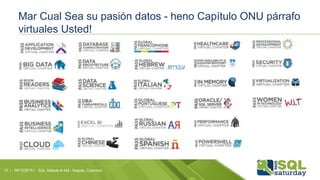
Mar Cual Sea su pasión datos - heno Capítulo ONU párrafo
virtuales Usted!
09/12/2015 | SQL Sábado # 448 - Bogotá, Colombia10 |
Septiembre 17 | 12:00 UTC
Sesiones Previas del PASS Summit 2015, Obtenga 24
Horas de Formación de SQL Server y BI de forma
Gratuita!
Registrese hoy: 24hoursofpass.com
Gracias !!!

Vistazo a SQL Server 2016

  • 1.
    Septiembre 12, 2015 BogotaColombia #sqlsatBogota
  • 2.
    Capítulos Organizadores delSQL Saturday 12/9/2015 | SQL Saturday #448 – Bogotá, Colombia7 |
  • 3.
    Patrocinadores del SQLSaturday 12/9/2015 | SQL Saturday #448 – Bogotá, Colombia8 |
  • 4.
    Ing. Eduardo Castro,PhD MVP de Microsoft SQL Server PASS Regional de Mentor PASS Board of Directors ecastro@simsasys.com http://www.youtube.com/eduardocastrom SQL Server 2016 Vistazo a todo lo nuevo!
  • 5.
  • 6.
    Material de Referencia SQLServer Evolution. SQL 2016 new innovations. Lindsey Allen Principal Group Program Manager, Borko Novakovic Program Manager New in Master Data Services and Integration Services in SQL Server 2016. Matt Masson SQL Server Evolution. Shawn Bice Engineering Partner Director Operational Analytics in SQL Server. Sunil Agarwal Principal Program Manager
  • 7.
    ¿Qué hay enesta sesión  SQL 2016 qué hay de Nuevo!  Scaling up aumentado – 16 sockets  Mejoras en el In-memory Engine  Query flight recorder - Query Store  Time travel y auditoria con Temporal database  Advanced Analytics en la base de datos OLTP
  • 8.
    Mejoras en ColumnStore  Artículo de Microsoft http://bit.ly/sql2016-columnstore
  • 9.
    Columnstore Index Feature SQLServer 2012 SQL Server 2014 SQL Server 2016 (CTP2) Azure SQL Database Batch execution for multi-threaded queries yes yes yes yes Batch execution for single-threaded queries yes yes Archival compression option. yes yes yes Snapshot isolation and read-committed snapshot isolation yes yes Specify columnstore index when creating a table. yes yes AlwaysOn supports columnstore indexes. yes yes yes yes AlwaysOn readable secondary supports read-only columnstore indexes. yes yes yes yes AlwaysOn readable secondary supports updateable columnstore indexes. yes Read-only nonclustered columnstore index on heap or btree. yes yes yes 1 yes 1 Updateable nonclustered columnstore index on heap or btree yes yes Additional btree indexes allowed on a heap or btree that has a columnstore index. yes yes yes yes Updateable clustered columnstore index. yes yes yes Btree index on a clustered columnstore index. yes yes Columnstore index on a memory-optimized table. Yes! Nonclustered columnstore index definition supports using a filtered condition. yes yes
  • 10.
    InMemory OLTP Mejoras Artículo de referenci: http: //bit.ly/sql2016-in-memory-oltp  Aaron Bertrand Blog: http: //sqlperformance.com/2015/05/sql-server- 2016/in-memory-oltp-enhancements
  • 11.
    Mejoras en InMemoryOLTP • Recomendado tamaño máximo de tabla en memoria pasa de 256MB-> 2 TB • Intercalaciones además BIN2 permitieron columnas en los índices (aconsejado que no se desempeñan tan bien) • ALTER TABLE se puede utilizar en las tablas de memoria para agregar, eliminar o alterar las columnas, o para agregar, eliminar o reconstruir los índices. • ALTER PROCEDURE se puede usar en forma nativa compilado procedimientos almacenados • Procedimientos compilados de forma nativa permite sintaxis adicional (LEFT JOIN, SELECT DISTINCT, UNION, todas las funciones matemáticas) • Permite escalar con mayor cantidad de sockets • AlwaysOn replicas ven in-memory cambios de datos “undelayed”. • Mejor garbage collection
  • 12.
    Mejoras en InMemoryOLTP Feature/Limit SQL Server 2014 SQL Server 2016 Maximum size of durable table 256 GB 2 TB LOB (varbinary(max), [n]varchar(max)) Not supported Supported* Transparent Data Encryption (TDE) Not supported Supported Offline Checkpoint Threads 1 1 per container ALTER PROCEDURE / sp_recompile Not supported Supported (fully online) Nested native procedure calls Not supported Supported Natively-compiled scalar UDFs Not supported Supported ALTER TABLE Not supported (DROP / re-CREATE) Partially supported (offline – details below) DML triggers Not supported Partially supported (AFTER, natively compiled) Indexes on NULLable columns Not supported Supported Non-BIN2 collations in index key columns Not supported Supported Non-Latin codepages for [var]char columns Not supported Supported Non-BIN2 comparison / sorting in native modules Not supported Supported Foreign Keys Not supported Supported Check/Unique Constraints Not supported Supported Parallelism Not supported Supported OUTER JOIN, OR, NOT, UNION [ALL], DISTINCT, EXISTS, IN Not supported Supported Multiple Active Result Sets (MARS) (Means better Entity Framework support.) Not supported Supported SSMS Table Designer Not supported Supported Fuente: http: //sqlperformance.com/2015/05/sql-server-2016/in-memory-oltp-enhancements
  • 13.
    ColumnStore + InMemory OLTP = OPERATIONAL ANALYTICS  In-memory, updateable, non-clustered columnstore index ya sea sobre disk-based or in-memory tables.
  • 14.
    Columnstore Indexes forOperational Analytics
  • 15.
  • 16.
    Qué es elQuery Store  Almacenar el historial de los planes de ejecución  Capturar el desempeño de los planes a través del tiempo  Identificar consultas que se han vuelto lentas  Permitir forzar planes de forma fácil  Hacer que funcione aunque se reinicie el servidor
  • 17.
  • 18.
    Temporal Tables  Demo Ver los datos a travéz del tiempo  Table Templates  Trabajo junto a SQL AUDIT para tener un historial complete de los cambios (QUIEN, QUE, CUANDO)
  • 19.
  • 20.
    Fuente: https://msdn.microsoft.com/en-us/library/dn935015%28v=sql.130%29.aspx Expression QualifyingRows Description AS OF<date_time> SysStartTime <= date_time AND SysEndTime > date_time Returns a table with single record for each row containing the values that were actual (current) at the specified point in time in the past. Internally, a union is performed between the temporal table and its history table and the results are filtered to return the values in the row that was valid at the point in time specified by the <date_time> parameter. The value for a row is deemed valid if thesystem_start_time_column_name value is less than or equal to the <date_time> parameter value and thesystem_end_time_column_name value is greater than the <date_time> parameter value. FROM<start_date_time>TO <end_date_time> SysStartTime < end_date_time AND SysEndTime > start_date_time Returns a table with the values for all record versions that were active within the specified time range, regardless of whether they started being active before the <start_date_time> parameter value for the FROM argument or ceased being active after the<end_date_time> parameter value for the TO argument. Internally, a union is performed between the temporal table and its history table and the results are filtered to return the values for all row versions that were active at any time during the time range specified. Records that became active exactly on the lower boundary defined by the FROM endpoint are included and records that became active exactly on the upper boundary defined by the TO endpoint are not included. BETWEEN<start_date_time >AND<end_date_time> SysStartTime <= end_date_time AND SysEndTime > start_date_time Same as above in the FOR SYSTEM_TIME FROM <start_date_time>TO <end_date_time> description, except the table of rows returned includes rows that became active on the upper boundary defined by the <end_date_time> endpoint. CONTAINED IN(<start_date_time> , <end_date_time>) SysStartTime >= start_date_time AND SysEndTime <= end_date_time Returns a table with the values for all record versions that were opened and closed within the specified time range defined by the two datetime values for the CONTAINED IN argument. Records that became active exactly on the lower boundary or ceased being active exactly on the upper boundary are included.
  • 21.
    Always Encrypted  Losdatos son encriptados durante el transporte en red y en disco  Mejor que TDE, puesto que está encriptado para todos los usuarios y administradores  Require .NET 4.6  Fuente (MSDN Blog): http: //bit.ly/sql2016-always-encrypted-walkthru
  • 22.
  • 23.
    Stretch Database  Soluciónque permite almacenar datos históricos en la nube  Permite liberar espacio de discos locales o de SAN  No requiere cambios en los TSQL  El engine de SQL Server realiza un procesamiento “distribuido” de las consultas
  • 24.
  • 28.
  • 29.
    Row Level Security Ya está en la versión V12 de SQL Azure Base de datos  Permite control granular a nivel de fila
  • 30.
  • 31.
    Dynamic Data Masking Permite que los datos sensible no sean guardados de forma literal sino que mediante una máscara  Ya está disponible en la versión V12 de SQL Azure Base de datos  Efectivamente protege datos sensibles en la capa de aplicación, no revela los datos a los administradores o usuarios con derechos SELECT.
  • 32.
  • 33.
    Otras cosas  SELECT* FROM Table FOR JSON AUTO  PolyBase  Managed Backup & Backup to Azure Improvements (Backup to Blob)  Multiple TempDBs upon install  Online ALTER COLUMN  Para saber más: http: //bit.ly/sql2016-whats-new-db-engine
  • 34.
  • 35.
    File-Snapshot Backups forDatabase Files in Azure Fuente. https://msdn.microsoft.com/en-US/library/mt169363.aspx
  • 36.
    SQL Server file-snapshotbackup Fuente. https://msdn.microsoft.com/en-US/library/mt169363.aspx
  • 37.
  • 38.
    Lo nuevo enSQL Server 2016  Rendimiento mejorado en memoria proporciona hasta 30x transacciones más rápidas, más de 100x consultas más rápidas que las bases de datos relacionales basados ​​en disco y análisis de operaciones en tiempo real.  La nueva tecnología siempre cifrada ayuda a proteger sus datos en reposo y en movimiento, en las instalaciones y en la nube, con llaves maestras que se sienta con la solicitud, sin cambios en las aplicaciones.  Tecnología de base de datos de estiramiento mantiene más de los datos históricos de sus clientes a su alcance por el estiramiento de forma transparente sus datos OLTP fríos y calientes a Microsoft Azure de forma segura y sin cambios en las aplicaciones.  Analíticas avanzadas integradas ofrecen la escalabilidad y rendimiento de beneficios de la construcción y explotación de sus algoritmos de análisis avanzados directamente en el SQL Server base de datos transaccional núcleo.  Ideas de negocio a través de visualizaciones ricas en dispositivos móviles con aplicaciones nativas para Windows, iOS y Android.  Simplifique la gestión de datos relacionales y no relacionales mediante la consulta tanto con T-SQL utilizando Polibase.  Copias de seguridad híbridos más rápidos, alta disponibilidad y escenarios de recuperación de desastres de copia de seguridad y restaurar sus bases de datos en las instalaciones de Microsoft Azure y colocan su SQL Server Siempre secundarias en Azure.
  • 39.
  • 40.
    Nombre de lademostración #sqlsatBogota 09/12/2015 | SQL Sábado # 448 - Bogotá, Colombia5|
  • 41.
    #sqlsatBogota 09/12/2015 | SQLSábado # 448 - Bogotá, Colombia6 | Preguntas y Respuestas
  • 42.
    Capítulos Organizadores delSQL Sábado 09/12/2015 | SQL Sábado # 448 - Bogotá, Colombia7|
  • 43.
    Patrocinadores del SQLSábado 09/12/2015 | SQL Sábado # 448 - Bogotá, Colombia8|
  • 44.
    Planea Asistir alPASS Summit 2015? Comience hoy un Ahorrar! • El más grande evento del Mundo Que reune un Profesionales de SQL Server y BI • Adquiera Habilidades baño SQL Servidor de la ONU Nivel Superior al Aprender de los Mejores Expertos del Mundo de SQL Server, en Mas de 190 Sesiones Técnicas • Más de 5.000 registros, Que representan unos 2.000 Empresas, de 52 Países, Listos para la roja y Aprender Ahorre $ 150 En Este Momento PREGUNTA por el Código de descuento 09/12/2015 | SQL Sábado # 448 - Bogotá, Colombia9 |
  • 45.
    Mar Cual Seasu pasión datos - heno Capítulo ONU párrafo virtuales Usted! 09/12/2015 | SQL Sábado # 448 - Bogotá, Colombia10 |
  • 46.
    Septiembre 17 |12:00 UTC Sesiones Previas del PASS Summit 2015, Obtenga 24 Horas de Formación de SQL Server y BI de forma Gratuita! Registrese hoy: 24hoursofpass.com
  • 47.

Notas del editor

  • #37 What is a SQL Server file-snapshot backup A file-snapshot backup consists of a set of Azure snapshots of the blobs containing the database files plus a backup file containing pointers to these file-snapshots. Each file-snapshot is stored in the container with the base blob. You can specify that the backup file itself to be written to URL, disk or tape. Backup to URL is recommended. For more information on backing up, see BACKUP (Transact-SQL) and on backing up to URL, see SQL Server Backup to URL. Deleting the base blob will invalidate the backup set and you are prevented from dropping a blob that contains file-snapshots (unless you expressly choose to delete a blob with all of its file-snapshots). Furthermore, dropping a database or a data file does not delete the base blob or any of its file-snapshots. Also, deleting the backup file does not delete any of the file-snapshots in the backup set. To delete a file-snapshot backup set, use thesys.sp_delete_backup system stored procedure. Full database backup: Performing a full database backup using file-snapshot backup creates an Azure snapshot of each data and log file comprising the database, establishes the transaction log backup chain, and writes the location of the file-snapshots into the backup file. Transaction log backup: Performing a transaction log backup using file-snapshot backup creates a file-snapshot of each database file (not just the transaction log), records the file-snapshot location information into the backup file, and truncates the transaction log file. Restore using file-snapshot backups Because each file-snapshot backup set contains a file-snapshot of each database file, a restore process requires at most adjacent two file-snapshot backup sets. This is true regardless of whether the backup set is from a full database backup or a log backup. This is very different than the restore process when using traditional streaming backup files to perform the restore process. With traditional streaming backup, the restore process requires the use of an entire chain of backup sets: the full backup, a differential backup and one or more transaction log backups. The recovery portion of the restore process remains the same regardless of whether the restore is using a file-snapshot backup or a streaming backup set. To the time of any backup set: In order to perform a RESTORE DATABASE operation to restore a database to the time of a specific file-snapshot backup set, only the specific backup set is required, plus the base blobs themselves. Because you can use a transaction log file-snapshot backup set to perform a RESTORE DATABASE operation, you will typically use a transaction log backup set to perform this type of RESTORE DATABASE operation and rarely use a full database backup set. An example appears at the end of this topic demonstrating this technique. To a point in time between two file-snapshot backup sets: In order to perform a RESTORE DATABASE operation to restore a database to a specific point in time between the time of two adjacent transaction log backup sets, only two transaction log backup sets are required (one before and one after the point in time to which you wish to restore the database). To accomplish this, you would perform a RESTORE DATABASE operation WITH NORECOVERY using the transactional log file-snapshot backup set from the earlier point in time and perform a RESTORE LOG operation WITH RECOVERY using the transaction log file-snapshot backup set from the later point in time and using the STOPAT argument to specify the point in time at which to stop the recovery from the transaction log backup. An example appears at the end of this topic demonstrating this technique. File-backup set maintenance Deleting a file-snapshot backup set: You cannot overwrite a file-snapshot backup set using the FORMAT argument. The FORMAT argument is not permitted to avoid leaving orphaned file-snapshots that were created with the original file-snapshot backup. To delete a file-snapshot backup set, use the sys.sp_delete_backup system stored procedure. This stored procedure deletes the backup file and the file-snapshots that comprise the backup set. Using another method to delete a file-snapshot backup set may delete the backup file without deleting the file-snapshots in the backup set. Deleting orphaned backup file-snapshots: You may have orphaned file-snapshots if the backup file was deleted without using the sys.sp_delete_backup system stored procedure or if a database or database file was dropped while the blob(s) containing the database or database file had backup file-snapshots associated with them. To identify file-snapshots that may be orphaned, use the sys.fn_db_backup_file_snapshots system function to list all file-snapshots of the database files. To identify the file-snapshots that are part of a specific file-snapshot backup set, use the RESTORE FILELISTONLY system stored procedure. You can then use the sys.sp_delete_backup_file_snapshot system stored procedure to delete an individual backup file-snapshot that was orphaned. Examples using this system function and these system stored procedures are at the end of this topic. For more information, see sp_delete_backup (Transact-SQL), sys.fn_db_backup_file_snapshots (Transact-SQL), sp_delete_backup_file_snapshot (Transact-SQL), andRESTORE FILELISTONLY (Transact-SQL). Considerations and Limitations Premium storage: When using premium storage, the following limitations apply: The backup file itself cannot be stored using premium storage. The frequency of backups can be no shorter than 10 minutes. The maximum number of snapshots that you can store is 100. RESTORE WITH MOVE is required. For additional information about premium storage, see Premium Storage: High-Performance Storage for Azure Virtual Machine Workloads Single storage account: You cannot perform a RESTORE WITH MOVE across storage accounts. The file-snapshot and destination blobs must use the same storage account. Bulk recovery model: When using bulk-logged recovery mode and working with a transaction log backup containing minimally logged transactions, you cannot do a log restore (including point in time recovery) using the transaction log backup. Rather, you perform a database restore to time of the file-snapshot backup set. This limitation is identical to the limitation with streaming backup. Online Restore: When using file-snapshot backups, you cannot perform an Online Restore. For more information about Online Restore, see Online Restore (SQL Server). Billing: When using SQL Server file-snapshot backup, additional charges will be incurred as data changes. For more information, see Understanding How Snapshots Accrue Charges. Archival: If you wish to archive a file-snapshot backup, you can archive to blob storage or to streaming backup. To archive to blob storage, copy the blobs in the file-snapshot backup set into separate blobs. To archive to streaming backup, restore the file-snapshot backup as a new database and then perform a normal streaming backup with compression and/or encryption and archive it for as long as desired, independent of the base blobs.