¿Cómo hacer un enlace corto de un
archivo en ONE DRIVE, para
compartir?
Por Luis Carrera
Docente líder de Entre Pares David,
Panamá.
luisep0458@outlook.com
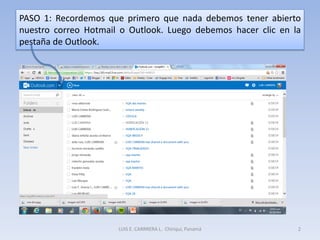
PASO 1: Recordemos que primero que nada debemos tener abierto
nuestro correo Hotmail o Outlook. Luego debemos hacer clic en la
pestaña de Outlook.
LUIS E. CARRRERA L. Chiriquí, Panamá 2
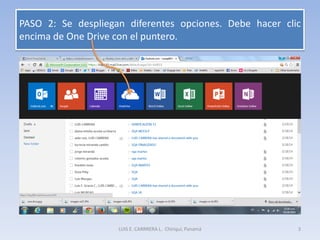
PASO 2: Se despliegan diferentes opciones. Debe hacer clic
encima de One Drive con el puntero.
LUIS E. CARRRERA L. Chiriquí, Panamá 3
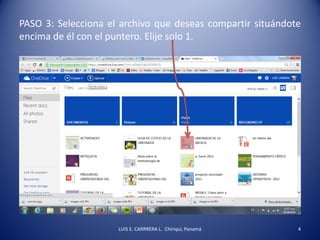
PASO 3: Selecciona el archivo que deseas compartir situándote
encima de él con el puntero. Elije solo 1.
LUIS E. CARRRERA L. Chiriquí, Panamá 4
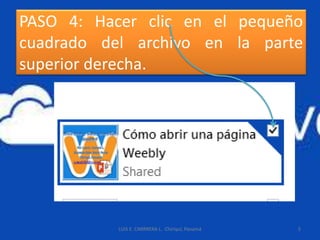
PASO 4: Hacer clic en el pequeño
cuadrado del archivo en la parte
superior derecha.
LUIS E. CARRRERA L. Chiriquí, Panamá 5
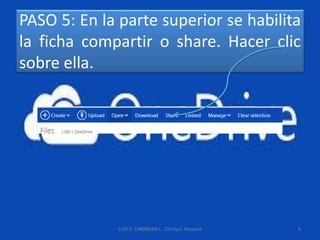
PASO 5: En la parte superior se habilita
la ficha compartir o share. Hacer clic
sobre ella.
LUIS E. CARRRERA L. Chiriquí, Panamá 6
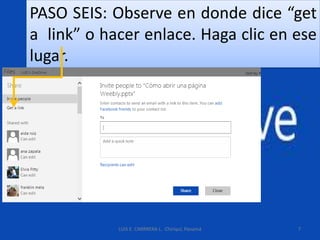
PASO SEIS: Observe en donde dice “get
a link” o hacer enlace. Haga clic en ese
lugar.
LUIS E. CARRRERA L. Chiriquí, Panamá 7
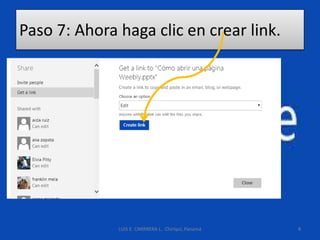
Paso 7: Ahora haga clic en crear link.
LUIS E. CARRRERA L. Chiriquí, Panamá 8
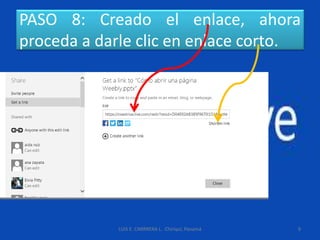
PASO 8: Creado el enlace, ahora
proceda a darle clic en enlace corto.
LUIS E. CARRRERA L. Chiriquí, Panamá 9
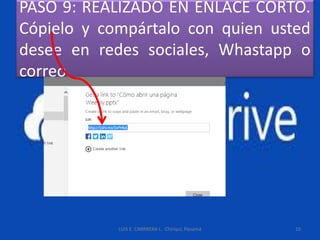
PASO 9: REALIZADO EN ENLACE CORTO.
Cópielo y compártalo con quien usted
desee en redes sociales, Whastapp o
correo.
LUIS E. CARRRERA L. Chiriquí, Panamá 10

Enlace corto One Drive

  • 1.
    ¿Cómo hacer unenlace corto de un archivo en ONE DRIVE, para compartir? Por Luis Carrera Docente líder de Entre Pares David, Panamá. luisep0458@outlook.com
  • 2.
    PASO 1: Recordemosque primero que nada debemos tener abierto nuestro correo Hotmail o Outlook. Luego debemos hacer clic en la pestaña de Outlook. LUIS E. CARRRERA L. Chiriquí, Panamá 2
  • 3.
    PASO 2: Sedespliegan diferentes opciones. Debe hacer clic encima de One Drive con el puntero. LUIS E. CARRRERA L. Chiriquí, Panamá 3
  • 4.
    PASO 3: Seleccionael archivo que deseas compartir situándote encima de él con el puntero. Elije solo 1. LUIS E. CARRRERA L. Chiriquí, Panamá 4
  • 5.
    PASO 4: Hacerclic en el pequeño cuadrado del archivo en la parte superior derecha. LUIS E. CARRRERA L. Chiriquí, Panamá 5
  • 6.
    PASO 5: Enla parte superior se habilita la ficha compartir o share. Hacer clic sobre ella. LUIS E. CARRRERA L. Chiriquí, Panamá 6
  • 7.
    PASO SEIS: Observeen donde dice “get a link” o hacer enlace. Haga clic en ese lugar. LUIS E. CARRRERA L. Chiriquí, Panamá 7
  • 8.
    Paso 7: Ahorahaga clic en crear link. LUIS E. CARRRERA L. Chiriquí, Panamá 8
  • 9.
    PASO 8: Creadoel enlace, ahora proceda a darle clic en enlace corto. LUIS E. CARRRERA L. Chiriquí, Panamá 9
  • 10.
    PASO 9: REALIZADOEN ENLACE CORTO. Cópielo y compártalo con quien usted desee en redes sociales, Whastapp o correo. LUIS E. CARRRERA L. Chiriquí, Panamá 10