CSS Preprocessors Time!
    - with SASS, LESS and Stylus -
           (and Finn and Jake)


                                     @nahuelsotelo
Hola.           Soy
        Nahuel Sotelo
            @nahuelsotelo

        machaco teclados en
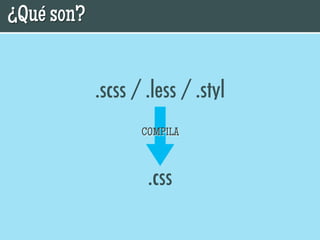
¿Qué son?


Una forma más eficiente de escribir CSS.
¿Qué son?


            .scss / .less / .styl
                   COMPILA


                    .css
¿Qué necesito
para empezar?
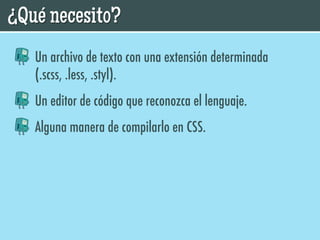
¿Qué necesito?
   Un archivo de texto con una extensión determinada
   (.scss, .less, .styl).
   Un editor de código que reconozca el lenguaje.
   Alguna manera de compilarlo en CSS.
¿Qué necesito?
   Hay varias maneras de compilar:
   En servidor (ruby)
   En cliente (JavaScript)
   En local (Compass, Codekit, Scout, less.app)
¿Qué necesito?

          Mi recomendación:
¿Qué necesito?
Codekit:
   Compila automáticamente al guardar en tu editor.
   Puede definirse el nivel de compresión del CSS.
   Settings por proyecto.
   Reporta errores.
   Actualiza los preprocesadores automáticamente.
   Bonus track: ¡Optimiza Imágenes!
Ventajas de los
preprocesadores
Ventajas
   Mejora el workflow de trabajo.
   Produce un código más legible y mantenible.
   Tienen una curva de aprendizaje muy amigable.
   Prototipado rápido con frameworks como Compass,
   Bourbon, Foundation o Twitter Bootstrap.
Pero no todo es
 color de rosa
Desventajas
   Si se usan sintaxis extremas luego puede costar volver
   al CSS normal.
   En equipos de varias personas, o todos o nadie.
   Si se trabaja en más de un equipo, todos tienen que tener
   la misma configuración.
   Si no se tiene cuidado puede resultar en un código
   ineficiente. ¡DRY!
Sintaxis (SCSS)
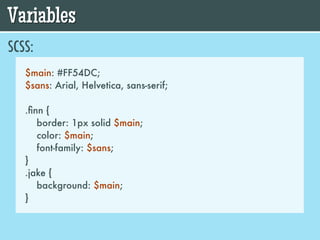
Variables
SCSS:
   $main: #FF54DC;
   $sans: Arial, Helvetica, sans-serif;

   .finn {
      border: 1px solid $main;
      color: $main;
      font-family: $sans;
   }
   .jake {
      background: $main;
   }
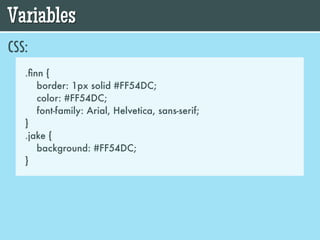
Variables
CSS:
   .finn {
      border: 1px solid #FF54DC;
      color: #FF54DC;
      font-family: Arial, Helvetica, sans-serif;
   }
   .jake {
      background: #FF54DC;
   }
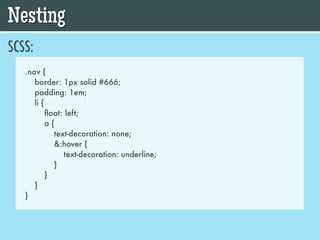
Nesting
SCSS:
   .nav {
      border: 1px solid #666;
      padding: 1em;
      li {
           float: left;
           a{
             text-decoration: none;
             &:hover {
                text-decoration: underline;
             }
           }
      }
   }
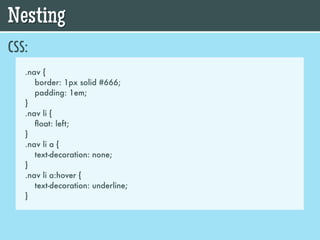
Nesting
CSS:
   .nav {
      border: 1px solid #666;
      padding: 1em;
   }
   .nav li {
      float: left;
   }
   .nav li a {
      text-decoration: none;
   }
   .nav li a:hover {
      text-decoration: underline;
   }
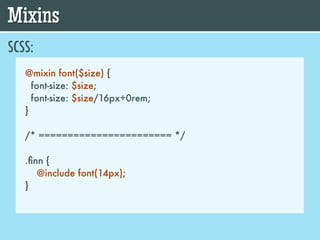
Mixins
SCSS:
   @mixin font($size) {
     font-size: $size;
     font-size: $size/16px+0rem;
   }

   /* ======================= */

   .finn {
      @include font(14px);
   }
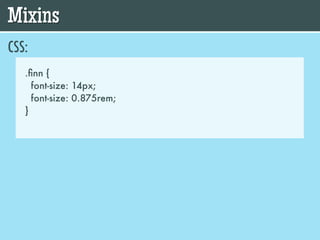
Mixins
CSS:
   .finn {
     font-size: 14px;
     font-size: 0.875rem;
   }
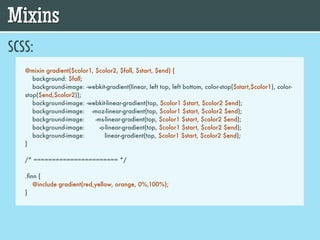
Mixins
SCSS:
   @mixin gradient($color1, $color2, $fall, $start, $end) {
      background: $fall;
      background-image: -webkit-gradient(linear, left top, left bottom, color-stop($start,$color1), color-
   stop($end,$color2));
      background-image: -webkit-linear-gradient(top, $color1 $start, $color2 $end);
      background-image: -moz-linear-gradient(top, $color1 $start, $color2 $end);
      background-image:     -ms-linear-gradient(top, $color1 $start, $color2 $end);
      background-image:       -o-linear-gradient(top, $color1 $start, $color2 $end);
      background-image:         linear-gradient(top, $color1 $start, $color2 $end);
   }

   /* ======================= */

   .finn {
      @include gradient(red,yellow, orange, 0%,100%);
   }
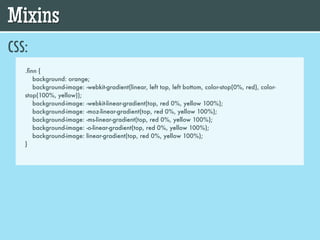
Mixins
CSS:
   .finn {
      background: orange;
      background-image: -webkit-gradient(linear, left top, left bottom, color-stop(0%, red), color-
   stop(100%, yellow));
      background-image: -webkit-linear-gradient(top, red 0%, yellow 100%);
      background-image: -moz-linear-gradient(top, red 0%, yellow 100%);
      background-image: -ms-linear-gradient(top, red 0%, yellow 100%);
      background-image: -o-linear-gradient(top, red 0%, yellow 100%);
      background-image: linear-gradient(top, red 0%, yellow 100%);
   }
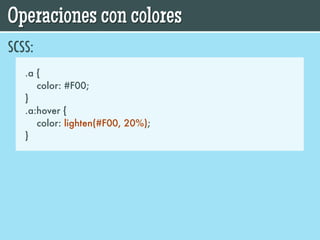
Operaciones con colores
SCSS:
   .a {
      color: #F00;
   }
   .a:hover {
      color: lighten(#F00, 20%);
   }
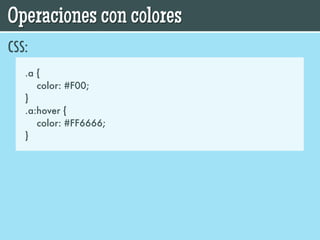
Operaciones con colores
CSS:
   .a {
      color: #F00;
   }
   .a:hover {
      color: #FF6666;
   }
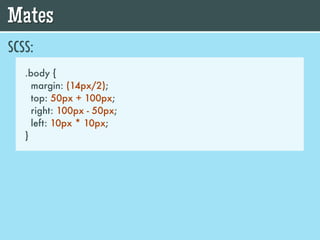
Mates
SCSS:
   .body {
     margin: (14px/2);
     top: 50px + 100px;
     right: 100px - 50px;
     left: 10px * 10px;
   }
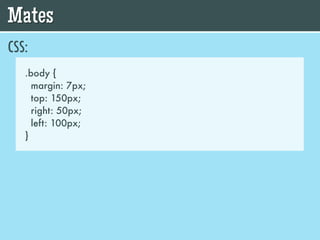
Mates
CSS:
   .body {
     margin: 7px;
     top: 150px;
     right: 50px;
     left: 100px;
   }
Y es sólo la
punta del icberg
     Functions
   Conditionals
   Interpolation
       Grids
         ...
Recursos
      PREPROCESADORES:
  •   SASS: http://sass-lang.com/
  •   LESS: http://lesscss.org/
  •   STYLUS: http://learnboost.github.com/stylus/

      HERRAMIENTAS:
  •   CODEKIT: http://incident57.com/codekit/
  •   SCOUT: http://mhs.github.com/scout-app/
  •   LESS APP: http://incident57.com/less/
Recursos
      FRAMEWORKS:
  •   COMPASS: http://compass-style.org/
  •   BOURBON: http://thoughtbot.com/bourbon/
  •   ZURB FOUNDATION: http://foundation.zurb.com/
  •   TWITTER BOOTSTRAP: http://twitter.github.com/bootstrap/

      GRID SYSTEMS:
  •   SINGULARITY: http://singularity.gs/
  •   SEMANTIC: http://semantic.gs/
  •   SUSY: http://susy.oddbird.net/
¡Gracias!


Imagenes de Adventure Time cortesía de Google y TM & © 2012 Cartoon Network. A Time Warner Company. All Rights Reserved.

"CSS Preprocessors Time!" por @nahuelsotelo

  • 1.
    CSS Preprocessors Time! - with SASS, LESS and Stylus - (and Finn and Jake) @nahuelsotelo
  • 2.
    Hola. Soy Nahuel Sotelo @nahuelsotelo machaco teclados en
  • 3.
    ¿Qué son? Una formamás eficiente de escribir CSS.
  • 4.
    ¿Qué son? .scss / .less / .styl COMPILA .css
  • 5.
  • 6.
    ¿Qué necesito? Un archivo de texto con una extensión determinada (.scss, .less, .styl). Un editor de código que reconozca el lenguaje. Alguna manera de compilarlo en CSS.
  • 7.
    ¿Qué necesito? Hay varias maneras de compilar: En servidor (ruby) En cliente (JavaScript) En local (Compass, Codekit, Scout, less.app)
  • 8.
    ¿Qué necesito? Mi recomendación:
  • 9.
    ¿Qué necesito? Codekit: Compila automáticamente al guardar en tu editor. Puede definirse el nivel de compresión del CSS. Settings por proyecto. Reporta errores. Actualiza los preprocesadores automáticamente. Bonus track: ¡Optimiza Imágenes!
  • 10.
  • 11.
    Ventajas Mejora el workflow de trabajo. Produce un código más legible y mantenible. Tienen una curva de aprendizaje muy amigable. Prototipado rápido con frameworks como Compass, Bourbon, Foundation o Twitter Bootstrap.
  • 12.
    Pero no todoes color de rosa
  • 13.
    Desventajas Si se usan sintaxis extremas luego puede costar volver al CSS normal. En equipos de varias personas, o todos o nadie. Si se trabaja en más de un equipo, todos tienen que tener la misma configuración. Si no se tiene cuidado puede resultar en un código ineficiente. ¡DRY!
  • 14.
  • 15.
    Variables SCSS: $main: #FF54DC; $sans: Arial, Helvetica, sans-serif; .finn { border: 1px solid $main; color: $main; font-family: $sans; } .jake { background: $main; }
  • 16.
    Variables CSS: .finn { border: 1px solid #FF54DC; color: #FF54DC; font-family: Arial, Helvetica, sans-serif; } .jake { background: #FF54DC; }
  • 17.
    Nesting SCSS: .nav { border: 1px solid #666; padding: 1em; li { float: left; a{ text-decoration: none; &:hover { text-decoration: underline; } } } }
  • 18.
    Nesting CSS: .nav { border: 1px solid #666; padding: 1em; } .nav li { float: left; } .nav li a { text-decoration: none; } .nav li a:hover { text-decoration: underline; }
  • 19.
    Mixins SCSS: @mixin font($size) { font-size: $size; font-size: $size/16px+0rem; } /* ======================= */ .finn { @include font(14px); }
  • 20.
    Mixins CSS: .finn { font-size: 14px; font-size: 0.875rem; }
  • 21.
    Mixins SCSS: @mixin gradient($color1, $color2, $fall, $start, $end) { background: $fall; background-image: -webkit-gradient(linear, left top, left bottom, color-stop($start,$color1), color- stop($end,$color2)); background-image: -webkit-linear-gradient(top, $color1 $start, $color2 $end); background-image: -moz-linear-gradient(top, $color1 $start, $color2 $end); background-image: -ms-linear-gradient(top, $color1 $start, $color2 $end); background-image: -o-linear-gradient(top, $color1 $start, $color2 $end); background-image: linear-gradient(top, $color1 $start, $color2 $end); } /* ======================= */ .finn { @include gradient(red,yellow, orange, 0%,100%); }
  • 22.
    Mixins CSS: .finn { background: orange; background-image: -webkit-gradient(linear, left top, left bottom, color-stop(0%, red), color- stop(100%, yellow)); background-image: -webkit-linear-gradient(top, red 0%, yellow 100%); background-image: -moz-linear-gradient(top, red 0%, yellow 100%); background-image: -ms-linear-gradient(top, red 0%, yellow 100%); background-image: -o-linear-gradient(top, red 0%, yellow 100%); background-image: linear-gradient(top, red 0%, yellow 100%); }
  • 23.
    Operaciones con colores SCSS: .a { color: #F00; } .a:hover { color: lighten(#F00, 20%); }
  • 24.
    Operaciones con colores CSS: .a { color: #F00; } .a:hover { color: #FF6666; }
  • 25.
    Mates SCSS: .body {   margin: (14px/2);   top: 50px + 100px;   right: 100px - 50px;   left: 10px * 10px; }
  • 26.
    Mates CSS: .body {   margin: 7px;   top: 150px;   right: 50px;   left: 100px; }
  • 27.
    Y es sólola punta del icberg Functions Conditionals Interpolation Grids ...
  • 28.
    Recursos PREPROCESADORES: • SASS: http://sass-lang.com/ • LESS: http://lesscss.org/ • STYLUS: http://learnboost.github.com/stylus/ HERRAMIENTAS: • CODEKIT: http://incident57.com/codekit/ • SCOUT: http://mhs.github.com/scout-app/ • LESS APP: http://incident57.com/less/
  • 29.
    Recursos FRAMEWORKS: • COMPASS: http://compass-style.org/ • BOURBON: http://thoughtbot.com/bourbon/ • ZURB FOUNDATION: http://foundation.zurb.com/ • TWITTER BOOTSTRAP: http://twitter.github.com/bootstrap/ GRID SYSTEMS: • SINGULARITY: http://singularity.gs/ • SEMANTIC: http://semantic.gs/ • SUSY: http://susy.oddbird.net/
  • 30.
    ¡Gracias! Imagenes de AdventureTime cortesía de Google y TM & © 2012 Cartoon Network. A Time Warner Company. All Rights Reserved.