HTML5 - Elemento
    CANVAS
    Hora de los Jueves
HTML5: Elemento CANVAS
El canvas es un lienzo, donde podemo pintar usando
javascript
Esto nos permite hacer imágenes dinámicas, como en flash
pero sin plugins externos
Se debe proporcionar contenido alternativo para cuando el
elemento no este soportado, por ejemplo, una imágen
estática equivalente
Compatibilidad de CANVAS
Desarrollado inicialmente por Apple para Safari
Estandarizado por WAHTWG para HTML5
Adoptado por Firefox y Opera
Chrome usa el motor de Safari, por lo que funciona
igualmente
No funciona en IE8 aunque hay plugins para meterlo
Ejemplo de Uso
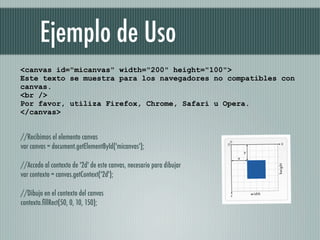
<canvas id="micanvas" width="200" height="100">
Este texto se muestra para los navegadores no compatibles con
canvas.
<br />
Por favor, utiliza Firefox, Chrome, Safari u Opera.
</canvas>


//Recibimos el elemento canvas
var canvas = document.getElementById('micanvas');

//Accedo al contexto de '2d' de este canvas, necesario para dibujar
var contexto = canvas.getContext('2d');

//Dibujo en el contexto del canvas
contexto.fillRect(50, 0, 10, 150);
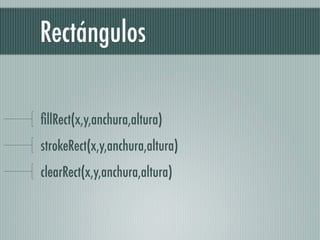
Rectángulos

fillRect(x,y,anchura,altura)
strokeRect(x,y,anchura,altura)
clearRect(x,y,anchura,altura)
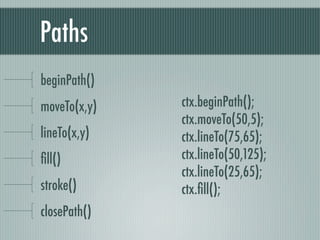
Paths
beginPath()
moveTo(x,y)   ctx.beginPath();
              ctx.moveTo(50,5);
lineTo(x,y)   ctx.lineTo(75,65);
fill()         ctx.lineTo(50,125);
              ctx.lineTo(25,65);
stroke()      ctx.fill();
closePath()
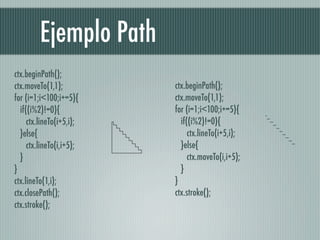
Ejemplo Path
ctx.beginPath();
ctx.moveTo(1,1);           ctx.beginPath();
for (i=1;i<100;i+=5){      ctx.moveTo(1,1);
   if((i%2)!=0){           for (i=1;i<100;i+=5){
      ctx.lineTo(i+5,i);      if((i%2)!=0){
   }else{                        ctx.lineTo(i+5,i);
      ctx.lineTo(i,i+5);      }else{
   }                             ctx.moveTo(i,i+5);
}                             }
ctx.lineTo(1,i);           }
ctx.closePath();           ctx.stroke();
ctx.stroke();
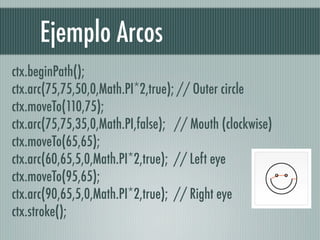
Ejemplo Arcos
ctx.beginPath();  
ctx.arc(75,75,50,0,Math.PI*2,true); // Outer circle  
ctx.moveTo(110,75);  
ctx.arc(75,75,35,0,Math.PI,false);   // Mouth (clockwise)  
ctx.moveTo(65,65);  
ctx.arc(60,65,5,0,Math.PI*2,true);  // Left eye  
ctx.moveTo(95,65);  
ctx.arc(90,65,5,0,Math.PI*2,true);  // Right eye  
ctx.stroke();  
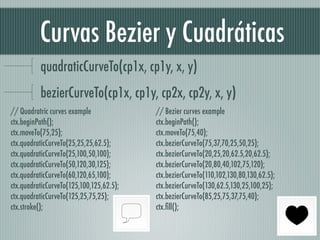
Curvas Bezier y Cuadráticas
          quadraticCurveTo(cp1x, cp1y, x, y)
          bezierCurveTo(cp1x, cp1y, cp2x, cp2y, x, y)
// Quadratric curves example                // Bezier curves example  
ctx.beginPath();                            ctx.beginPath();  
ctx.moveTo(75,25);                          ctx.moveTo(75,40);  
ctx.quadraticCurveTo(25,25,25,62.5);        ctx.bezierCurveTo(75,37,70,25,50,25);  
ctx.quadraticCurveTo(25,100,50,100);        ctx.bezierCurveTo(20,25,20,62.5,20,62.5);  
ctx.quadraticCurveTo(50,120,30,125);        ctx.bezierCurveTo(20,80,40,102,75,120);  
ctx.quadraticCurveTo(60,120,65,100);        ctx.bezierCurveTo(110,102,130,80,130,62.5);  
ctx.quadraticCurveTo(125,100,125,62.5);     ctx.bezierCurveTo(130,62.5,130,25,100,25);  
ctx.quadraticCurveTo(125,25,75,25);         ctx.bezierCurveTo(85,25,75,37,75,40);  
ctx.stroke();                               ctx.fill();  
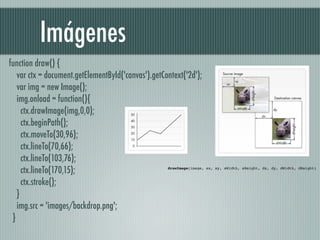
Imágenes
function draw() {  
    var ctx = document.getElementById('canvas').getContext('2d');  
    var img = new Image();  
    img.onload = function(){  
      ctx.drawImage(img,0,0);  
      ctx.beginPath();  
      ctx.moveTo(30,96);  
      ctx.lineTo(70,66);  
      ctx.lineTo(103,76);  
      ctx.lineTo(170,15);                             drawImage(image, sx, sy, sWidth, sHeight, dx, dy, dWidth, dHeight)


      ctx.stroke();  
    }  
    img.src = 'images/backdrop.png';  
  } 
Colores y Estilos

// these all set the fillStyle to 'orange'  
ctx.fillStyle = "orange";  
ctx.fillStyle = "#FFA500";  
ctx.fillStyle = "rgb(255,165,0)";  
ctx.fillStyle = "rgba(255,165,0,1)"; 
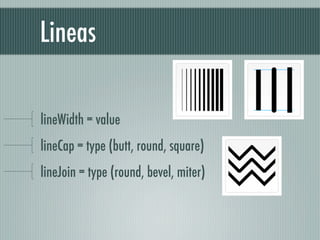
Lineas

lineWidth = value
lineCap = type (butt, round, square)
lineJoin = type (round, bevel, miter)
Gradientes

createLinearGradient(x1,y1,x2,y2)
createRadialGradient(x1,y1,r1,x2,y2,r2)
addColorStop(position, color)
var lineargradient = ctx.createLinearGradient(0,0,150,150);
lineargradient.addColorStop(0,'white');  
lineargradient.addColorStop(1,'black'); 
Más cosas


Transformaciones: Escalados, traslaciones, etc
Composiciones: Diferencia, Unión, clipping, mascaras...
Animaciones

Usar setInterval
Eventos para el ratón
Y Javascript que ya conocemos
Problema de todo esto


   Que es un coñazo hacer
cosas medio complejas
Processing JS
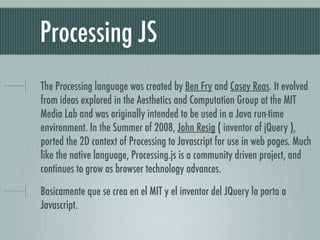
The Processing language was created by Ben Fry and Casey Reas. It evolved
from ideas explored in the Aesthetics and Computation Group at the MIT
Media Lab and was originally intended to be used in a Java run-time
environment. In the Summer of 2008, John Resig ( inventor of jQuery ),
ported the 2D context of Processing to Javascript for use in web pages. Much
like the native language, Processing.js is a community driven project, and
continues to grow as browser technology advances.

Basicamente que se crea en el MIT y el inventor del JQuery lo porta a
Javascript.
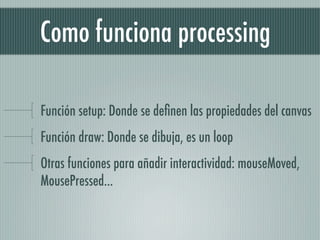
Como funciona processing

Función setup: Donde se definen las propiedades del canvas
Función draw: Donde se dibuja, es un loop
Otras funciones para añadir interactividad: mouseMoved,
MousePressed...
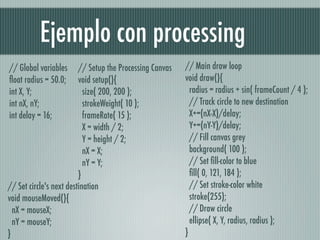
Ejemplo con processing
// Global variables      // Setup the Processing Canvas     // Main draw loop  
float radius = 50.0;      void setup(){                      void draw(){  
int X, Y;                  size( 200, 200 );                  radius = radius + sin( frameCount / 4 );  
int nX, nY;                strokeWeight( 10 );                // Track circle to new destination  
int delay = 16;            frameRate( 15 );                   X+=(nX-X)/delay;  
                           X = width / 2;                     Y+=(nY-Y)/delay;  
                           Y = height / 2;                    // Fill canvas grey  
                           nX = X;                            background( 100 );  
                           nY = Y;                            // Set fill-color to blue  
                         }                                    fill( 0, 121, 184 );  
// Set circle's next destination                              // Set stroke-color white  
void mouseMoved(){                                            stroke(255);   
  nX = mouseX;                                                // Draw circle  
  nY = mouseY;                                                ellipse( X, Y, radius, radius );                    
}                                                           }  

Introducción al elemento canvas de HTML5