Ejemplo Completo #1:
DIM vs. NAL
Juan Carlos Zuluaga
Introducción
 Este será el primero de una serie de juegos que nos servirán de base para
construir nuestros propios juegos.
 El juego consiste en que aparecen los escudos de los equipos de Futbol de
Medellín y Nacional (los puedes cambiar por los equipos de tu preferencia) y
aparecen una serie de balones, al azar en cualquier posición de la pantalla. El
escudo que primero tome el balón, anota un punto. El que primero tome 10
balones, gana el juego.
 Cabe anotar que los dos escudos no se pueden tocar, un escudo bloquea el
otro.
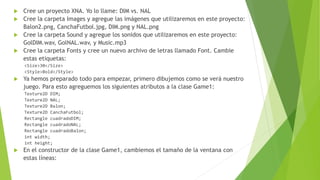
 Cree un proyecto XNA. Yo lo llame: DIM vs. NAL
 Cree la carpeta Images y agregue las imágenes que utilizaremos en este proyecto:
Balon2.png, CanchaFutbol.jpg, DIM.png y NAL.png
 Cree la carpeta Sound y agregue los sonidos que utilizaremos en este proyecto:
GolDIM.wav, GolNAL.wav, y Music.mp3
 Cree la carpeta Fonts y cree un nuevo archivo de letras llamado Font. Cambie
estas etiquetas:
<Size>30</Size>
<Style>Bold</Style>
 Ya hemos preparado todo para empezar, primero dibujemos como se verá nuestro
juego. Para esto agreguemos los siguientes atributos a la clase Game1:
Texture2D DIM;
Texture2D NAL;
Texture2D Balon;
Texture2D CanchaFutbol;
Rectangle cuadradoDIM;
Rectangle cuadradoNAL;
Rectangle cuadradoBalon;
int width;
int height;
 En el constructor de la clase Game1, cambiemos el tamaño de la ventana con
estas líneas:
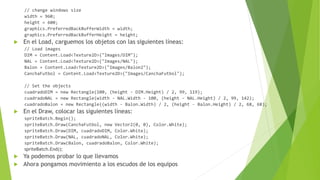
// change windows size
width = 960;
height = 600;
graphics.PreferredBackBufferWidth = width;
graphics.PreferredBackBufferHeight = height;
 En el Load, carguemos los objetos con las siguientes líneas:
// Load images
DIM = Content.Load<Texture2D>("Images/DIM");
NAL = Content.Load<Texture2D>("Images/NAL");
Balon = Content.Load<Texture2D>("Images/Balon2");
CanchaFutbol = Content.Load<Texture2D>("Images/CanchaFutbol");
// Set the objects
cuadradoDIM = new Rectangle(100, (height - DIM.Height) / 2, 99, 119);
cuadradoNAL = new Rectangle(width - NAL.Width - 100, (height - NAL.Height) / 2, 99, 142);
cuadradoBalon = new Rectangle((width - Balon.Width) / 2, (height - Balon.Height) / 2, 68, 68);
 En el Draw, colocar las siguientes líneas:
spriteBatch.Begin();
spriteBatch.Draw(CanchaFutbol, new Vector2(0, 0), Color.White);
spriteBatch.Draw(DIM, cuadradoDIM, Color.White);
spriteBatch.Draw(NAL, cuadradoNAL, Color.White);
spriteBatch.Draw(Balon, cuadradoBalon, Color.White);
spriteBatch.End();
 Ya podemos probar lo que llevamos
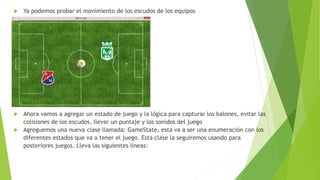
 Ahora pongamos movimiento a los escudos de los equipos
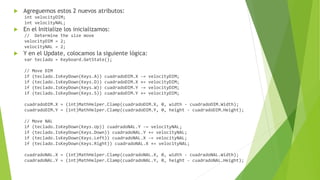
 Agreguemos estos 2 nuevos atributos:
int velocityDIM;
int velocityNAL;
 En el Initialize los inicializamos:
// Determine the size move
velocityDIM = 2;
velocityNAL = 2;
 Y en el Update, colocamos la siguiente lógica:
var teclado = Keyboard.GetState();
// Move DIM
if (teclado.IsKeyDown(Keys.A)) cuadradoDIM.X -= velocityDIM;
if (teclado.IsKeyDown(Keys.D)) cuadradoDIM.X += velocityDIM;
if (teclado.IsKeyDown(Keys.W)) cuadradoDIM.Y -= velocityDIM;
if (teclado.IsKeyDown(Keys.S)) cuadradoDIM.Y += velocityDIM;
cuadradoDIM.X = (int)MathHelper.Clamp(cuadradoDIM.X, 0, width - cuadradoDIM.Width);
cuadradoDIM.Y = (int)MathHelper.Clamp(cuadradoDIM.Y, 0, height - cuadradoDIM.Height);
// Move NAL
if (teclado.IsKeyDown(Keys.Up)) cuadradoNAL.Y -= velocityNAL;
if (teclado.IsKeyDown(Keys.Down)) cuadradoNAL.Y += velocityNAL;
if (teclado.IsKeyDown(Keys.Left)) cuadradoNAL.X -= velocityNAL;
if (teclado.IsKeyDown(Keys.Right)) cuadradoNAL.X += velocityNAL;
cuadradoNAL.X = (int)MathHelper.Clamp(cuadradoNAL.X, 0, width - cuadradoNAL.Width);
cuadradoNAL.Y = (int)MathHelper.Clamp(cuadradoNAL.Y, 0, height - cuadradoNAL.Height);
 Ya podemos probar el movimiento de los escudos de los equipos
 Ahora vamos a agregar un estado de juego y la lógica para capturar los balones, evitar las
colisiones de los escudos, llevar un puntaje y los sonidos del juego
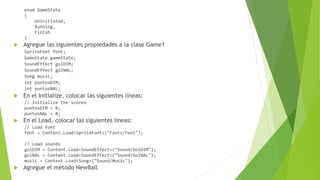
 Agreguemos una nueva clase llamada: GameState, esta va a ser una enumeración con los
diferentes estados que va a tener el juego. Esta clase la seguiremos usando para
posteriores juegos. Lleva las siguientes líneas:
enum GameState
{
Uninitiated,
Running,
Finish
}
 Agregue las siguientes propiedades a la clase Game1
SpriteFont font;
GameState gameState;
SoundEffect golDIM;
SoundEffect golNAL;
Song music;
int puntosDIM;
int puntosNAL;
 En el Initialize, colocar las siguientes líneas:
// Initialize the scores
puntosDIM = 0;
puntosNAL = 0;
 En el Load, colocar las siguientes líneas:
// Load font
font = Content.Load<SpriteFont>("Fonts/Font");
// Load sounds
golDIM = Content.Load<SoundEffect>("Sound/GolDIM");
golNAL = Content.Load<SoundEffect>("Sound/GolNAL");
music = Content.Load<Song>("Sound/Music");
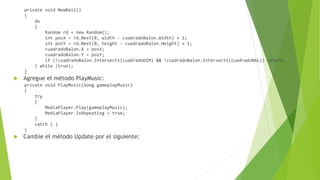
 Agregue el método NewBall
private void NewBall()
{
do
{
Random rd = new Random();
int posX = rd.Next(0, width - cuadradoBalon.Width) + 1;
int posY = rd.Next(0, height - cuadradoBalon.Height) + 1;
cuadradoBalon.X = posX;
cuadradoBalon.Y = posY;
if (!cuadradoBalon.Intersects(cuadradoDIM) && !cuadradoBalon.Intersects(cuadradoNAL)) return;
} while (true);
}
 Agregue el método PlayMusic:
private void PlayMusic(Song gameplayMusic)
{
try
{
MediaPlayer.Play(gameplayMusic);
MediaPlayer.IsRepeating = true;
}
catch { }
}
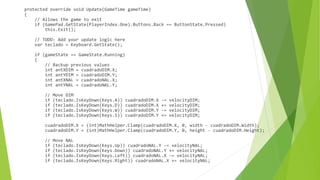
 Cambie el método Update por el siguiente:
protected override void Update(GameTime gameTime)
{
// Allows the game to exit
if (GamePad.GetState(PlayerIndex.One).Buttons.Back == ButtonState.Pressed)
this.Exit();
// TODO: Add your update logic here
var teclado = Keyboard.GetState();
if (gameState == GameState.Running)
{
// Backup previous values
int antXDIM = cuadradoDIM.X;
int antYDIM = cuadradoDIM.Y;
int antXNAL = cuadradoNAL.X;
int antYNAL = cuadradoNAL.Y;
// Move DIM
if (teclado.IsKeyDown(Keys.A)) cuadradoDIM.X -= velocityDIM;
if (teclado.IsKeyDown(Keys.D)) cuadradoDIM.X += velocityDIM;
if (teclado.IsKeyDown(Keys.W)) cuadradoDIM.Y -= velocityDIM;
if (teclado.IsKeyDown(Keys.S)) cuadradoDIM.Y += velocityDIM;
cuadradoDIM.X = (int)MathHelper.Clamp(cuadradoDIM.X, 0, width - cuadradoDIM.Width);
cuadradoDIM.Y = (int)MathHelper.Clamp(cuadradoDIM.Y, 0, height - cuadradoDIM.Height);
// Move NAL
if (teclado.IsKeyDown(Keys.Up)) cuadradoNAL.Y -= velocityNAL;
if (teclado.IsKeyDown(Keys.Down)) cuadradoNAL.Y += velocityNAL;
if (teclado.IsKeyDown(Keys.Left)) cuadradoNAL.X -= velocityNAL;
if (teclado.IsKeyDown(Keys.Right)) cuadradoNAL.X += velocityNAL;
cuadradoNAL.X = (int)MathHelper.Clamp(cuadradoNAL.X, 0, width - cuadradoNAL.Width);
cuadradoNAL.Y = (int)MathHelper.Clamp(cuadradoNAL.Y, 0, height - cuadradoNAL.Height);
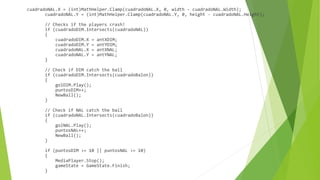
// Checks if the players crash!
if (cuadradoDIM.Intersects(cuadradoNAL))
{
cuadradoDIM.X = antXDIM;
cuadradoDIM.Y = antYDIM;
cuadradoNAL.X = antXNAL;
cuadradoNAL.Y = antYNAL;
}
// Check if DIM catch the ball
if (cuadradoDIM.Intersects(cuadradoBalon))
{
golDIM.Play();
puntosDIM++;
NewBall();
}
// Check if NAL catch the ball
if (cuadradoNAL.Intersects(cuadradoBalon))
{
golNAL.Play();
puntosNAL++;
NewBall();
}
if (puntosDIM >= 10 || puntosNAL >= 10)
{
MediaPlayer.Stop();
gameState = GameState.Finish;
}
}
else
{
if (teclado.IsKeyDown(Keys.Enter))
{
if (gameState == GameState.Uninitiated)
{
gameState = GameState.Running;
PlayMusic(music);
}
else
{
cuadradoDIM.X = 100;
cuadradoDIM.Y = (height - DIM.Height) / 2;
cuadradoNAL.X = width - NAL.Width - 100;
cuadradoNAL.Y = (height - NAL.Height) / 2;
cuadradoBalon.X = (width - Balon.Width) / 2;
cuadradoBalon.Y = (height - Balon.Height) / 2;
puntosDIM = 0;
puntosNAL = 0;
gameState = GameState.Uninitiated;
}
}
}
base.Update(gameTime);
}
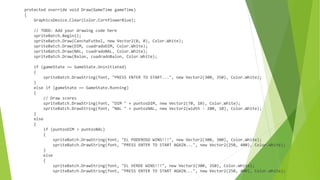
 Cambie el método Update por el siguiente:
protected override void Draw(GameTime gameTime)
{
GraphicsDevice.Clear(Color.CornflowerBlue);
// TODO: Add your drawing code here
spriteBatch.Begin();
spriteBatch.Draw(CanchaFutbol, new Vector2(0, 0), Color.White);
spriteBatch.Draw(DIM, cuadradoDIM, Color.White);
spriteBatch.Draw(NAL, cuadradoNAL, Color.White);
spriteBatch.Draw(Balon, cuadradoBalon, Color.White);
if (gameState == GameState.Uninitiated)
{
spriteBatch.DrawString(font, "PRESS ENTER TO START...", new Vector2(300, 350), Color.White);
}
else if (gameState == GameState.Running)
{
// Draw scores
spriteBatch.DrawString(font, "DIM " + puntosDIM, new Vector2(70, 10), Color.White);
spriteBatch.DrawString(font, "NAL " + puntosNAL, new Vector2(width - 200, 10), Color.White);
}
else
{
if (puntosDIM > puntosNAL)
{
spriteBatch.DrawString(font, "EL PODEROSO WINS!!!", new Vector2(300, 300), Color.White);
spriteBatch.DrawString(font, "PRESS ENTER TO START AGAIN...", new Vector2(250, 400), Color.White);
}
else
{
spriteBatch.DrawString(font, "EL VERDE WINS!!!", new Vector2(300, 350), Color.White);
spriteBatch.DrawString(font, "PRESS ENTER TO START AGAIN...", new Vector2(250, 400), Color.White);
}
}
spriteBatch.End();
base.Draw(gameTime);
}
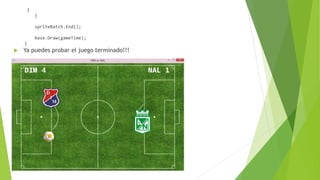
 Ya puedes probar el juego terminado!!!
Taller #6
 Modificar el juego anterior para que aparezcan 4 obstáculos de forma
aleatoria (donde no haya, ni balón ni escudos). Estos obstáculos no permiten
que los escudos pasen por encima de ellos, haciendo el juego un poco más
interesante

Xna game studio presentación 06

  • 1.
    Ejemplo Completo #1: DIMvs. NAL Juan Carlos Zuluaga
  • 2.
    Introducción  Este seráel primero de una serie de juegos que nos servirán de base para construir nuestros propios juegos.  El juego consiste en que aparecen los escudos de los equipos de Futbol de Medellín y Nacional (los puedes cambiar por los equipos de tu preferencia) y aparecen una serie de balones, al azar en cualquier posición de la pantalla. El escudo que primero tome el balón, anota un punto. El que primero tome 10 balones, gana el juego.  Cabe anotar que los dos escudos no se pueden tocar, un escudo bloquea el otro.
  • 3.
     Cree unproyecto XNA. Yo lo llame: DIM vs. NAL  Cree la carpeta Images y agregue las imágenes que utilizaremos en este proyecto: Balon2.png, CanchaFutbol.jpg, DIM.png y NAL.png  Cree la carpeta Sound y agregue los sonidos que utilizaremos en este proyecto: GolDIM.wav, GolNAL.wav, y Music.mp3  Cree la carpeta Fonts y cree un nuevo archivo de letras llamado Font. Cambie estas etiquetas: <Size>30</Size> <Style>Bold</Style>  Ya hemos preparado todo para empezar, primero dibujemos como se verá nuestro juego. Para esto agreguemos los siguientes atributos a la clase Game1: Texture2D DIM; Texture2D NAL; Texture2D Balon; Texture2D CanchaFutbol; Rectangle cuadradoDIM; Rectangle cuadradoNAL; Rectangle cuadradoBalon; int width; int height;  En el constructor de la clase Game1, cambiemos el tamaño de la ventana con estas líneas:
  • 4.
    // change windowssize width = 960; height = 600; graphics.PreferredBackBufferWidth = width; graphics.PreferredBackBufferHeight = height;  En el Load, carguemos los objetos con las siguientes líneas: // Load images DIM = Content.Load<Texture2D>("Images/DIM"); NAL = Content.Load<Texture2D>("Images/NAL"); Balon = Content.Load<Texture2D>("Images/Balon2"); CanchaFutbol = Content.Load<Texture2D>("Images/CanchaFutbol"); // Set the objects cuadradoDIM = new Rectangle(100, (height - DIM.Height) / 2, 99, 119); cuadradoNAL = new Rectangle(width - NAL.Width - 100, (height - NAL.Height) / 2, 99, 142); cuadradoBalon = new Rectangle((width - Balon.Width) / 2, (height - Balon.Height) / 2, 68, 68);  En el Draw, colocar las siguientes líneas: spriteBatch.Begin(); spriteBatch.Draw(CanchaFutbol, new Vector2(0, 0), Color.White); spriteBatch.Draw(DIM, cuadradoDIM, Color.White); spriteBatch.Draw(NAL, cuadradoNAL, Color.White); spriteBatch.Draw(Balon, cuadradoBalon, Color.White); spriteBatch.End();  Ya podemos probar lo que llevamos  Ahora pongamos movimiento a los escudos de los equipos
  • 5.
     Agreguemos estos2 nuevos atributos: int velocityDIM; int velocityNAL;  En el Initialize los inicializamos: // Determine the size move velocityDIM = 2; velocityNAL = 2;  Y en el Update, colocamos la siguiente lógica: var teclado = Keyboard.GetState(); // Move DIM if (teclado.IsKeyDown(Keys.A)) cuadradoDIM.X -= velocityDIM; if (teclado.IsKeyDown(Keys.D)) cuadradoDIM.X += velocityDIM; if (teclado.IsKeyDown(Keys.W)) cuadradoDIM.Y -= velocityDIM; if (teclado.IsKeyDown(Keys.S)) cuadradoDIM.Y += velocityDIM; cuadradoDIM.X = (int)MathHelper.Clamp(cuadradoDIM.X, 0, width - cuadradoDIM.Width); cuadradoDIM.Y = (int)MathHelper.Clamp(cuadradoDIM.Y, 0, height - cuadradoDIM.Height); // Move NAL if (teclado.IsKeyDown(Keys.Up)) cuadradoNAL.Y -= velocityNAL; if (teclado.IsKeyDown(Keys.Down)) cuadradoNAL.Y += velocityNAL; if (teclado.IsKeyDown(Keys.Left)) cuadradoNAL.X -= velocityNAL; if (teclado.IsKeyDown(Keys.Right)) cuadradoNAL.X += velocityNAL; cuadradoNAL.X = (int)MathHelper.Clamp(cuadradoNAL.X, 0, width - cuadradoNAL.Width); cuadradoNAL.Y = (int)MathHelper.Clamp(cuadradoNAL.Y, 0, height - cuadradoNAL.Height);
  • 6.
     Ya podemosprobar el movimiento de los escudos de los equipos  Ahora vamos a agregar un estado de juego y la lógica para capturar los balones, evitar las colisiones de los escudos, llevar un puntaje y los sonidos del juego  Agreguemos una nueva clase llamada: GameState, esta va a ser una enumeración con los diferentes estados que va a tener el juego. Esta clase la seguiremos usando para posteriores juegos. Lleva las siguientes líneas:
  • 7.
    enum GameState { Uninitiated, Running, Finish }  Agreguelas siguientes propiedades a la clase Game1 SpriteFont font; GameState gameState; SoundEffect golDIM; SoundEffect golNAL; Song music; int puntosDIM; int puntosNAL;  En el Initialize, colocar las siguientes líneas: // Initialize the scores puntosDIM = 0; puntosNAL = 0;  En el Load, colocar las siguientes líneas: // Load font font = Content.Load<SpriteFont>("Fonts/Font"); // Load sounds golDIM = Content.Load<SoundEffect>("Sound/GolDIM"); golNAL = Content.Load<SoundEffect>("Sound/GolNAL"); music = Content.Load<Song>("Sound/Music");  Agregue el método NewBall
  • 8.
    private void NewBall() { do { Randomrd = new Random(); int posX = rd.Next(0, width - cuadradoBalon.Width) + 1; int posY = rd.Next(0, height - cuadradoBalon.Height) + 1; cuadradoBalon.X = posX; cuadradoBalon.Y = posY; if (!cuadradoBalon.Intersects(cuadradoDIM) && !cuadradoBalon.Intersects(cuadradoNAL)) return; } while (true); }  Agregue el método PlayMusic: private void PlayMusic(Song gameplayMusic) { try { MediaPlayer.Play(gameplayMusic); MediaPlayer.IsRepeating = true; } catch { } }  Cambie el método Update por el siguiente:
  • 9.
    protected override voidUpdate(GameTime gameTime) { // Allows the game to exit if (GamePad.GetState(PlayerIndex.One).Buttons.Back == ButtonState.Pressed) this.Exit(); // TODO: Add your update logic here var teclado = Keyboard.GetState(); if (gameState == GameState.Running) { // Backup previous values int antXDIM = cuadradoDIM.X; int antYDIM = cuadradoDIM.Y; int antXNAL = cuadradoNAL.X; int antYNAL = cuadradoNAL.Y; // Move DIM if (teclado.IsKeyDown(Keys.A)) cuadradoDIM.X -= velocityDIM; if (teclado.IsKeyDown(Keys.D)) cuadradoDIM.X += velocityDIM; if (teclado.IsKeyDown(Keys.W)) cuadradoDIM.Y -= velocityDIM; if (teclado.IsKeyDown(Keys.S)) cuadradoDIM.Y += velocityDIM; cuadradoDIM.X = (int)MathHelper.Clamp(cuadradoDIM.X, 0, width - cuadradoDIM.Width); cuadradoDIM.Y = (int)MathHelper.Clamp(cuadradoDIM.Y, 0, height - cuadradoDIM.Height); // Move NAL if (teclado.IsKeyDown(Keys.Up)) cuadradoNAL.Y -= velocityNAL; if (teclado.IsKeyDown(Keys.Down)) cuadradoNAL.Y += velocityNAL; if (teclado.IsKeyDown(Keys.Left)) cuadradoNAL.X -= velocityNAL; if (teclado.IsKeyDown(Keys.Right)) cuadradoNAL.X += velocityNAL;
  • 10.
    cuadradoNAL.X = (int)MathHelper.Clamp(cuadradoNAL.X,0, width - cuadradoNAL.Width); cuadradoNAL.Y = (int)MathHelper.Clamp(cuadradoNAL.Y, 0, height - cuadradoNAL.Height); // Checks if the players crash! if (cuadradoDIM.Intersects(cuadradoNAL)) { cuadradoDIM.X = antXDIM; cuadradoDIM.Y = antYDIM; cuadradoNAL.X = antXNAL; cuadradoNAL.Y = antYNAL; } // Check if DIM catch the ball if (cuadradoDIM.Intersects(cuadradoBalon)) { golDIM.Play(); puntosDIM++; NewBall(); } // Check if NAL catch the ball if (cuadradoNAL.Intersects(cuadradoBalon)) { golNAL.Play(); puntosNAL++; NewBall(); } if (puntosDIM >= 10 || puntosNAL >= 10) { MediaPlayer.Stop(); gameState = GameState.Finish; }
  • 11.
    } else { if (teclado.IsKeyDown(Keys.Enter)) { if (gameState== GameState.Uninitiated) { gameState = GameState.Running; PlayMusic(music); } else { cuadradoDIM.X = 100; cuadradoDIM.Y = (height - DIM.Height) / 2; cuadradoNAL.X = width - NAL.Width - 100; cuadradoNAL.Y = (height - NAL.Height) / 2; cuadradoBalon.X = (width - Balon.Width) / 2; cuadradoBalon.Y = (height - Balon.Height) / 2; puntosDIM = 0; puntosNAL = 0; gameState = GameState.Uninitiated; } } } base.Update(gameTime); }  Cambie el método Update por el siguiente:
  • 12.
    protected override voidDraw(GameTime gameTime) { GraphicsDevice.Clear(Color.CornflowerBlue); // TODO: Add your drawing code here spriteBatch.Begin(); spriteBatch.Draw(CanchaFutbol, new Vector2(0, 0), Color.White); spriteBatch.Draw(DIM, cuadradoDIM, Color.White); spriteBatch.Draw(NAL, cuadradoNAL, Color.White); spriteBatch.Draw(Balon, cuadradoBalon, Color.White); if (gameState == GameState.Uninitiated) { spriteBatch.DrawString(font, "PRESS ENTER TO START...", new Vector2(300, 350), Color.White); } else if (gameState == GameState.Running) { // Draw scores spriteBatch.DrawString(font, "DIM " + puntosDIM, new Vector2(70, 10), Color.White); spriteBatch.DrawString(font, "NAL " + puntosNAL, new Vector2(width - 200, 10), Color.White); } else { if (puntosDIM > puntosNAL) { spriteBatch.DrawString(font, "EL PODEROSO WINS!!!", new Vector2(300, 300), Color.White); spriteBatch.DrawString(font, "PRESS ENTER TO START AGAIN...", new Vector2(250, 400), Color.White); } else { spriteBatch.DrawString(font, "EL VERDE WINS!!!", new Vector2(300, 350), Color.White); spriteBatch.DrawString(font, "PRESS ENTER TO START AGAIN...", new Vector2(250, 400), Color.White);
  • 13.
  • 14.
    Taller #6  Modificarel juego anterior para que aparezcan 4 obstáculos de forma aleatoria (donde no haya, ni balón ni escudos). Estos obstáculos no permiten que los escudos pasen por encima de ellos, haciendo el juego un poco más interesante