Curso sobre Arduino:
Librerías
11-7-2014
elcacharreo.com José Antonio Vacas
Programando Arduino: Lenguaje
elcacharreo.com A.B. 2014
Una librería no es más que un conjunto de código empaquetado y al que podemos
llamar desde nuestro programa
Facilita la tarea de desarrollar y nos abstrae y encapsula la dificultad de la tarea
Para usarlas solo tenemos que importarlas desde nuestro código con un #include
<....>
Librerías: básicas
elcacharreo.com
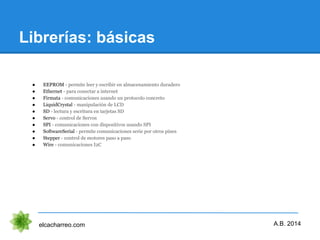
● EEPROM - permite leer y escribir en almacenamiento duradero
● Ethernet - para conectar a internet
● Firmata - comunicaciones usando un protocolo concreto
● LiquidCrystal - manipulación de LCD
● SD - lectura y escritura en tarjetas SD
● Servo - control de Servos
● SPI - comunicaciones con dispositivos usando SPI
● SoftwareSerial - permite comunicaciones serie por otros pines
● Stepper - control de motores paso a paso
● Wire - comunicaciones I2C
A.B. 2014
Librerías: otras
elcacharreo.com
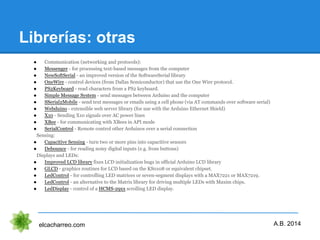
● Communication (networking and protocols):
● Messenger - for processing text-based messages from the computer
● NewSoftSerial - an improved version of the SoftwareSerial library
● OneWire - control devices (from Dallas Semiconductor) that use the One Wire protocol.
● PS2Keyboard - read characters from a PS2 keyboard.
● Simple Message System - send messages between Arduino and the computer
● SSerial2Mobile - send text messages or emails using a cell phone (via AT commands over software serial)
● Webduino - extensible web server library (for use with the Arduino Ethernet Shield)
● X10 - Sending X10 signals over AC power lines
● XBee - for communicating with XBees in API mode
● SerialControl - Remote control other Arduinos over a serial connection
Sensing:
● Capacitive Sensing - turn two or more pins into capacitive sensors
● Debounce - for reading noisy digital inputs (e.g. from buttons)
Displays and LEDs:
● Improved LCD library fixes LCD initialization bugs in official Arduino LCD library
● GLCD - graphics routines for LCD based on the KS0108 or equivalent chipset.
● LedControl - for controlling LED matrices or seven-segment displays with a MAX7221 or MAX7219.
● LedControl - an alternative to the Matrix library for driving multiple LEDs with Maxim chips.
● LedDisplay - control of a HCMS-29xx scrolling LED display.
A.B. 2014
Librerías: y más
elcacharreo.com
● These libraries are compatible Wiring versions, and the links below point to the (excellent) Wiring
documentation.
● Matrix - Basic LED Matrix display manipulation library
● Sprite - Basic image sprite manipulation library for use in animations with an LED matrix
Frequency Generation and Audio:
● Tone - generate audio frequency square waves in the background on any microcontroller pin
Motors and PWM:
● TLC5940 - 16 channel 12 bit PWM controller.
Timing:
● DateTime - a library for keeping track of the current date and time in software.
● Metro - help you time actions at regular intervals
● MsTimer2 - uses the timer 2 interrupt to trigger an action every N milliseconds.
Utilities:
● PString - a lightweight class for printing to buffers
● Streaming - a method to simplify print statements
A.B. 2014
Escribiendo nuestra librería
elcacharreo.com
● Para crear nuestra librería tenemos que generar nuestro código en C++
● Crearemos una clase con nuestro código
● Usaremos un fichero "nuestralibreria.h" donde declararemos nuestro interface
(obligatorio que exista el constructor)
● Un fichero "nuestralibreria.cpp" con nuestro código
● Incluiremos todos los ficheros en una carpeta "nuestralibreria" en la carpeta
libraries del directorio de usuario
● Cerramos y abrimos el entorno arduino para que la recompile y ya está
disponible.
Tutorial para escribir una librería
A.B. 2014
Librerías: Servo
elcacharreo.com
● attach(pin) : conecta el objeto servo con el pin dado
● write(angle) : establece la posición del servo
● read() : devuelve la posición del servo
● attached() : comprueba si está conectado
● detach() : desconecta el pin del servo
Tutorial para escribir una librería
A.B. 2014
Nos permite controlar hasta 12 servos (48 en mega) con cada pin
Librerías: servo controlado por
potenciometro 3.5.1
elcacharreo.com A.B. 2014
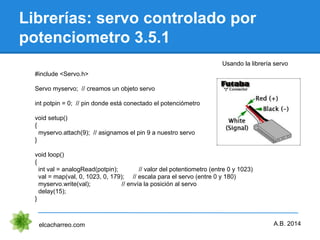
Usando la librería servo
#include <Servo.h>
Servo myservo; // creamos un objeto servo
int potpin = 0; // pin donde está conectado el potenciómetro
void setup()
{
myservo.attach(9); // asignamos el pin 9 a nuestro servo
}
void loop()
{
int val = analogRead(potpin); // valor del potentiometro (entre 0 y 1023)
val = map(val, 0, 1023, 0, 179); // escala para el servo (entre 0 y 180)
myservo.write(val); // envía la posición al servo
delay(15);
}
Librería: EEPROM
elcacharreo.com
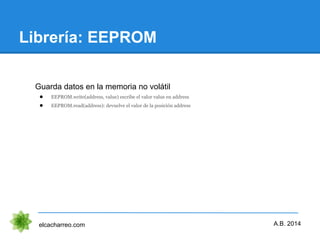
Guarda datos en la memoria no volátil
● EEPROM.write(address, value) escribe el valor value en address
● EEPROM.read(address): devuelve el valor de la posición address
A.B. 2014
Ejemplo: Escritura y lectura de
EEROM
elcacharreo.com
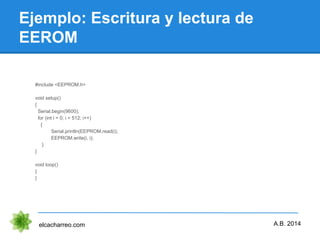
#include <EEPROM.h>
void setup()
{
Serial.begin(9600);
for (int i = 0; i < 512; i++)
{
Serial.println(EEPROM.read(i);
EEPROM.write(i, i);
}
}
void loop()
{
}
A.B. 2014
Ejemplo: Servo indicador de
temperatura 3.5.2
elcacharreo.com
Usar un servo para indicar la escala de temperatura
A.B. 2014
Conclusiones
Gracias por vuestra atención
elcacharreo.com A.B. 2014

Arduino práctico librerias

  • 1.
  • 2.
    Programando Arduino: Lenguaje elcacharreo.comA.B. 2014 Una librería no es más que un conjunto de código empaquetado y al que podemos llamar desde nuestro programa Facilita la tarea de desarrollar y nos abstrae y encapsula la dificultad de la tarea Para usarlas solo tenemos que importarlas desde nuestro código con un #include <....>
  • 3.
    Librerías: básicas elcacharreo.com ● EEPROM- permite leer y escribir en almacenamiento duradero ● Ethernet - para conectar a internet ● Firmata - comunicaciones usando un protocolo concreto ● LiquidCrystal - manipulación de LCD ● SD - lectura y escritura en tarjetas SD ● Servo - control de Servos ● SPI - comunicaciones con dispositivos usando SPI ● SoftwareSerial - permite comunicaciones serie por otros pines ● Stepper - control de motores paso a paso ● Wire - comunicaciones I2C A.B. 2014
  • 4.
    Librerías: otras elcacharreo.com ● Communication(networking and protocols): ● Messenger - for processing text-based messages from the computer ● NewSoftSerial - an improved version of the SoftwareSerial library ● OneWire - control devices (from Dallas Semiconductor) that use the One Wire protocol. ● PS2Keyboard - read characters from a PS2 keyboard. ● Simple Message System - send messages between Arduino and the computer ● SSerial2Mobile - send text messages or emails using a cell phone (via AT commands over software serial) ● Webduino - extensible web server library (for use with the Arduino Ethernet Shield) ● X10 - Sending X10 signals over AC power lines ● XBee - for communicating with XBees in API mode ● SerialControl - Remote control other Arduinos over a serial connection Sensing: ● Capacitive Sensing - turn two or more pins into capacitive sensors ● Debounce - for reading noisy digital inputs (e.g. from buttons) Displays and LEDs: ● Improved LCD library fixes LCD initialization bugs in official Arduino LCD library ● GLCD - graphics routines for LCD based on the KS0108 or equivalent chipset. ● LedControl - for controlling LED matrices or seven-segment displays with a MAX7221 or MAX7219. ● LedControl - an alternative to the Matrix library for driving multiple LEDs with Maxim chips. ● LedDisplay - control of a HCMS-29xx scrolling LED display. A.B. 2014
  • 5.
    Librerías: y más elcacharreo.com ●These libraries are compatible Wiring versions, and the links below point to the (excellent) Wiring documentation. ● Matrix - Basic LED Matrix display manipulation library ● Sprite - Basic image sprite manipulation library for use in animations with an LED matrix Frequency Generation and Audio: ● Tone - generate audio frequency square waves in the background on any microcontroller pin Motors and PWM: ● TLC5940 - 16 channel 12 bit PWM controller. Timing: ● DateTime - a library for keeping track of the current date and time in software. ● Metro - help you time actions at regular intervals ● MsTimer2 - uses the timer 2 interrupt to trigger an action every N milliseconds. Utilities: ● PString - a lightweight class for printing to buffers ● Streaming - a method to simplify print statements A.B. 2014
  • 6.
    Escribiendo nuestra librería elcacharreo.com ●Para crear nuestra librería tenemos que generar nuestro código en C++ ● Crearemos una clase con nuestro código ● Usaremos un fichero "nuestralibreria.h" donde declararemos nuestro interface (obligatorio que exista el constructor) ● Un fichero "nuestralibreria.cpp" con nuestro código ● Incluiremos todos los ficheros en una carpeta "nuestralibreria" en la carpeta libraries del directorio de usuario ● Cerramos y abrimos el entorno arduino para que la recompile y ya está disponible. Tutorial para escribir una librería A.B. 2014
  • 7.
    Librerías: Servo elcacharreo.com ● attach(pin): conecta el objeto servo con el pin dado ● write(angle) : establece la posición del servo ● read() : devuelve la posición del servo ● attached() : comprueba si está conectado ● detach() : desconecta el pin del servo Tutorial para escribir una librería A.B. 2014 Nos permite controlar hasta 12 servos (48 en mega) con cada pin
  • 8.
    Librerías: servo controladopor potenciometro 3.5.1 elcacharreo.com A.B. 2014 Usando la librería servo #include <Servo.h> Servo myservo; // creamos un objeto servo int potpin = 0; // pin donde está conectado el potenciómetro void setup() { myservo.attach(9); // asignamos el pin 9 a nuestro servo } void loop() { int val = analogRead(potpin); // valor del potentiometro (entre 0 y 1023) val = map(val, 0, 1023, 0, 179); // escala para el servo (entre 0 y 180) myservo.write(val); // envía la posición al servo delay(15); }
  • 9.
    Librería: EEPROM elcacharreo.com Guarda datosen la memoria no volátil ● EEPROM.write(address, value) escribe el valor value en address ● EEPROM.read(address): devuelve el valor de la posición address A.B. 2014
  • 10.
    Ejemplo: Escritura ylectura de EEROM elcacharreo.com #include <EEPROM.h> void setup() { Serial.begin(9600); for (int i = 0; i < 512; i++) { Serial.println(EEPROM.read(i); EEPROM.write(i, i); } } void loop() { } A.B. 2014
  • 11.
    Ejemplo: Servo indicadorde temperatura 3.5.2 elcacharreo.com Usar un servo para indicar la escala de temperatura A.B. 2014
  • 12.
    Conclusiones Gracias por vuestraatención elcacharreo.com A.B. 2014