Modelado de casos de uso ESCUELA: Ciencias de la Computación NOMBRE: Ing. Patricio Abad Espinoza FECHA: ABRIL - AGOSTO 2010
Temática 4.1 Casos de uso 4.2 Diagramas de casos de uso 4.3 Especificación de casos de uso
Propósito Estudiar la especificación de requerimientos mediante la técnica de casos de uso.
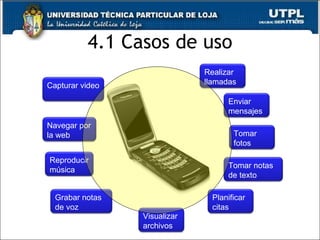
4.1 Casos de uso Realizar llamadas Enviar mensajes Tomar fotos Capturar video Navegar por la web Reproducir música Grabar notas de voz Tomar notas de texto Planificar citas Visualizar archivos
Definiciones Actor Nombres Actor-Caso de uso Flujo de eventos Escenarios Colaboraciones Relaciones
Técnica de modelado Identificar actores Organizar actores en roles generales y especializados Identificar las formas normales de interactuar Formas excepcionales Organizar comportamientos como CU.
Ejercicio 1: Identificar los casos de uso para una agenda académica personal.
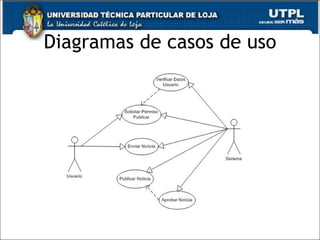
Diagramas de casos de uso
Especificación de UC Los casos de uso son esencialmente un texto que describe el comportamiento esperado del sistema. Existen diferentes estilos especificar los casos de uso. La especificación sirve de base para: Diseño Aseguramiento de calidad
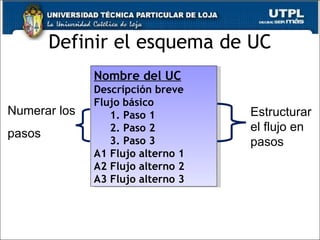
Definir el esquema de UC Nombre del UC Descripción breve Flujo básico 1. Paso 1 2. Paso 2 3. Paso 3 A1 Flujo alterno 1 A2 Flujo alterno 2  A3 Flujo alterno 3 Estructurar el flujo en pasos Numerar los  pasos
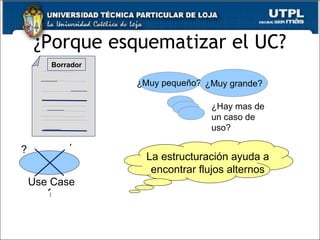
¿Porque esquematizar el UC? La estructuración ayuda a encontrar flujos alternos Borrador Use Case ¿Muy pequeño? Use Case Size  ¿Muy grande? ¿Hay mas de un caso de uso? ? ? ?
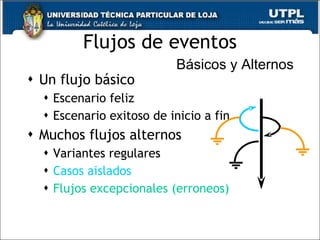
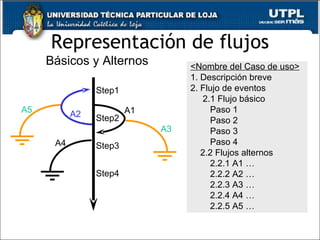
Flujos de eventos Un flujo básico Escenario feliz Escenario exitoso de inicio a fin Muchos flujos alternos Variantes regulares Casos aislados Flujos excepcionales (erroneos) Flow : A sequential set of steps. Básicos y Alternos
Representación de flujos Step1 Step2 A1 A3 Step4 A4 Step3 A2 A5 <Nombre del Caso de uso> 1. Descripción breve 2. Flujo de eventos 2.1 Flujo básico Paso 1 Paso 2 Paso 3 Paso 4 2.2 Flujos alternos 2.2.1 A1 … 2.2.2 A2 … 2.2.3 A3 … 2.2.4 A4 … 2.2.5 A5 … Básicos y Alternos
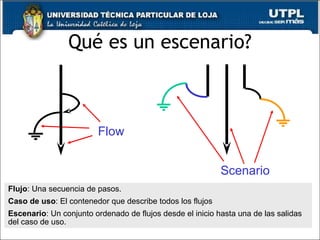
Qué es un escenario? Flow Scenario Flujo : Una secuencia de pasos. Caso de uso : El contenedor que describe todos los flujos Escenario : Un conjunto ordenado de flujos desde el inicio hasta una de las salidas del caso de uso.
Capturando escenarios Capture los escenarios en la sección correspondiente de la especificación del caso de uso. Asigne un nombre al escenario. Liste el nombre de cada flujo en el escenario. Coloque los flujos en secuencia.
Capturando escenarios Ejemplo  Escenario “Enlace al servidor caído.”  Flujos: “Flujo básico,” “Sistema no disponible.”
¿Cómo estructurar los flujos? Flujo básico ¿Qué evento inicia el caso de uso?  ¿Cómo termina el caso de uso? ¿Cómo repite el caso de uso cierto comportamiento?
¿Cómo estructurar los flujos? Flujos alternos Hay situaciones opcionales en el caso de uso? ¿Que casos extraños pueden suceder? ¿Qué variantes podrían darse? ¿Qué puede salir ma? ¿Qué cosas podrían no funcionar? ¿Qué clases de recursos podrían bloquearse?
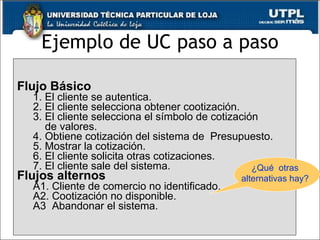
Ejemplo de UC paso a paso Flujo Básico 1. El cliente se autentica. 2. El cliente selecciona obtener cootización. 3. El cliente selecciona el símbolo de cotización  de valores . 4.  Obtiene cotización del sistema de  Presupuesto . 5. Mostrar la cotización. 6. El cliente solicita otras cotizaciones. 7. El cliente sale del sistema. Flujos alternos A1. Cliente de comercio no identificado. A2. Cootización no disponible. A3  Abandonar el sistema. ¿Qué  otras alternativas hay?
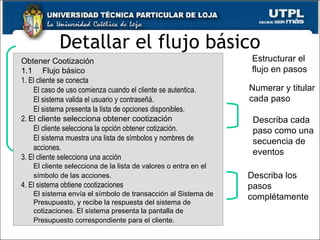
Detallar el flujo básico Estructurar el flujo en pasos Numerar y titular cada paso Describa los pasos complétamente Describa cada paso como una secuencia de eventos Obtener Cootización 1.1       Flujo básico 1. El cliente se conecta El caso de uso comienza cuando el cliente se autentica.  El sistema valida el usuario y contraseñá.  El sistema presenta la lista de opciones disponibles. 2.  El cliente selecciona obtener cootización El cliente selecciona la opción obtener cotización. El sistema muestra una lista de símbolos y nombres de acciones.  3. El cliente selecciona una acción El cliente selecciona de la lista de valores o entra en el símbolo de las acciones . 4. El sistema obtiene cootizaciones El sistema envía el símbolo de transacción al Sistema de Presupuesto, y recibe la respuesta del sistema de cotizaciones. El sistema presenta la pantalla de Presupuesto correspondiente para el cliente .
Modelado de casos de uso

Modelado de casos de uso

  • 1.
    Modelado de casosde uso ESCUELA: Ciencias de la Computación NOMBRE: Ing. Patricio Abad Espinoza FECHA: ABRIL - AGOSTO 2010
  • 2.
    Temática 4.1 Casosde uso 4.2 Diagramas de casos de uso 4.3 Especificación de casos de uso
  • 3.
    Propósito Estudiar laespecificación de requerimientos mediante la técnica de casos de uso.
  • 4.
    4.1 Casos deuso Realizar llamadas Enviar mensajes Tomar fotos Capturar video Navegar por la web Reproducir música Grabar notas de voz Tomar notas de texto Planificar citas Visualizar archivos
  • 5.
    Definiciones Actor NombresActor-Caso de uso Flujo de eventos Escenarios Colaboraciones Relaciones
  • 6.
    Técnica de modeladoIdentificar actores Organizar actores en roles generales y especializados Identificar las formas normales de interactuar Formas excepcionales Organizar comportamientos como CU.
  • 7.
    Ejercicio 1: Identificarlos casos de uso para una agenda académica personal.
  • 8.
  • 9.
    Especificación de UCLos casos de uso son esencialmente un texto que describe el comportamiento esperado del sistema. Existen diferentes estilos especificar los casos de uso. La especificación sirve de base para: Diseño Aseguramiento de calidad
  • 10.
    Definir el esquemade UC Nombre del UC Descripción breve Flujo básico 1. Paso 1 2. Paso 2 3. Paso 3 A1 Flujo alterno 1 A2 Flujo alterno 2 A3 Flujo alterno 3 Estructurar el flujo en pasos Numerar los pasos
  • 11.
    ¿Porque esquematizar elUC? La estructuración ayuda a encontrar flujos alternos Borrador Use Case ¿Muy pequeño? Use Case Size ¿Muy grande? ¿Hay mas de un caso de uso? ? ? ?
  • 12.
    Flujos de eventosUn flujo básico Escenario feliz Escenario exitoso de inicio a fin Muchos flujos alternos Variantes regulares Casos aislados Flujos excepcionales (erroneos) Flow : A sequential set of steps. Básicos y Alternos
  • 13.
    Representación de flujosStep1 Step2 A1 A3 Step4 A4 Step3 A2 A5 <Nombre del Caso de uso> 1. Descripción breve 2. Flujo de eventos 2.1 Flujo básico Paso 1 Paso 2 Paso 3 Paso 4 2.2 Flujos alternos 2.2.1 A1 … 2.2.2 A2 … 2.2.3 A3 … 2.2.4 A4 … 2.2.5 A5 … Básicos y Alternos
  • 14.
    Qué es unescenario? Flow Scenario Flujo : Una secuencia de pasos. Caso de uso : El contenedor que describe todos los flujos Escenario : Un conjunto ordenado de flujos desde el inicio hasta una de las salidas del caso de uso.
  • 15.
    Capturando escenarios Capturelos escenarios en la sección correspondiente de la especificación del caso de uso. Asigne un nombre al escenario. Liste el nombre de cada flujo en el escenario. Coloque los flujos en secuencia.
  • 16.
    Capturando escenarios Ejemplo Escenario “Enlace al servidor caído.” Flujos: “Flujo básico,” “Sistema no disponible.”
  • 17.
    ¿Cómo estructurar losflujos? Flujo básico ¿Qué evento inicia el caso de uso? ¿Cómo termina el caso de uso? ¿Cómo repite el caso de uso cierto comportamiento?
  • 18.
    ¿Cómo estructurar losflujos? Flujos alternos Hay situaciones opcionales en el caso de uso? ¿Que casos extraños pueden suceder? ¿Qué variantes podrían darse? ¿Qué puede salir ma? ¿Qué cosas podrían no funcionar? ¿Qué clases de recursos podrían bloquearse?
  • 19.
    Ejemplo de UCpaso a paso Flujo Básico 1. El cliente se autentica. 2. El cliente selecciona obtener cootización. 3. El cliente selecciona el símbolo de cotización de valores . 4. Obtiene cotización del sistema de Presupuesto . 5. Mostrar la cotización. 6. El cliente solicita otras cotizaciones. 7. El cliente sale del sistema. Flujos alternos A1. Cliente de comercio no identificado. A2. Cootización no disponible. A3 Abandonar el sistema. ¿Qué otras alternativas hay?
  • 20.
    Detallar el flujobásico Estructurar el flujo en pasos Numerar y titular cada paso Describa los pasos complétamente Describa cada paso como una secuencia de eventos Obtener Cootización 1.1      Flujo básico 1. El cliente se conecta El caso de uso comienza cuando el cliente se autentica. El sistema valida el usuario y contraseñá. El sistema presenta la lista de opciones disponibles. 2. El cliente selecciona obtener cootización El cliente selecciona la opción obtener cotización. El sistema muestra una lista de símbolos y nombres de acciones. 3. El cliente selecciona una acción El cliente selecciona de la lista de valores o entra en el símbolo de las acciones . 4. El sistema obtiene cootizaciones El sistema envía el símbolo de transacción al Sistema de Presupuesto, y recibe la respuesta del sistema de cotizaciones. El sistema presenta la pantalla de Presupuesto correspondiente para el cliente .

Notas del editor

  • #2 utpl
  • #3 utpl
  • #4 utpl
  • #11 MRMUC Instructor Notes Module 6 - Define the System Developing a use-case sequence of actions is an iterative process. Start by developing an outline or draft, such as the one on this page. Later you add in the descriptions. The outlines are not official documents, but a start toward developing a document. The outlines would probably be sketched on easel paper at a requirements workshop. The basic flow shows the major steps in accomplishing the goal of the use case. The alternative flows show alternative behavior: what may go wrong and optional behavior. Animation is automatic; structure the flow into steps with either bullets or numbers. Review the basic concepts for developing a use-case outline. See Student Notes. Ask: Why do you think we number the steps in the flows? Answer: It makes the sequence easier to understand. It helps you identify specific steps.
  • #12 MRMUC Instructor Notes Module 6 - Define the System Some of the reasons to outline your use cases are: Iterative development reduces risk. For the same reason we do not implement the whole system in one hit, we do not develop the detailed requirements all at once. Avoid getting bogged down in too much detail too early. You do not know everything at once. Outlining helps you discover what you don’t know. Outlining use cases creates a rough draft for fully specifying your use cases. Outlining helps determine whether the use case is too small on its own or too big to be just one use case. It might also help decide whether the use case is actually more than just one use case. Once you write out your steps, you might find that they really belong in another use case. If the outline shows that the use case does not have much to it, it may not be a use case at all. Outlining adds value to finding all possible alternate flows.
  • #13 MRMUC Instructor Notes Module 6 - Define the System The outline of the flow of events for a use case has two main sections: Basic Flow of Events. Alternative Flow of Events. The outline is used as a base when you start to write the full use-case specification. Structure the flows in such a way that it is easy to follow the different scenarios and to be able to understand what happens when alternatives occur and where they pick up or finish. The basic flow of events should be relatively short and very easy to read, like a single story line. The basic flow should show the steps needed to achieve the main goal of the use case. Most of the other details go into alternative flows. You can think of the alternative flows as “detours” from the basic flow of events, some that return to the basic flow of events and some that end the execution of the use case. In the diagram on the slide, the straight arrow represents the basic flow and the curves represent alternative paths in relation to the basic flow. Examples of different kinds of alternative flows for the Register for Courses use case are: Regular variants : Handle freshman enrollments differently. Odd cases : Handle registering for over 25 credit-hours differently. Exceptional (error) flows : Invalid student ID Number. You develop both the basic and alternative flows in the outline you make in the Find Actors and Use Cases activity. Note, the diagram above is informational only and is not a valid UML diagram. This slide adds more depth about basic and alternative flows. Review some reasons to have alternative flows of events. Ask: “Why not just put all the descriptions of all the options into the basic flow of events?” Answer: Because it would be hard to read, like reading a flowchart in text form. The basic flow of events should be relatively short and very easy to read (like a single story). Typically, most of the other descriptions are located in alternative flows. A short example may help to illustrate the different kinds of subflows (see Student Notes).
  • #14 MRMUC Instructor Notes Module 6 - Define the System The basic and alternative flows of events are captured in sections of the use-case specification. Each flow has its own section in the use-case specification. The steps in each flow are listed within the flow’s section.
  • #15 MRMUC Instructor Notes Module 6 - Define the System A scenario describes an instance using the system (an instance of a use case). It is one path through a use case flows from its beginning to one of its end points. Each use-case has a web of flows of events with a scenario being a particular path through the web. When you describe this path, you are describing a scenario of the use case. The scenario might involve the basic flow and any number of alternative flows in any number of combinations. In the above example, the bold lines highlight some possible scenarios for the basic and alternative flows previously described. How many scenarios are needed? Simple answer: As many as one needs to understand the system being developed. You should elaborate the scenarios of the interesting and high-risk use cases. Scenarios can be used to understand, as well as to validate the use-case flows of events. Some people write scenarios first and extract use cases, while others find use cases first and validate those use cases by writing scenarios. Scenarios make excellent test cases. When planning a project, we need to decide which use cases or which flows we plan on building in the current iteration. If you have enumerated the scenarios for a use case you can use those as a planning mechanism. You allocate a scenario to an iteration.
  • #16 MRMUC Instructor Notes Module 6 - Define the System Documenting scenarios is useful because, although you write flows (basic, alternative, subflows) in a use case, you implement and test scenarios. Each scenario captures a family of test cases. Each test case in the family follows the same path through the use case, but use different data values to ensure all the boundary conditions are tested. Give the scenario a descriptive name and list the flows (in order) that make up the scenario. Scenarios should be captured in a separate section of your use-case specification or as part of your test cases. The benefit of capturing the scenarios in the use-case specification is that all the information required for analysis, design, and test is co-located with the use-case description. Scenarios do not contain details of the data that is input to or output from the system. That information forms part of your test cases. Note : Currently the RUP use-case specification template does not contain a section for listing scenarios. You can customize the templates if you wish to capture scenarios in your use-case specifications. According to the book Use Case Modeling by Kurt Bittner and Ian Spence, “Capturing scenarios is useful for a number of reasons: The scenarios will match your test cases. Scenarios are what actually gets performed, so they are useful for discussing what the system will do in practice. Scenarios are useful for analysis and design, since they help the developers think about how the system will be used.” This style came from Kurt Bittner’s and Ian Spences’ book.
  • #18 MRMUC Instructor Notes Module 6 - Define the System Here is a list of questions to help you make decisions about the details in the flow of events. Alternative flows describe how the system should behave when things go wrong or when unusual things happen. When working on the alternative flows, questions regarding the behavior of the system are bound to surface. List these questions and have the users answer what the system is supposed to do, and how they expect to interact with the system in each scenario. Understanding the alternatives is an important step in clarifying the requirements. At this point in the process, however, it is enough to identify the alternatives without describing them in detail. This is a good list of questions for students to use in developing their own flow of events. Suggest that the students mark this page so they can find it easily. Use lots of examples to illustrate the differences between the types of alternative flows. There is a different question to identify each type. What variations or options do we need to consider? What unusual circumstances must be handled a bit differently? What can go wrong? The point is to be able to identify all of the alternatives needed in a use case.
  • #20 MRMUC Instructor Notes Module 6 - Define the System This is an example of a step-by-step outline for a use case. It shows a step-by-step outline for the Get Quote use case from the RU e-st system. The basic flow shows the major steps. The alternative flows show optional behavior. Notice the level of detail in this example. Remember, this is just a brief step-by-step outline to help understand what functions are contained in the use case. Further describe these steps in Module 8, Refine the System Definition. Go over the outline. This is a first draft for the use case, and we develop more detail later. For those not familiar with stock trading, you might need to explain that a “quote” refers to getting the currently traded price of a stock. Points for discussion: What can you tell about the use case by looking at this outline? What questions might you have about this use case that are still not defined?
  • #21 MRMUC Instructor Notes Module 8 - Refine the System Definition There are many styles for writing flows of events. One of the styles Rational® uses is to number and title each step. This gives the reader an overview of the flow without all the details and can refer to a step when it is being reviewed. There are many other styles. You can encourage consistency in style by specifying acceptable style guidelines when you write your Use-Case Modeling Guidelines. When you detail each step in the outline, be sure to describe the flow of events, not only what the system is doing. A suggestion for how to enforce this is to start every step with “When the [actor] ... ” Rational recommends making each step in the flow of events show a roundtrip of events, usually in the form of messages: What the actor does: &lt;Actor&gt; messages &lt;System&gt; , and What the system does in response: &lt;System&gt; messages &lt;An Actor&gt; ... Making each step a roundtrip ensures testability, ensures adherence to the purpose of a use case, and makes sequence diagrams far easier to develop and read. However, observe that step 3 is not a roundtrip of events. In this particular case, it made the use case description easier to read if we described the user action on its own. You should strive for roundtrip descriptions, but they are not always be practical. Some interactions are system-controlled. That is, after the user’s initial request to begin the use case, the system controls the interaction: the system asks for information and the user supplies information. The system asks for additional information and the user supplies it, and so on. In these cases, a roundtrip within a step would begin with system actions and then have the user response. Animation: Starts automatically after 2 seconds. Review the example of a basic flow for RU e-st. Remind students that this topic was introduced and discussed in the Introduction to Use-Case Modeling module. The student notes are the same as the corresponding slide in the Introduction to Use-Case Modeling module. The repetition is intended to remind students about writing flows of events and to prepare them for the exercise in writing detailed flows of events for the class project. Detail the use case by defining the basic flow of events. Structure flow into steps. Number each step. Describe each step in 1-3 sentences. Make each step a roundtrip event.
  • #22 utpl