Diigo: El facebook de los marcadores sociales  Mario A. Núñez Molina
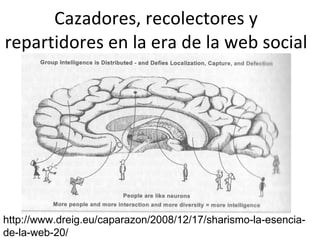
Cazadores, recolectores y repartidores en la era de la web social http://www.dreig.eu/caparazon/2008/12/17/sharismo-la-esencia-de-la-web-20/
Sharism Isaac Mao  y el “Espíritu de la Era de la Web 2.0” :  “Cuanto menos compartes, menos poder tienes”
Definición de social bookmarking: Actividad en línea que  permite a los usuarios almacenar y clasificar  enlaces favoritos  que pueden compartirse con otros.  Los usuarios pueden añadir los favoritos de otros  a su colección y subscribirse a las listas de otras personas. Los contenidos de los archivos de enlaces se organizan mediante lo que se conoce como “tags”(etiquetas).
“ Los usuarios marcan los recursos que encuentran más útiles, por lo tanto, los recursos más útiles son marcados por más usuarios. De esta forma se crea un ranking de recursos basado en el criterio de los usuarios.” http://tinyurl.com/qfj79s
¿Qué podemos hacer  con los SB? Tener un archivo en línea de nuestros enlaces favoritos Compartir nuestros enlaces con aquellos interesados y beneficiarnos de lo que enlazan otras personas Clasificar nuestros enlaces utilizando “tags” Sindicar  enlaces  vía RSS: Las personas pueden subscribirse y saber cuáles son los enlaces que vas añadiendo
¿Qué podemos hacer con los SB?  Buscar tópicos de interés utilizando los tags que otras personas le han asignado a sus favoritos. Obtener una “nube” de tags que permite saber fácilmente cuáles son las categorías más populares
Las Opciones  (50+) Los Favoritos
Marcadores Sociales Recomendados*
Dos herramientas especiales Del.icio.us:  http://del.icio.us  (Fue la primera y  es la que más popularidad tiene. ) Diigo:  http://www.diigo.com  (Mi preferida)
Designed for knowledge workers Ideally suited for 21st century learning  “ D igest of  I nternet  I nformation,  G roups, &  O ther Stuff ”  http://www.diigo.com
 
Crear una cuenta
Crear cuenta
Instalar Diigo toolbar:  http://www.diigo.com/tools
Guided Tours:  http://www.diigo.com/learn_more   Research:  http://www.diigo.com/learn_more/research Share:  http://www.diigo.com/learn_more/share Collaborate:  http://www.diigo.com/learn_more/collaborate Diigo V4 Overviews
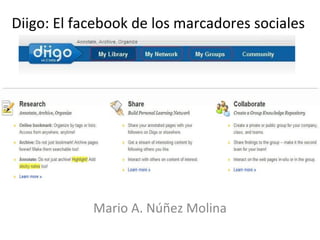
Tools for active reading  Bookmark, Highlight & Sticky Notes ~ familiar tools, powerful capabilities   Access anywhere Organize, Archive, Search  Share, Report, Present Source: “social bookmarking using diigo”  http://bit.ly/4v76jC
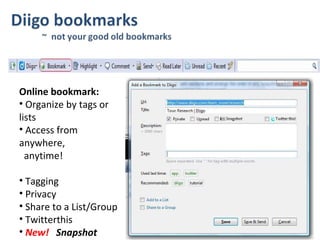
Online bookmark:   Organize by tags or lists  Access from anywhere,    anytime!   Tagging  Privacy  Share to a List/Group Twitterthis  New!  Snapshot
Archive multiple versions of the same URL  ~ snapshots, of moments in time  Snapshot available in both webpage (html) & screenshot (picture) formats Snapshot on demand  ~ A rchive selective pages forever & make them searchable
Highlights & Sticky Notes  ~ Indispensable for active reading and better retention
Improved “view annotation” filter to filter out public sticky notes  (page-specific!) More annotation features… Use “Get Annotated Link” to share your annotated page with anyone!
Group Knowledge Repository  Collaborative Reading & Research Collaborate
My Groups V4.0    ~  New UI & features  Unified View (V4: bookmarks  & forums) ~  to encourage more interactions  Better filters / sort options  Improved group search result  Group snapshot
Networked Sharing and Learning  Building Learning Communities  Building Personal Learning Network  Share
Following / Followers / Contact List  Follow, or be followed, to help you connect  with people who share specific interests Contact Lists ~ different PLNs
My Networks
Tareas: Añadirse al grupo: Tecnofilia: http://groups.diigo.com/group/tecnofilia
Subscribirse  a  grupos de interés en  Diigo: http://groups.diigo.com/
Lista de enlaces en Diigo: http://www.diigo.com/bookmark_list/new_list
Ejercicio: Crear una lista de enlaces
Aplicaciones para la enseñanza/investigación Recurso para que los estudiantes y profesores  puedan ir desarrollando una lista de enlaces favoritos por clases.  Recurso para compartir enlaces en una clase.  Herramienta para que un grupo de estudiantes  incluya enlaces relacionados a su proyecto de investigación.  Herramienta  de mejoramiento continuo
A new kind of online research and collaborative research tool that integrates tags and folders, highlighting and clipping, sticky notes, group-based collaboration, and much more, to enable  a whole new process of online knowledge management, learning, and teaching in the information age. “ D igest of  I nternet  I nformation,  G roups, &  O ther Stuff ”
Diigo Education Account, Phase I:  http://blog.diigo.com/2008/09/19/announcing-diigo-educator-accounts/ Diigo Help / Tutorials:  http://help.diigo.com/   Diigo ~ 21 st  Century Tool for Research, Reading and Collaboration  http://tinyurl.com/93u5be  by  Peggy Steffens Diigo the Web for Education - From TeleGatherer to TelePlanter with Diigo  http://tinyurl.com/9efcpt  by Miguel Guhlin Diigo in Education Resources
Why Diigo  ~  Social Bookmarking 101: Making the Web Work for You  http://tinyurl.com/9j7ohs   by Emily Barney Overview PPT ~ “Dig Deeper with Diigo” by Jennifer Dorman  http://jdorman.wikispaces.com/diigo “ Social bookmarking and Social Anntoations Overview” by Bill @ Digitally Speaking  http://digitallyspeaking.pbworks.com/Social-Bookmarking-and-Annotating "Truly a unique and transformative tool ~  Diigo  has the potential to change the ways in which we mentor all our students"  ~ Barbara Lindsey  http://www.worldatways.com/2008/11/16/diigo/

Marcadores Sociales

  • 1.
    Diigo: El facebookde los marcadores sociales Mario A. Núñez Molina
  • 2.
    Cazadores, recolectores yrepartidores en la era de la web social http://www.dreig.eu/caparazon/2008/12/17/sharismo-la-esencia-de-la-web-20/
  • 3.
    Sharism Isaac Mao y el “Espíritu de la Era de la Web 2.0” : “Cuanto menos compartes, menos poder tienes”
  • 4.
    Definición de socialbookmarking: Actividad en línea que permite a los usuarios almacenar y clasificar enlaces favoritos que pueden compartirse con otros. Los usuarios pueden añadir los favoritos de otros a su colección y subscribirse a las listas de otras personas. Los contenidos de los archivos de enlaces se organizan mediante lo que se conoce como “tags”(etiquetas).
  • 5.
    “ Los usuariosmarcan los recursos que encuentran más útiles, por lo tanto, los recursos más útiles son marcados por más usuarios. De esta forma se crea un ranking de recursos basado en el criterio de los usuarios.” http://tinyurl.com/qfj79s
  • 6.
    ¿Qué podemos hacer con los SB? Tener un archivo en línea de nuestros enlaces favoritos Compartir nuestros enlaces con aquellos interesados y beneficiarnos de lo que enlazan otras personas Clasificar nuestros enlaces utilizando “tags” Sindicar enlaces vía RSS: Las personas pueden subscribirse y saber cuáles son los enlaces que vas añadiendo
  • 7.
    ¿Qué podemos hacercon los SB? Buscar tópicos de interés utilizando los tags que otras personas le han asignado a sus favoritos. Obtener una “nube” de tags que permite saber fácilmente cuáles son las categorías más populares
  • 8.
    Las Opciones (50+) Los Favoritos
  • 9.
  • 10.
    Dos herramientas especialesDel.icio.us: http://del.icio.us (Fue la primera y es la que más popularidad tiene. ) Diigo: http://www.diigo.com (Mi preferida)
  • 11.
    Designed for knowledgeworkers Ideally suited for 21st century learning  “ D igest of I nternet I nformation, G roups, & O ther Stuff ” http://www.diigo.com
  • 12.
  • 13.
  • 14.
  • 15.
    Instalar Diigo toolbar: http://www.diigo.com/tools
  • 16.
    Guided Tours: http://www.diigo.com/learn_more Research: http://www.diigo.com/learn_more/research Share: http://www.diigo.com/learn_more/share Collaborate: http://www.diigo.com/learn_more/collaborate Diigo V4 Overviews
  • 17.
    Tools for activereading Bookmark, Highlight & Sticky Notes ~ familiar tools, powerful capabilities Access anywhere Organize, Archive, Search Share, Report, Present Source: “social bookmarking using diigo” http://bit.ly/4v76jC
  • 18.
    Online bookmark: Organize by tags or lists Access from anywhere, anytime! Tagging Privacy Share to a List/Group Twitterthis New! Snapshot
  • 19.
    Archive multiple versionsof the same URL ~ snapshots, of moments in time Snapshot available in both webpage (html) & screenshot (picture) formats Snapshot on demand ~ A rchive selective pages forever & make them searchable
  • 20.
    Highlights & StickyNotes ~ Indispensable for active reading and better retention
  • 21.
    Improved “view annotation”filter to filter out public sticky notes (page-specific!) More annotation features… Use “Get Annotated Link” to share your annotated page with anyone!
  • 22.
    Group Knowledge Repository Collaborative Reading & Research Collaborate
  • 23.
    My Groups V4.0 ~ New UI & features Unified View (V4: bookmarks & forums) ~ to encourage more interactions Better filters / sort options Improved group search result Group snapshot
  • 24.
    Networked Sharing andLearning Building Learning Communities Building Personal Learning Network Share
  • 25.
    Following / Followers/ Contact List Follow, or be followed, to help you connect with people who share specific interests Contact Lists ~ different PLNs
  • 26.
  • 27.
    Tareas: Añadirse algrupo: Tecnofilia: http://groups.diigo.com/group/tecnofilia
  • 28.
    Subscribirse a grupos de interés en Diigo: http://groups.diigo.com/
  • 29.
    Lista de enlacesen Diigo: http://www.diigo.com/bookmark_list/new_list
  • 30.
    Ejercicio: Crear unalista de enlaces
  • 31.
    Aplicaciones para laenseñanza/investigación Recurso para que los estudiantes y profesores puedan ir desarrollando una lista de enlaces favoritos por clases. Recurso para compartir enlaces en una clase. Herramienta para que un grupo de estudiantes incluya enlaces relacionados a su proyecto de investigación. Herramienta de mejoramiento continuo
  • 32.
    A new kindof online research and collaborative research tool that integrates tags and folders, highlighting and clipping, sticky notes, group-based collaboration, and much more, to enable a whole new process of online knowledge management, learning, and teaching in the information age. “ D igest of I nternet I nformation, G roups, & O ther Stuff ”
  • 33.
    Diigo Education Account,Phase I: http://blog.diigo.com/2008/09/19/announcing-diigo-educator-accounts/ Diigo Help / Tutorials: http://help.diigo.com/ Diigo ~ 21 st Century Tool for Research, Reading and Collaboration http://tinyurl.com/93u5be by Peggy Steffens Diigo the Web for Education - From TeleGatherer to TelePlanter with Diigo http://tinyurl.com/9efcpt by Miguel Guhlin Diigo in Education Resources
  • 34.
    Why Diigo ~ Social Bookmarking 101: Making the Web Work for You http://tinyurl.com/9j7ohs by Emily Barney Overview PPT ~ “Dig Deeper with Diigo” by Jennifer Dorman http://jdorman.wikispaces.com/diigo “ Social bookmarking and Social Anntoations Overview” by Bill @ Digitally Speaking http://digitallyspeaking.pbworks.com/Social-Bookmarking-and-Annotating "Truly a unique and transformative tool ~ Diigo has the potential to change the ways in which we mentor all our students"  ~ Barbara Lindsey http://www.worldatways.com/2008/11/16/diigo/

Notas del editor

  • #12 Diigo is an integrated suite of Online Research & Collaborative Tools for individuals & groups. Diigo has been widely regarded as one of the best social bookmarking and web annotation services,  It’s a new kind of online research and collaborative research tool that integrates tags and folders, highlighting and clipping, sticky notes, and group-based collaboration, and much more, to enable a whole new process of online knowledge management, learning, and teaching in the information age. The new 4.0 version has undergone significant further improvements in both the website and toolbar to make Researching, Sharing, and Collaborating faster, easier, and more effective. We will discuss more on each of the component later on. you can comfortably use it just as a personal tool, or as your needs grow, you can then tap into the social and collaborative aspect of the application.
  • #18 So let’s Talk about research and see what diigo can do for you. Diigo is foremost a powerful online research tool for highlighting, archiving, organizing, searching and accessing what you've found on the web Diigo integrates together some fairly familiar things to make your research effort easy.
  • #19 Diigo bookmarks – really not your typical old old bookmarks. To set up, you need to have diigo browser add-on installed, on either ff or ie, or you need to get a bookmarklet, which works any browser. A very brief overview: Click this to bookmark a page, I can add tags, which are keywords that can be used to retrieve the bookmark easily. You can add some note. You can choose to make it private. I have set it such that it is private by default. You can also add to a list or to a group. Once saved it, it goes to my library. Of course, since this is on the web, make it accessible anywhere, this is especially if you do work on multiple pc . And we are just getting started. Archive – not only the url is saved, the page is also automatically archived – always there for you forever. If you want to archive pages behind a password, this can also be done by uploading a snapshot when bookmarking – you get both the original page as well as the screenshot. You can take multiple snapshots of the same page at different times – say you maintain a portfolio on yahoo finance, you can take snapshots of that page at the end of each month to build a good portfolio history. With pages archived, I can search my library by the full-text of the pages, in addition to titles, tags and descriptions. Let’s talk about tags – tag makes it easy to organize and retrieve items. Diigo provides very rich tagging functionality . Here you see the recent tags you use. Here are all your tags. Retrieve by tag education, and you see that there are quite a few related tags – you can drill down by just adding related tags, until you find exactly what you want. So it is now widely agreed that if you have a lot of bookmarks as many of us do, tagging is a better way to organize inf than the traditional folders. But we did not give up on the good old folders, we made it better and call it Lists. If you are researching a specific topic, you can organize your bookmarks by lists. With lists, you can easily re-arrange the order, add notes, add divider such as section headings. You can generate report and you can play it as a slides – we call it webslides. So now you see if you consume a lot of inf on the web, Diigo bookmarks make your life so much easier.
  • #20 There is a really cool new feature in Diigo V4, that is the new snapshot capability to capture and archive entire web pages — even dynamic and password-protected content.  Archive – not only the url is saved, the page is also automatically archived – always there for you forever. If you want to archive pages behind a password, this can also be done by uploading a snapshot when bookmarking – you get both the original page as well as the screenshot. You can take multiple snapshots of the same page at different times – say you maintain a portfolio on yahoo finance, you can take snapshots of that page at the end of each month to build a good portfolio history. This is like building a personal wayback machine of important webpages .   With pages archived, I can search my library by the full-text of the pages, in addition to titles, tags and descriptions.
  • #21 As educators, we all know selective highlighting and margin notes are great tools for active reading, and does help with retention. These familiar tools are now made available online and tightly integrated with bookmarking to make them much more powerful. For those who are already familiar with Diigo, you will also notice some UI changes and new features available in V4! So here are you at a page. You can highlight any paragraph like this. You can even highlight a picture. If you want to highlight a lot on a page, you can turn on the highlight pen. Very soon, you should gain the ability to have multiple highlight color. To attach a sticky note to highlight, mouse-over to see the menu . To have a floating sticky note not attached a highlight, simply right-click . Notice that when you add sticky note, you have a choice to make it private, public, group -- we will talk more about this later. Let me talk about a very cool and useful feature called annotated view. Get annotated link, and open by anyone using any browser, see annotation Sidebar … You can send links and annotations to other by emails either from my library or the toolbar. How do highlights and sticky notes get collected in my library? Here are they are, nicely organized and displayed.
  • #22 Let me talk about a very cool and useful feature called annotated view. Get annotated link, and open by anyone using any browser, see annotation To share these bits of information, you can send multiple clips across multiple pages to others in one batch. Moreover, instead of just links, the recipients will see your highlights and notes nicely extracted as shown in bullet points. They will also see them right on the original pages. Best of all, the recipients don’t even need to install anything. Use “Get Annotated Link” to share your annotated page with anyone!
  • #23 You could stop here and you will find that Diigo makes your web research much more productive.  For team or collaborative learning, let's move on and see how Diigo makes sharing and collaborating on information so much easier. Diigo Groups are great for group knowledge repository. In particular, for education applications, Diigo Groups are perfect for collaborative reading & research!
  • #24 Diigo Groups UI has been completely revamped to allow increasing capability for knowledge repositories and collaboration Unified view — forum discussions and bookmarks are no longer separated to encourage more interaction. For those who prefer a separated view, filters are handy. Share your snapshots: now, when you share a bookmark to a group, the group also gains your archive of that bookmark.
  • #25 Lastly, Share Diigo V4 provides multiple ways to share information easily and facilitate conversations around content networked sharing & learning Building learning communities Building PLN
  • #26 Follow, or be followed, to help you connect with people who share specific interests In My network area, you can build  different "personal learning networks", consisting of a stream of bookmarks and annotations from people that you choose, with ways of creating conversations
  • #27 In My network area, you can build  different "personal learning networks", consisting of a stream of bookmarks and annotations from people that you choose, with ways of creating conversations
  • #30 http://groups.diigo.com/groups/edn